Online Services

Blog

  • PSA: Multiple Vulnerabilities Present In Firefox 61

    In an advisory published yesterday, Mozilla disclosed the presence of nine security flaws in Firefox 61 which have been patched in the latest release of the browser. Some of the bugs are severe, but at this time do not appear to be receiving attacks in the wild. To protect yourself as a Firefox user, ensure that you have updated Firefox to the latest version as soon as possible. To do this, click the ‘Firefox‘ menu and ‘About Firefox‘. The browser will check for an update automatically and will download the update if available. You will then be prompted to ‘Restart to update Firefox

    This post is Copyright 2018 Defiant, Inc. and was published on the wordfence.com official blog. Republication of this post without permission is prohibited. You can find this post at: https://www.wordfence.com/blog/2018/09/psa-multiple-vulnerabilities-present-in-firefox-61/

    In the remainder of this post, we will take a closer look at some of the notable bugs from yesterday’s update and the types of vulnerabilities they contain. To help secure the broader web community, we would like to encourage you to let your friends, family and colleagues know that they should update Firefox as soon as possible. Either share this post or drop them a helpful note.

    Though the amount of detail available on each bug varies, Mozilla’s advisories contain brief descriptions and impact scores of disclosed issues. Five of the nine vulnerabilities were assigned scores of Low and Moderate and the remaining four items have been determined to be of High or Critical impact.

    The Bugzilla entries for these higher-severity bugs are all private at the time of this writing, most likely to limit the spread of details on the exploitability of these flaws while the Firefox user base collectively updates their browsers.

    Use-After-Free Flaws

    Two bugs marked high-impact in Mozilla’s advisory, CVE-2018-12377 and CVE-2018-12378, pertain to use-after-free vulnerabilities. This type of bug exists when an application can be made to attempt to reference data stored in memory which has already been freed. In other words, in certain cases a program can be made to crash or behave abnormally if it attempts to recall information it’s already been told to forget. The “abnormal behavior” can depend on how exactly the issue was triggered in the first place, as well as what new data may have replaced whatever the application attempted to load.

    In the case of these two Firefox bugs, the advisory specifies the existence of a “potentially exploitable crash”, which is common for this sort of vulnerability. No mention was made of possible remote code execution, another possible consequence of use-after-free flaws, suggesting that particular vector is not present in these cases.

    Memory Safety Bugs

    The other two notable issues, CVE-2018-12375 and CVE-2018-12376 (marked High and Critical-impact, respectively), have been labeled memory safety bugs. Memory safety is a fairly wide umbrella term, potentially referring to classes of vulnerability like race conditions, buffer overflows, and more, so the scope of these vulnerabilities remains to be seen. However, Mozilla’s details in the advisory entries on both of these CVEs state “Some of these bugs showed evidence of memory corruption and we presume that with enough effort that some of these could be exploited to run arbitrary code.”

    Patching Against The Theoretical

    Mozilla’s statement, that they “presume” the reported memory safety bugs “could” be used to run code “with enough effort”, is an important one. Mind you, it’s not necessarily an uncommon mindset to have, but it’s worth bringing attention to it when it comes up. Patching a vulnerability that may not be feasibly exploited today is still critical in an age where technologies and techniques advance so rapidly.

    This concept is of historical note, specifically in the example of CVE-2016-5195, better known as Dirty COW. Dirty COW (short for Dirty Copy-On-Write), was a major vulnerability in the Linux kernel publicly disclosed in 2017. The flaw allowed attackers with low-privilege access (such as a PHP web shell or even an unrooted Android device) to temporarily overwrite protected system files allowing a privilege escalation, up to and including root access to the affected system.

    Dirty COW’s relevance in this case stems from the fact that the flaw was actually identified and patched eleven years prior, before being reverted due to compatibility issues. In a commit message from 2016, Linus Torvalds stated “…what used a purely theoretical race back then has become easier to trigger,” referring to the race condition flaw that allows Dirty COW to be exploited. Put simply, when it was discovered it would have been arbitrarily unfeasible to successfully perform the exploit on existing hardware. Thus, it was deemed low-severity enough to get buried for over a decade.

    Mozilla’s decision, and similar choices made by security-conscious developers every day, benefit the community by reinforcing the mindset that a theoretical vulnerability is a vulnerability nonetheless.

    What Now?

    Information overload aside, these aren’t issues worth worrying about for most Firefox users. As usual, performing the update (if yours hasn’t automatically patched by now) is all it takes to protect yourself from these issues. With that in mind, please take a moment to make sure your peers are aware of bugs like these. Poke your friends and coworkers and nag them to click that update button, or just share this post with them. Either way, you’ll be doing your part to make them more secure.

    The post PSA: Multiple Vulnerabilities Present In Firefox 61 appeared first on Wordfence.

  • Duplicator Update Patches Remote Code Execution Flaw

    A critical remote code execution (RCE) vulnerability has been patched in the latest release of Duplicator, a WordPress backup and migration plugin with millions of downloads. In their public disclosure of this flaw, Synacktiv detailed its scope and severity, and provided a viable proof of concept exploit for the security community. In this post we’ll take a look at the basics of the vulnerability, what was patched, and what you can do if you think your site’s at risk.

    This post is Copyright 2018 Defiant, Inc. and was published on the wordfence.com official blog. Republication of this post without permission is prohibited. You can find this post at: https://www.wordfence.com/blog/2018/09/duplicator-update-patches-remote-code-execution-flaw/

    The Vulnerability

    Notably, the vulnerable code in this case isn’t present within the Duplicator plugin directory itself. The flaw becomes exposed when using Duplicator to migrate or restore a backed-up copy of a WordPress site.

    Backing up a site generates two files which are both necessary to restore the site’s content: an archived .zip file, and the script which unpacks and configures it, installer.php. These files can be moved to a new server and placed in an appropriate directory, then the admin can visit installer.php in their browser to begin the process of restoring the site’s files and database.


    Duplicator’s installer.php interface

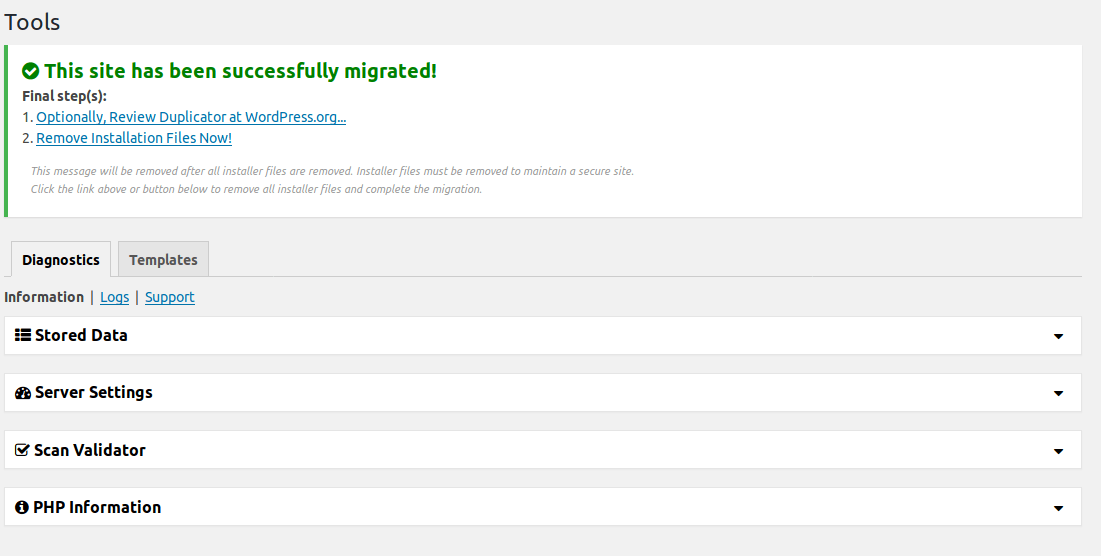
    Once the restore is completed, you’re prompted to log into the new site. On login, a success page is displayed:


    Duplicator migration success screen

    On this success page, there’s a Final Steps list which reminds users to remove the leftover files from their Duplicator migration. In fact, if they don’t remove these files, a nag message will be displayed in the site’s WordPress dashboard until either the files are removed or Duplicator is uninstalled.


    Persistent “nag” message displayed by Duplicator while installer files still exist

    These messages are persistent for a good reason: leaving installation scripts available in a web-accessible location can be really dangerous. There’s a history of this sort of thing being exploited in the wild, like the campaign targeting fresh WordPress installations.

    In the case of unpatched Duplicator backups, the installer.php script (and generated copies, like installer-backup.php which will be found in a site’s document root after unpacking) introduces an injection vulnerability by failing to sanitize database configuration data submitted by the user, writing the values directly to the newly generated wp-config.php file.


    Example of vulnerable code in installer using raw $_POST input

    The above chunk of code is assembling a set of regular expressions to identify database connection strings in the site’s previous wp-config.php file, then defining new values for these strings to be replaced with. These new values are the injectable point.

    Exploiting this flaw on a vulnerable site is simple. While there are some basic protections in the installer script that will prevent an admin from overwriting an existing wp-config.php file from the installer’s web interface, these can be bypassed by just supplying the POST parameter action_ajax=3, effectively telling the installer that those checks have already passed.

    As for crafting the payload string to be supplied, the payload will be inserted predictably into an existing define()call in the config file, like DB_HOST or DB_USER. As long as a single quote can be successfully passed, an attacker has the ability to add any desired code to the affected site’s wp-config.php file. From this point, backdoors can be established and various malicious activity can be performed.

    The Patch

    Two issues regarding installation security were addressed in the recent patch to Duplicator. Most relevant to the code injection flaw described above, installer.php scripts generated by patched versions of Duplicator now use addslashes() to sanitize the database connection strings input by users. Now, attackers are unable to inject PHP code into these values.

    Additionally, when creating Duplicator packages, a new optional setting has been added for users to password-protect their generated installer scripts. This affords users additional security during the install process, as malicious third parties will no longer have access to the script at all. However, this option is concealed by a collapsible menu at first when generating new packages, so users who aren’t aware it’s been added may miss it at first.


    Package creation form in the new Duplicator release, with password protection visible.

    Caveats

    Although these patches make needed steps towards securing the process of migrating a WordPress site with Duplicator, it can’t be understated that it’s still of critical importance that any installation files are completely removed once they’re no longer needed.

    Even though the user-supplied connection strings are now sanitized before being written to a site’s active wp-config.php file–preventing new code from being introduced and executed–the existing values are still getting replaced by this process. This means if a patched but unprotected installer.php file is found, an attacker has the ability to bring down a site just by supplying incorrect database credentials to the installer.


    Oops.

    What Do I Need To Do?

    At the time of this writing, we have identified a number of malicious actors probing sites for the existence of installer.php and installer-backup.php. If you’ve used Duplicator in the past to migrate a WordPress site, take some time to confirm that any leftover files from the process have been properly removed. Wordfence Premium users will begin receiving alerts from their malware scanner if vulnerable versions of these files are detected on new scans. Additionally, a new rule has been deployed to protect Premium WAF users from exploits of the Remote Code Execution vulnerability discussed above as long as Extended Protection has been enabled. Free users will receive these new rules thirty days from today.

    As always, if you believe your site has fallen victim to the successful exploitation of an attack like this or any other, please don’t hesitate to contact our team of experts to discuss a site cleaning or security audit.

    The post Duplicator Update Patches Remote Code Execution Flaw appeared first on Wordfence.

  • 12 Disadvantages of Email Marketing and How to Avoid Them

    12 Disadvantages of Email Marketing and How to Avoid Them

    12 Disadvantages of Email Marketing and How to Avoid Them. 

    Email marketing is the way to go if a business is set to accomplish long-term performance.

    The email marketing industry is huge and spread in hundreds of directions.

    When I talk about email marketing I’m simply discussing the practice of developing a relationship between a business and a client.

    As Jane Bay, Marketing Associate at Australian Assignment Geek Service defines it, “Email marketing is, simply put, one of the most preferred methods of communications that brands choose to create and nurture long-term, profitable relationships with their customers.

    Many businesses choose to adopt email as their primary channel of communication because this method presents real benefits.

    I’m going to list the most evident ones, and then I’ll continue with the “not-so-pink-side” of this widely adopted practice.


    The Benefits of Email Marketing for Your Business


    • Scales your business operations.

    By automating your emails and allowing them to “run on their own” under your command, you’ll be able to deal with much more clients and customers without you getting involved directly every time.

    • You can have a 1-to-1 interaction with your customers.

    This is an aspect that allows your relationship to improve. If you create the proper segmentation strategies, you’ll be able to send automated and personalized messages to your list of subscribers.

    • It improves your brand awareness.

    Every time you send an email that’s being opened, your brand awareness improves.

    People don’t usually remember brands after just one interaction, so helping them remember the brand is the way to go.

    • Improved ROI.

    If you implement an automated and well-strategized email marketing strategy, a big portion of your unique website visitors will be reachable again (through email.)

    Therefore, you’ll be basically “filling the bucket”, so that no more potential customers may slip out of your sales funnel.

    Obviously, there is no such thing as a perfect strategy – they all come with flaws.

    When it comes to email marketing, you’ll see that there are plenty of disadvantages that slip into your path, yet I none of them are “deadly”.
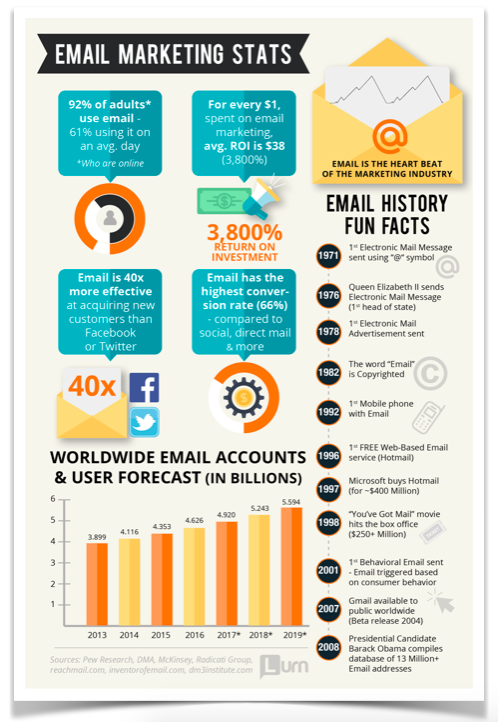
    This means that you can take steps to diminish the damage or completely remove it, depending on the circumstances of your issues.

    Well, in today’s post, we’re going to help you discover 12 disadvantages of email marketing while also offering you insightful suggestion on how to diminish or remove their negative consequences.

    Pay attention and make sure you follow through with the real action!


    1. It’s a Lengthy Process

    Email marketing takes time. In case you’ve never done it before and you’re starting from scratch, you must acknowledge and implement the basic practices (building a list) and trial-and-error your way to success through permanent tracking.

    You’ll need to take advantage of the power of analytics and collect precise feedback that’ll tell you whether you’re doing it “right” or “wrong”.

    You shouldn’t buy your subscribers – that’s a bad practice because of many obvious reasons such as not knowing who’s behind those emails, not knowing if they’re bots or real people, and not knowing their interests, needs, problems, and so on.

    The best way to speed up things is to use paid advertising and drive the campaign’s traffic directly into your email marketing funnel.

    This way, you’ll improve your list’s numbers and you’ll be able to figure out things more rapidly.

    2. Law Regulations & Issues

    In case you didn’t know, there are strict regulations concerning internet spamming all around the world. US, Europe, or Asia, it doesn’t matter.

    Wikipedia offers a useful resource post that will help you discover the email regulations for each country.

    What does this mean?

    If your emails reach Switzerland, you should check the Switzerland regulations and ensure that you’re not breaking any rules.

    If you do, there will be consequences, but each depends on the country who’s accusing you.

    Well, here’s a better guide that will explain how to avoid or comply with the rules established by more countries.

    If you don’t want any complications, though, you should opt for a certified and legal email autoresponders services such as MailChimp or Aweber.

    3. The Risk to Get Labeled and Perceived as a Spammer

    If you send emails to people who haven’t heard of you before (without their consent), you’ll risk getting labeled as a spammer.

    The number one rule for successful email marketing is to ask for permission. If you don’t, more people will report your emails or place them in their Spam list.

    What this means for you is that you lose your authority in front of the big email corporations such as Gmail, Yahoo, Outlook, and so on.

    This will represent a trap for your business because even if you’re doing everything right, your emails will never reach your prospects.

    You can also be labeled as a spammer if you send emails too frequently or if you send irrelevant information, even if people have given you the permission to send them emails regularly.

    To avoid this risk, ensure that you try out more delivery strategies while analyzing the results properly.

    Another good trick is to ask your subscribers directly by sending them a short survey.

    4. Delivery Issues

    There are many delivery issues that may intersect with your email marketing strategies.

    People change emails, the spam filter becomes more and more strict, and certain formatting (discussed soon) will prevent you from delivering your valuable updates to your new and loyal customers.

    Nobody can guarantee that you won’t encounter some issues along the way.

    However, you can decrease those chances by not spamming your list, offering valuable and relevant content, and also by educating your audience about how email filter works.

    Use your website or the first “Welcome email” to let your subscribers understand how to keep your emails out of the spam list.

    Here’s a great explanation of the most common reasons why email delivery issues happen.

    5. Formatting Issues are Harmful to Email Campaigns

    It’s certain that not all of your images, videos, flash or other visual content that you might opt to include in your emails will be appropriately displayed to your subscribers.

    When you create an email copy, you need to consider all the email platforms, all the devices, all the device resolutions, and so on.

    Unless you work with a professional designer who’s experienced at creating email design, you should probably write more effective copy and offer links to the multimedia content.

    For example, instead of embedding a video into an email, shorten it using Bit.ly or Goo.gl and post it as a link.

    Even if you embed links in buttons, some of them won’t be displayed so you’ll lose quality traffic over such an easy-to-fix mistake.

    6. Engagement Problems

    If the list isn’t responsive, email marketing becomes a useless strategy that will soak your time and money.

    The simplest and most effective way to track how many emails are getting opened and how many links are clicked is to leverage email marketing analytics tools.

    Generally, every respectable email autoresponder will have analytics features included, so unless you’re journeying on your own, you should be able to constantly track your engagement.
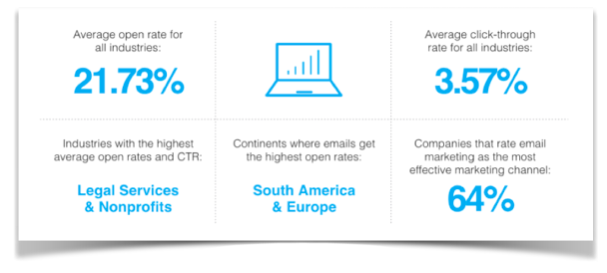
    Here are some of the reasons why your email subscribers became unresponsive:

    • You haven’t matched their communication preferences (the frequency of the emails, the time of the delivery, etc.)
    • You aren’t offering them something useful (poor content, boring promotions, etc)
    • They’ve changed their email address (they’re gone)
    • You didn’t hold your promises (promising something then failing to deliver)
    • They’re not reading your competitors’ emails

    How can you fix the engagement problems?

    It’s simple: implement fresh strategies and test again.

    See what works, what doesn’t, keep the good and eliminate the bad.

    7. Emails Might Trigger Off Some of Your Customers

    Be very careful how you treat your audience.

    Besides maintaining a professional tone, you should also pay attention not to create any conflict with controversial ideas.

    Of course, you can be controversial every now and then, but displaying racist thinking, religious thinking, or political thinking throughout your emails might not be the best idea.

    These details are extremely important.

    Try your best to avoid any subject of controversy and keep delivering emails that maintain a professional tone.

    8. Hard-to-Read Content

    If you know how to write to be understood, this won’t really be a disadvantage.

    However, many email marketers and website owners won’t even consider this aspect.

    Remember: most people take a few seconds to decide whether your email is worth reading or not.

    If it contains blocks of text, complicated language, or grammar issues, you can be certain that your subscribers will lose their patience.

    When a subscriber decides to skip your article because of these reasons, he will probably keep avoiding your emails again and again until they’ll unsubscribe or add you to the spam list.

    9. Huge Investments of Time, Money, and Energy

    Email marketing is a strategy that requires plenty of resources.

    As I’ve mentioned earlier, it takes time, practice, and hustle.

    Besides that, you shouldn’t ignore the budget requirements, which, depending on your standards, can be affordable or expensive.

    Lastly, the energy you’re spending on creating, analyzing, optimizing, and scaling your email marketing strategies and posts will be considerable.

    How can you deal with that disadvantages of email marketing?

    Well, for starters, you can begin enjoying your journey without obsessing over the result.

    The more emails you send and the bigger your list gets the more money you’ll make in the end, so that should be a good motivation to keep pursuing.

    10. Requires Knowledge and Skills

    Many businesses do email marketing yet only a few do it effectively.

    There’s a considerable difference between a “working” email marketing strategy and a failing one.

    The more knowledge and skills you gather the more options, opportunities, and results you’ll receive.

    Therefore, when you’re running out of ideas or you’re simply overwhelmed by the number of steps you have to take until you get it right, start consuming email marketing educational content.

    Don’t copy what you see.

    Study with a selective filter and try your best to find twists to the solutions that other people found.

    Or, you can opt into your competitors’ lists and “steal” from their success.

    11. File Size Issues

    If you want to include files in your emails, you should always be careful to add only light files.

    If you decide to add images to your post (more of them), the email will load hard meaning that it’ll take time.

    Those seconds are crucial because people are likely to refresh and skip the page whenever a problem (that’s not on their end) occurs.

    12. Huge Competition

    The last thing that should be on your mind every now and then is your competition.

    competition

    The competition level is always going to influence your subscribers’ engagement and your sales process.

    No matter what niche you’re in, you’ll find competitors who will do their best to capture your email subscribers’ attention.

    Guess what…

    Just like when a website is more qualitative, and more visitors turn to it, it happens the same with the email subscriptions.

    In case your current subscribers join your competitors’ email lists and they find it more useful, be certain that those subscribers will open your emails less frequently or will stop opening them at all.

    Stay ahead of your competitors by analyzing their email newsletters and do your best to do better.

    Create better products, offer more comprehensive solutions, and connect with your audience better.

    Other than that, you can wish for a better luck but good luck will never sustain you in the long term.

    want to measure your content marketing success

    Try for free – 14 days free trial!

    Takeaways

    Email marketing is a controversial strategy.

    Many entrepreneurs prefer it due to the immediate improvement benefits.

    Other entrepreneurs reject it because they either don’t need it or because they haven’t given themselves the chance to witness its results.

    Either way, every business is free to choose.

    If you do go for email marketing though, you should pay attention to the presented disadvantages of email marketing and do your best to avoid them.

    One last thing: don’t forget that consistent practice will bring you steady results, so when you’re into big “troubles”, keep moving forward!


    The post 12 Disadvantages of Email Marketing and How to Avoid Them appeared first on Unamo Blog.