Online Services

Blog

  • Announcing a new Firewall, a Threat Defense Feed and a New Approach

    Announcing a new Firewall, a Threat Defense Feed and a New Approach

    This morning at 9am Pacific time we rolled out a new kind of firewall to over 1 Million active WordPress websites. The new Wordfence firewall comes with a Threat Defense Feed that updates our firewall as new threats emerge. It also continuously updates our malware scan as we discover new malware patterns through our forensic research.

    If you have auto-update enabled in Wordfence, you will automatically be upgraded to 6.1.1 today which will include the new firewall and features. You can manually update by signing into your WordPress site and upgrading to Wordfence to 6.1.1 or you can download Wordfence from the official WordPress plugin repository.

    I want to share with you some of the journey that we took to arrive at this day. About 9 months ago we took a long hard look at Wordfence and asked the question: “How can we do a better job of stopping hacks and detecting them early?”.

    We also looked at existing firewall providers and discovered they could be doing a better job. And then we looked at our own malware scan and realized that it could benefit from a few improvements.

    So we set ourselves an ambitious goal:

    • Build an excellent forensic analysis team to discover the newest malware infections and new attacks that are used to break into sites.
    • Build a new kind of firewall that stops all attacks immediately, including zero day and emerging attacks.
    • Radically improve intelligence in our scan.
    • Continually feed the data our forensic team uncovers into our firewall and scan.

    We worked for 7 months on the project and about 2 months ago we thought we had finished the firewall. But then we discovered a way to radically improve our protection against SQL injection attacks. It meant building an SQL parser into Wordfence that is both extremely fast and is able to understand SQL the way a database does and determine if something is malicious or not. It was worth taking the extra time to include this important functionality and so we did exactly that.

    Then a few weeks ago, once again we thought we were ready and we realized we could build protection into the firewall against privilege escalation attacks. When you run Wordfence’s firewall, it knows who your users are so the firewall is able to make decisions about what to block more intelligently. So we went ahead and built that into Wordfence 6.1.1 too.

    Instead of letting the marketing team rule, we gave the engineers enough space to solve these very hard problems with innovative solutions.

    During the past month we have been quietly beta testing Wordfence 6.1.1 and our beta community has been an invaluable source of feedback and bug reports. Thank you very much to everyone who kindly participated in our public beta testing. You have helped turn Wordfence 6.1.1 into a rock solid enterprise-ready WordPress protector.

    We have also been running Wordfence 6.1.1 Beta on this site for longer than a month and it has worked perfectly. At times we have had over 3,000 concurrent users on the site and huge traffic spikes. Last Thursday and Friday thanks to the huge amount of press we received for our ground-breaking research into how the Panama Papers were leaked, we experienced a large sustained traffic spike and the Wordfence firewall just yawned and carried on doing a great job of serving up pages and protecting us from attacks.

    It’s really cool watching your own software block hackers in real-time. Instructions on how to watch that below.

    Today we are officially announcing the release of Wordfence 6.1.1 along with our Threat Defense Feed. Here are the details:

    The Firewall

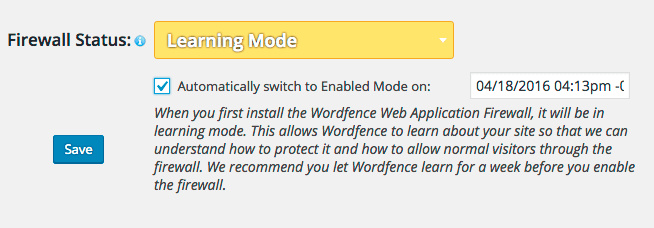
    The Wordfence firewall is installed with 6.1.1 and you will see a new ‘Firewall’ menu option appear in your Wordfence menu. When you arrive on the firewall configuration page, Wordfence should be in Learning Mode if you just upgraded to 6.1.1. It will look like this:
    Screen Shot 2016-04-11 at 4.13.56 PM


    Wordfence firewall will learn for a week and then automatically switch to “Enabled and Protecting”. During this one week learning period, anything that would have been blocked will automatically be whitelisted. You can scroll to the bottom of the firewall page and see the list of whitelisted items as they grow:
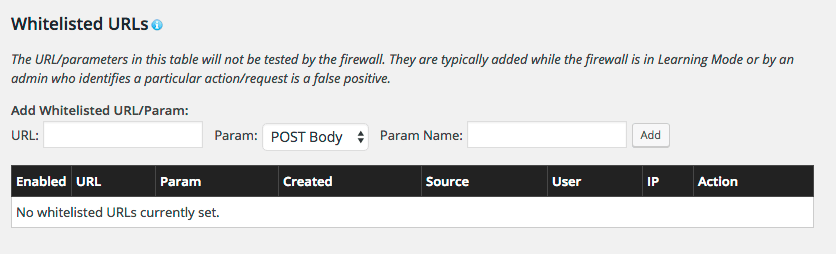
    Screen Shot 2016-04-11 at 4.16.35 PM

    If you don’t like something that has been whitelisted during Learning Mode or think it may be a real attack, you can simply remove it once the firewall is enabled.

    If you don’t want to wait a week you can speed things up by:

    • Visiting all pages and taking all actions you can think of on your site. This includes working in the WordPress admin console, submitting forms on your site and doing everything else that normally happens on your site. This will allow Wordfence to rapidly learn about your site.
    • Then enable the firewall and keep an eye on what it blocks in live traffic. Read on to understand how to view firewall activity in Live Traffic.

    Changes to Live Traffic and How to see what the Firewall has blocked

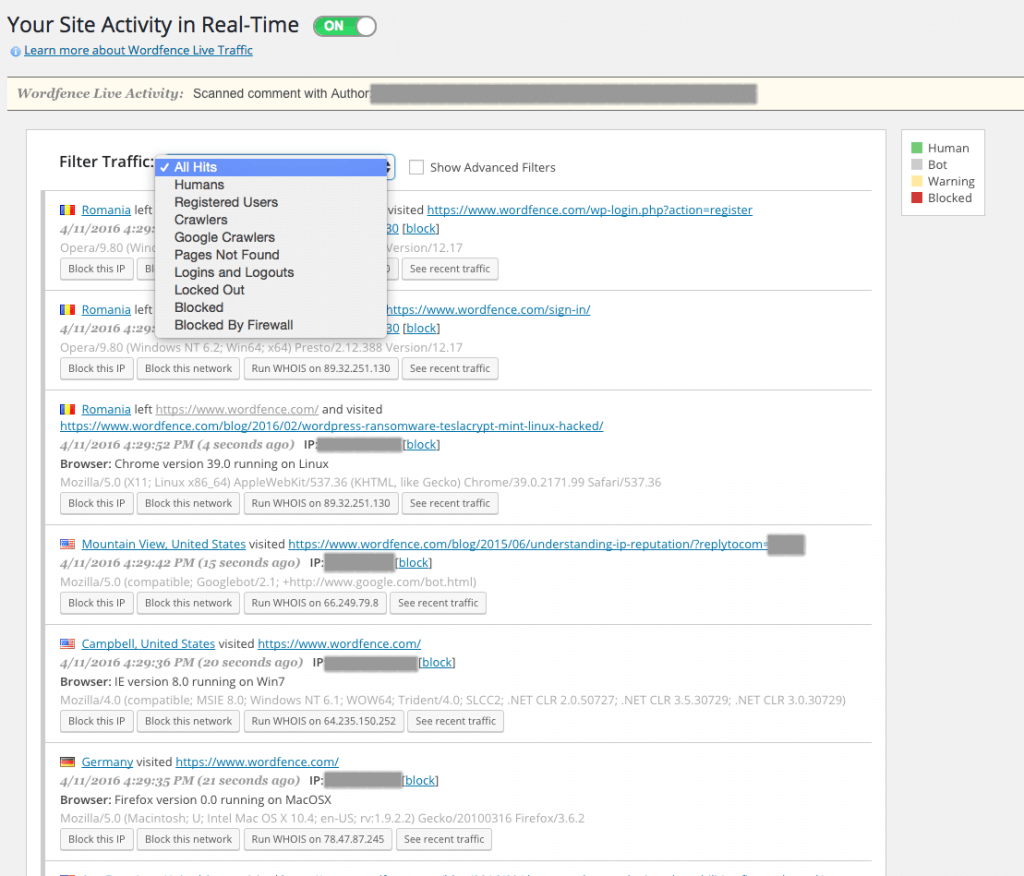
    Wordfence Live Traffic has been given a redesign that I can only describe as spectacular. We have added a drop-down list that lets you filter what kind of traffic you want to see:
    Screen Shot 2016-04-11 at 4.29.35 PM

    Simply select the option “Blocked by Firewall” to see what your firewall has blocked recently. You’ll be surprised what shows up. We have had quite a few attacks on our own site blocked by Wordfence 6.1.1.

    You’ll notice that Live Traffic has an advanced filters option that lets you filter your live traffic any way you can possibly imagine.

    A Threat Defense Feed through Excellent Forensic Analysis

    A great firewall and great scan engine are no good without continuous updates. We started by building an excellent forensic analysis team. Every day our team goes out and analyzes hacked sites and brings that on-the-ground intelligence back into Wordfence.

    Malware samples are turned into signatures used by our scan engine. New attacks are turned into firewall rules which update our firewall logic.

    We unified this flow of data under a single umbrella called the Threat Defense Feed. This feed constantly updates Wordfence’s ability to block attacks and to detect infections or malicious activity.

    Our premium Wordfence customers receive a real-time version of the feed. If a new threat emerges, we can update your rules within minutes. Our free customers receive a delayed version of the Threat Defense Feed.

    Changing the Game on Attackers

    We realized that the status quo isn’t going to cut it if we are to succeed in our mission of making the web safer and protecting our customer’s sites. Wordfence 6.1.1 isn’t just a new product with new data flowing into it. It is an organizational change for us.

    We have had to build a forensic analysis team by bringing senior analysts on board with tremendous depth of experience. Those senior team members have been developing processes and training up more junior colleagues to rapidly get them up to speed.

    We have also had to scale up our operations, make new capital investments in hardware, in software and in operations personnel.

    We have also brought on board additional senior engineers and customer service staff. We have been hiring so quickly that we decided to turn hiring into a software problem which you would have experienced if you’ve been through one of our tests for forensic analysts. Don’t worry, you still get to talk to us humans as part of the process.

    What we’ve ended up with is one of the fastest growing and best performing information security organizations in the world. It has been an incredible experience for me personally during the past 2 years, hiring people who are smarter than I am, stepping back and watching them guide our product, serve our customers and create engineering solutions that are incredibly innovative and that provide a new kind of protection that is able to defeat the new threats that we are seeing.

    I’m incredibly proud of our team for creating, testing and shipping Wordfence 6.1.1. Special thanks to Matt Barry our lead developer and Matt Rusnak our QA analyst who both worked tirelessly to improve, find new ways to break and then continue to improve 6.1.1. Thanks guys, you are both legends. Thanks also to the rest of the team who contributed tremendously, you know who you are and you’re amazing!

    I speak for the whole team when I say that we are proud to have your trust and to have you as a customer. We are working hard to deliver the level of engineering, research and innovation you have come to expect from Wordfence. And we look forward to a long relationship with our community and our premium customers as we continue to deliver the best available protection for your WordPress website.

    Mark Maunder – Wordfence Founder & CEO – April 2016.

    Update: At 11am Pacific time we release 6.1.2 which is a point release that fixes a minor issue. It fixed fatal error when using a whitelisted IPv6 range and connecting with an IPv6 address. This is an edge case and would have only affected a small number of sites.

    Official Press Release available here.

    Press contact: Dan Moen at press@wordfence.com.

    Wordfence is hiring. If you’re passionate about tracking attackers and their methods and want to join our forensic analysis team, we’d love to hear from you.

    The post Announcing a new Firewall, a Threat Defense Feed and a New Approach appeared first on Wordfence.

  • Panama Papers: Email Hackable via WordPress, Docs Hackable via Drupal

    Panama Papers: Email Hackable via WordPress, Docs Hackable via Drupal

    The Mossack Fonseca (MF) data breach, aka Panama Papers, is the largest data breach to journalists in history and includes over 4.8 million emails. Yesterday we broke the story that MF was running WordPress with a vulnerable version of Revolution Slider and the WordPress server was on the same network as their email servers when the breach occurred.

    Today we will release new information describing how the attackers may have breached the MF email servers via WordPress and Revolution Slider. We will also summarize below how they probably gained access to client documents via Drupal. We are breaking the story today about the link between WordPress and MF’s email server. The Drupal story has already been covered earlier this week in the media by Forbes (see below), but we are providing some data to support it.

    How they hacked email

    According to Süddeutsche Zeitung, the German publication that originally received the Panama Papers leak, this is the breakdown of the data structure of the Panama Papers:

    Screen Shot 2016-04-08 at 1.42.55 PM

    Source: Süddeutsche Zeitung


    Email is by far the largest chunk of data in the MF breach. Last week MF sent an email to its clients saying that it had experienced unauthorized access of its email servers, confirming that the servers were compromised and making it clear this was in fact a hack.

    Yesterday we showed how trivially easy it was to hack into the MF WordPress website via the vulnerable version of Revolution Slider that they were running.

    Once you gain access to a WordPress website, you can view the contents of wp-config.php which stores the WordPress database credentials in clear text. The attacker would have used this to access the database.

    Our analyst’s research shows that www.mossfon.com is running two plugins in addition to Revolution slider:

    MF are running the WP SMTP plugin which gives you the ability to send mail from your website via a mail server. This plugin stores email server address and login information in plain text in the WordPress database. The login information stored is a mail server SMTP login for sending email. Here is a screenshot showing the login information for this plugin appearing in a database as plain text on one of our test servers:

    Screen Shot 2016-04-08 at 2.37.47 PM

    As you can see above, once an attacker had access to WordPress, the wp-config.php file which contains the database credentials and then the WordPress database, they can see the mail server address and a username and password to sign-in and begin to send email. They would also have had whatever other privileges were conferred on that account.

    MF are also running the ALO EasyMail Newsletter plugin which provides list management functionality. One of the functions it provides is to receive bounced emails from a mail server and automatically remove those bounced mails from the subscriber list. To do this, the plugin needs access to read emails from the email server. This plugin also stores email server login information in the WordPress database in plain text. In this case the login information provides the ability to receive mail via POP or IMAP from the mail server. The screenshot below shows how this plugin stores email server login information:

    Screen Shot 2016-04-08 at 2.44.43 PM

    Once the attacker also had access to this data, after gaining access to the WordPress database via Revolution Slider, they would have been able to sign-into the email server and would be able to read emails via POP or IMAP.

    To summarize the attackers movement

    We think it is likely that an attacker gained access to the MF WordPress website via a well known Revolution Slider vulnerability. This vulnerability is trivially easy to exploit as we demonstrated in our research released yesterday.

    This would have given them access to the WordPress database. The research we released today shows that MF are running two additional plugins that store login information for their email server in plain text in the database. The attacker would have read this information from the WordPress database and used it to gain access to the email server.

    Did they enforce the principle of least privilege?

    One of the key concepts in information security is the principle of least privilege. For example: User accounts should only have the access they need to do their job. Did MF configure those WordPress plugin email accounts so that they could only receive bounces and send web based emails?

    It’s easy to imagine in a company with high powered clients, the same account that a customer relationship manager uses is also used to send list emails. This would ensure that the manager sees all replies in his or her inbox. If that was the case, the attacker would have gained access to a senior staff member’s email account when they stole these email server credentials.

    How attackers probably gained access to client corporate documents

    I’m going to briefly summarize how attackers probably gained access to client corporate documents like PDF’s. According to the Mossfon client portal website at https://portal.mossfon.com/, “The Mossfon Client Information Portal is a secure online account that enables to access your corporate information anywhere and everywhere, with real time updates of your ongoing request.”.

    Screen Shot 2016-04-08 at 2.11.53 PM

    The MF client portal that provides clients access to data was running (and continues to run) a version of Drupal that has over 23 vulnerabilities. This version was responsible for “Drupageddon“, a mass hacking of Drupal sites. This link to mossfon.com’s drupal changelog shows they are still running an old vulnerable version of Drupal. Here’s a screenshot:

    Screen Shot 2016-04-08 at 2.06.30 PM


    Breaking into this system wouldn’t even tax a beginner security analyst. Once an attacker compromised the client login permissions system which is Drupal powered, they would have defeated any access control and could access any client corporate information. We think this is a likely vector used to steal client PDF’s and other documents. The weakness in MF’s Drupal website was first covered by Fortune earlier this week.

    Conclusion

    Yesterday we demonstrated that Mossack Fonseca had a Revolution Slider vulnerability in their WordPress site which probably gave an attacker initial access to their systems including their WordPress database. Today we demonstrated how the attacker could move from their WordPress installation into MF’s email systems and begin to compromise email which formed the bulk of the data breach in the Panama Papers.

    The post Panama Papers: Email Hackable via WordPress, Docs Hackable via Drupal appeared first on Wordfence.
  • Mossack Fonseca Breach – WordPress Revolution Slider Plugin Possible Cause

    Mossack Fonseca Breach – WordPress Revolution Slider Plugin Possible Cause

    Mossack Fonseca (MF), the Panamanian law firm at the center of the so called Panama Papers Breach may have been breached via a vulnerable version of Revolution Slider. The data breach has so far brought down the Prime Minister of Iceland and surrounded Russian President Putin and British Prime Minister David Cameron with controversy, among other famous public figures. It is the largest data breach to journalists in history, weighing in at 2.6 terabytes and 11.5 million documents.

    Forbes have reported that MF was giving their customers access to data via a web portal running a vulnerable version of Drupal. We performed an analysis on the MF website and have noted the following:

    The MF website runs WordPress and is currently running a version of Revolution Slider that is vulnerable to attack and will grant a remote attacker a shell on the web server. 

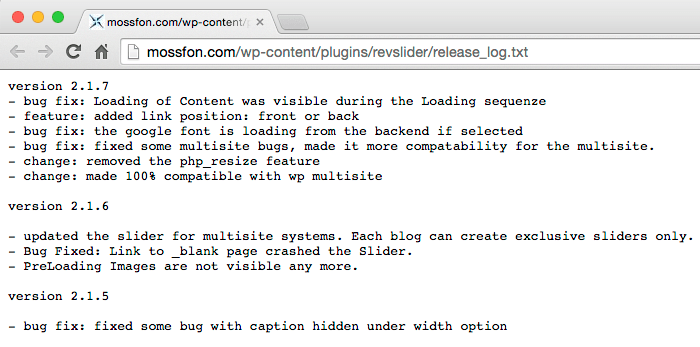
    Viewing this link on the current MF website to a Revolution Slider file reveals the version of revslider they are running is 2.1.7. Versions of Revslider all the way up to 3.0.95 are vulnerable to attack.

    Mossack Fonseca running vulnerable Revolution Slider


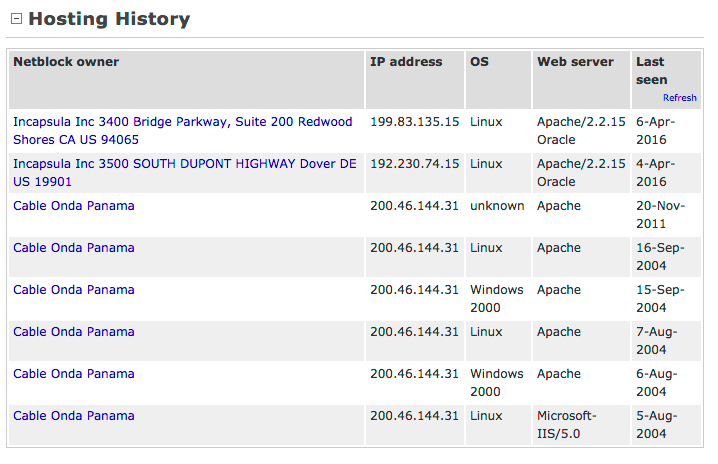
    It appears that MF have now put their site behind a firewall which would protect against this vulnerability being exploited. This is a recent change within the last month.

    Looking at their IP history on Netcraft shows that their IP was on the same network as their mail servers.

    Screen Shot 2016-04-07 at 9.58.56 AM

    ViewDNS.info further confirms that this was a recent move to protect their website:

    Screen Shot 2016-04-07 at 10.09.51 AM

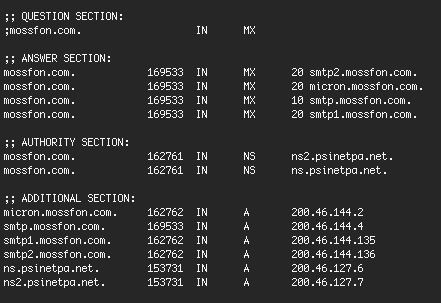
    According to service crawler Shodan, one of the IP’s on their 200.46.144.0 network runs Exchange 2010 mail server which indicates this network block is either their corporate network or at the very least has a range of IT assets belonging to the company. We also show they’re running VPN remote access software.

    You can view the IP addresses used for email for MF below which are all on the same network block:

    Screen Shot 2016-04-07 at 10.01.52 AM

    To summarize so far:

    • We’ve established that they were (and still are) running one of the most common WordPress vulnerabilities, Revolution Slider.
    • Their web server was not behind a firewall.
    • Their web server was on the same network as their mail servers based in Panama.
    • They were serving sensitive customer data from their portal website which includes a client login to access that data.

    A theory on what happened in the Mossack Fonseca breach:

    A working exploit for the Revolution Slider vulnerability was published on 15 October 2014 on exploit-db which made it widely exploitable by anyone who cared to take the time. A website like mossfon.com which was wide open until a month ago would have been trivially easy to exploit. Attackers frequently create robots to hit URLs like : http://mossfon.com/wp-content/plugins/revslider/release_log.txt

    Once they establish that the site is vulnerable from the above URL the robot will simply exploit it and log it into a database and the attacker will review their catch at the end of the day. It’s possible that the attacker discovered they had stumbled across a law firm with assets on the same network as the machine they now had access to. They used the WordPress web server to ‘pivot’ into the corporate assets and begin their data exfiltration.

    Technical details of the vulnerability in Revolution Slider

    This is a brief technical summary from one of our analysts describing the nature of the vulnerability in Revolution Slider that was exploited.

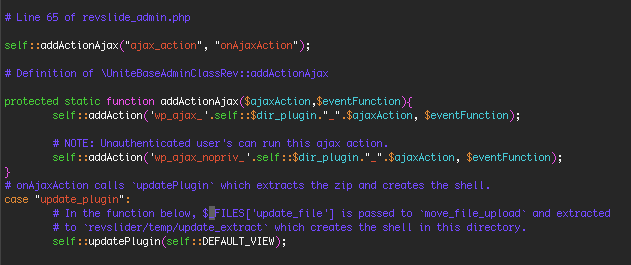
    Revolution Slider (also known as Slider Revolution) version 3.0.95 or older is vulnerable to unauthenticated remote file upload. It has an action called `upload_plugin` which can be called by an unauthenticated user, allowing anyone to upload a zip file containing PHP source code to a temp directory within the revslider plugin.

    The code samples below point you to where the specific problem is in revslider. Note that the revslider developer is allowing unprivileged users to make an AJAX (or dynamic browser HTTP) call to a function that should be used by privileged users only and which allows the creation of a file an attacker uploads.

    Screen Shot 2016-04-07 at 10.31.37 AM

    A demonstration of Revolution Slider being exploited

    The following video demonstrates how easy it is to exploit the Revolution Slider vulnerability on a website running the newest version of WordPress and a vulnerable version of Revolution Slider.

    Conclusion

    As a courtesy we have reached out to Mossack Fonseca to inform them about the Slider Revolution vulnerability on their site and have not yet received a response. They appear to be protected against it being exploited, or perhaps re-exploited in this case but the WordPress plugin on the site still needs updating.

    To protect your WordPress installation it is critically important that you update your plugins, themes and core when an update becomes available. You should also monitor updates for security fixes and give those the highest priority. You can find out if a WordPress plugin includes a security update by viewing the changes in the “Changelog”.

    In this case the site owners did not update for some time and it resulted in world leaders being toppled and the largest data breach to journalists in history.

    Update: 7 April at 3:52 PST – We should add that one of the firm partners has confirmed that the data was exfiltrated through a hack. There seemed to be some confusion about whether this was an inside job or a hack. Source: BBC News.

    The post Mossack Fonseca Breach – WordPress Revolution Slider Plugin Possible Cause appeared first on Wordfence.
  • Vulnerability in User Role Editor – Users Can Become Admins

    Vulnerability in User Role Editor – Users Can Become Admins

    There is a major vulnerability in a popular plugin with over 300,000 active installs: User Role Editor 4.24 and older.

    The vulnerability allows any registered user to gain administrator access. For sites that have open registration, this is a serious security hole.

    If you are running User Role Editor, upgrade to the newest version which is 4.25 immediately.

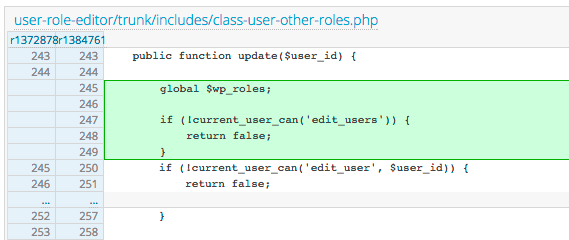
    Looking at a diff of the newest plugin release, the author was checking if users have access to edit another user using the ‘current_user_can’ function and checking for the ‘edit_user’ (without an ‘s’ on the end) capability on a specific user ID. The green code below was added.

    Screen Shot 2016-04-04 at 9.58.02 AM

    A user can edit themselves, and so sending data to the plugin that supplies the current user’s ID to this access check would bypass the check.

    The fix released in version 4.25 (new code shown in green above) checks if the current user has the ‘edit_users’ capability which is a general access check that would fix this vulnerability.

    The edit_user check that was being used is undocumented on the Roles wiki page, but it is used by WordPress core (in a secure way). So if you are using this check in your plugins, it is important to realize that it can be bypassed if used as a general access level check.

    As always, please make sure that the rest of your plugins are at the newest version because we have seen several, less impactful vulnerabilities emerge during the past month.

    Regards,

    The Wordfence Team.

    The post Vulnerability in User Role Editor – Users Can Become Admins appeared first on Wordfence.