Online Services

Blog

  • Avoid Malware Scanners That Use Insecure Hashing

    In this post I’m going to discuss a major problem that exists with several WordPress malware scanners: The use of weak hashing algorithms for good and bad file identification. Some malware and antivirus scanners outside of WordPress suffer from this same issue.

    For brevity, I’m going to refer to this as the “weak hash scanner” issue.

    This issue may allow an attacker to hide malware that is undetectable to scanners using the MD5 hashing algorithm. Below I will explain how hashes are used in the security industry, what the problem is and how to solve it. I’ll also point you to research demonstrating this issue and further reading. I’ll also describe how Wordfence uses a secure hashing algorithm for our malware scanner.

    How we use hashes in the security industry to find bad things

    In the security world we have a commonly used process of running a file through a piece of logic, called an algorithm, and generating a unique number. That number is used to uniquely identify files. This process is called a hashing algorithm and the unique number is called a ‘hash’.

    We use hashing algorithms for all kinds of really cool and useful stuff. We can take a piece of malware, create a hash for it and then store that hash. Later, we can create a hash of a file we’re scanning to check if it contains malware. If that hash matches the hash of the malware we created earlier, then we know the file is that malware.

    We can also use hashes to identify “known good” files. At Wordfence we have created hashes of every file we know is safe in the WordPress universe. We have hashes for every theme, plugin and core release in WordPress history. In fact, we have hashes of every file in every version of WordPress core ever released and every version of every theme and plugin ever released.

    Right now Wordfence tracks hashes for:

    • 205,146 WordPress core files that Wordfence knows are safe. 

    • 5,967,361 WordPress theme files that Wordfence knows are safe.

    • 23,527,261 – yes that’s 23 Million – WordPress plugin files that are known to Wordfence to be safe. This is every version of every file in every plugin ever released. 

    Hashes are a way for security companies like us to store a small piece of data that uniquely identifies known bad or good files, and then use that data to check if those files exist on a system we’re scanning. Then we can make a decision about whether to preserve the file or get rid of it.

    The diagram below illustrates how malware scanners use hashing to identify good and bad files.
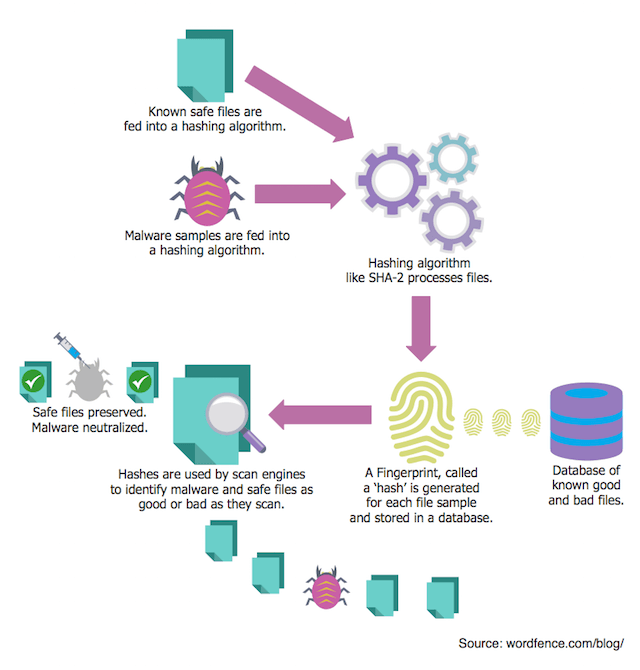
    How scanners use hashing

    Not all hashing algorithms are equal: MD5 vs SHA-2

    There are various ways to create a hash. When you run a file through one of these hashing ‘algorithms’, they create a unique number of a fixed length. MD5 is a hashing algorithm that was created in 1991 by Professor Ron Rivest at MIT. It was incredibly useful but is now quite old and has some problems.

    Another newer and much more secure hashing algorithm called SHA-2 was developed by the National Security Agency and released by the National Institute of Standards and Technology in 2001. Today SHA-2 is widely used and considered secure enough for commercial use.

    MD5 is quite old now and the problem with it is something called ‘collisions’. It’s easy to understand the issue: With MD5, it’s possible to create two different files that have the same MD5 hash, or unique signature. This could be used, for example, to fool a malware scanner into thinking a malware file is actually a known-good file.

    That is why we use SHA-2 in Wordfence to track known good files. It prevents an attacker from creating a bad file that has the same hash as a known good file and avoiding detection.

    The weak hash scanner problem

    Unfortunately not all security products do this. In the WordPress space, some malware scanners uses plain old MD5 to hash files when searching for malware. Sucuri’s WordPress plugin and “Shield WordPress Security”, for example, use MD5 to detect core file changes. The way they do this is they grab the newest MD5 hashes from api.wordpress.org.

    The API these products use was not designed to be used for malware scanning. It was originally created for the WordPress upgrade process back in 2013 to help determine which files need to be upgraded. The MD5 algorithm used by this API is not cryptographically strong enough to be used to detect malicious or safe files.

    At Wordfence we use SHA-2 and this is one of the reasons we have created our own API endpoint that we use for malware scanning. Doing this allows us to use a cryptographically strong hash function to ensure that malware can’t evade detection by exploiting weak hash algorithms. We have been using SHA-2 since 2012, when the very first version of Wordfence was released as version 1.1.

    Last week a security researcher demonstrated how it’s possible to create two windows executables that both have the same MD5 hash. This allows an attacker to create one friendly executable and another malicious file that will later replace the friendly file and avoid detection.

    In 2014 Nat McHugh showed how to create two different PHP files and two different image files with the same MD5 hash. This demonstrates the same concept in PHP – that an attacker can create a friendly file which becomes trusted and later replace it with a malicious file that avoids detection by MD5 scanners.

    This research has actually been around for some time now. The attack is called a ‘chosen prefix’ attack on MD5 in the security industry. It first came to light in a paper in 2005 written by Xiaoyun Wang and Hongbo Yu at Shandong University in China in which they refer to it as a modular differential attack on MD5.

    In 2007, Marc Stevens created an open source toolkit as part of his masters thesis which actually exploited this weakness in MD5. These tools are what were used by the researchers above to create different files with identical MD5 hashes.

    This research demonstrates that it’s already possible for an attacker to exploit MD5 to provide a safe file and later replace it with a malicious file that will avoid detection by scanners using MD5. It may soon be possible to create a malicious file that shares the same MD5 hash as a legitimate WordPress core file. For this reason it is important that malware scanners avoid MD5 and use strong cryptographic hash functions to verify file integrity.

    What to do about this

    The goal of today’s blog post is to encourage two things:

    1. If you are a customer of a security product, make sure your product is using SHA-2 or another secure hashing algorithm for malware scanning and other checks. If a product uses MD5, it risks being fooled into thinking a file is safe when it is dangerous.
    2. If you are a security vendor and have not already switched to SHA-2 or a secure hashing algorithm, it’s time to do so now in the interests of your customer’s security.

    As always I’m happy to respond to questions and comments below.

    Mark Maunder – Wordfence Founder/CEO.

    Footnotes:

    You can learn more about hashing, how it is used for passwords and how to crack passwords using consumer GPU hardware by visiting our Password Authentication and Password Cracking article in the Wordfence Learning Center.

    The post Avoid Malware Scanners That Use Insecure Hashing appeared first on Wordfence.

  • Exploited Script in WordPress Theme Sends Spam

    Exploited Script in WordPress Theme Sends Spam

    Exploited Script in WordPress Theme Sends Spam

    As WordPress continues to grow in popularity, so does its library. New and experienced developers are creating themes and plugins – which creates diverse directories. While this is useful to the WordPress community, the nature of mass creation can account for coding errors and vulnerabilities. Even premium themes have security issues. We often find code that is developed with good intentions but without taking security measures into consideration. For that reason, many people often wonder if their site is hacked when they begin receiving complaints from their users.

    Continue reading Exploited Script in WordPress Theme Sends Spam at Sucuri Blog.

  • Emergency Bulletin: Firefox 0 day in the wild. What to do.

    Update at 2:32pm PST / 5:32pm EST: Firefox released a fix for this a few minutes ago. Update to Firefox 50.0.2 now to patch this vulnerability. Tor have also released a fix with version 6.0.7 of their browser.There is also a Thunderbird fix out, version 45.5.1. I also posted an extended update at the end of the post including data indicating this exploit may be part of a law enforcement operation.

    /End Update.

    We’re publishing this as an emergency bulletin for our customers and the larger web community. A few hours ago a zero day vulnerability emerged in the Tor browser bundle and the Firefox web browser. Currently it exploits Windows systems with a high success rate and affects Firefox versions 41 to 50 and the current version of the Tor Browser Bundle which contains Firefox 45  ESR.

    If you use Firefox, we recommend you temporarily switch browsers to Chrome, Safari or a non-firefox based browser that is secure until the Firefox dev team can release an update. The vulnerability allows an attacker to execute code on your Windows workstation. The exploit is in the wild, meaning it’s now public and every hacker on the planet has access to it. There is no fix at the time of this writing.

    Currently this exploit causes a workstation report back to an IP address based at OVH in France. But this code can likely be repurposed to infect workstations with malware or ransomware. The exploit code is now public knowledge so we expect new variants of this attack to emerge rapidly.

    This is a watering hole attack, meaning that a victim has to visit a website that contains this exploit code to be attacked. So our forensic team is keeping an eye on compromised WordPress websites and we expect to see this code show up on a few of them during the next few days. An attackers goal would be to compromise workstations of visitors to WordPress websites that have been hacked.

    How this unfolded

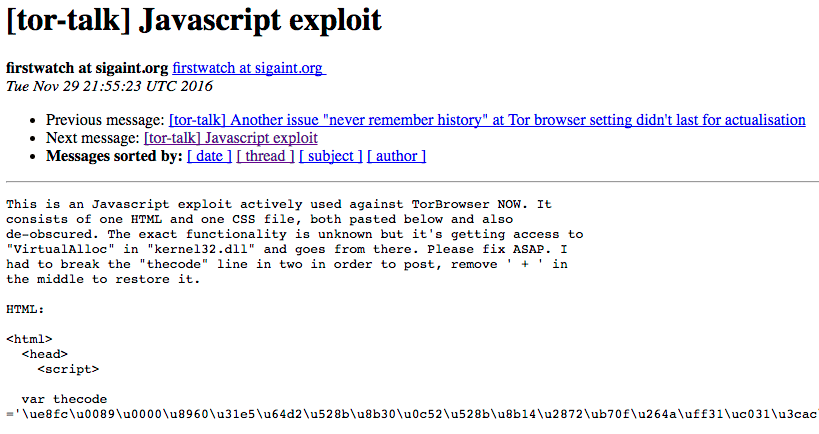
    On Tuesday just after noon Pacific time, someone published a 0 day exploit for Firefox and Tor to the tor browser mailing list.

    Original post

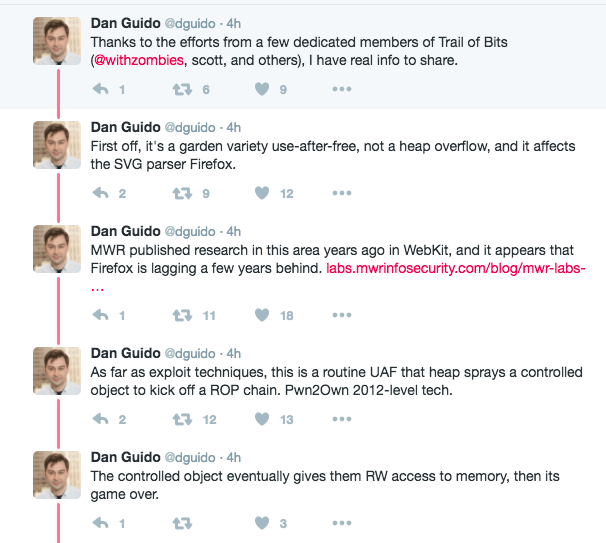
    Since then researcher Dan Guido posted a series of tweets with some analysis of the exploit itself.

    Dan Guido Tweets

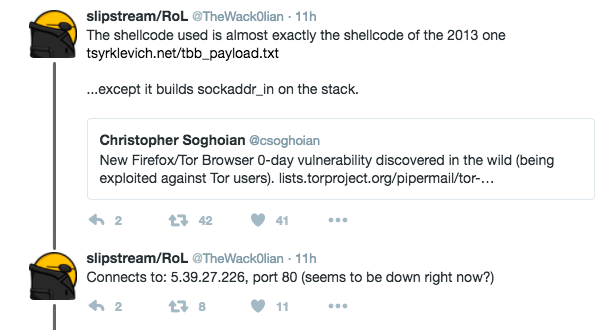
    Twitter user @TheWack0lian noticed the shellcode (code that executes on your Windows workstation once exploited) is very similar to shellcode likely used by the FBI back in 2013 to deanonymize visitors to child porn websites hosted by FreedomHosting. The FBI confirmed that they compromised that server and days later it was serving malware that would infect site visitor workstations. The code then reported site visitor real IP addresses, MAC addresses (network card hardware address) and windows computer name to a central server. This code is very similar.

    Tweets

    What we found

    The shell code in this attack calls back to IP address 5.39.27.226, which was a web server hosted at OVH in France. The site is now down. Our own research shows that if you look up this IP address in Shodan, it had an SSL certificate that is a wildcard for the energycdn.com domain name. That site for energycdn is simplistic and according to archive.org, it has not changed since 2014.

    Googling energycdn.com shows that the domain is used frequently to host pirated content. Norton Safe Web reports it hosts viruses. Google Safe Browsing transparency report says the domain hosts malware and redirects to malicious sites.

    One could speculate that the server at 5.39.27.226 was used by energycdn.com as one of their servers to host pirated content. Perhaps the server was compromised by whoever controls energycdn to host that content and then was reinfected by the perpetrator of this new malware variant. But we’re speculating.

    Additional press coverage

    Update at 2:03pm PST / 5:03PM EST on Wednesday:

    Vice’s Motherboard have provided an update 2 hours ago on this issue from a few sources.  Here’s the summary and some context:

    Remember, this attack targeted Tor users specifically and the goal of the attack was to reveal the identity of the browser operator. It is also very similar to a 2013 attack that was likely launched on child porn website visitors by the FBI to identify and arrest them. The fact that this exploit simply tries to reveal a user’s identity rather than infect them with malware indicates it is being perpetrated by a law enforcement branch in some country.

    Vice is now reporting that their sources are saying this exploit is active on a child porn website called The GiftBox Exchange. There are also warnings on the Dark Web about the presence of this malware. In my opinion this strongly indicates that this exploit is in fact the FBI or another agency targeting visitors of The GiftBox Exchange.

    Vice has reached out to FBI and Europol. FBI declined to comment and Europol did not respond.

    My guess is that you will hear about this again a few months from now when the indictments start to emerge. If that is the case, and it is confirmed this is an FBI operation, this would make it clear that using 0 day vulnerabilities to actively exploit browsers for surveillance is the new modus operandi of the FBI. This technique was used in 2013 to target visitors of websites on FreedomHosting. It was used again to target and indict visitors of Playpen in 2015. And this technique is being used again today.

    Firefox have now released a fix with version 50.0.2.

    Tor released an update to their browser today that fixes this vulnerability.

    Thunderbird have also released a security fix related to this.

    You can find the actual Firefox vulnerability report here.


    The post Emergency Bulletin: Firefox 0 day in the wild. What to do. appeared first on Wordfence.

  • Hacking 27% of the Web via WordPress Auto-Update

    At Wordfence, we continually look for security vulnerabilities in the third party plugins and themes that are widely used by the WordPress community. In addition to this research, we regularly examine WordPress core and the related wordpress.org systems. Recently we discovered a major vulnerability that could have caused a mass compromise of the majority of WordPress sites.

    The vulnerability we describe below may have allowed an attacker to use the WordPress auto-update function, which is turned on by default, to deploy malware to up to 27% of the Web at once.

    Choosing the most damaging target to attack

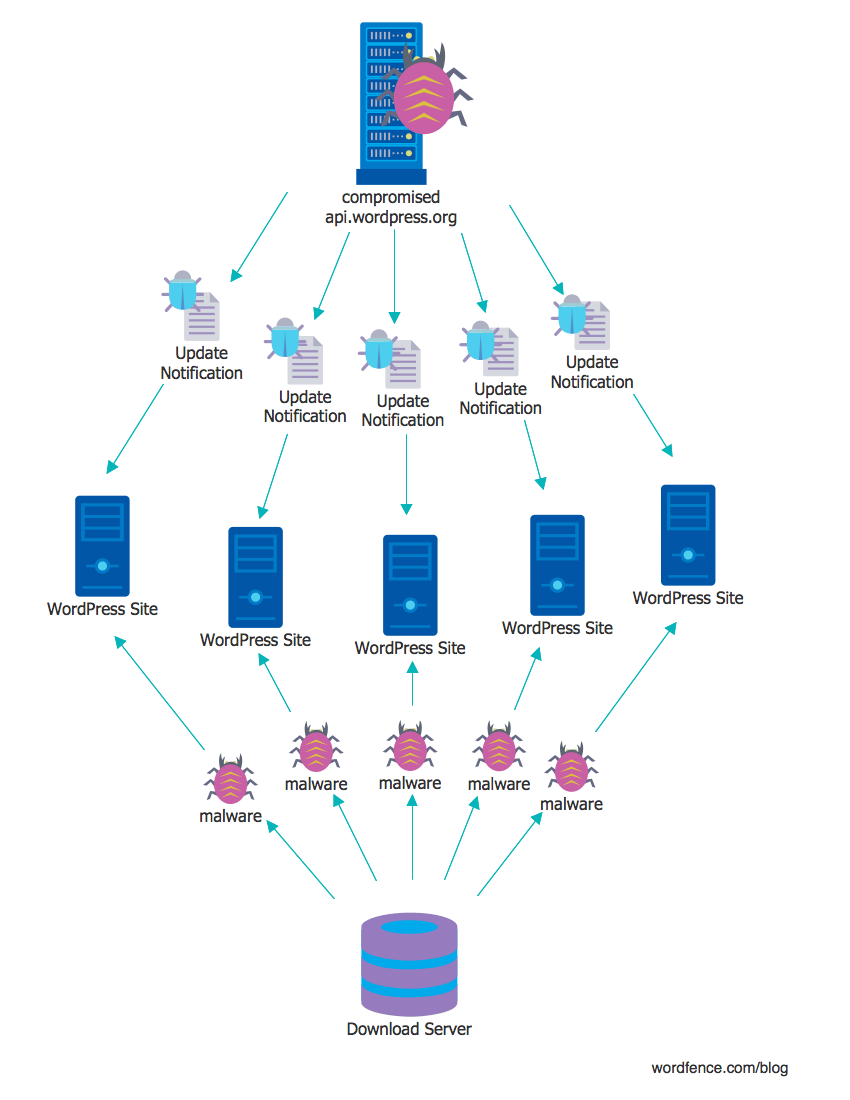
    The server api.wordpress.org (or servers) has an important role in the WordPress ecosystem: it releases automatic updates for WordPress websites. Every WordPress installation makes a request to this server about once an hour to check for plugin, theme, or WordPress core updates. The response from this server contains information about any newer versions that may be available, including if the plugin, theme or core needs to be updated automatically. It also includes a URL to download and install the updated software.

    api-normal

    Compromising this server could allow an attacker to supply their own URL to download and install software to WordPress websites, automatically. This provides a way for an attacker to mass-compromise WordPress websites through the auto-update mechanism supplied by api.wordpress.org. This is all possible because WordPress itself provides no signature verification of the software being installed. It will trust any URL and any package that is supplied by api.wordpress.org.

    api-compromised

    WordPress powers approximately 27% of all websites on the Internet. According to the WordPress documentation: “By default, every site has automatic updates enabled for minor core releases and translation files.”. By compromising api.wordpress.org, an attacker could conceivably compromise more than a quarter of the websites worldwide in one stroke.

    Below we describe the technical details of a serious security vulnerability that we uncovered earlier this year that could compromise api.wordpress.org. We reported this vulnerability to the WordPress team via HackerOne. They fixed the vulnerability within a few hours of acknowledging the report. They have also awarded Wordfence lead developer Matt Barry a bounty for discovering and reporting it.

    Technical Details of the api.wordpress.org vulnerability

    api.wordpress.org has a GitHub webhook that allows WordPress core developers to sync their code to the wordpress.org SVN repository. This allows them to use GitHub as their source code repository. Then, when they commit a change to GitHub it will reach out and hit a URL on api.wordpress.org which then triggers a process on api.wordpress.org that brings down the latest code that was just added to GitHub.

    The URL that GitHub contacts on api.wordpress.org is called a ‘webhook’ and is written in PHP. The PHP for this webhook is open source and can be found in this repository. We analyzed this code and found a vulnerability that could allow an attacker to execute their own code on api.wordpress.org and gain access to api.wordpress.org. This is called a remote code execution vulnerability or RCE.

    When a request arrives at api.wordpress.org, presumably from GitHub, the api.wordpress.org webhook verifies that it is in fact GitHub making the request by using a shared secret and hashing algorithm. The way this works is that, as GitHub is about to send JSON data, it combines the data it’s about to send with a secret value that has been pre-shared with api.wordpress.org. It then hashes the combination and it sends that hash along with the JSON data to api.wordpress.org.

    When api.wordpress.org receives the request, it takes the JSON data, also combines it with the shared secret and computes a hash of its own. If its hash matches the hash that GitHub just sent, then GitHub must know the shared secret and that proves that GitHub is allowed to make the request it’s making.

    GitHub uses SHA1 to generate the hash and supplies the signature in a header: X-Hub-Signature: sha1={hash}. The webhook extracts both the algorithm, in this case ‘sha1’, and the hash to verify the signature. The vulnerability here lies in the fact the code will use the hash function supplied by the client, normally github. That means that, whether it’s GitHub or an attacker hitting the webhook, they get to specify which hashing algorithm is used to verify the message authenticity, as you can see in the code below.

    function verify_github_signature() {
    	if ( empty( $_SERVER['HTTP_X_HUB_SIGNATURE'] ) )
    		return false;
    
    	list( $algo, $hash ) = explode( '=', $_SERVER['HTTP_X_HUB_SIGNATURE'], 2 );
    
    	// Todo? Doesn't handle standard $_POST, only application/json
    	$hmac = hash_hmac( $algo, file_get_contents('php://input' ), FEATURE_PLUGIN_GH_SYNC_SECRET );
    
    	return $hash === $hmac;
    }
    

    If we can bypass the webhook authentication mechanism, there is a POST parameter for the GitHub project URL that is passed unescaped to shell_exec which allows us to execute shell commands on api.wordpress.org. This allows us to compromise the server. You can see the shell_exec call in the code sample below:

    $repo_name = $_POST['repository']['full_name'];
    $repo_url  = $_POST['repository']['git_url'];
    
    if ( ! $this->verify_valid_plugin( $repo_name ) ) {
    	die( 'Sorry, This Github repo is not configured for WordPress.org Plugins SVN Github Sync. Please contact us.' );
    }
    
    $svn_directory = $this->whitelisted_repos[ $repo_name ];
    
    $this->process_github_to_svn( $repo_url, $svn_directory );
    
    function process_github_to_svn( $github_url, $svn_directory ) {
    
    	putenv( 'PHP_SVN_USER=' . FEATURE_PLUGIN_GH_SYNC_USER );
    	putenv( 'PHP_SVN_PASSWORD=' . FEATURE_PLUGIN_GH_SYNC_PASS );
    
    	echo shell_exec( __DIR__ . "/feature-plugins.sh $github_url $svn_directory 2>&1" );
    
    	putenv( 'PHP_SVN_USER' );
    	putenv( 'PHP_SVN_PASSWORD' );
    }
    

    The challenge here is to somehow fool the webhook into thinking that we know the shared secret that GitHub knows. That means that we need to send a hash with our message that ‘checks out’. In other words it appears to be a hash of the message we’re sending and the secret value that only api.wordpress.org and GitHub know – the shared secret.

    As we pointed out above, the webhook lets us choose our own hashing algorithm. PHP provides a number of non-cryptographically secure hashing functions like crc32, fnv32 and adler32, which generate a 32bit hash vs the expected 160 bit hash generated by SHA1. These hashing functions are checksums which are designed to catch data transmission errors and be highly performant with large inputs. They are not designed to provide security.

    If we can find a weak enough hashing algorithm, it lets us brute force attack the webhook. We just need to send a series of hashes, trying to guess the hash value of the shared secret and the data we’re sending, until we get it right and api.wordpress.org allows the request.

    By using any one of these weak hashing algorithms, we reduce the brute force space, or number of guesses we have to make, significantly (2^160 down to 2^32). But it is still not feasible to launch this attack over the network to api.wordpress.org without it being incredibly noisy as we make a large number of guesses.

    Of these weak algorithms, the one that stood out the most was adler32, which is actually two 16 bit hashing functions with their outputs concatenated together. It also has a known implementation flaw when used on short messages. When combined with PHP’s hash_hmac function, the second round of hashing will only ever pass 68 bytes of data to adler32 which severely limits the amount of possible hashes that can be generated given any input at the start of the hashing process.

    Not only are the total number of hashes limited, but there’s also significant non-uniformity in the hash space. This results in many hashes being the same even though they were supplied with different inputs. The distribution of possible checksum values are similar to rolling dice where 7 is the most likely outcome (the median value), and the probability of rolling any value in that range would work its way out from the median value (6 and 8 would have the next highest probability, and on it goes to 2 and 12).

    The proof of concept supplied in the report utilizes the non-uniformity by creating a profile of most common significant bytes in each 16 bit hash generated. Using this, we were able to reduce the amount of requests from 2^32 to approximately 100,000 to 400,000 based on our tests with randomly generated keys.

    This is a far more manageable number of guesses that we would need to send to the webhook on api.wordpress.org which could be made over the course of a few hours. Once the webhook allows the request, the attack executes a shell command on api.wordpress.org which gives us access to the underlying operating system and api.wordpress.org is compromised.

    From there an attacker could conceivably create their own update for all WordPress websites and distribute a backdoor and other malicious code to more than one quarter of the Web. They would also be able to disable subsequent auto-updates so that the WordPress team would lose the ability to deploy a fix to affected websites.

    The CVSS vulnerability score for this vulnerability is:

    Are You at Risk?

    We confidentially reported this vulnerability on September 2nd to Automattic and they pushed a fix to the code repository on September 7th. Presumably the same fix had been deployed to production before then.

    We still consider api.wordpress.org a single point of failure when distributing WordPress core, plugins and theme updates. We have made attempts to start a conversation with members of Automattic’s security team about improving the security posture of the automatic update system, but we have not yet received a response.

    Starting three years ago, there has been some discussion about providing an authentication mechanism for the code that the WordPress servers distribute. So far there has been no progress on this. The issue came up again this week on a security mailing list.

    Should api.wordpress.org or a similarly critical server be compromised, it is possible that an attacker could compromise WordPress sites en-masse across the web in a very short amount of time and simultaneously remove the ability for the WordPress/Automattic security team to push out a security update or a fix.

    This would clearly be a disaster for the Web and the online community. The phrase “too big to fail” comes to mind. With 27% market share, WordPress powers over a quarter of all websites. A failure of this magnitude would be catastrophic for the Web. Furthermore, it would provide a massive attack platform for the attacker, who would control millions of web hosting accounts from which they could launch further attacks.

    Disclosure Timeline

    • 2016-09-02 21:08 (-0400) – Initial report submitted to Automattic via Hackerone.
    • 2016-09-06 19:48 (-0400) – Automattic acknowledges the report.
    • 2016-09-07 02:02 (-0400) – A fix for the vulnerability is pushed to the repository.
    • 2016-09-21 17:17 (-0400) – The report is resolved and closed.
    • 2016-10-29 05:21 (-0400) – Bounty is awarded by Automattic.
    • 2016-11-22 – Public disclosure.

    Credits

    We would like to congratulate Lead Wordfence Developer Matt Barry for this spectacular research. Matt tackled this project in his spare time and handled the disclosure of this via HackerOne to the Automattic team. Matt is also the technical author of this post with some minor assistance from the rest of the Wordfence team.

    The post Hacking 27% of the Web via WordPress Auto-Update appeared first on Wordfence.