Occasionally at Wordfence we publish posts that are public service announcements that help the broader online community including your team, friends and relatives. Today I’m publishing a guide that will help improve your overall personal cyber security. This guide focuses on the basics: How to reduce the truly important life altering risks that we face from the cyber realm.
This is a “cyber security survival guide”. In it I’m going to start by giving you a clear picture of the current state of cyber security. Then I’m going to help you prioritize what you should be protecting. In this guide I am focusing on the biggest risks that we are all presented with. This is, after all, a survival guide. Finally I will explain how to reduce risk for each category.
I have written this guide to be as readable as possible. It is designed to be shared with your less technical friends and family. Most of my day is spent focusing on protecting our customer websites from attack. Today I am focusing on the bigger picture, the important basics, like protecting your physical safety and your basic financial means.
“Si vis pacem, para bellum.” ~Vegetius. Circa 4th century.
Translation: If you wish for peace, prepare for war.
The hostile cyber security environment we find ourselves in today would startle even the most cynical predictions of a decade ago. This guide will improve the security posture of anyone who has an online presence, which today means everyone. In addition, today is “Safer Internet Day“, so this is our contribution to helping improve the safety of the online community.
The State of Cyber Security
 Your data has a 2 in 3 chance of already having been stolen and it will be stolen again and again. It doesn’t matter if you use secure passwords and have two factor authentication enabled on your accounts. It doesn’t matter if you are old or young, male or female, which country you are based in or which services you use and which companies you do business with.
At various points in your life your data will be stolen. And it will, in all likelihood, be stolen repeatedly.
Today, 64% of Americans have already had their data stolen through data breaches. That is almost 2 out of three people. This percentage is rapidly trending towards 100% of the population in the US alone.
In the past 3 years we saw the first data breach of over 1 billion user accounts with the Yahoo breach. That breach affected 1 in 7 people on planet Earth. In the United States, the OPM breach saw the data of our top spies stolen, including their fingerprints, personal data and their answers to some very personal questions during an interview using a lie detector. Even our intelligence services can’t protect highly confidential personnel data.
Data has been stolen in the hundreds of millions of records from private companies, intelligence agencies and the military. Even companies who are experts in security have had their data stolen too.
Data that has been stolen includes usernames, passwords, email addresses, social security numbers, biometric data, medical records and more.
How Data is Stolen
Even if you use a strong password, two factor authentication and security best practices, your data will still be stolen because the companies whose services you use in some cases will fail to protect their own networks.
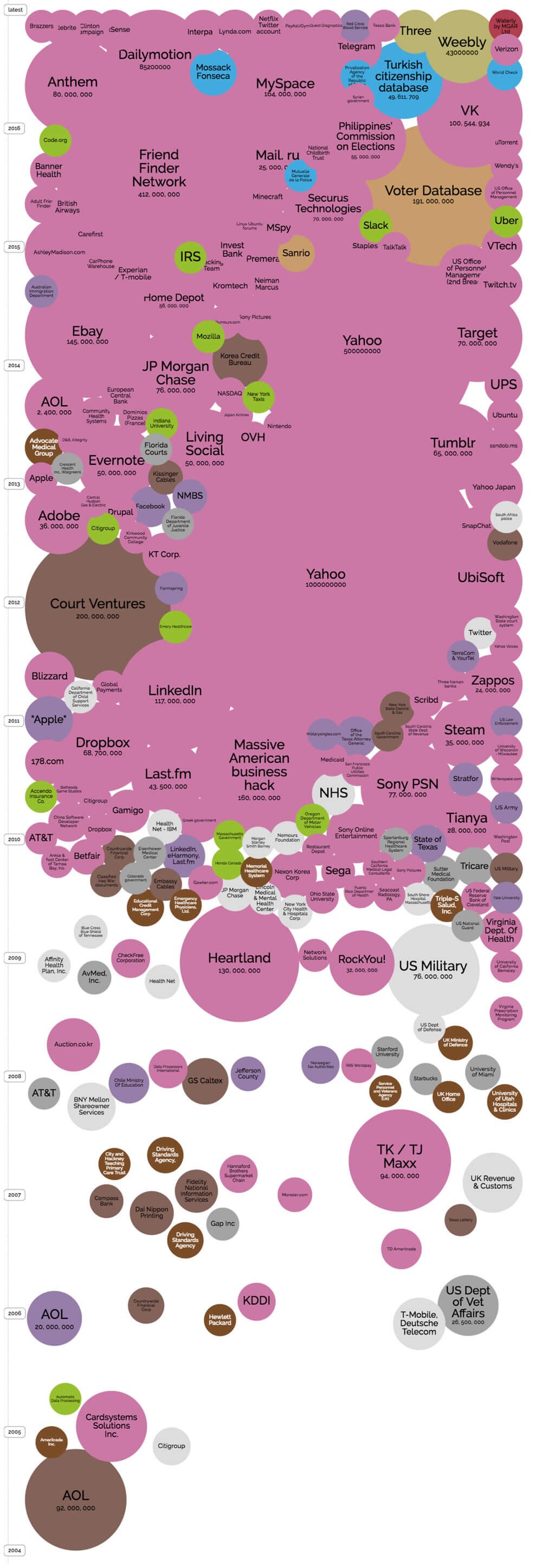
The trend at this point is undeniable and the track record so far makes it clear: Companies and government organizations are being breached at an increasing rate and the breaches are becoming increasingly severe.
If you would like a visual representation that illustrates this point, visit dataisbeautiful.com and take a look at their bubble chart visual showing breaches since 2004. As you scroll up through the years, the bubbles become bigger and more abundant until they simply merge into each other.
Prioritizing What We Need to Protect as Individuals
If data breaches are the new normal and if you accept the premise that they are inevitable and unavoidable, the problem we need to solve in our personal and business lives becomes “How do I reduce the risk and the impact of a breach?”
It’s helpful to start this conversation by prioritizing what we need to protect. Once again, in this post I am focusing on the really important items and people in our lives. In order of importance, in the cyber realm we need to protect:
- Information about us that may help criminals target us in the real world.
- Our financial means. In other words, savings accounts, ability to borrow and our assets.
- Sensitive personal information like medical records, tax data and other private data.
- Our ability to earn an income through our reputation and our ability to provide products or services, including our own labor, to others.
The above list is, in my opinion, in order of importance.
I think we all agree that our personal safety and the physical safety of those we care about is number one on the list. Most of the items on this list are things that can be fixed or recovered from. A human life is irreplaceable. Reducing the risk of real world targeting by criminals through the cyber realm is therefore at the top of the list.
Financial means is second because without your savings and income, you don’t have the ability to feed, clothe and house yourself and your family. If your savings account is emptied, you may literally find yourself homeless without the ability to fend for yourself.
Sensitive personal data is third on the list. Having sensitive medical data disclosed, for example, can irreparably damage or affect some people’s lives. This is not something that can be repaired or undone.
Fourth on the list is our ability to earn an income. If you are not able to earn an income or damage your reputation, your quality of life and that of your family will be severely impacted.
Preventing Real World Targeting via Cyber
 In most developed countries, it is rare to hear stories of real-world targeting of individuals through information they have ‘leaked’ into the cyber realm. Most of the world is still developing economically and has a high disparity in wealth distribution. The reality in many countries that are still developing is that crime is significantly higher than developed countries like the United States, Australia or the United Kingdom, for example.
Kidnapping for ransom, carjacking and robbery is a reality in many parts of the world. In order to reduce your own risk of being targeted if you are in a high risk environment, I suggest the following:
- Never flaunt high value items online, including cars and jewelry.
- Share your location in general terms and if you want to share a specific location, do it after you have left that location.
- Don’t share information that may indicate when you have been paid.
- Consider making social profiles only accessible to people you have approved. Your social profile can provide someone with enough data to give you the impression they know you or are a friend of a friend.
- If you work in a job with privileged access or access to sensitive data, avoid disclosing who your employer is and your position. This includes disclosure on public websites like LinkedIn.
Protecting Your Financial Means
 In this section I’m not concerned with credit card fraud. That risk falls on the vendor and the transactions can be reversed. Instead, I’m focused on the kind of risk that can have a permanent impact on your long term financial well-being.
If an attacker is able to authorize a wire transfer from your savings account, they can empty your bank account and the funds may never be recoverable. This risk applies to savings accounts, checking accounts and investments like brokerage accounts and money market accounts.
If they are able to borrow in your name, it can permanently damage your credit score and your ability to borrow money to buy a home, for example.
I suggest taking the following steps to reduce the risk of large scale financial fraud:
- Make a list of savings accounts and investment accounts. Audit each account to determine how you prove your identity when transferring funds and get a clear understanding of what an attacker would need to do to commit fraud on each account. Contact banks, brokerages and lenders where necessary to get the data you need.
- Implement any additional security that your bank provides. This may include:
- A callback to a predetermined number,
- Authorization from multiple parties required before transferring funds,
- Two factor or hardware based authentication and
- Limiting transaction size when you are not at the bank in person to perform the transaction.
- Your bank may also provide real-time alerts when a transaction is processed.
- Monitor your account statements weekly for unauthorized activity. Make this a routine.
- If you are in the United States, place a credit freeze on your credit report. This restricts access to your credit report and makes it difficult for thieves to open new accounts in your name which allows them to borrow money as you. You may have a similar option in your own country if you don’t live in the USA.
- Also in the US, you can place a fraud alert on your credit report. This lasts 90 days and forces a business to verify your identity before issuing credit in your name. You can renew the fraud alert every 90 days. Outside the US you may find that your own country has similar protections available that prevent unauthorized borrowing.
In all of the above cases if you are able to choose a password, use a complex password and use a password manager like 1Password to store and manage your long and complex passwords.
Protecting Sensitive Data About You
Sensitive data that you need to protect may include medical records, tax information and your own social security number. There are two surprisingly easy ways you can help protect your own personal data.
Firstly, try to avoid creating data about yourself. If it doesn’t exist, it doesn’t need protection. You will frequently find forms that ask you for your social security number or equivalent. Most of the forms I encounter asking for this don’t actually require that information. I simply don’t enter it and rarely receive a complaint. Skip any optional forms and optional form fields. When entering sensitive data, find out if it is required or optional.
Secondly, the best way to protect data is to delete it. Once again, if it doesn’t exist, it doesn’t need protection. If you have old data on a workstation that is sensitive but that you don’t need to keep, delete it and empty your trash to permanently delete the data. If you have old databases lying around on servers that you don’t need but that present a risk, delete them. Don’t hoard sensitive data.
Where you do need to store and protect data on your own systems, use hard drive encryption if it is available for your operating system. Password protect your devices including your cellphone, tablets, laptops and workstations. Use complex codes, gestures or passwords.
In the medical domain it is difficult to protect your data. You don’t control where the data is stored and who has access to it. Medical data can be shared widely among providers which creates a large attack surface with many potential points of entry. Currently the best approach is to do your best to avoid creating data about yourself in the first place.
Protecting Your Ability to Earn an Income and Your Reputation
Most of us rely on IT infrastructure in some way to make our living. Whether you are an architect, photographer or computer programmer, it is important that you secure the systems you use. Here are a few tips to secure your own systems and the services you use:
- If you publish a WordPress website, install a malware scanner and firewall like Wordfence to keep hackers out and detect any intrusions.
- Use a password manager like 1Password to automatically generate and store long complex passwords that are different for each system you access. That way if one provider experiences a data breach, your other accounts won’t be compromised.
- Secure your phones, tablets and workstations by using disk encryption where available on workstations and use complex passwords, codes or gestures that are required to gain access.
- Avoid adding data to systems and services that you don’t need to. Once again, the best way to protect data is to delete it or to not create it in the first place.
- Enable two factor authentication on all services that you use.
- Consider using a YubiKey for cloud services. A YubiKey is a hardware two-factor authentication device. An increasing number of cloud providers are supporting hardware authentication. Enable this where you can. YubiKey adoption is increasing rapidly as it becomes more popular.
- Keep backup drives in a secure place and destroy their data if they are no longer needed. Never simply throw backup drives or devices in the trash. They need to be wiped using secure drive wiping software.
Protecting Your Reputation
If you use social media, never simply ‘Share’ or retweet someone else’s post until you have fully read it, understood it and also understand any context around it. If you accidentally share something that is highly controversial without fully understanding what you’re sharing, you may find your professional reputation severely damaged.
Secure any social media accounts that you own. If your account is hacked, it may be used for spam which could damage your online reputation.
Secure any websites that you own. If your website is hacked, it will damage your search engine ranking and infuriate your customers if their data is stolen. This can have a severe impact on your reputation. If you use WordPress, install Wordfence which will help prevent a hack.
Make sure that your email accounts are secure. If your email account is compromised, your contacts list is also compromised. This usually results in your contacts receiving phishing emails that also try to hack their email accounts. They may also receive spam. This will damage your reputation among your contacts. Brian Krebs has a great writeup on the value of a hacked email account.
When installing apps on your smartphone, avoid installing apps that are aggressively viral. Some apps gain access to your contacts list and can SMS, private message or email your contacts a message from you that suggests they also sign up for the service. These messages can be infuriating and won’t help your reputation among your friends and colleagues. When installing a new app, think before you click.
Additional Tips and Techniques
How to Avoid Social Engineering
Social Engineering is what happens when someone phones you and pretends to be an organization or individual that you trust. They will try to get sensitive information out of you including passwords, usernames and a description of systems that you have access to.
This kind of attack is common and is used to commit tax refund fraud. It is also used to gain access to your bank accounts. You will even find attackers trying to get access to your workstation by telling you that they have found something wrong and asking you to install their software to fix it.
To avoid social engineering you can use a simple technique. Usually the individual will claim they’re from a reputable company or organization. Simply hang up, find the organization’s central number, call back and ask for that individual or someone in the same role.
Don’t let the person who called you provide the number you call back. Instead find the central number via Google or elsewhere online and call that instead. If it’s an IRS agent, call the IRS back yourself. Use this technique no matter how friendly, polite, aggressive or scary the person on the other end of the line is.
Using the callback method is an effective way to defeat social engineering.
How to Avoid Phishing and Spear Phishing
 Phishing is when someone sends you an email that looks like it came from a bank or service you trust. They try to get you to open an attachment that compromises your device or to click on a web link and to sign in on a malicious website.
Spear phishing is the same as phishing, except the email you receive is especially crafted just for you. The attacker has researched you well and knows who your friends, family and associates are. They may know who you work for and what you are working on. The phishing email received in a spear phishing campaign looks much more authentic, appears to come from someone you know and may refer to something you are working on. Spear phishing attacks have a much higher success rate.
To avoid spear phishing campaigns, follow these two simple rules:
- Never open an attachment unless you are 100% sure that someone you trust sent it to you. If in doubt, phone them to verify they sent you the file.
- Never click on a website link unless you are 100% sure that the person or organization that sent it to you is someone you trust. When you do open the link, check your browser location bar at the top for the following:
- The location should start with https://
- The part after https:// should be the domain name of an organization you trust. For example, it should say paypal.com and not paypal.com.badsite.com. Everything from the first forward slash to the final forward slash in the location should be a name that you trust.
- The https:// part should be green if you are using Chrome and it should also say “Secure” to the left.
If you receive an email that makes you suspicious in any way, don’t click anything in it, don’t open any attachments, and don’t reply to the email. Instead, contact the person or organization that sent it and ask them what it is about.
Some of the largest data breaches are as a result of spear phishing attacks and the average cost of a successful spear phishing attack is $1.6 million.
Use a Password Manager
I have mentioned 1Password several times in this post as an example of a password manager that helps you use unique passwords across all the services that you use. Using long, complex and unique passwords is one of the most effective things that you can do to protect yourself against future data breaches.
There is an argument that all your “eggs” are in one basket when using a password manager. However, among security professionals it is widely agreed that this risk is outweighed by the benefit of being able to reliably use unique complex passwords across services.
Don’t Create Data You Don’t Have to, Delete Data You Don’t Need
I mentioned this earlier in the post but it bears repeating: to protect yourself from future data breaches, avoid creating data you don’t have to and delete data you don’t need.
Deleting data includes any profiles on websites that you don’t use anymore. If you are on a social media website that you don’t use, delete your profile. The recent MySpace breach that was announced is a great example. Many people don’t use the service anymore, but last year a MySpace breach was announced that affected over 300 million accounts.
Use Backups to Protect Yourself Against Ransomware
One final tip. Ransomware is malware that encrypts your entire hard drive and forces you to pay a hacker to get your data back. Sadly this attack is very effective and many people pay to get their data back, including large organizations. Two thirds of companies that fall victim to ransomware actually pay the ransom.
Use backups to protect yourself against a ransomware attack. Make sure that your backups are not connected to the computer you are trying to protect once the backups have completed or the ransomware may also encrypt your backup drive.
Crashplan is a cloud backup service that can protect you against ransomware. We don’t have any commercial relationship with them but we have heard good things.
Help Keep Friends and Family Safe
I hope this cyber security survival guide improves your security posture online. I have kept it as readable and accessible as possible so that the guide is usable by technical and non-technical readers alike. You can help improve online and offline safety by sharing this with friends and family that may benefit by reading it.
Stay safe!
Mark Maunder – Wordfence Founder/CEO.
The post Staying Safe: The Wordfence Cyber Security Survival Guide appeared first on Wordfence.