Online Services

Blog

  • WordPress-Delivered Ransomware and Hacked Linux Distributions

    In a rather unfortunate turn of events earlier this month, the Hollywood Presbyterian Medical Center was infected with ransomware. Ransomware, if you’re unfamiliar with it, encrypts everything on your workstation and then tells you to pay an attacker to decrypt your system and regain access to your information.

    In the case of Presbyterian, they had to pay 40 bitcoins or the equivalent of $17,000 to regain access to their systems. The ransomware attack affected CT scans, documentation, lab work, pharmacy functions and their email went down. Last week they paid the attacker the $17,000 and their systems were decrypted and they’re back online.

    Unfortunately WordPress has been a source of ransomware infections. It’s unknown whether it contributed to the Presbyterian attack or not. During the past month the information security industry has seen WordPress used as a kind of platform to launch ransomware attacks. It works as follows:

    • A WordPress site is hacked through any method available. That may be a brute force password guessing attack or by exploiting a vulnerability in a plugin, theme or core.
    • The attacker installs code on the WordPress site that redirects visitors to other infected websites that are running the Nuclear Exploit Kit. The redirects may happen through a series of websites to try and prevent web browsers and Google from warning you that a site is infected. The sites involved in the redirect change frequently.
    • When a visitor to the infected site is redirected, the nuclear exploit kit searches for vulnerabilities in the site visitor’s Flash Plugin, Microsoft Silverlight, Adobe Reader or Internet Explorer.
    • If Nuclear finds a vulnerability, it exploits the visitor machine and installs the TeslaCrypt Ransomware.
    • The ransomware then encrypts all files on the workstation and extorts the owner into paying to get their system decrypted.

    This is what TeslaCrypt looks like:
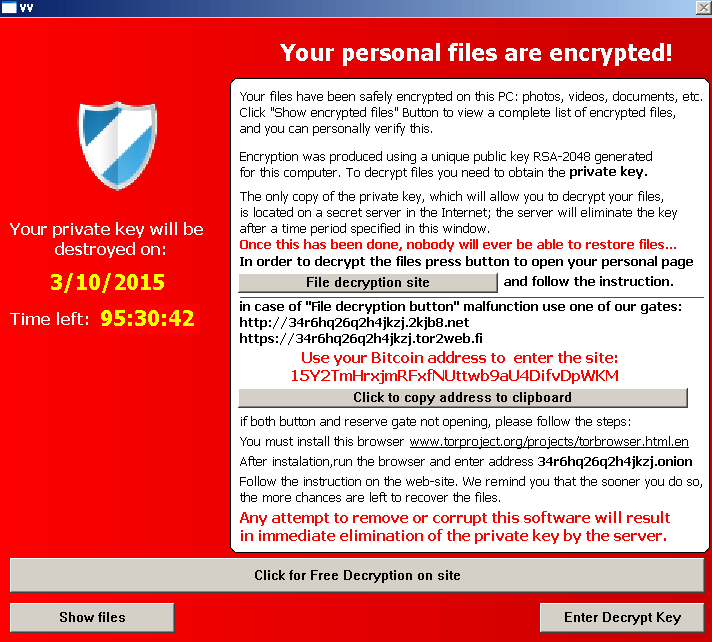
    A screenshot of the screen that TeslaCrypt displays when your files are encrypted. Courtesy Bromium Labs.

    A screenshot of the screen that TeslaCrypt displays when your files are encrypted. Courtesy Bromium Labs.


    As you can tell from the sequence of events above, TeslaCrypt and the attackers behind it rely on a cascade of failures. They require multiple vulnerable WordPress sites to perform their infection and to set up a chain of redirects. They then need a visitor using an unpatched workstation with vulnerable applications to visit an infected site.

    The fact that Hollywood Presbyterian actually paid the ransom to regain access to their systems, speaks volumes about how effective a ransomware attack is and the impact it has on systems.

    Update: If you are infected with TeslaCrypt, there is a utility available written by an anonymous researcher called TeslaCrack which may help. Thanks to Samuel who posted it in the comments below, where you can find a link to the utility along with a few other links I’ve added discussing the utility.

    In another turn of events, the Linux distribution “Mint” reported on Saturday that they had their website hacked via a WordPress installation. According to Clement Lefebvre, the project leader, in reply to a comment on their blog:

    “We found an uploaded php backdoor in the theme directory of a wordpress installation, which was 1 day old and had no plugins running. The theme was new but most importantly I think we had lax file permissions on this. This was only set up hours before the attack but we were probably scanned for something like this for a while. Anyhow, we don’t know yet how it was uploaded but we know it happened there, and I’m certainly not pointing the finger at anybody. People just asked if we were running wordpress or if wordpress was used in the attack and I answered yes.”

    The attacker replaced the real Linux distribution that Mint users download from the site with a version that had malware installed. The modified Linux distribution turns your Linux machine into a member of an attack botnet that can be used for DDoS attacks.

    As WordPress site owners, our role in this is clear. If you don’t protect your WordPress site from attackers, you risk infecting your site visitors with Ransomware, turning their machines into an attack platform, or worse.

    When thinking about WordPress security, it’s important to consider the broader impact a hack might have, and the larger responsibility that we as site admins have to not just protect our own website and our investment, but our site members’ personally identifiable data and the security of visitors to our websites.

    At Wordfence, we continue to provide detailed advice on how to keep your WordPress site secure including here on our blog and in our WordPress Security Learning Center. Securing your site is critically important, not just to protect your investment, but for your site visitors’ safety.

    In other news: We’d like to remind all ElegantThemes customers to update their themes if they haven’t already. There was a critical security update released on Thursday that fixed a vulnerability in several of their themes. Update immediately if you haven’t done so already.

    As always we welcome your comments below. Please share this with the larger community to create awareness of our larger responsibility as WordPress site administrators.

    The post WordPress-Delivered Ransomware and Hacked Linux Distributions appeared first on Wordfence.

  • Scary Data – Trends in Malware, Phishing, Site Cleaning and Bad Networks

    At Wordfence we have great visibility into the size and scale of the threat facing the WordPress community. Our software protects well over a million sites worldwide. This week we thought it would be interesting to provide you with a broader perspective, analyzing some of the information that Google has made available in the Safe Browsing section of their Transparency Report. As we dug into the data we found a number of insights that we think you will benefit from.

    gsb_phishing_malware

    Almost Half a Million Malware Sites

    The number of Malware sites continues to grow, hitting a new peak of 489,801 in October of 2015. That is up over 160% from the same time the previous year. As we have discussed before, a website that is infected with malware can install malicious software on your computer if you visit it. Attackers use the software to steal sensitive information from you such as credit card information and social security numbers.

    As an internet user, the growth in malware sites means that the odds of you accidentally visiting one and becoming infected continue to increase. Google and the other search engines do a decent job of flagging them, but they can’t catch all of them in time to provide complete protection.

    As a website owner, it means that attackers are having more success than ever compromising websites. It goes without saying that we think you should take website security seriously.

    150% Growth in Phishing Sites in 7 Months

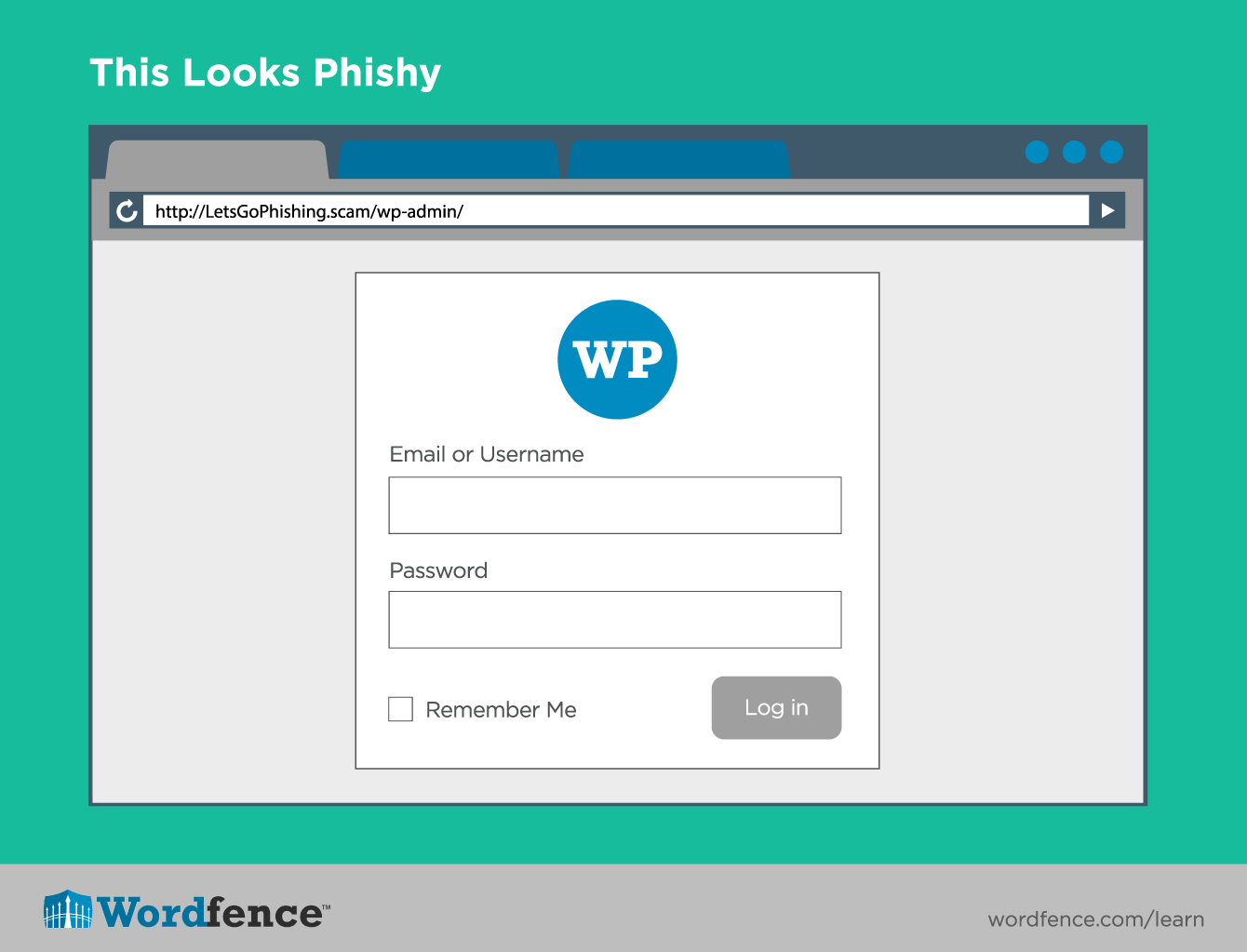
    According to Google there are now 293,747 phishing sites on the internet, up from 113,132 in July of last year. This represents growth of over 150% in a mere seven months. A phishing site attempts to trick you into thinking it is legitimate, like your online bank or an online retailer. They then lure you into providing login credentials or other sensitive information. In the Introduction to WordPress Security article in our Learning Center we talk about how attackers are even using phishing tactics to steal WordPress credentials.

    This is a significant trend, representing a threat that you should now be much more wary of.

    Phishing Login Screen

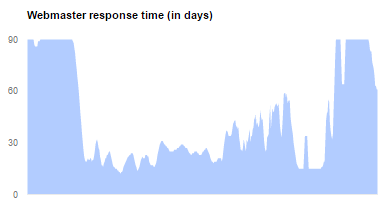
    It’s taking webmasters up to 90 days to respond

    Google measures how long it takes for webmasters to take action after they have received notice that their site has been compromised. Over the last year, the fastest average webmaster response time reported was 61 days, and for much of the year it was 90 or worse.

    gsb_webmaster_response

    Wait, what?

    We found this statistic to be absolutely shocking. As we have gotten to know our customers better and better, it has become very clear that their websites matter. In fact, in our recent WordPress Security Survey, 66% of respondents said that a compromised site could affect their income. Based on this, our theory is that the slow response time is not generally driven by apathy, but by a long lag time between infection and discovery. If you aren’t already proactively monitoring your site for compromise we strongly recommend that you spend some time reading our Learning Center article on how to detect a hacked website.

    Which neighborhoods to avoid on the internet

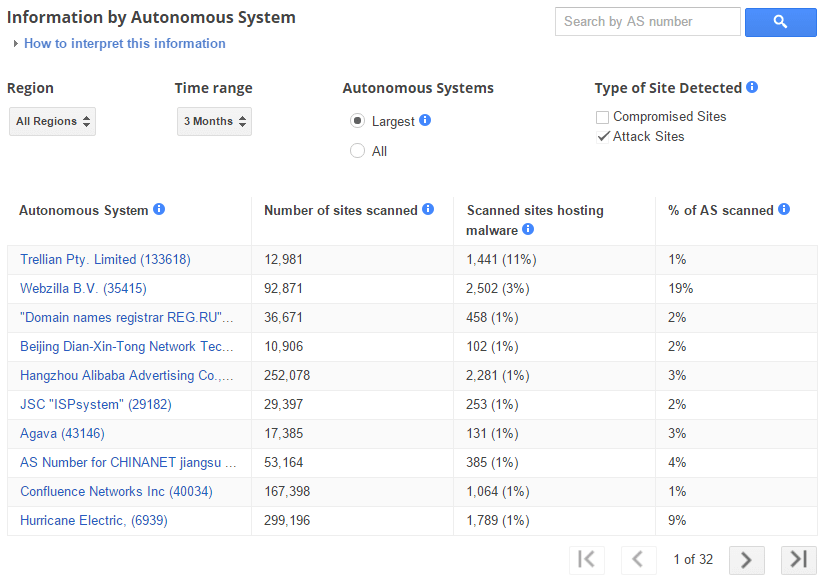
    Google provides very interesting data about the rate of infection for different Autonomous Systems on the internet. An Autonomous System is a network level designation that represents a pool of IP addresses that are under the control of one or more networks on behalf of a single entity. You can think of it roughly as the group of IP addresses that have been assigned to an ISP. The data is very interesting, and aligns with what we learned in the analysis of brute force attacks we did a few weeks ago.

    The thing that jumps out the most to us is the incredibly high penetration of infection on some Autonomous Systems. With infection rates as high 49%, there are areas of the internet that we would strongly encourage you to avoid. If you want to check out what Autonomous System your IP address belongs to, simply enter it into this handy tool. The good news is that the large majority of Autonomous Systems have infection rates of 1% or lower. We hope that Google’s reporting will serve as a call to action for the networks with the biggest problems.

    The other thing that jumps out is that this is clearly a global problem. As you page through the list, there are numerous countries spanning the globe represented. This problem is impacting all of us.

    gsb_automous_systems_compromise

    On the other side of the coin, we see a similar situation with Attack Sites. While there is a little more concentration in countries like the United States and China, you would still need to circle the globe to visit all of the biggest offenders.


    gsb_automous_systems_attack

    Rising to the Challenge

    The team at Wordfence has been hard at work on this problem for years now, and we are really proud of the product we have created and how it has been received by the WordPress community. As evidenced by the insights above, and numerous others from our other blog posts, the scale and complexity of the threat facing website owners continues to grow dramatically. That is why we have continued to invest in our team and our product. We have very exciting news to share with you in April about how we will be making the best security solution for WordPress significantly better. Stay tuned for a big announcement, we can’t wait to share it with you.

    The post Scary Data – Trends in Malware, Phishing, Site Cleaning and Bad Networks appeared first on Wordfence.

  • A Backdoored WordPress Plugin and 3 Additional Vulnerabilities

    We have several plugin vulnerabilities we’d like to bring to your attention this week.

    First up is a backdoor that was added to the Custom Content Type Manager plugin. The backdoor was added by a malicious coder who gained access to the plugin code in the official WordPress plugin repository.

    It’s unclear whether the plugin author’s credentials were stolen or whether the malicious actor was granted access. The WordPress security team removed the malicious user account that added the backdoor to the plugin. They have also removed all malicious code that was added to the plugin and updated the version number so that users running this plugin will be prompted to upgrade.

    If you are using Custom Content Type Manager, you will need to take the following steps to remove any infection and install the updated non-backdoored version of the plugin.

    1. Update to version 0.9.8.9 of Custom Content Type Manager
    2. The malicious code in this plugin installed a backdoor in WordPress core files. So run a Wordfence scan on your site to check the integrity of your core files. The free version of Wordfence will do this.  Make sure the option to compare your core files against the official WordPress versions is enabled. In the scan results, make sure that the following three files are not modified.
      • wp-login.php
      • wp-admin/user-edit.php
      • wp-admin/user-new.php
    3. If any of the above files are modified, you can use Wordfence to repair them.
    4. Change the passwords of all your users.
    5. Delete any user accounts you don’t recognize. Check admin accounts in particular.
    6. If a file called wp-options.php exists in your home directory, remove it.

    The SP Projects and Document Manager plugin version 2.5.9.6 has multiple vulnerabilities including file upload, code execution, sql injection and XSS. Update to to version 2.6.1.1 immediately which contains the vendor released fixes and is the newest version.

    If you are running Easy Digital Downloads, ensure you’ve updated to at least version 2.5.8 which fixes an object injection vulnerability. The current version is 2.5.9. The vulnerability was disclosed within the past week.

    A vulnerability was publicly disclosed in the Bulk Delete plugin earlier this month that allows unprivileged users to delete pages or posts. The vendor has already released a fix so make sure that if you’re using the Bulk Delete Plugin, you’ve updated to version 5.5.4 which is the latest version.

    That concludes our vulnerability roundup for this week. Please share this with the larger WordPress community to help create awareness of these issues.

    The post A Backdoored WordPress Plugin and 3 Additional Vulnerabilities appeared first on Wordfence.

  • The Crypto Wars – How We Arrived at Apple vs United States

    This week our team is in San Francisco attending the RSA 2016 Security conference. It is the largest security conference in the world with over 40,000 attendees this year. We’re also here for the BSides San Francisco security conference which happened right before RSA and which is a smaller independent locally organized conference.

    These conferences cover the larger subject of information security and our specific interest is of course web security and WordPress in particular. New zero day vulnerabilities, research and data are often disclosed at conferences like RSA and BSides. They are also a great way for vendors, researchers and government to share intelligence on what is happening in the wild and discuss emerging threats.

    There were several exciting developments at RSA yesterday including the announcement that Whitfield Diffie and Martin Hellman are the winners of this year’s Turing award, the Computer science equivalent of the Nobel Prize.

    In this video blog from San Francisco, I chat about what happened at RSA (This was recorded on Tuesday night) and I’m including an interview I did with Kurt Opsahl who is the Deputy Executive Director and General Counsel for the Electronic Frontier Foundation (EFF).

    In case you don’t know who the EFF is and what they do, they’re an organization who has been fighting for our digital rights for a long time. In the interview, Kurt explains some of the history of the EFF and he gives us an overview of the “crypto wars” starting in the 1990’s through to today.

    As Kurt explains in the interview, it all started with a small business called Steve Jackson Games getting raided by the Secret Service because someone posted a document to their bulletin board system called E911. The document described how the 911 system works and it was seen as a security risk.

    The Secret Service confiscated all computer equipment at Steve Jackson Games and then read and deleted private emails. The EFF sued the government on behalf of the book publisher and they established the principle that email should be given at least as much protection under the law as telephone calls.

    The EFF then went on to take on a case where a PhD student at the University of California, Dan Bernstein, was prohibited by the government from publishing an encryption program called Snuffle that he had created because they said it was classified as munitions under the law and regulated as such. In this case, the EFF sued the government and argued that computer code is a form of speech and is therefore protected under the First Amendment which protects freedom of speech. The court ruled in their favor which was a groundbreaking decision.

    Kurt then brings us up to date describing how we got to the situation with Apple today – and which we have blogged about previously.

    It’s interesting to note that Apple now appears to be making a few constitutional arguments of their own. They recently argued that forcing them to unlock the iPhone: “amounts to compelled speech and viewpoint discrimination in violation of the First Amendment.“.

    It sounds like Apple is borrowing several pages out of the EFF’s 1990’s playbook. Here is my interview with Kurt Opsahl….

    You can visit EFF.org to learn more about their storied history. The EFF is a foundation that relies on donations, and you can donate to the EFF on this page if you’d like to contribute.

    The post The Crypto Wars – How We Arrived at Apple vs United States appeared first on Wordfence.