Online Services

Blog

  • Get Rid of Data to Help Secure It

    Last week I spent some time chatting with Mike Dahn who is the co-founder of the BSides information security conferences globally. He’s also organizer of BSides San Francisco and is well known and respected in information security circles.

    We had a really informative chat and I’ve posted the video interview below. You know you’re chatting with someone who spends a lot of time thinking about a subject when they’re able to provide insights that are concise and are highly effective – ideas that can have a significant impact if overlooked or implemented.

    During our conversation I asked Mike how “we can all be more secure”. We stopped filming for a few minutes and agreed….that is a really big question. He told me he knew what many vendors could do to be more secure – and so I filmed his response.

    What Mike said is that “the best way to secure data is to get rid of it“. If you’re new to systems administration, security or WordPress administration, you may not understand the value of this advice. So I’m going to expand on what Mike said because I think it’s something that is overlooked by many of us and can be a major risk reducer when trying to secure your website or your systems.

    Anything you store needs to be protected. Storing data you don’t absolutely need is a potential liability and a source of risk. Here are a few things that you may currently store on your WordPress site or in other areas of your organization that you may be able to get rid of or take offline, reducing risk:

    Backups

    We’ve seen many customers use WordPress plugins that store backup files on the server. Sometimes, catastrophically, the backups even end up in publicly accessible web directories. These should be backed up to an external storage system that is secure, or ideally taken completely offline. You don’t need your backups online until you need to perform a disaster recovery and that is (hopefully) a rare occurrence.

    One compelling reason to take your backups offline is the rise in ransomware which encrypts both your web server (or workstation) and your backups. If your backups are offline, ransomware can’t encrypt it and your backups remain safe.

    Credit Card Data

    Never, ever store any data related to credit cards. In the interview Mike mentions “tokenization”. If you want to give your customers the ability to “store” their card information with you so they can perform repeat transactions, the way to do this securely is to pass the card data to a processor like Authorize.net (owned by Visa) and have them store the card data. They give you a unique ID or token which you can use to perform future transactions.

    By tokenizing credit card data, you avoid having to store it and there is no card data on your site for an attacker to steal.

    User Personally Identifiable Information (PII)

    Only store what you absolutely must. Don’t collect information you only think you “might” use. Collect the data you have to and discard everything else.

    For example, I’ve seen many online forms that ask for physical address information. Leave this out if you can because it’s one more piece of sensitive PII that you need to protect and it introduces additional liability into your organization if you are hacked.

    Leave it to the (real) experts

    While it’s tempting to store data on your own servers, companies like Visa in the credit card example above have much more stringent compliance requirements and have a larger team of security professionals than you do. So if you are able to outsource storage of data to a company that has a proven track record of excellence in data security, do that rather than reinventing secure data storage as a small team.

    Delete old data

    Another way to get rid of data so that you don’t have to protect it is to remove old data you no longer need. This may include:

    • Inactive user accounts
    • Old backups
    • Archived copies of your site stored on the server
    • Draft posts and pages
    • Inactive plugins and themes on your WordPress site
    • Websites that are still active but don’t receive any traffic or aren’t used
    • Old database instances that aren’t used anymore
    • Old database tables no longer used
    • Backup files or old files – for example if you made a copy of wp-config.php for WordPress and called it wp-config.php.old you definitely need to delete that because it contains your database credentials and is publicly visible on your site!

    The Interview with Mike

    This was filmed outside the BSides security conference in San Francisco. As always we welcome your feedback and insights in the comments below. Please share this to help promote good security practices in the WordPress community.


    The post Get Rid of Data to Help Secure It appeared first on Wordfence.
  • Hacked Sites Suffer Long Term Search Ranking Penalties

    During our research into what the WordPress community knows about hacked websites, we discovered that there is very little data available on the subject. We decided to conduct a survey, inviting a portion of our community to participate.

    We received responses from 1,605 people who reported having a website they manage hacked in the last year. We learned a lot. Thank you to everyone who participated!

    In a related effort, we also added an article to our Learning Center focused on recovering SEO after a hack.

    How does a hacked website impact SEO

    We approached this question from a number of angles. The first thing we asked was whether the website was flagged by Google as hacked or containing malicious content. Of the respondents who knew, 46.5% reported being flagged. We were surprised at how low this number was. With over half of the sites not being flagged by Google, we can’t rely on Google to alert us to a hack.

    It also means that if you move quickly, you have a good chance of cleaning your site before Google discovers it, potentially avoiding a search engine traffic impact. This is a strong indicator of the value of having your own malware scanner like Wordfence installed that is checking your site regularly.

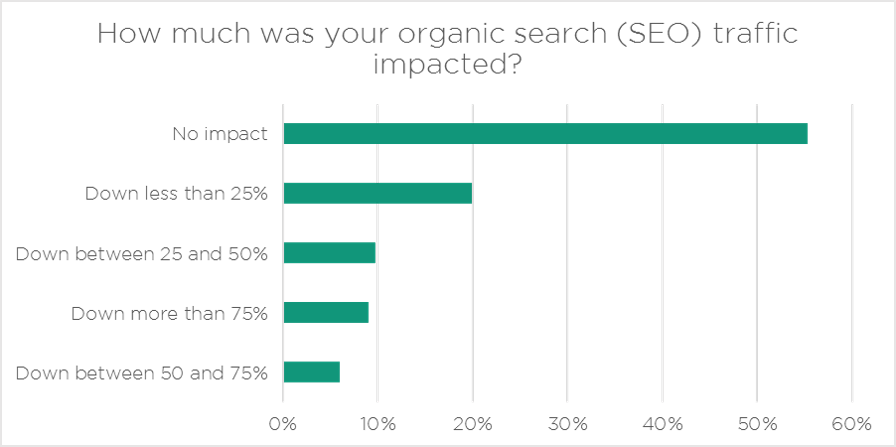
    The next thing we looked at was the impact of a hacked website on traffic. The chart below shows good news and bad. The good news is that 55% of you said that a hack had no impact on search traffic.

    The bad news is that 45% saw search traffic impacted by a hack and 9% saw a traffic drop of over 75%.

    hacked_website_seo_traffic_impact

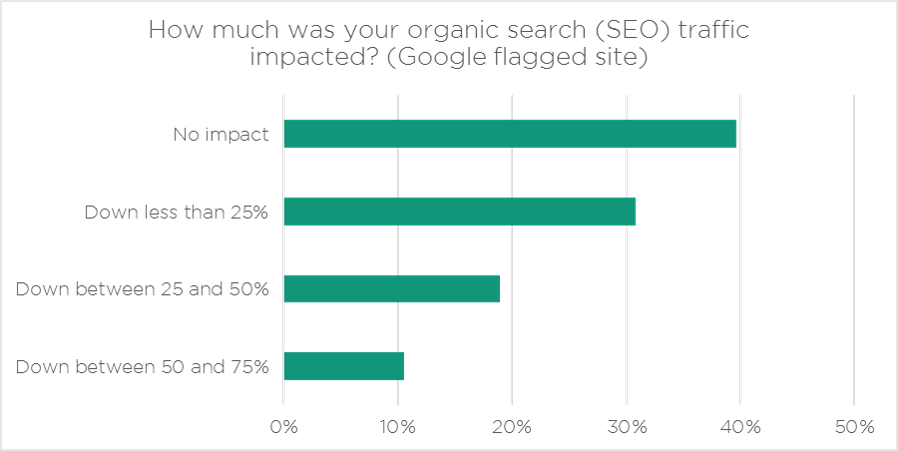
    One thing that occurred to us as we analyzed the data was that websites that Google flagged as hacked might see a greater drop in search traffic. To test that hypothesis we looked at the same question, but just for people who reported being flagged by Google.

    As expected, if your site is hacked and Google notices, you will see a much greater drop in search engine traffic: For people flagged by Google, 77% of them saw a drop in traffic compared to the average of 45%.

    Based on this we can conclude that the impact on traffic is greater if Google flags your site as hacked. The lesson: Don’t get hacked and if you do, scramble to fix it before Google notices.

    hacked_website_seo_traffic_impact_google

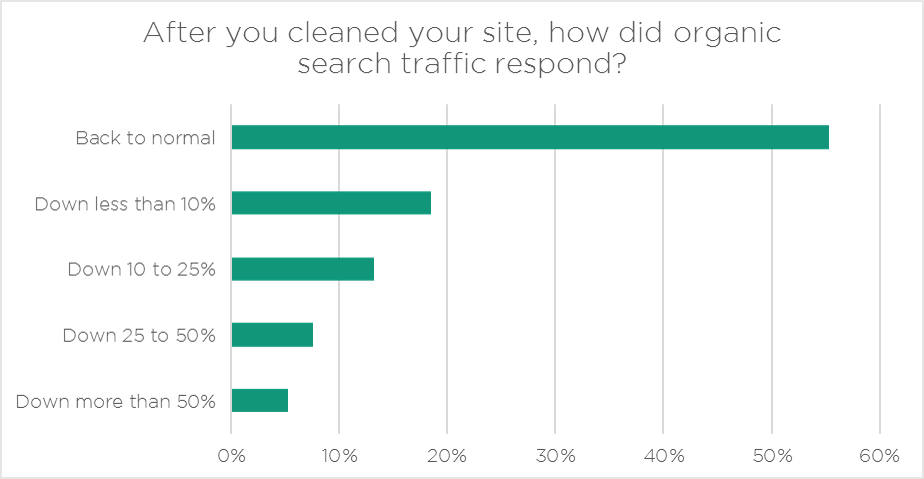
    One of the unfortunate things we noticed is that 45% of respondents report that their traffic never returned to normal, even after cleaning.

    hacked_website_seo_traffic_impact_after_cleaning

    We were curious to see whether search engine traffic improves over time after a site is cleaned. To do this we compared sites that were hacked longer ago and their search traffic now vs sites that were hacked more recently and their search traffic now.

    What we was a little shocking: Sites that have had more time to recover their rankings did not show an improvement compared to sites that have had less time. This is really worrying because it indicates that sites that are hacked and penalized by Google suffer a long term penalty on their rankings.

    How long does it take to recover from a hack?

    In the survey we asked respondents to tell us how many days it took them to restore their websites to normal following a hack. 40.9% were able to restore their site to normal within a day. We’re guessing those lucky site owners had a recent backup available that the attacker had not compromised.

    On the other end of the spectrum, 16.6% of respondents reported taking more than a week to recover. The average time to recover from a hacked site is 7.49 days.

    We also asked what steps were taken to clean respondents’ websites. 85.6% were able to clean the site themselves. Only 3.7% turned to friends for help, while 14.4% paid a professional to do it for them. We hope that our page on how to clean a hacked site has helped contribute to the high percentage of people who are successfully cleaning their own sites.

    We urge you to review your website backup approach. Ideally you should be taking automated backups frequently, storing them off site and retaining them for as long as is feasible. Nothing makes recovering from a hack easier than having a recent site backup available.

    How much does a hacked website cost?

    We knew going in that we would receive responses from a very diverse group of website owners, so we knew that the cost of hacked website would vary dramatically across sites.

    For your reference, the question we asked was: “What was the total cost of your hacked site including downtime, lost revenue and any other costs incurred?”

    To calculate this number we disqualified estimates that were clearly out of range. We also kept all the responses that said the hack cost them nothing and allowed those responses to bring down the average number. We determined that the average cost of a hacked website is $2,518. 

    Every site is different, but our universal take-away from this is that hacked websites are expensive. They can cost you a lot of money in downtime, lost revenue due to adverse SEO impact and repair costs. They can also impact your reputation with your customers. And cleaning a hacked website takes you away from what you would rather be doing.

    Your best course of action is to do everything you can to avoid getting hacked in the first place, something we are very passionate about here at Wordfence.

    Conclusion

    We hope you found the data in this article as interesting as we did. The data provides a strong incentive to get serious about website security, doing everything you can to prevent attackers from compromising your site in the first place. The survey contained a lot more interesting data. Look for a related blog post where we share some of that data next week.

    The post Hacked Sites Suffer Long Term Search Ranking Penalties appeared first on Wordfence.

  • How Attackers Gain Access to WordPress Sites

    On this blog we write a lot about different vulnerabilities that could lead to site compromise. In our Learning Center we go deep on a myriad of important topics related to WordPress security. Our handy checklist, for example, includes 42 items you really should be paying attention to. But surely not all 42 items are equally important, right? In today’s post we dive into some very interesting data we gathered a couple of weeks ago in a survey, letting the facts tell us what matters most.

    The question we asked in the survey was:

    If you know how your site was compromised please describe how the attackers gained access.

    The answers were free form text, so we manually categorized the answers. If the respondent expressed any doubt in their answer, we categorized them as uncertain.

    Most Site Owners Don’t Know

    Of the 1,032 survey respondents who answered this question, 61.5% didn’t know how the Attacker compromised their website. That is a not a huge surprise given that the large majority of respondents cleaned their sites themselves, but it is troubling. It is impossible to be confident that you have cleaned your site completely or that the vulnerability doesn’t still exist without knowing how the site was compromised in the first place.

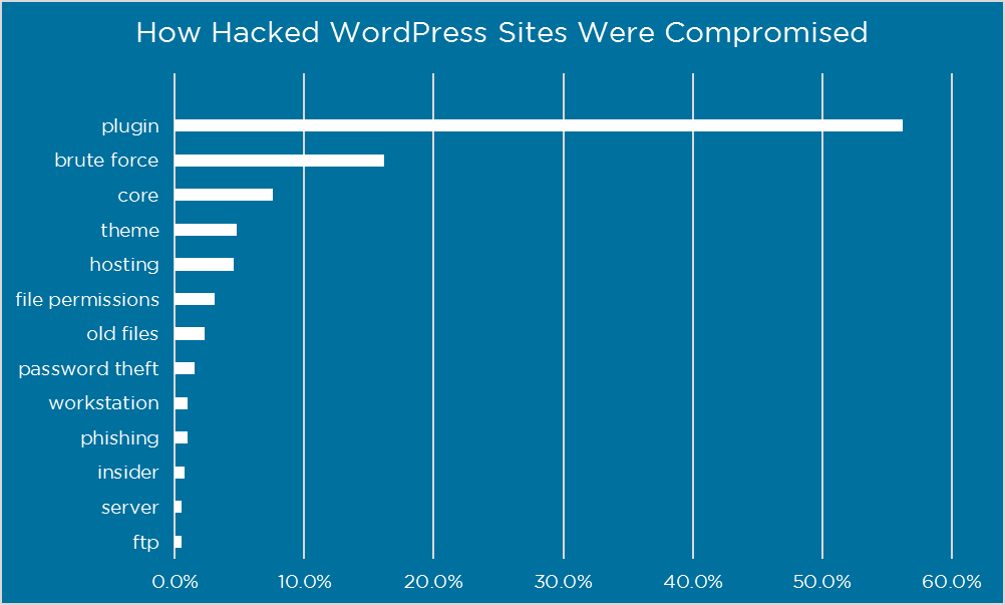
    For the site owners who did figure out how the attackers entered, here is what the breakdown looks like:

    hacked_website_how_compromised

    In the balance of this post we’re going to focus primarily on the top two risks. Because if you can protect yourself against plugin vulnerabilities and brute force attacks, you are accounting for over 70% of the problem.

    Plugins Are Your Biggest Risk

    Plugins play a big part in making WordPress as popular as it is today. As of this writing there are 43,719 plugins available for download in the official WordPress plugin directory. That is an incredible selection of plug and play software. But you obviously need to be careful with them, as plugin vulnerabilities represented 55.9% of the known entry points reported by respondents.

    Some tips for avoiding plugin vulnerabilities:

    Keep them updated

    Reputable plugin authors fix vulnerabilities very quickly when discovered. By keeping them up to date you insure that you benefit from fixes before attackers can exploit them. We recommend that you check for updates at least weekly. In addition we recommend that you pay attention to the alerts generated by Wordfence scans. Wordfence alerts you when your plugins need to be updated.

    Don’t use abandoned plugins

    You are relying on the plugin developer to insure that their code is free of vulnerabilities. If they are no longer providing updates there is a high likelihood that there are vulnerabilities that have not been fixed. We recommend avoiding plugins that have not been updated in over 6 months. For plugins you have already installed we recommend you conduct an audit at least quarterly to make sure none of your plugins have been abandoned by their authors.

    Only download plugins from reputable sites
    If you are going to download plugins somewhere other than the official WordPress repository, you need to make sure the website is reputable. One of the easiest ways for attackers to compromise your website is to trick you into loading malware yourself. An attacker will do this by setting up a website that looks legitimate and getting you to download a compromised or ‘nulled’ plugin.

    Use these tips to help determine whether a site is a reputable source or not:

    • Eye Test – Is the site itself professionally designed and uses clear language to describe the product? Or does it look like it was thrown together quickly by a single individual?
    • Company Information – Does the site belong to a company with the company name in the footer?
    • TOS and Privacy Policy – Do they have terms of service and a privacy policy?
    • Contact Info – Do they provide a physical contact address on the contact page or in their terms of service?
    • Domain Search – Google the domain name in quotes e.g. “example.com“. Do you find any reports of malicious activity. Add the word ‘theme’ or ‘plugin’ next to the quoted domain name in your search and see what that reveals.
    • Name Search – Do a Google search for the name of the plugin and see if any malicious activity is reported. Add the phrase “malware” or “spyware” to the search which may reveal forums discussing a malicious version of the theme being distributed.
    • Vulnerability Search – Do a search for the theme or plugin name or the vendor name and include the word “vulnerability”. This will help you find out if any vulnerabilities have been reported for the product you’re interested in or for the vendor. If they have fixed the vulnerability in a timely manner, that usually indicates they are a responsible vendor who is actively maintaining their product when problems arise.

    Brute Force Attacks Are Still A Big Problem

    A brute force attack is a password guessing attack. The attacker needs to both identify a valid username on your website and then guess the password for that username. Despite the availability of methods and technology that are 100% effective, this type of attack is still a huge problem, representing 16.1% of known entry points in our survey.

    Some tips for avoid a hack via brute force attack:

    Use Cellphone Sign-in

    Also referred to as two factor authentication, this approach requires the user to not only know their password, but to have possession of their cell phone as well. This technology is 100% effective in preventing brute force attacks. Wordfence premium includes this feature today.

    Don’t Use Obvious Usernames

    The most obvious usernames to avoid are ‘Admin’ and ‘Administrator’, they are the most common usernames attempted in brute force attacks. Also avoid using your domain name, company name and the names of people who are writing for your blog or are listed elsewhere on your website.

    Enable Login Security in Wordfence

    The free version of Wordfence provides a long list of login security features. By making sure they are enabled, you benefit from the following features:

    • Enforce strong passwords
    • Locking users out after a defined number of login failures
    • Locking out users after a number of forgot password attempts
    • Locking out invalid usernames
    • Preventing WordPress from revealing valid usernames in login errors
    • Preventing username discovery through author scans
    • Immediate blocking of IPs that try to sign in as a defined list of usernames.

    Other Steps to Secure your Site

    Keeping everything up-to-date is key. There are no serious known vulnerabilities in the current version of WordPress core. There are however, a large number of known vulnerabilities in older WordPress versions. So keeping WordPress core up-to-date is very important. The WordPress team responds quickly when an issue is reported and so should you.

    Many of our respondents indicated that their hosting account was compromised in some way. Make sure that you have a strong password policy for your CPanel account and any other server or hosting related accounts. Also ensure that you remove any applications on your server, like phpmyadmin, that aren’t absolutely necessary. If you don’t, you will have to maintain them too and ensure they’re updated and secure. Each application is another endpoint that can be attacked. The less you have to protect, the lower your risk.

    Secure your workstation by keeping your operating system and applications up-to-date. Running an old vulnerable web browser, or an old version of Flash or Adobe reader can make you vulnerable to phishing attacks that can compromise your workstation. Once you workstation is compromised, an attacker can easily install a keyboard logger to capture usernames and passwords. They will gain access to much more than your WordPress website.

    Store passwords securely. Do not store them in plaintext in a document online that may be compromised. You can use a product like 1Password which provides an encrypted ‘vault’ to store your passwords in.

    Finally, as we’ve said before, delete any old data you don’t need from your website. This includes backup files you don’t need, log files, applications you don’t use or anything else you don’t need on your site. Old data is one more possible entry point that needs to be protected and if you can remove it, you reduce risk.

    Conclusion

    WordPress security is a battle fought on many fronts, as evidenced by the 42 items on our checklist and the depth and breadth of subjects in our ever evolving Learning Center. But knowledge is power, and this survey data allows us to focus on what matters most. We hope that you take the opportunity to make improvements in how you select and manage plugins on your website. We also hope that you review your approach to brute force attack protection. Small investments in these areas will pay big security dividends. Stay safe!

    The post How Attackers Gain Access to WordPress Sites appeared first on Wordfence.

  • Hello world!

    Welcome to WordPress. This is your first post. Edit or delete it, then start blogging!