Online Services

Category: Security

  • Revslider, MailPoet, GravityForms Exploits Bypass Cloudflare WAF

    Last week we blogged about the advantages of endpoint security over a cloud firewall solution. We wrote about how cloud WAFs can be bypassed. We also blogged about how it is more challenging for a cloud WAF provider to write complex firewall rules because cloud WAFs don’t know if a user is signed in or what their access level is.

    Part of the forensic research we do at Wordfence involves analyzing attack data we receive from sites that use Wordfence. We use a scaleable database cluster to perform big data analysis on WordPress attack data. We identified many attacks that were bypassing Cloudflare and being blocked by Wordfence. So we dug a little deeper.

    Cloudflare Pro provides a web application firewall that is designed to perform a similar function to the Wordfence WAF. We are in that sense, direct competitors. We wanted to evaluate the Cloudflare WAF and to get access to it you have to get a paid ‘Pro’ account for $240 per year or $20/month. So we bought and paid for the Cloudflare WAF.

    The default Cloudflare WAF sensitivity setting is ‘Medium’. We increased the sensitivity setting to ‘High’.  That is the highest sensitivity setting before your users have to get through a captcha to access your site.

    We also enabled every rule we could find in the Cloudflare WAF. That includes 11 rules in the “Cloudflare ruleset” and 20 rules in the “OWASP ModSecurity Core Rule Set”. We also put that ruleset on “High” sensitivity. We also enabled the “browser integrity check”.

    We enabled absolutely everything we could find and put everything on “High” sensitivity.

    We then confirmed that we could bypass the Cloudflare Pro WAF with the following attacks using no special techniques:

    • Revolution Slider – We gained a remote shell. This went through completely undetected.
    • MailPoet – We gained a remote shell. Also completely undetected.
    • Gravity Forms – We gained a remote shell. Also completely undetected.
    • Timthumb – Gained a remote shell using the .phtml form of the attack. Detected but not blocked.

    These results were surprising. We used off-the-shelf hacker scripts without any special modifications. It’s well known that RevSlider, Gravity Forms and Timthumb are three of the leading causes of hacked websites. According to one report, 25% of hacked sites are hacked through one of these three WordPress exploits. Cloudflare Pro at $240/year with a ‘High’ sensitivity setting and all rules enabled allows these attacks through.

    The free version of Wordfence blocks all of these attacks.

    Why do these well known attacks bypass Cloudflare?

    We don’t know why Cloudflare allows these attacks through, as surprising as it is, but I’d like to share a few observations. Firstly, Cloudflare is not WordPress specific. They are trying to be a firewall for all web platforms which is a difficult, perhaps impossible, challenge. Wordfence is WordPress specific, so we are able to tailor our rules for attacks that we know target that platform specifically.

    Cloudflare is a ‘cloud WAF’ and, as we have pointed out previously, because their servers and rules run out on the Internet, they don’t have access to authentication and authorization data to make their rule decisions. Wordfence on the other hand knows if a user is signed in, what their identity is and what their access level is, so we are able to write more complex and stricter rules.

    Demonstration

    We have created a video demonstrating Cloudflare being bypassed by these exploits. In the first test we have a site that is filtering traffic through Cloudflare Pro with all rules enabled and on a ‘High’ sensitivity setting. In this test we also enable the free version of Wordfence on our target site. This allows us to see the attacks bypassing Cloudflare and being blocked by Wordfence.
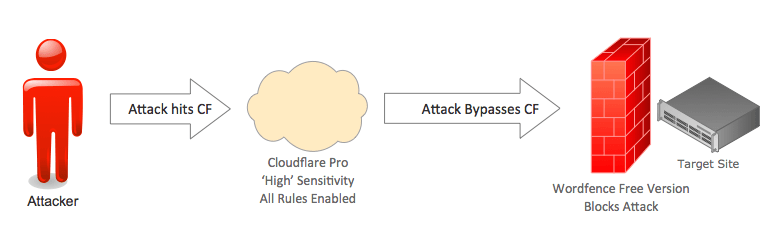
    cfwf2

    In the next test, we remove Wordfence completely from the target site and demonstrate how, without it, the site is exploited by an attacker, completely bypassing the Cloudflare Pro WAF on ‘High’ sensitivity.
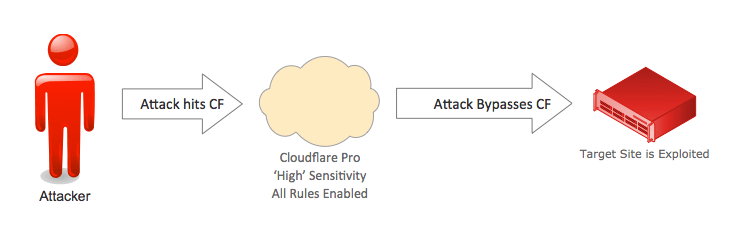
     

    cfexploited1


    The following is a video demonstration of this attack. In it we use two Linode servers, one as our attacker and another as our ‘Victim’. We use a Cloudflare Pro account on ‘High’ sensitivity with all rules enabled. We also download and configure the free version of Wordfence for the first part of the demo, and then remove it.

    Why does this matter?

    The free version of Wordfence blocks all of these attacks. They are what we consider “the basics” when it comes to WordPress security. If you pay us $99 a year you also get a real-time feed of emerging threats. Cloudflare are selling a web application firewall for $240 per year that allows through the best known and most dangerous WordPress attacks.

    That means you can get better protection by using our free product than by using the $240/year Pro Cloudflare WAF. Then, if you choose to upgrade to our paid option, you know you’re protected against the newest emerging threats against WordPress.

    It’s important to us that our customers know this. We feel we would be doing you a disservice if we didn’t share this comparative data. If you want to protect your WordPress site from a hack, you need a WordPress specific firewall that runs on the endpoint and protects you against “the basics” and also against emerging threats.

    Conclusion and Technical Notes

    We have provided a public Github repository that include tcpflow packet captures from the perspective of the attacker and from the perspective of the victim. The repository also includes the four exploits we used. Note that you will need to edit the exploit files to add in your own target hostnames. In the case of Timthumb you will also need to add a server from which timthumb can download an attack shell.

    We have not included the vulnerable plugins or theme. However, we are supplying their versions. They are: Gravity Forms 1.8.1, MailPoet 2.6.4, Revslider 2.3.91 and Timthumb version 1.12. You can find these in the WordPress.org repository, in other repositories on github and elsewhere.

    If you do download and test one of these vulnerable products and find you’re not able to exploit them, you may be using an old version that has a back-ported security fix. So please note that you need to find both a vulnerable ‘version’ of the product and one that has not had a back-ported security fix applied.

    As always I welcome your comments and questions.

    Trademark notice: All product names, logos, and brands are property of their respective owners. All company, product and service names used in this website are for identification purposes only. Use of these names, logos, and brands does not imply endorsement.

    The post Revslider, MailPoet, GravityForms Exploits Bypass Cloudflare WAF appeared first on Wordfence.
  • We are removing Falcon Cache from Wordfence. Here’s what you need to know.

    Version 6.2.1 of Wordfence was just released and you may have noticed in the changelog that we’ve announced that we will be removing Falcon from Wordfence. I thought I’d go into some detail about why we made this decision.

    When we launched Falcon, the caching feature that is part of Wordfence, it was a ground breaking caching engine that was faster than any cache available for certain user configurations. But caching is a complex beast and we have learned a lot during the past few years. When Falcon launched, we were just a team of two people. Wordfence is now a team of 23 people and our area of specialization is high performance security. Not caching.

    During the past few months we have been working with hosting providers and what we’ve learned is that, for certain hosting provider configurations, Falcon cache actually can slow things down slightly and it’s preferable for the customer to instead rely on a much faster front-end cache that the host provides. The reason for this is because some hosts use slow local disk for their WordPress hosting but use very fast front-end caches. In those configurations, Falcon generates unwanted disk IO trying to outperform the front end cache, which it will never do.

    Some of the hosting providers we’ve worked with have told us that they want the awesome security that Wordfence providers, but they don’t want users to slow down their customer sites by enabling Falcon. Remember, this only applies to certain hosts. But this is one of the reasons we have chosen to remove the feature.

    The second, and main reason is that Wordfence is really all about security. It’s what we know and what we’re incredibly good at. We have a sizable team now of forensic experts, analysts, senior developers, operations people and customer service experts and we’re all completely focused on securing WordPress websites. We’d like to stay 100% focused on that and not be distracted by trying to support a feature that is outside our area of focus.

    And so with that in mind, we’d like to announce that Wordfence 6.2.1, released yesterday, is phasing out Falcon cache. For this release, if you’re using Falcon, you will receive a notice that you should manually disable it. If you don’t have Falcon enabled or have a newly installed Wordfence installation, you will notice that the Falcon menu has been removed for you.

    Our QA team has worked through many scenarios to ensure that this transition is painless for the relatively small percentage of users using Falcon. An upcoming release will disable Falcon and remove the feature if you haven’t already manually disabled Falcon. We recommend that you remove it manually because an attended installation is always safer than having things happen automatically.

    We currently have no timeline for when Falcon will be completely removed, but it will be relatively soon and we recommend you take action now. We won’t completely remove Falcon for at least another 4 weeks.

    If you’re looking for a replacement WordPress caching plugin, you can find a few recommendations with benchmarks on this page. But I strongly recommend you first consult your hosting provider because what we’ve found is that in some cases, it’s better to rely on the caching that your host already provides.

    Going forward, Wordfence will be 100% focused on security and in particular providing the best firewall and malware scanner available for WordPress.

    Minor update: As a helpful user on reddit pointed out, it’s unclear in the post above if we’re also removing the ‘basic’ cache. Yes, we’re removing what we refer to as ‘Falcon’ cache which is the .htaccess based caching engine and we’re also removing the ‘Basic’ cache which is the PHP based caching engine. If that’s not clear or if you have any more questions, please post in the comments. Thanks. ~Mark.

    The post We are removing Falcon Cache from Wordfence. Here’s what you need to know. appeared first on Wordfence.

  • Endpoint vs Cloud Security: The Cloud WAF User Identity Problem

    Imagine you’re a security guard at the entrance to a high security facility. You need to evaluate each person who wants to gain entry to ensure they are allowed access. You use information about each person to make your decisions. You might use information like what they say, whether they’re carrying a bag, if they’re carrying a gun and so on.

    The most important item of information you’ll use in your decision-making is who they are and what access level they have. In other words, their identity. If you don’t have this identity information, you are going to have a very difficult time making a decision about whether someone should be granted access or not.

    In this post, we show you how cloud WAFs like Cloudflare and Sucuri, also known as cloud firewalls, actually don’t know who you are. They don’t even know if you’re signed in or not. The result is that they tend to do a much worse job when it comes to deciding who should be allowed to access a website and who should be blocked.

    This post is a continuation of a series of Endpoint vs Cloud blog posts, which we started on Tuesday. We have already described the Cloud WAF Bypass Problem, and how an endpoint firewall like Wordfence prevents bypass.

    Endpoint Security: Wordfence Knows Who a Visitor Is and their Access Level

    As we discussed earlier this week, ‘endpoint security’ is what all major security vendors are moving towards. The ‘endpoint’ is the target an attacker is trying to gain access to. It might be a workstation, mobile device or your web application like WordPress.

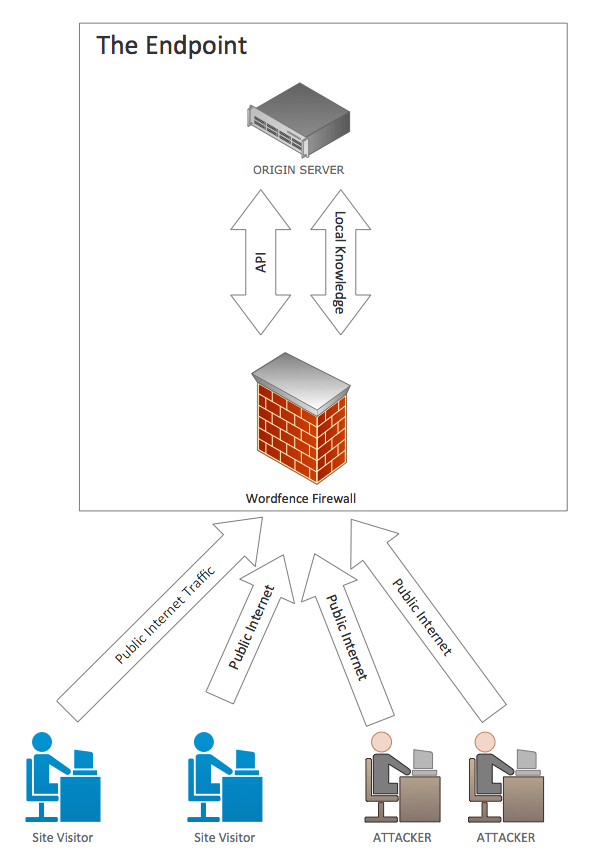
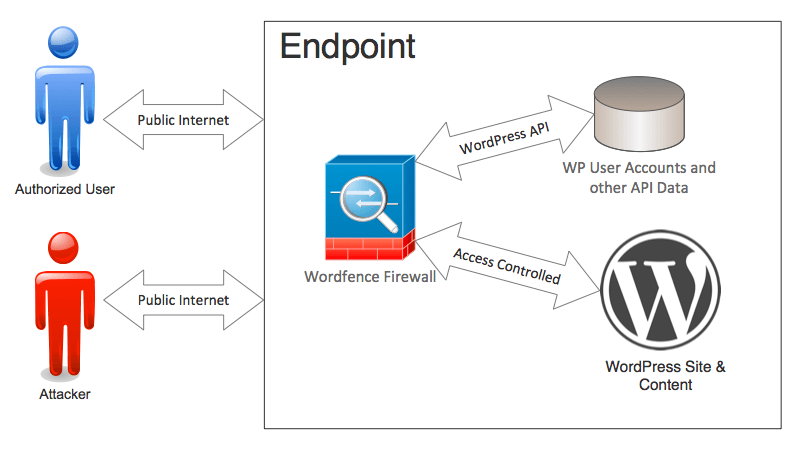
    An endpoint security solution runs directly on the endpoint and protects it in a variety of ways. Wordfence is an endpoint security solution because it executes directly on WordPress, which is the endpoint for an attacker targeting your website.

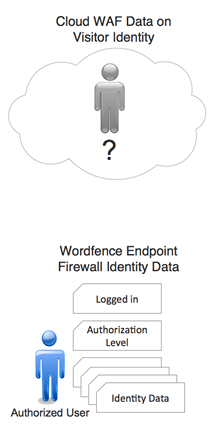
    Wordfence integrates deeply with WordPress. One of the items of data we have is who a visitor to your site actually is and what access level they have.  In security industry terms, we refer to this as authentication and authorization. We know if they’ve proven they are who they claim to be and we know what they have authorization to access.

    Wordfence Protecting the Endpoint

    Identity information is a critical part of the decision-making that our firewall performs. It helps us create firewall rules that block the bad guys and make sure that administrators and other privileged users don’t accidentally get blocked.

    User identity and access level is so important to our firewalls decision-making that we use the user’s access level in more than 80% of our firewall rules. It helps us prevent the dreaded “false positive” when a real user is blocked. It also helps us create rules that block against more complex attacks.

    By having user identity and access level, we can be extremely aggressive in the kind of rules that we create. Along with user identity we use other information to make our decisions, like the path being accessed, the URL query string, the type of request being made, the body of the request and other headers that might be included in the request.

    Cloud Firewalls Don’t Have Identity Information

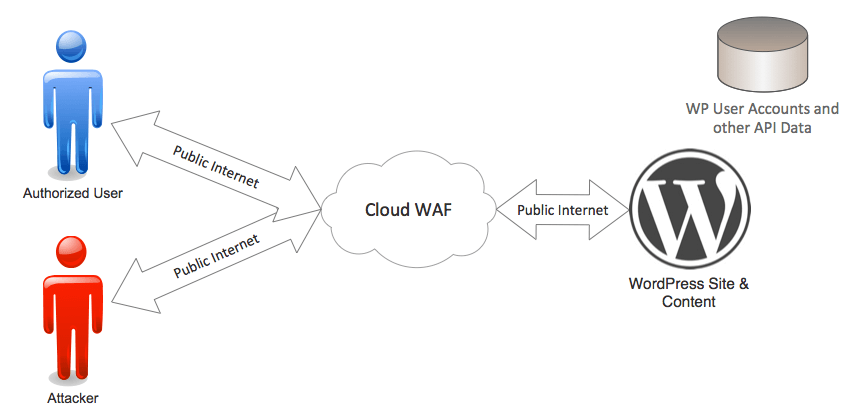
    A cloud firewall like Cloudflare or Sucuri’s WAF uses servers based out on the Internet, away from the endpoint they’re protecting. Visitors and attackers who come to your website first arrive at the cloud WAF. The cloud WAF runs the request through a series of rules and decides if it’s allowed or not.

    Cloud WAF providers have a firewall that runs physically and logically separated from the endpoint. They don’t interact with the endpoint API to make their firewall rule decisions. They don’t have authentication and authorization data that can use to help with that decision making.

    cloud1

    A cloud WAF might be able to see if a user has a login cookie, but that cookie can be easily faked because they can’t verify its authenticity, because they don’t have access to the endpoint API, data and execution environment.

    As we have explained, it’s critically important that a firewall knows who a visitor is and what permission level they have to make effective decisions. A cloud WAF does not even know if a user is signed in or not. 

    Cloud WAFs use pattern matching. They examine the arriving web request and use patterns to try to determine if it’s an attack or not. This results in much less effective decision-making. They block a few attacks but miss many others.

    Cloud WAFs may also suffer a higher rate of false positives because they can’t identify real users making perfectly legitimate requests that trigger their rules. The only way to fix the false positives is to loosen up the rule-set, which results in more attacks getting through. It’s a Catch-22 situation.

    Endpoint Security for WordPress: Local Knowledge, Defense in Depth

    identity2Wordfence is an endpoint security solution that executes within the WordPress environment. That means we have full access the the WordPress API and we can use any data in this API to make our decisions about who is granted access. That’s one of the reasons the industry is moving towards endpoint solutions: they have local knowledge to help their decision-making.
    To help the Wordfence Firewall make its decisions, the WordPress API provides us the following data:

    • If the user is signed in or not.
    • The user’s identity.
    • The user’s authorization level e.g. ‘subscriber’, ‘editor’ or ‘admin’.

    If we see a verified admin user trying to access something that looks like a common attack, we might allow it to pass if all other data indicates it’s safe. If we see the same request coming from a ‘subscriber’ level user or someone who is not signed in at all, we will block it.

    Protecting Against Complex Attacks

    Wordfence protects you against more complex attacks, like a “privilege escalation attack”, or privesc attack as we refer to it internally. If you look at the list of firewall rules we’ve deployed on your site, you’ll see at least three privesc attack rules that are currently active and protecting you.

    A privesc attack is where an attacker uses an account with low level access, like a ‘subscriber’ level WordPress account. Then they use the lower level privileges that account has to exploit their way to administrator level access.

    To protect against privesc attacks, you need to know if a user is signed in and what access level or level or ‘authorization’ they have. If you don’t have authorization information, you don’t know if a subscriber level user is trying to perform an admin function or if it’s a real admin taking the same action. 

    Wordfence in effect has local knowledge about the system it is protecting. To make better firewall decisions we have made sure we simply have better data.

    Conclusion

    Smart decision making requires the best data.  By protecting against attacks at the endpoint, you can make smarter decisions about who should gain access and who should be denied. With better data, you can also benefit from a far more aggressive rule-set without risking false positives, because you know who is using your web application. That is why Wordfence protects against attacks at the endpoint.

    The post Endpoint vs Cloud Security: The Cloud WAF User Identity Problem appeared first on Wordfence.

  • Endpoint vs Cloud Security: The Cloud WAF Bypass Problem

    Earlier this year at Black Hat 2016 there was a lot of buzz around “endpoint security”. In this post I’m going to explain a few issues with a cloud approach to web firewalls. Then I’ll explain the benefits of endpoint security and why Wordfence takes an endpoint approach to protecting your investment.

    The Cloud WAF Bypass Problem

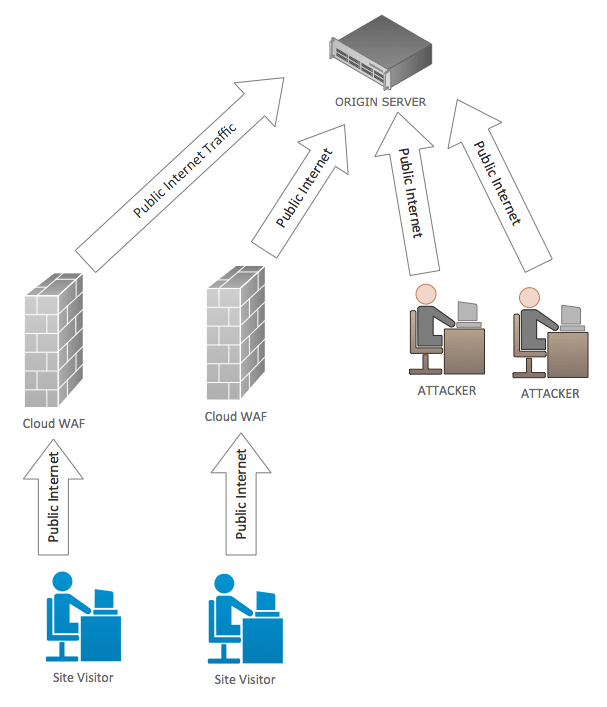
    Cloud firewall providers like Sucuri and Cloudflare have servers that live out on the internet. When you configure a cloud firewall (or cloud WAF), the provider will ask you to point your website at their servers by making a DNS change. Once you’ve done that, the cloud provider configures their servers so that when your web traffic arrives there, it is filtered using their firewall rules.

    Once filtered, the traffic is forwarded over the public Internet to your website. In this configuration your original website is known as the “origin” or your “origin server”. That is where your site originates from and is actually hosted.

    Your origin server may be hosted at Bluehost, Hostgator, Godaddy, on your own server or with one of the many other hosting providers.

    In theory once you have configured your website with a cloud firewall (or cloud WAF) you are protected by it. The expectation is that attackers will try to access your website using your domain name of www.example.com, they will be pointed to the cloud WAF and their attacks will be filtered out.

    In reality, if an attacker can discover your origin IP address, they can simply bypass the cloud WAF as the diagram below shows:

    cloud-waf-diagram

    In the case of a cloud WAF, you aren’t actually “behind” a firewall because the server is still on the public internet. Anyone on the net can access your server directly if they discover your origin server IP address. Knowing your origin server IP allows them to simply go around the cloud firewall provider and attack your origin server.

    Cloudflare have acknowledged this problem in a blog post and they provide various suggestions on how to keep your origin server IP address “secret”. They also explain how to access your origin server directly for testing if you have the IP address.

    We refer to this problem as the “Cloud WAF Bypass Problem”.

    The Cloud WAF Bypass Problem is Well Documented

    This issue is well documented by many security bloggers. Tools like CloudPiercer.org and CrimeFlare exist to help attackers bypass a Cloud WAF.

    CrimeFlare lets you look up a Cloudflare customer’s origin IP address or download an entire database of 1.5 million Cloudflare customers and what CrimeFlare detected as their origin IP address.

    CloudPiercer uses an array of techniques to reveal a targets real IP address. They estimate that 70% of sites protected by cloud WAF providers have their origin IP address exposed. More detailed stats and our own data is included below.

    Keeping the Origin IP Address Secret is Difficult

    There are many ways to discover a site’s origin IP address. You can:

    • Look up the IP address of subdomains like mail.example.com and ssh.example.com. In many cases they point to the origin IP address. (See below for detailed statistics)
    • Use an IP history database like viewdns.info to look up where the origin IP was hosted before the website started using a cloud WAF.
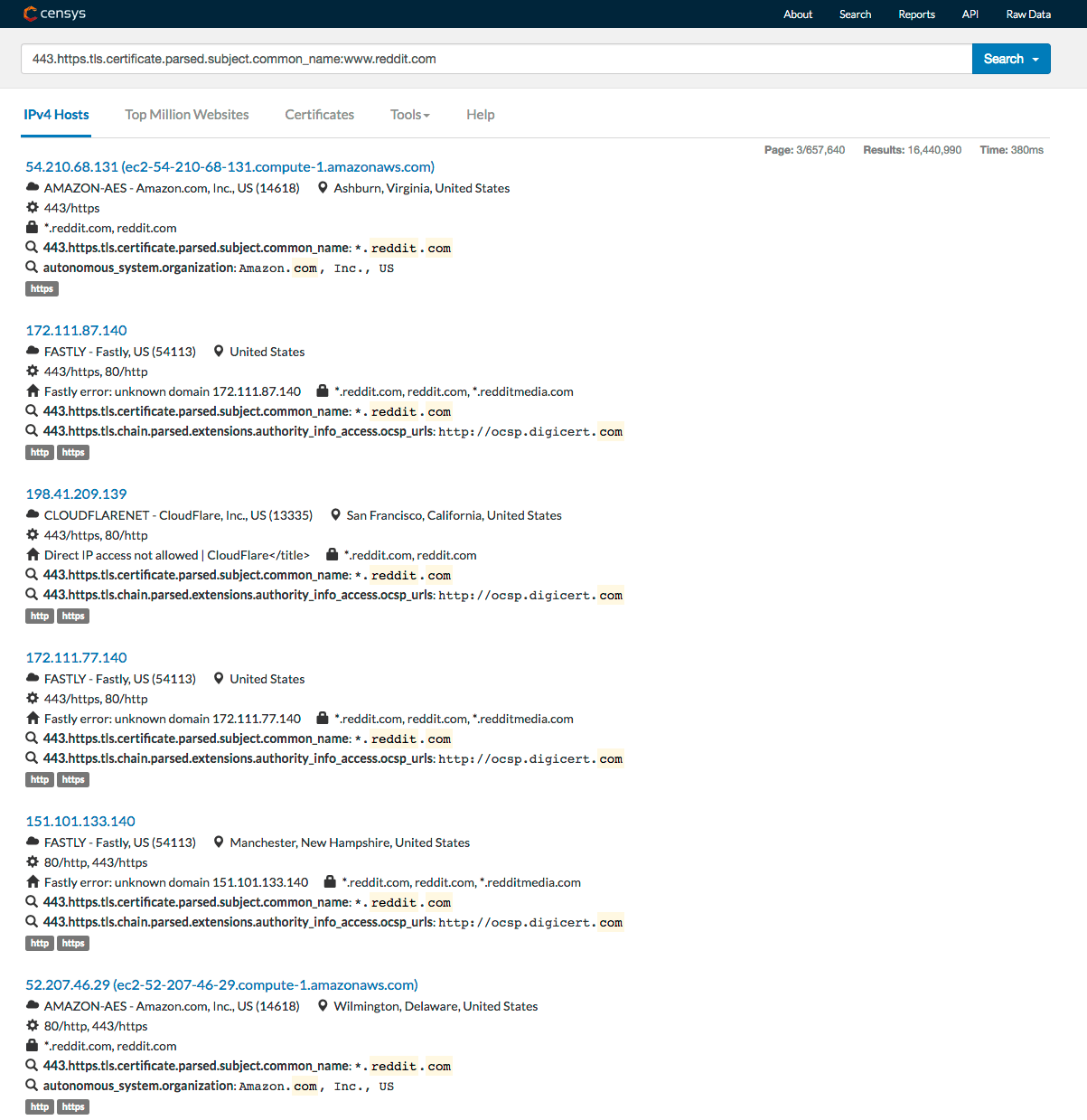
    • Use the site certificate and a search engine like Censys.io or Shodan.io to locate the origin IP address where the certificate is installed.
    • Perform an action that gets the site to connect somewhere, revealing its origin IP address. For example, on WordPress you can initiate a pingback to a site which will cause it to connect back to you, revealing its origin IP address.
    • Use DNS records like SPF which might reveal the origin IP or adjacent addresses.
    • Examine site HTML source which may include subdomains that point to the origin IP address.
    • Examine public source or log files which may include the origin IP address or subdomains pointing to the origin.

    The original designers of the net never intended IP addresses to be secret. There are no standards or conventions on the net that describe how an IP address might stay secret. In fact standards like SSL certificates and de facto standards like WordPress Pingback make it virtually impossible to keep an IP address hosting a website secret.

    Search engines like Censys.io and Shodan, well known in the hacker community, go around and index the internet at a network level, indexing SSL certificates and network service information. They provide a treasure trove of information to attackers who are looking for targets.

    Censys.io lets you easily search for the origin IP of any website by using that sites certificate. The results below are from a search on Censys using the certificate common name (website hostname) of Reddit.com which is behind Fastly and Cloudflare. An attacker would use the origin server addresses to launch an attack that bypasses the cloud WAF.

    screen-shot-2016-10-04-at-7-57-23-am


    34% of Cloudflare sites can be bypassed using just one of these techniques

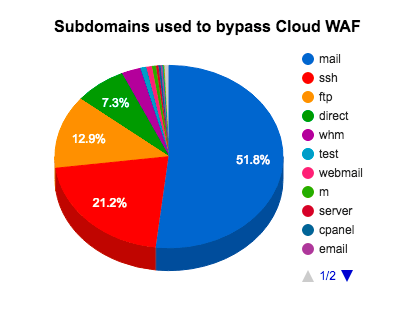
    To determine the scale of this problem we did an automated survey of 30,753 randomly selected Cloudflare customers. We tested how many sites are accessible by simply bypassing Cloudflare and accessing the site directly. We only used one technique to discover the origin IP: Looking up a common subdomain. We didn’t use the pingback technique, site certificates or any of the several other techniques detailed above.

    We found that we could directly access 34% of Cloudflare customers, or one in every three customers, bypassing any security that Cloudflare provides, by simply looking up a common subdomain.

    To perform the audit on subdomains, we took the following steps:

    1. Verify the customer is using Cloudflare and store a copy of their website home page. We checked HTTP and HTTPS and the site with and without the www. prefix to locate it.
    2. Look up common subdomain IP addresses.
    3. Verify the subdomain IPs don’t point to Cloudflare.
    4. Remove duplicate IPs.
    5. Try to fetch the site from the origin IPs directly by connecting directly and specifying a ‘Host’ header in the HTTP request.
    6. Where we received a response, compare the original page title and first asset (first item in a src= attribute) with the page we just fetched directly.
    7. If they match, then count it as a successful bypass.

    As you can see from the chart below, looking up the IP address using the ‘mail’ subdomain is by far the most successful technique. Over 50% of cloud WAF customers that reveal their origin IP do so through the ‘mail’ subdomain. The ‘ssh’ domain is also a common culprit, likely because Cloudflare’s own documentation use it to illustrate how you can connect directly to your own origin IP address.

    screen-shot-2016-10-11-at-7-45-30-am

    The Fix: Protect the Endpoint and Prevent Bypass

    Endpoint protection has taken the industry by storm during the past year. Almost every major vendor is providing some form of endpoint security. So what is the endpoint exactly? An endpoint can be defined simply as: the final target a hacker is after. In the case of desktop security, it is the workstation a user works on. In the case of mobile platforms, it’s the smartphone a user has in their pocket.

    In the case of WordPress, the endpoint is the actual WordPress installation that the attacker is trying to compromise. We believe that to best protect a website, you need to protect the endpoint.

    The first benefit of protecting a website at the endpoint is there is no way for an attacker to bypass the security mechanisms. They can’t go around the Wordfence Firewall because it is an integral part of the endpoint. To use the endpoint application, you have to interact with our firewall.

    The second major benefit is that, by protecting the endpoint, we can provide a defense in depth strategy. We don’t just provide a firewall. We also include a malware scanner and a range of other features. It’s not feasible to include a malware scan unless you are executing on the endpoint itself.

    wordfence-waf-diagram

    Conclusion

    To fully protect your investment you need to employ an endpoint strategy that takes a defense in depth approach to security. Wordfence takes this approach.

    As our company has evolved we have had to consider whether we would invest in “cloud” security or focus on protecting our customers where their assets are. We chose to stay on the endpoint and the industry has now also shifted their focus to protecting the endpoint.

    In our opinion, using a cloud WAF is like hiring a security firm in Los Angeles and asking all of your visitors to go through their Los Angeles offices before visiting you in New York. We believe in posting guards where the assets are and putting additional defenses behind that first layer of security. This proven approach works for the over 1.5 million sites we protect and it is where the industry is headed.

    The post Endpoint vs Cloud Security: The Cloud WAF Bypass Problem appeared first on Wordfence.