Online Services

Category: Security

  • Scary Data – Trends in Malware, Phishing, Site Cleaning and Bad Networks

    At Wordfence we have great visibility into the size and scale of the threat facing the WordPress community. Our software protects well over a million sites worldwide. This week we thought it would be interesting to provide you with a broader perspective, analyzing some of the information that Google has made available in the Safe Browsing section of their Transparency Report. As we dug into the data we found a number of insights that we think you will benefit from.

    gsb_phishing_malware

    Almost Half a Million Malware Sites

    The number of Malware sites continues to grow, hitting a new peak of 489,801 in October of 2015. That is up over 160% from the same time the previous year. As we have discussed before, a website that is infected with malware can install malicious software on your computer if you visit it. Attackers use the software to steal sensitive information from you such as credit card information and social security numbers.

    As an internet user, the growth in malware sites means that the odds of you accidentally visiting one and becoming infected continue to increase. Google and the other search engines do a decent job of flagging them, but they can’t catch all of them in time to provide complete protection.

    As a website owner, it means that attackers are having more success than ever compromising websites. It goes without saying that we think you should take website security seriously.

    150% Growth in Phishing Sites in 7 Months

    According to Google there are now 293,747 phishing sites on the internet, up from 113,132 in July of last year. This represents growth of over 150% in a mere seven months. A phishing site attempts to trick you into thinking it is legitimate, like your online bank or an online retailer. They then lure you into providing login credentials or other sensitive information. In the Introduction to WordPress Security article in our Learning Center we talk about how attackers are even using phishing tactics to steal WordPress credentials.

    This is a significant trend, representing a threat that you should now be much more wary of.
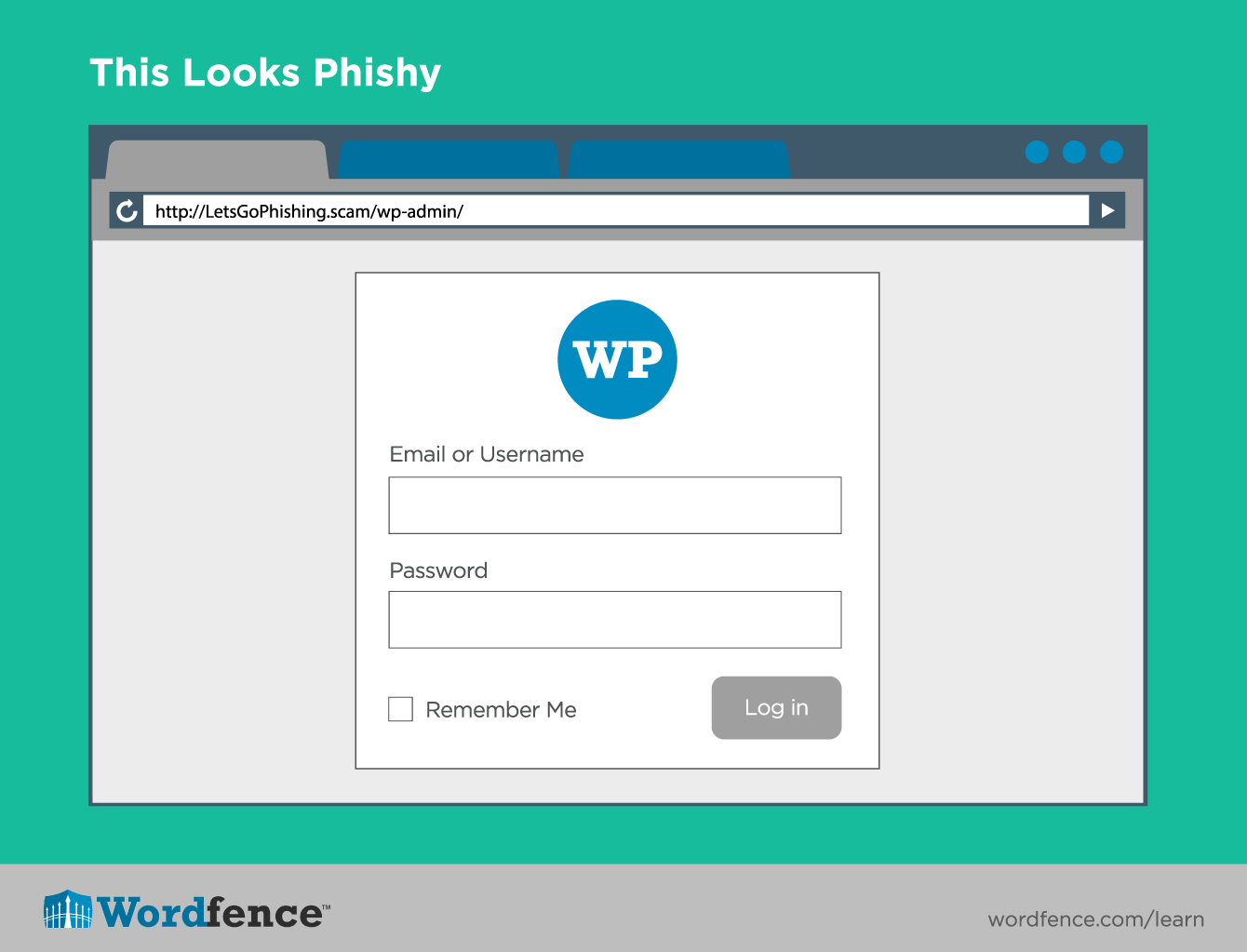
    Phishing Login Screen

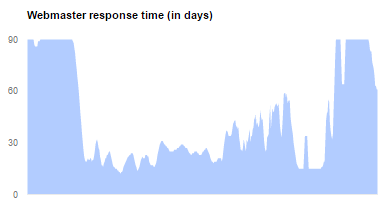
    It’s taking webmasters up to 90 days to respond

    Google measures how long it takes for webmasters to take action after they have received notice that their site has been compromised. Over the last year, the fastest average webmaster response time reported was 61 days, and for much of the year it was 90 or worse.
    gsb_webmaster_response

    Wait, what?

    We found this statistic to be absolutely shocking. As we have gotten to know our customers better and better, it has become very clear that their websites matter. In fact, in our recent WordPress Security Survey, 66% of respondents said that a compromised site could affect their income. Based on this, our theory is that the slow response time is not generally driven by apathy, but by a long lag time between infection and discovery. If you aren’t already proactively monitoring your site for compromise we strongly recommend that you spend some time reading our Learning Center article on how to detect a hacked website.

    Which neighborhoods to avoid on the internet

    Google provides very interesting data about the rate of infection for different Autonomous Systems on the internet. An Autonomous System is a network level designation that represents a pool of IP addresses that are under the control of one or more networks on behalf of a single entity. You can think of it roughly as the group of IP addresses that have been assigned to an ISP. The data is very interesting, and aligns with what we learned in the analysis of brute force attacks we did a few weeks ago.

    The thing that jumps out the most to us is the incredibly high penetration of infection on some Autonomous Systems. With infection rates as high 49%, there are areas of the internet that we would strongly encourage you to avoid. If you want to check out what Autonomous System your IP address belongs to, simply enter it into this handy tool. The good news is that the large majority of Autonomous Systems have infection rates of 1% or lower. We hope that Google’s reporting will serve as a call to action for the networks with the biggest problems.

    The other thing that jumps out is that this is clearly a global problem. As you page through the list, there are numerous countries spanning the globe represented. This problem is impacting all of us.

    gsb_automous_systems_compromise

    On the other side of the coin, we see a similar situation with Attack Sites. While there is a little more concentration in countries like the United States and China, you would still need to circle the globe to visit all of the biggest offenders.
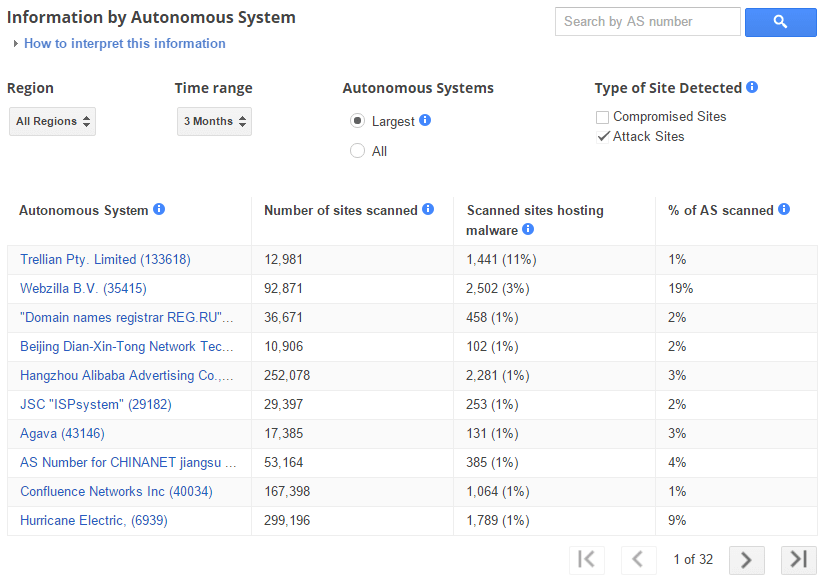
     

    gsb_automous_systems_attack

    Rising to the Challenge

    The team at Wordfence has been hard at work on this problem for years now, and we are really proud of the product we have created and how it has been received by the WordPress community. As evidenced by the insights above, and numerous others from our other blog posts, the scale and complexity of the threat facing website owners continues to grow dramatically. That is why we have continued to invest in our team and our product. We have very exciting news to share with you in April about how we will be making the best security solution for WordPress significantly better. Stay tuned for a big announcement, we can’t wait to share it with you.

    The post Scary Data – Trends in Malware, Phishing, Site Cleaning and Bad Networks appeared first on Wordfence.

  • A Backdoored WordPress Plugin and 3 Additional Vulnerabilities

    We have several plugin vulnerabilities we’d like to bring to your attention this week.

    First up is a backdoor that was added to the Custom Content Type Manager plugin. The backdoor was added by a malicious coder who gained access to the plugin code in the official WordPress plugin repository.

    It’s unclear whether the plugin author’s credentials were stolen or whether the malicious actor was granted access. The WordPress security team removed the malicious user account that added the backdoor to the plugin. They have also removed all malicious code that was added to the plugin and updated the version number so that users running this plugin will be prompted to upgrade.

    If you are using Custom Content Type Manager, you will need to take the following steps to remove any infection and install the updated non-backdoored version of the plugin.

    1. Update to version 0.9.8.9 of Custom Content Type Manager
    2. The malicious code in this plugin installed a backdoor in WordPress core files. So run a Wordfence scan on your site to check the integrity of your core files. The free version of Wordfence will do this.  Make sure the option to compare your core files against the official WordPress versions is enabled. In the scan results, make sure that the following three files are not modified.
      • wp-login.php
      • wp-admin/user-edit.php
      • wp-admin/user-new.php
    3. If any of the above files are modified, you can use Wordfence to repair them.
    4. Change the passwords of all your users.
    5. Delete any user accounts you don’t recognize. Check admin accounts in particular.
    6. If a file called wp-options.php exists in your home directory, remove it.

    The SP Projects and Document Manager plugin version 2.5.9.6 has multiple vulnerabilities including file upload, code execution, sql injection and XSS. Update to to version 2.6.1.1 immediately which contains the vendor released fixes and is the newest version.

    If you are running Easy Digital Downloads, ensure you’ve updated to at least version 2.5.8 which fixes an object injection vulnerability. The current version is 2.5.9. The vulnerability was disclosed within the past week.

    A vulnerability was publicly disclosed in the Bulk Delete plugin earlier this month that allows unprivileged users to delete pages or posts. The vendor has already released a fix so make sure that if you’re using the Bulk Delete Plugin, you’ve updated to version 5.5.4 which is the latest version.

    That concludes our vulnerability roundup for this week. Please share this with the larger WordPress community to help create awareness of these issues.

    The post A Backdoored WordPress Plugin and 3 Additional Vulnerabilities appeared first on Wordfence.

  • The Crypto Wars – How We Arrived at Apple vs United States

    This week our team is in San Francisco attending the RSA 2016 Security conference. It is the largest security conference in the world with over 40,000 attendees this year. We’re also here for the BSides San Francisco security conference which happened right before RSA and which is a smaller independent locally organized conference.

    These conferences cover the larger subject of information security and our specific interest is of course web security and WordPress in particular. New zero day vulnerabilities, research and data are often disclosed at conferences like RSA and BSides. They are also a great way for vendors, researchers and government to share intelligence on what is happening in the wild and discuss emerging threats.

    There were several exciting developments at RSA yesterday including the announcement that Whitfield Diffie and Martin Hellman are the winners of this year’s Turing award, the Computer science equivalent of the Nobel Prize.

    In this video blog from San Francisco, I chat about what happened at RSA (This was recorded on Tuesday night) and I’m including an interview I did with Kurt Opsahl who is the Deputy Executive Director and General Counsel for the Electronic Frontier Foundation (EFF).

    In case you don’t know who the EFF is and what they do, they’re an organization who has been fighting for our digital rights for a long time. In the interview, Kurt explains some of the history of the EFF and he gives us an overview of the “crypto wars” starting in the 1990’s through to today.

    As Kurt explains in the interview, it all started with a small business called Steve Jackson Games getting raided by the Secret Service because someone posted a document to their bulletin board system called E911. The document described how the 911 system works and it was seen as a security risk.

    The Secret Service confiscated all computer equipment at Steve Jackson Games and then read and deleted private emails. The EFF sued the government on behalf of the book publisher and they established the principle that email should be given at least as much protection under the law as telephone calls.

    The EFF then went on to take on a case where a PhD student at the University of California, Dan Bernstein, was prohibited by the government from publishing an encryption program called Snuffle that he had created because they said it was classified as munitions under the law and regulated as such. In this case, the EFF sued the government and argued that computer code is a form of speech and is therefore protected under the First Amendment which protects freedom of speech. The court ruled in their favor which was a groundbreaking decision.

    Kurt then brings us up to date describing how we got to the situation with Apple today – and which we have blogged about previously.

    It’s interesting to note that Apple now appears to be making a few constitutional arguments of their own. They recently argued that forcing them to unlock the iPhone: “amounts to compelled speech and viewpoint discrimination in violation of the First Amendment.“.

    It sounds like Apple is borrowing several pages out of the EFF’s 1990’s playbook. Here is my interview with Kurt Opsahl….

    You can visit EFF.org to learn more about their storied history. The EFF is a foundation that relies on donations, and you can donate to the EFF on this page if you’d like to contribute.

    The post The Crypto Wars – How We Arrived at Apple vs United States appeared first on Wordfence.

  • Get Rid of Data to Help Secure It

    Last week I spent some time chatting with Mike Dahn who is the co-founder of the BSides information security conferences globally. He’s also organizer of BSides San Francisco and is well known and respected in information security circles.

    We had a really informative chat and I’ve posted the video interview below. You know you’re chatting with someone who spends a lot of time thinking about a subject when they’re able to provide insights that are concise and are highly effective – ideas that can have a significant impact if overlooked or implemented.

    During our conversation I asked Mike how “we can all be more secure”. We stopped filming for a few minutes and agreed….that is a really big question. He told me he knew what many vendors could do to be more secure – and so I filmed his response.

    What Mike said is that “the best way to secure data is to get rid of it“. If you’re new to systems administration, security or WordPress administration, you may not understand the value of this advice. So I’m going to expand on what Mike said because I think it’s something that is overlooked by many of us and can be a major risk reducer when trying to secure your website or your systems.

    Anything you store needs to be protected. Storing data you don’t absolutely need is a potential liability and a source of risk. Here are a few things that you may currently store on your WordPress site or in other areas of your organization that you may be able to get rid of or take offline, reducing risk:

    Backups

    We’ve seen many customers use WordPress plugins that store backup files on the server. Sometimes, catastrophically, the backups even end up in publicly accessible web directories. These should be backed up to an external storage system that is secure, or ideally taken completely offline. You don’t need your backups online until you need to perform a disaster recovery and that is (hopefully) a rare occurrence.

    One compelling reason to take your backups offline is the rise in ransomware which encrypts both your web server (or workstation) and your backups. If your backups are offline, ransomware can’t encrypt it and your backups remain safe.

    Credit Card Data

    Never, ever store any data related to credit cards. In the interview Mike mentions “tokenization”. If you want to give your customers the ability to “store” their card information with you so they can perform repeat transactions, the way to do this securely is to pass the card data to a processor like Authorize.net (owned by Visa) and have them store the card data. They give you a unique ID or token which you can use to perform future transactions.

    By tokenizing credit card data, you avoid having to store it and there is no card data on your site for an attacker to steal.

    User Personally Identifiable Information (PII)

    Only store what you absolutely must. Don’t collect information you only think you “might” use. Collect the data you have to and discard everything else.

    For example, I’ve seen many online forms that ask for physical address information. Leave this out if you can because it’s one more piece of sensitive PII that you need to protect and it introduces additional liability into your organization if you are hacked.

    Leave it to the (real) experts

    While it’s tempting to store data on your own servers, companies like Visa in the credit card example above have much more stringent compliance requirements and have a larger team of security professionals than you do. So if you are able to outsource storage of data to a company that has a proven track record of excellence in data security, do that rather than reinventing secure data storage as a small team.

    Delete old data

    Another way to get rid of data so that you don’t have to protect it is to remove old data you no longer need. This may include:

    • Inactive user accounts
    • Old backups
    • Archived copies of your site stored on the server
    • Draft posts and pages
    • Inactive plugins and themes on your WordPress site
    • Websites that are still active but don’t receive any traffic or aren’t used
    • Old database instances that aren’t used anymore
    • Old database tables no longer used
    • Backup files or old files – for example if you made a copy of wp-config.php for WordPress and called it wp-config.php.old you definitely need to delete that because it contains your database credentials and is publicly visible on your site!

    The Interview with Mike

    This was filmed outside the BSides security conference in San Francisco. As always we welcome your feedback and insights in the comments below. Please share this to help promote good security practices in the WordPress community.


    The post Get Rid of Data to Help Secure It appeared first on Wordfence.