Online Services

Tag: Wordfence

  • Vulnerability Roundup: 3 Vulnerable WP Plugins and Update Your Joomla

    It’s been a tough week for the WP Statistics plugin. Last Friday, Sucuri (now owned by GoDaddy) discovered a SQL injection vulnerability in the WP Statistics plugin version 12.0.7 and older. To exploit the vulnerability, an attacker needs to register an account (or use a compromised account) with subscriber-level access. They can then exploit a weakness in a WP Statistics shortcode to launch a SQL injection attack. This allows them to, for example, create an admin-level user and sign in to your website as an admin.

    Then, 2 days ago Ryan Dewhurst discovered a cross site scripting vulnerability in the same plugin, which was fixed within a few hours of discovery.

    Over 300,000 websites use WP Statistics. If you use the plugin, you should immediately update to version 12.0.9 which fixes both of these vulnerabilities.

    Wordfence includes built-in protection against SQL injection attacks and cross site scripting (XSS) attacks. As a precautionary measure, we’ve released an additional rule to our Wordfence Premium customers in real-time to protect them against the specific SQL injection attack that targets this plugin.

    Other WordPress Vulnerabilities You Should Be Aware Of

    The All-in-One WP Migration plugin for WordPress reportedly suffered from a cross site scripting vulnerability which was fixed about 6 weeks ago. Wordfence free and Premium has built-in XSS protection, as mentioned above, so even if you were running the vulnerable plugin, you would have been safe. Nevertheless, if you haven’t already, we recommend you update to 6.51, the newest version of All-in-One WP Migration.

    A few weeks ago, a reflected cross site scripting vulnerability was discovered in the WordPress Download Manager plugin versions 2.9.51 and older. We suggest you update to 2.9.53, which is the newest version of this plugin. Wordfence also protects against this exploit (free and Premium).

    Don’t Forget to Update Your Joomla Installations

    Joomla released a security update 48 hours ago which fixes three vulnerabilities. The new release is Joomla 3.7.3 and includes fixes for two XSS vulnerabilities and an information disclosure vulnerability. If you run Joomla on your website, you can visit https://www.gravityscan.com/ to run a quick scan on your Joomla site and find out if you are vulnerable and need to take action. Details on the release can be found on Joomla.org and we also mentioned this update on the Gravityscan blog.

    That’s all for today’s updates. As always, I’ll be around to reply to your comments if needed.

    The post Vulnerability Roundup: 3 Vulnerable WP Plugins and Update Your Joomla appeared first on Wordfence.

  • The 2017 WordPress Security Half-Time Report

    2017 has been a remarkable year so far for Wordfence and our customers. We are about halfway through the year at this point, so I’d like to give you an update on some of the incredible innovation and progress at Wordfence in 2017.

    Our company’s top priority is to secure our customers’ websites from attackers. Our goals are to prevent an attack before it can occur, and to provide the best detection capability available to help you find and fix security problems and malware on your website. To fulfill this objective, we need to innovate constantly on several fronts. This year, we have improved the performance of our security products, improved detection capability, introduced a completely new service that expands beyond the WordPress universe, and published continual cutting-edge research to help you better understand the threats you are facing.

    As a result, the team at Wordfence has been terrifically busy this year, and the items I mention below only include the highlights of their many impressive achievements so far. The Wordfence security plugin for WordPress has received 13 updates this year as of this writing, or an average of an update every two weeks. To get an idea of the rapid pace of innovation at Wordfence, look at the most recent 13 releases in our change log and how much has gone into each one.

    Plugin Release Highlights in the First Half of 2017

    First, a Strong Focus on Security Innovation

    January 12: We released an improvement to brute force login reporting, tracking brute-force attempts to wp-login.php and XMLRPC separately so that we could better identify attackers and attack types. We also improved the performance of brute force attack reporting.

    January 26: We launched a robust Dashboard for Wordfence to give you a clear overview of your security posture. This release also included a menu redesign to help you navigate the Wordfence user interface more easily.

    February 7: This release changed the way we block IPs: we switched to blocking them at the Wordfence WAF (Firewall) level to virtually eliminate the performance impact that blocked IPs have when accessing your site.

    February 23: We improved the Wordfence firewall’s ability to inspect incoming form submission requests for malicious content.

    March 9: This was a big milestone. We launched the Wordfence IP Blacklist for our Premium customers. The blacklist is a real-time list of IPs that are attacking WordPress sites right now. It is continually updated and continually pushed out to our customers. This release dramatically improved the protection that our Premium customers receive.

    Next, We Focused on Performance

    March 23: We improved the performance of the Wordfence malware scanner when handling very large files. We also improved Wordfence compatibility with various caching systems.

    April 5: We reduced the memory usage of the overall scan and reduced its network bandwidth usage.

    April 25: We further improved the performance of Wordfence on large multisite installations.

    May 17: We optimized the malware signature scan to improve speed when scanning your site for malicious files.

    June 1: We further reduced the overall memory usage and peak memory usage of the malware scanner.

    Now, A Shift Back to Security Improvement and Innovation

    June 15: We added a brand new capability to the Wordfence scan, letting you know if you are using any plugins that have not been updated in two or more years. It also alerts you if a plugin you are using has been removed from the WordPress.org plugin repository. The scan also includes any vulnerability info related to an outdated plugin or one that has been removed from the official WordPress repository. This helps you ensure that the plugins you are using are well-maintained and vulnerability-free.

    Major Customer Service Improvements

    January 9: Wordfence added Paypal support to our checkout. This was by popular request, and intended to better support our international customers.

    January 26: Our site cleaning team lowered the price for site cleanings from $179 per site to $149 per site. When the site cleaning team told me they wanted to do this in early January, I was very surprised and, of course, overjoyed. They explained that their operations had become so efficient that they could lower the price to the $149 level. When you consider that a site cleaning includes a Wordfence Premium license worth $99, that is a huge value.

    May 4: The site cleaning team then went even further and launched our Site Security Audit service. Our customers have been asking for this service for a long time, and the package the team put together is exceptional. Along with the comprehensive security auditing service, it includes a 90-day guarantee and a free Wordfence Premium license for just $149 per site.

    May 16 was a big day for us. We launched Gravityscan.com, which scans any website for malware and vulnerabilities. Gravityscan is a completely new kind of scanner that performs a deep scan of any website to discover security problems that may make your site vulnerable to being hacked, and also checks if you have already been hacked. The team had worked on Gravityscan for about a year prior to launch. It is phenomenally high-performing, very easy to use and free. Gravity continues to grow at a terrific pace and already has thousands of daily users performing security scans on their websites.

    Highlights From the Blog in the First Half of 2017

    January 12: We blogged about a highly effective Gmail phishing campaign that was affecting even experienced online users. The campaign used a data URI to throw up a fake login screen and steal Google credentials. On January 18, Google reached out to us and provided information on what actions they had taken to fix the issue, and we posted a follow-up.

    Early February was a dark time for many WordPress site owners. A major vulnerability was found in the WordPress core which allowed attackers to exploit the WordPress JSON API to easily deface WordPress sites. A security company disseminated details about the vulnerability, and the exploits began almost immediately.

    February 9: We covered the story in a blog post titled “A Feeding Frenzy to Deface WordPress Sites.” We hadn’t seen an attack this bad before or since.

    February 10: We posted a follow-up showing a 26% growth in defacements within 24 hours. This was an early indication of how widespread and severe the impact of this attack would be. Wordfence added protection for our Premium customers in real-time as this attack emerged.

    February 13: We published research showing how WordPress was used as a command and control server for some of the malware used in the 2016 election hacks.

    February 23: We wrote about a catastrophic data leak that Cloudflare experienced. The Cloudflare system had inadvertently mixed sensitive data across sites and visitors. A visitor to one site would accidentally receive data destined for a visitor viewing a completely different site.

    March 1: We published a report on a criminal organization we code-named Jersey Shore. This organization was attacking and infecting WordPress sites and using them to market counterfeit sports apparel.

    March 17: We came out in support of end-to-end encryption on the Web. We recommended that website owners move away from cloud-based WAFs that intercept traffic and decrypt it. Instead, we suggested that site owners allow users to have a completely secured connection from their browser to the destination web server without intercepting traffic.

    April 10: We published a report identifying thousands of vulnerable and infected home routers at ISPs around the world that were attacking WordPress websites. We identified over 10,000 IP addresses in Algeria alone that were attacking WordPress. We posted a followup the next day providing a tool that users could use to check if their router is vulnerable.

    April 14: We published a report showing how attackers were able to register a domain that looked identical to a legitimate domain and use it for phishing . The technique exploited the way web browsers render unicode domains. We included an example where we registered our own demo version of a domain called ‘epic.com’ that looked identical to the real epic.com and could be used for phishing.

    April 20: We published a fun post that included over 50 tools for security analysts. These tools were curated by our team during a technology-sharing call, and they use many of those same tools in their day-to-day work.

    May 10: We published research that included 22 abandoned WordPress plugins still listed on the WordPress repository, each of which had significant security vulnerabilities.

    May 12: We wrote about WannaCry, also called WannaCrypt, as the story was unfolding in real-time. We published the story on within hours of the attack first emerging to give our users early warning. By the following Monday, it had become a major story in the media.

    The Next Half of 2017 Will Be Extraordinary

    Writing this blog post has been a helpful exercise for me personally. We are so busy at Wordfence that we don’t often take a step back and look at how far we have come, or how quickly we are moving. Writing this post has given me a tangible sense of how quickly the team is moving.

    I am continuously looking for ways to improve our organization, our practices and our business processes. Looking at what we have achieved in the first 6 months of this year, I am left with a sense that we have a small (38+ people) but nimble, adaptive and fast-moving team that is doing a fine job of serving our customers.

    As always, we will continue to improve and innovate. I expect the second half of 2017 will have challenges in store for our customers and the security community, but the Wordfence team is well-equipped to respond rapidly and ensure that our customers receive the best available protection for their websites.

    Mark Maunder – Wordfence Founder & CEO

    The post The 2017 WordPress Security Half-Time Report appeared first on Wordfence.

  • New in Wordfence 6.3.11: Abandoned and Removed Plugin Alerts

    On Thursday of last week, we released Wordfence 6.3.11 which included a really exciting new feature: we are now alerting you if you are running a plugin that either appears to be abandoned or has been removed from the WordPress.org plugin directory. In this post, we explain how each of these new alerts work and why they’re so important to the security of your website.

    Abandoned Plugins

    At Wordfence, we define a potential abandoned plugin as one that has not been updated by its developers in at least 2 years. In May, we analyzed the plugins in the WordPress.org repo and found that almost half of them hadn’t been updated in over 2 years. Over a third of them had a compatibility tag for a WordPress version dating back to 2014 or earlier.

    abandoned plugin alert

    The alert we send tells you how long it’s been since the developer updated the plugin, as well as whether we found reference to any unpatched security issues with it and whether it has been tested with the current version of WordPress.

    Why Should You Care if a Plugin Hasn’t Been Updated Recently?

    If a developer hasn’t updated a plugin in two or more years, there is a really good chance that the plugin author has actually abandoned the plugin altogether. An author that has abandoned a plugin is very unlikely to fix any security vulnerabilities that users have reported. No plugin is immune to becoming a security vulnerability on a website, even simple plugins with small user bases. Simply put, the older a plugin’s code, the higher the risk of security issues.

    Let’s look at ways that vulnerabilities happen or are discovered:

    1. Many Plugins Use Software Components That Were Written by Someone Else

    One of our favorite examples is the TimThumb vulnerability that was discovered in 2011 by someone we know quite well here at Wordfence. TimThumb was an image-sizing utility that was included in lots of themes and plugins. Once the WordPress community discovered the vulnerability, all of the theme and plugin authors who had used it had to scramble to release a fix of their own for each of their plugins.

    In the case of an abandoned plugin, the authors wouldn’t likely be available apply a quick fix. To this day, we continue to see attacks seeking to exploit this very old vulnerability on sites that we protect.

    2. WordPress Plugins Function in a Very Dynamic Environment

    WordPress.org publishes core WordPress updates constantly, and  PHP, Apache, Nginx and updates to other plugins and themes are posted at least as often, too. This continually changing landscape represents a security risk over time.

    A great example is the ‘add_query_arg()’ and ‘remove_query_arg()’ issue that GoDaddy/Sucuri discovered two years ago. The issue here was with a WordPress function that plugin and theme developers use to interact with WordPress core. To fix the issue, each plugin developer needed to update their code and push updates. Any plugin author who was no longer paying attention would likely miss this and leave the vulnerabilities in their code.

    3. Security Researchers and Attackers Are Constantly Finding Vulnerabilities

    As of this writing, the WPVulndb website has publicly reported five WordPress plugin vulnerabilities in the last week alone.

    When a security researcher discovers a vulnerability, they reach out to the developer, disclose the details and give them a fixed amount of time to release a fix. Once the author releases the fix, the researcher generally publishes their findings publicly.

    However, in cases where the author does not respond, such as with an abandoned plugin, the researcher will sometimes release the details anyway, giving attackers the information they need to exploit it. The worst case scenario is when an attacker is the first to discover a vulnerability, leaving literally all of the sites running that plugin vulnerable to attack before developers get the chance to release a fix.

    What Should You Do if One of Your Plugins Appears to be Abandoned?

    The best option in this situation is to remove the plugin and replace it with a plugin whose author is actively maintaining the code. If a suitable replacement doesn’t exist and you are a software developer, or know someone who is, it might be possible to assess the risk and potentially decide to maintain it yourself going forward if vulnerabilities are reported.

    Plugins Removed from WordPress.org

    Plugins listed in the WordPress.org plugin directory need to follow a set of guidelines. The list of requirements is long, so there are a wide variety of reasons why the WordPress.org team may remove a plugin.

    One common security reason is that a security researcher has discovered a vulnerability, contacted the author without getting a response, and then contacted the WordPress plugin team about the author’s unresponsiveness. The WordPress plugin team will do their best to contact the author, but if they also receive no response, they will subsequently remove the plugin from the plugin directory.

    It’s important to stress that not all of the reasons for removing a plugin represent something that should lead you to stop using the plugin, but many of those reasons are worth taking into consideration when deciding whether to keep a plugin on your website.

    What Should You Do if the WordPress.org Directory Removes One of Your Site’s Plugins?

    Your first course of action should be to try to determine why it was removed. If you’re able to verify that the plugin was removed for a non-security reason, then it might be okay to continue to use it. It’s a judgement call on your part based on all the information you’re able to gather. If you can’t figure out why it was removed, or you confirm that it was removed due to a security vulnerability that hasn’t been fixed, we recommend that you remove the plugin from your website immediately and finding a well-maintained replacement for its functionality.

    Conclusion

    As we’ve written about in the past, vulnerable plugins are the most common way that attackers compromise WordPress websites. It is critical that, as a site owner, you only install (and keep) reputable plugins on your website, and that you keep them up-to-date and remove them if they are abandoned. The new alerts that we added last week should make that task much easier going forward.

    The post New in Wordfence 6.3.11: Abandoned and Removed Plugin Alerts appeared first on Wordfence.

  • Wordfence Launches WordPress Security Audit Service

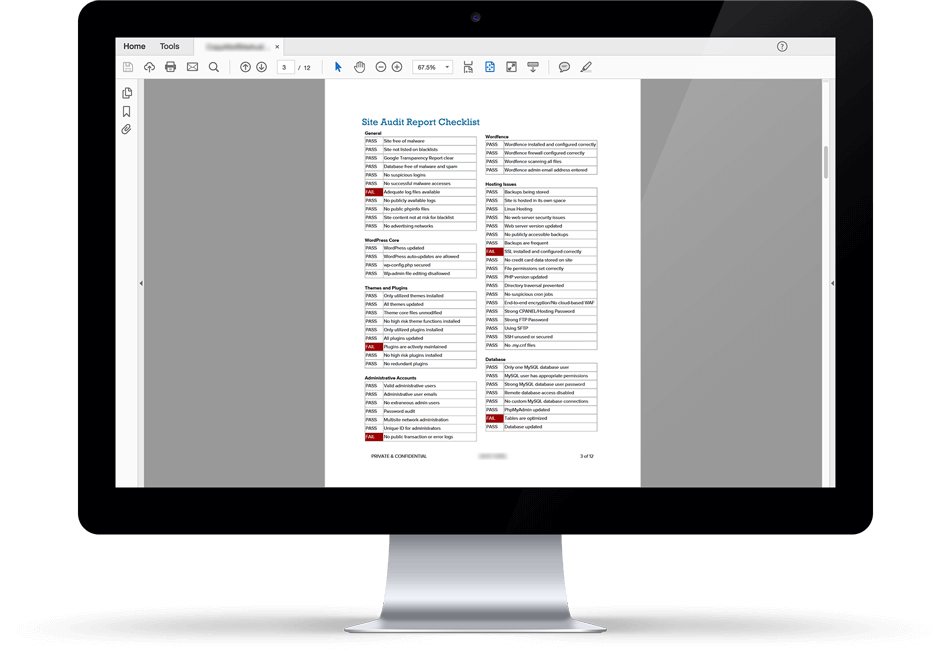
    WordPress Security AuditThis morning I am very excited to announce that Wordfence is officially launching a WordPress Security Audit service. Many of our customers have asked us for a service like this and it has finally arrived.

    For just $149, one of our experienced security analysts will perform a 59-point inspection to ensure that your site is secure. They produce a report that includes detailed recommendations for improving your site security. The service also includes a Wordfence Premium license for your site. You can find a sample report on this page.

    What makes this service really amazing is that a single Wordfence license costs $99. So now, instead of just buying a $99 license, for just $50 more you can have one of our security analysts secure your site. In addition to the site audit, the team also inspects your Wordfence configuration to make sure malware scanning is running optimally and that your firewall is configured correctly for your hosting environment.

    The service is backed by a 90-day guarantee. We will clean your site free of charge should it get hacked within 90 days after the audit.

    Why We Created the WordPress Security Audit

    For some time now Wordfence has been providing site cleaning services for hacked websites at a price of $149 per site. This service includes a Wordfence Premium API key. We realized that many customers are also interested in having an experienced Wordfence security analyst look at their site, even if they have not been hacked.

    Our senior team got together and spent some time developing the WordPress Security Audit service, including the comprehensive 59-point inspection that each site receives from an analyst.

    We have been quietly providing site security audits for a few weeks now to a select group of customers as part of a soft-launch. Our team has already found many issues that they have helped customers resolve, including vulnerable PHPMyAdmin installations and commercial plugins and themes with vulnerable subdirectories that our customers weren’t aware of.

    Today we are publicly announcing the availability of the service. You can sign up for your security audit now on this page.

    The Benefit of an Audit by a Security Team

    So far every site audit we have performed has found something that needs attention to help secure the customer website. During testing, our team audited sites belonging to security professionals and have found several items that could help improve site security.

    Even if you are a security professional, you can’t compete with the knowledge our team has gained from thousands of hacked site cleanings. The Wordfence Security Services Team (SST) think about WordPress site security all day long and have a wealth of knowledge they can draw from. Having our team of experienced professionals lock down your WordPress site is a way to rapidly improve your security posture.

    Get your site security audit scheduled today.

    As always you are welcome to post your thoughts and feedback in the comments below. I will be around to reply where needed.

    Mark Maunder – Wordfence Founder/CEO.

    The post Wordfence Launches WordPress Security Audit Service appeared first on Wordfence.