Online Services

Tag: Wordfence

  • Getting the Most From Wordfence Premium

    If your WordPress site matters, upgrading to Wordfence Premium gives you the best protection available. And at $99 per year, it is incredibly affordable. Once you’ve made this great investment, there are a few things you can do to optimize your site’s security.

    This post is Copyright 2018 Defiant, Inc. and was published on the wordfence.com official blog. Republication of this post without permission is prohibited. You can find this post at: https://www.wordfence.com/blog/2018/04/wordfence-premium/

    Install Your Premium License Key

    Do you have the free version of Wordfence installed? You probably see that your site security status circles are not fully 100%. You can quickly change that after you purchase your premium license.

    Your Premium license key is available on the API Keys page at Wordfence.com. To install it, simply go to either the Global Options or All Options page within the plugin on your site, and paste the license key into the ‘License Key’ box in the Wordfence License section. Hit the ‘Install License’ button and you’re all set!

    That one step enables these important Premium features:

    • The Real-time IP Blacklist blocks all requests from the most malicious IPs, protecting your site while reducing load.
    • Real-time firewall rule updates protect you from the latest threats
    • Real-time malware signature updates provide malware blocking within the firewall and malware scanning features with the latest threat intelligence
    • Site reputation checks tell you if your IP has been blacklisted for malicious activity, generating spam or other security issues.
    • Premium support from our amazing team of Senior Support Engineers


    There are just a few more steps to make sure you site is locked down.

    Optimize the Firewall

    Your Wordfence firewall should be in extended protection mode, which means the Wordfence firewall will execute before any other PHP code on your server. There’s no better protection available than the Wordfence firewall when it’s optimized and armed with the Premium firewall rules, malware signatures and malicious IPs.

    You can learn more about optimizing the Wordfence firewall in our help section.

    Enable Two-Factor Authentication

    Two factor is one of the most secure forms of remote system authentication available. We support both text messages to your cell phone or Google Authenticator as second authentication methods. If a password is ever stolen somehow, this extra layer of protection ensures your WordPress site remains secure.

    Configure Country Blocking

    If you’re experiencing malicious activity from a country that you’re not doing business in, you can block it with Wordfence Premium. Be judicious in your blocking, however. Make sure you don’t block countries that may affect your site’s functionality (e.g., don’t block the United States and inadvertently block Google and PayPal).

    You can also use country blocking to secure your login page only. If you know you’ll only be logging in from one location, secure your login page from being accessed from other locations.

    Customize Your Scan Schedule

    With Wordfence Premium, a full scan runs every 24 hours by default, which should be fine for most sites. You can specify which hour or hours of the day you’d like scans to run. We recommend looking at your site traffic patterns and selecting times when traffic is generally the lowest for the day. If you’d like to increase the frequency, you can schedule them to run as often as every hour.

    Managing a Large Number of Sites?

    We’re doing something new for those of you tasked with securing a large number of WordPress web sites. The Wordfence Client Partner initiative gives agencies, educational institutions, and other large scale users of WordPress a dedicated technical partner to assist with Wordfence at scale. Does this sound like you? Let us know. We’re here to help.

    hbspt.forms.create({
    portalId: “4354010”,
    formId: “9991d113-0424-4aec-b28c-0e968cd8a8c2”
    });

    Get Support From Our Senior Support Engineers

    The comprehensive capabilities of Wordfence give you tools and features that provide a level of security for WordPress you won’t see elsewhere. But when you’re just getting started, it all may seem overwhelming at first. With Wordfence Premium, you have access to the best WordPress security support team in the world. Our awesome team of Sr. Support Engineers can assist you with any Wordfence- or site security-related question you may have. Just enter a ticket here and they will respond within a few hours on average.

    Conclusion

    We hope this article helped get your started with Wordfence Premium. To learn more about Wordfence please check out our great help content, or our learning center to learn more about WordPress security in general.

    The post Getting the Most From Wordfence Premium appeared first on Wordfence.

  • Introducing High Demand Pricing for Security Services

    In Summer 2016,  we began offering a site cleaning service for people with hacked websites. In Spring 2017, we added a second service: site security audits. The popularity of both services has grown tremendously since then. We now service hundreds of sites every month.

    Our approach to cleaning or auditing a website requires a highly trained security analyst to perform hours of work on each site. We know that there are shortcuts we could take to speed up the process, but only at the expense of quality. That’s not a trade-off we’re willing to make.

    At the same time, while demand for our services is consistently strong, it is also highly volatile. In the last year, we cleaned 3.6 times more sites in our busiest week than in our slowest. These increases in demand are driven largely by the success of cybercriminals at any given time, which is impossible to forecast. We continue to work on our ability to adjust our capacity to match incoming demand, but inevitably there are times when demand exceeds our maximum capacity.

    To date, we have dealt with this problem by posting an estimated wait time at checkout. This worked quite well for a long time. Unfortunately we hit a point last month where it stopped working. During an unprecedented spike in order volume, our posted wait times grew to 7 business days. That is simply too long to wait. We knew we needed a new approach.

    Introducing High Demand Pricing

    Beginning today, we are changing the way we handle spikes in demand for our site security services. When the number of orders exceeds a preset threshold, we will be increasing our prices. The price increases will be expressed as a multiplier, eg 1.4x. For example, a single site cleaning purchased during a period where the high demand pricing multiplier is 1.2 would cost $214.80 (1.2 x $179). As demand increases, we will continue to increase the size of the multiplier.

    We believe that with this change, price elasticity will dampen demand during spikes, preventing our security services team from getting swamped with orders and ensuring that you receive an acceptable turnaround time.

    We will be closely monitoring the impact the pricing multiplier has on order volume and making adjustments as necessary.

    A Continued Focus on Customer and Employee Experience

    We have always prided ourselves on providing industry-leading customer service. We also work very hard to make Defiant a company that the best people in the industry want to work for. With that in mind, our approach to handling the inevitable mismatch between demand for services and our capacity to serve it could not compromise on the experience of our customers or employees doing the work.

    We are confident that this change in approach will allow us deliver on both. We recognize that this will be an adjustment for many of you longtime customers. Your continued support is what enables us to remain the leader in WordPress security and ultimately make the web safer.

    The post Introducing High Demand Pricing for Security Services appeared first on Wordfence.

  • PSA: Lessons From The Atlanta Ransomware Situation

    In the past few days the City of Atlanta has been hit with a ransomware attack. Several major computer systems that provide city services have been encrypted by an attacker. The attacker is demanding $51,000 worth of bitcoin to decrypt the systems, and the city has not yet ruled out paying the ransom. The attack occurred five days ago, and as of this writing, the systems remain inaccessible.

    Yesterday, Mayor Keisha Lance Bottoms held a press conference to chat about the problem.  So far the mayor and her team seem to be doing a great job of putting together a coordinated and multipronged response to deal with the incident.

    What struck me about the conference is that it was the kind of conference a city holds when dealing with a physical disaster. The mayor actually described it as a “hostage situation” towards the end of the conference. This is the tangible impact of a cyber attack on a local government.

    The City of Atlanta is working with the Secret Service, FBI, Department of Homeland Security and academic and private institutions, including Georgia Tech and SecureWorks. They have completed the investigation and containment phase of the incident response and have moved on to the restoration phase where they work to bring critical systems back online, but at this time the affected systems are still encrypted.

    Many of Atlanta’s systems have now been down for five days, though critical systems such as police, fire, rescue, 911, water services and airports are operational and continue without interruption. The departments affected include:

    • Department of City Planning and Office of Buildings: Processing times are longer than normal.
    • Office of Zoning and Development: Processing times are longer than normal.
    • Office of Housing and Community Development: Office is unavailable to process disbursement requests.
    • Municipal Court: The Department of Corrections has switched to a manual ticketing system for defendants who have been arrested and taken into custody. No “failure to appear” for court will be generated at this time and all cases will be reset.
    • Department of Watershed Management: Online bill payments and in-person bill payments are down.

    Mayor Bottoms has described this as: “Bigger than a ransomware attack. This is an attack on our government, which makes it an attack on all of us.” She goes on to say that “what has been attacked is digital infrastructure. As elected officials, we tend to focus on things people see. But we have to make sure that we focus on the things that people can’t see and digital infrastructure is very important.”

    The city does not currently have a time estimate for when they will get all of their systems back up and running. They are working around the clock, and they are actually concerned that some of the team that has responded to this incident may burn themselves out, so they are managing that aspect of the task, too.

    They have confirmed that it was a remote attack that compromised their systems. The city was reportedly hit by the SamSam ransomware. This ransomware variant has made the attackers $850,000 since December 2017. According to CSO Online, the city had many services exposed to the public, which could have provided an attacker with a point of entry, including “VPN gateways, FTP servers, and IIS installations.” Many services had SMBv1 enabled, which has known security issues.

    One thing I found interesting about the mayor’s comments was an analogy she used. She uses as an example an old truck she had. She didn’t think she had to replace it until she was in a wreck. And then she had to replace it. Her analogy makes it clear that the city should have updated their security posture before this incident occurred, and now that it has occurred, they are forced to take action to resolve the issue and secure their systems going forward, but at great cost and inconvenience.

    I think this is a valuable lesson, and something that WordPress site owners should take to heart. It is important to be proactive when it comes to securing your systems and educating yourself about cybersecurity. Don’t wait until you get hacked before you take action. If you have a WordPress website, install a malware scanner and firewall like Wordfence and use our blog, learning center and Wordfence documentation to empower yourself and secure your website. We have also written about ransomware as an emerging threat to WordPress in the past.

    Ransomware mainly targets desktop systems. To protect your home or office systems from a ransomware attack, take the following steps:

    • Ensure you have regular backups and that those backups are offline. They must not be accessible from the workstation that is being backed up to ensure that ransomware cannot also encrypt your backups when you get infected.
    • Install the latest security patches for Windows, OSX, Android, iPhone and any other operating system that you use. Along with backups, this is the most effective thing you can do to protect yourself.
    • Install any application updates, especially browser updates. Make sure you are not running an old vulnerable browser, or else simply visiting a compromised website can infect you.
    • Install a desktop antivirus solution and ensure it has updated virus signatures, or alternatively, enable Windows Defender, which is free.
    • Do not open attachments or dowloaded files from untrusted sources. Avoid using file attachments completely if you can, and use cloud services like Google Docs instead.
    • Do not click links in emails from people you do not trust. 

    Bringing Cybersecurity Education to Atlanta in April

    WordCamp is a WordPress conference that happens in cities around the world throughout the year. WordCamp Atlanta will be held April 13-15, 2018. Our team will be there, and we will be hosting a unique event to help participants learn more about WordPress security and cybersecurity in general.

    Our team will be hosting a ‘Capture The Flag’ or CTF event at WordCamp Atlanta. A CTF is a contest where participants have to complete a series of challenges to capture ‘flags’. The challenges range from completing a technical task to solving a puzzle to hacking into a system. CTF’s are designed to teach participants how to secure computer systems better. They get participants to think like a hacker, and in doing so, participants learn how to better defend against attacks.

    As far as I know, this is the first time that a CTF is going to be held at a WordCamp. These events are usually found at hacker conferences like DefCon and BSides. The CTF that we are hosting has been created by our top security researchers and is focused around WordPress security. We will also have five of our team members there to help you get started and to chat with you about security, including several senior Wordfence developers.

    If you are just starting out in WordPress or security, don’t panic! Our team has worked hard to make sure that this CTF has something for everyone. So visit us at our booth at WordCamp Atlanta and we’ll help you get set up and capturing your first flags in no time at all! You may even win a prize or two!

    Our top prize for the contest is a PlayStation 4 with full Virtual Reality setup, including a headset, motion controllers and a VR game. We also have a ton of other prizes I think you’ll really like. If you can make it to WordCamp Atlanta this year to participate, I highly recommend you give the CTF contest a shot. Not only do you have the chance of winning an amazing prize, but participating in the CTF will empower you to secure WordPress and your websites.

    If you don’t have a ticket for WordCamp Atlanta yet, I suggest you buy one now if you plan to attend. At the time of writing there were only 87 tickets left, and those will probably go quickly. You can purchase your ticket here. When you arrive, make sure you come over and visit us at our booth and we’ll help you get set up to participate in the CTF.

    If you can’t make it to WordCamp Atlanta, don’t despair. We will be hosting future events, and will let you know about them via our blog.

    The post PSA: Lessons From The Atlanta Ransomware Situation appeared first on Wordfence.

  • New Feature Protects Against Password Leak Attacks

    To better protect our users’ websites, we work with a lot of data from sources like our Security Services Team and the Wordfence network. We try to understand not just what attackers are doing, but also how and why. Our research into a recent campaign revealed an interesting method of attack, and contributed to the development of a new feature.

    Password Leaks Are a Rich Source of Information for Hackers

    During the last several years, hackers have compromised a wide range of organizations and harvested account details from them. The details almost always include usernames or email addresses, along with hashed versions of passwords (or even worse, plain-text passwords). These compromised accounts are often bought and sold on the dark web, but occasionally they’re also leaked publicly.

    For hackers, the value of a stolen user account goes well beyond being able to log in to the compromised website. Hackers are well aware that people are unlikely to use best practices when it comes to password management. In other words, they’re likely to use weak passwords and to repeat the same passwords across multiple accounts. So the hackers try to explore every account they may be able to hijack with a given username and password.

    As we’ve discussed before, hackers can do a lot with a hijacked website. We wrote that post two years ago, but all of those criminal activities are still going on today, with the new addition of cryptojacking attacks. WordPress websites are still attractive targets for hackers.

    Leaked Accounts Used in Malware Campaigns

    We observed a few interesting techniques hackers have been using with leaked accounts during the last several weeks. Normally, they would face several obstacles when trying to take over a WordPress website’s administrator account:

    • They don’t know the administrator username
    • They don’t know the password
    • They fail too many times to log in, so they get blocked by plugins, servers, or networks

    But the leaks have helped some attackers overcome these obstacles and find valid accounts on a lot of WordPress sites. Imagine that Bob Smith runs a WordPress site at example.com. If he used bob.smith@example.com as his primary email address at a website whose accounts were leaked, his details in the leak would look something like this:

    bob.smith@example.com:pony123

    This yields several pieces of information for hackers to use: Bob’s email address, some likely usernames, and a password he uses (pony123). Some published leaks combined data from several other leaks, yielding two or more accounts that probably belong to the same person. If Bob used his Gmail account at another compromised site, then the leak might look like this:

    bob.smith@example.com:pony123

    bob@gmail.com:pony123456

    Finding WordPress Sites in the Leaks

    It seems that hackers are using a direct approach to find WordPress sites among the leaked accounts. In our example, they simply check example.com to see if it’s running WordPress. But they also seem to be following redirects: in a case where example.com redirects to example2.com, these login attempts were being made against example2.com even though it never appeared in the leaks.

    We observed an interesting twist, though: sometimes email addresses on completely unrelated domains (like Gmail) were being used during login attempts. In this example, we observe bob@gmail.com and pony123456 being attempted on example.com. How did the hackers know to try it? It’s unlikely they actually got into the Gmail account and found emails from WordPress there; if they had, they could have simply used the “reset password” feature to take over the site. Instead, in the cases we observed, the email address was actually publicly used as a contact address in the site’s DNS registration. In other words, Bob used bob@gmail.com when he registered example.com. So the hackers may be searching DNS records for leaked email addresses to find target sites.

    Getting Valid Usernames From the Leaks

    The attackers behind the most recent campaign use email addresses to create a small set of usernames that are likely to be real administrator users on target sites. First they try “admin” since it’s the default username, and presumably the most common. Then they also try the full email address (like bob.smith@example.com), and then a couple of variations on the first part of the email address: one with all dots removed (bobsmith) and another with anything before the first dot (bob). Altogether, they only try to log in four times. The leaked accounts give them a much higher chance of success than brute-force attacks or guessing common passwords, while keeping the number of failures small enough that they don’t get blocked.

    Leaks Being Used

    We have copies of public leaks, so we’ve been able to locate the source of some of the compromised credentials used in the attacks. Many of them came from the set of 1.4 billion accounts leaked in December (which includes several previous leaks). Of the rest, every single one we checked was listed in at least one leak on HaveIBeenPwned. This demonstrates the tenacity of the attackers, and the way they can find value even in seemingly unrelated breaches.

    What We’ve Done to Address This

    Because of the small number of login attempts these attackers make, standard brute force login protection is not enough to block these kinds of attacks. Wordfence currently has two additional features that can have an effect in stopping this attack: Two Factor Authentication and “Immediately lock out invalid usernames.” But we decided we needed a more robust tool to deal with these kinds of attacks thoroughly.

    So, we’ve introduced a new feature within Wordfence to block logins for administrators that use a known compromised password. Any administrator using a password previously seen in a breach will need to reset their password to log in. The new feature is available as of today with the release of Wordfence 7.1.0.
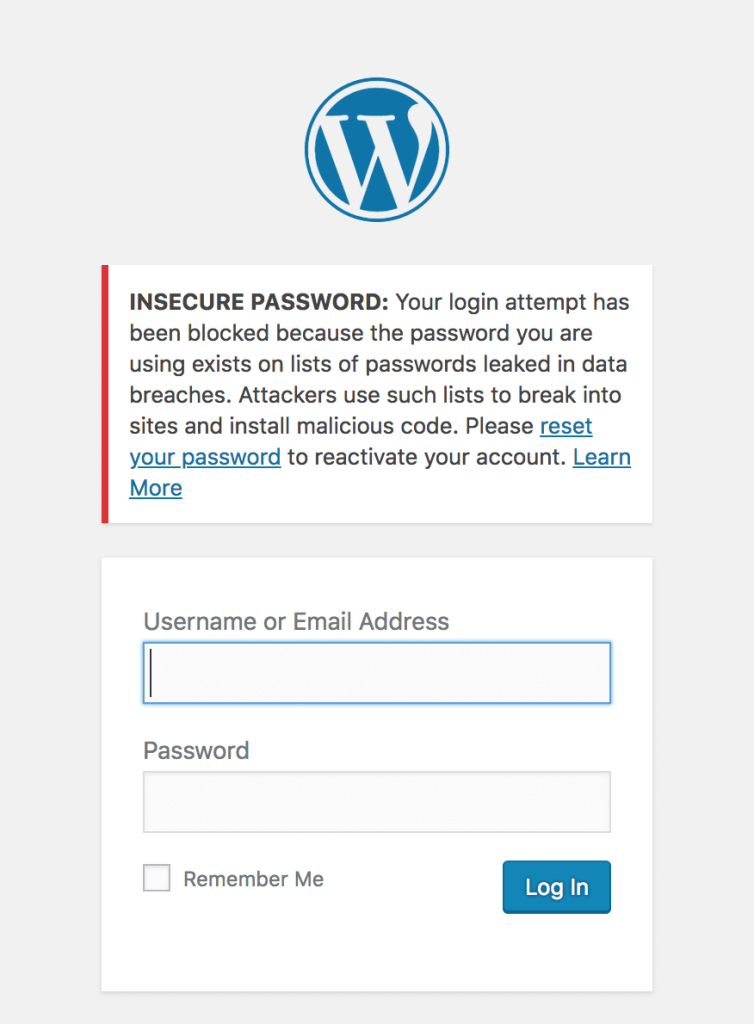
    We’ve done this by integrating Wordfence’s login security with the database provided by Troy Hunt’s version 2 of the Pwned Passwords API. Troy has built a substantial list of 501 million compromised passwords across 270 breaches. We’d suggest you read his post describing the new features and data that have gone into this new version.


    Privacy Improvements in Version 2 of Pwned Passwords

    We’ve looked at integrating Pwned Passwords in the past, but have been reluctant to risk sending insecure data about any non-compromised passwords to a third-party service. The options that version 1 of the Pwned Passwords API provided allowed users to send either the SHA1 hash of a password (which is insecure, as far as password hashes go), or the plain text password to check if it’s been used in a breach. The other option would be to include the full password list in order to compare it to the user’s password, but that’s not feasible to include within Wordfence, given that it’s around 30GB of data total.

    Version 2 of Pwned Passwords introduces a new feature to detect if a password is compromised without sending enough information about the password to be useful in case a hacker tried to reverse it. It works by sending the first 5 characters of the SHA1 hash of the password to the API. The API responds with a list of all SHA1 hashes from the full list of 501 million that start with those 5 characters. It ends up averaging around 475 hashes returned for each 5 character prefix.

    To illustrate with an example:

    The SHA1 hash of Bob Smith’s password “pony123” is E24F4B083C2F925CC894B2F04BAA7D83B7A5E669. We’d send the first 5 chars (E24F4) to our API:
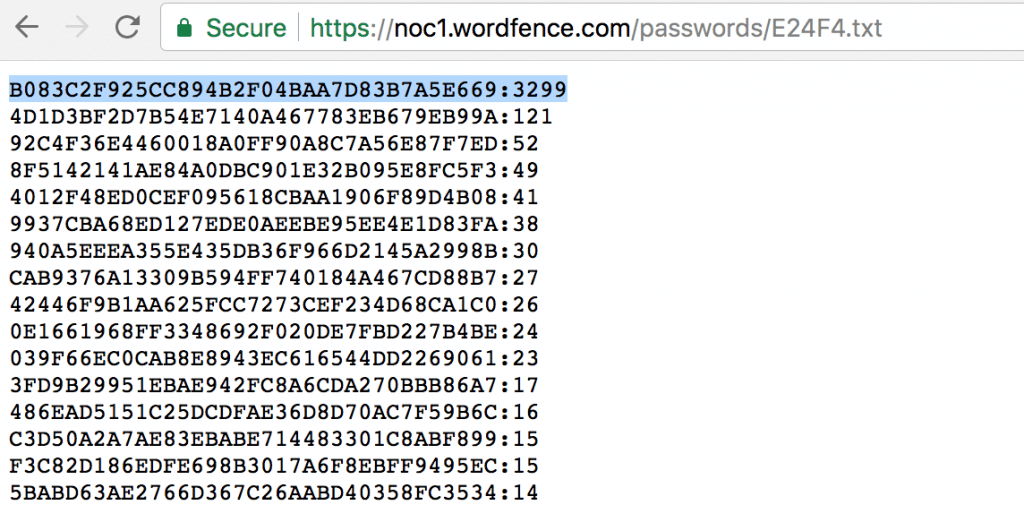

    We can then check to see if the remaining 35 characters of the hash (B083C2F925CC894B2F04BAA7D83B7A5E669) is in the list, and we can see it’s the first item in the list. The format of each item in the list is the remaining 35 characters hash suffix and the number of times this password has appeared in breaches, so we can see that Bob Smith’s password has been seen 3299 times across multiple breaches by multiple users. It’s probably a good idea that Bob Smith (and anyone else using “pony123”) update his password.

    How We’ll Be Rolling Out This Feature

    Since we have the number of times each password has been seen across all breaches, this allows us to gauge the severity of password reuse and risk to the site owner. Any password that’s been seen 10 or more times in previous breaches will blocked from logging in. We will gradually expand this to include all passwords in the database over the next week.

    Farewell to the Password Audit

    With the introduction of this new login protection, Wordfence will be removing the password audit feature. The password audit dictionary was based on password lists leaked from breaches. The functionality provided by the password audit is mostly redundant if we’re able to prevent the same compromised passwords from being used to login in the first place. This approach takes a more active role in preventing weak passwords from being used maliciously.

    Recommendations

    This new feature is enabled by default for administrators. To manage the settings of this feature, log in to your WordPress admin panel and navigate to: Wordfence → Firewall → Manage Brute Force Protection → Prevent the use of passwords leaked in data breaches.

    1. Ensure that you have strong passwords on all user accounts, especially admin. Wordfence provides an option to enforce strong passwords when creating/updating a user account under “Login Security Options”.
    2. Change your admin username from the default ‘admin’ to something harder to guess.
    3. Delete any unused accounts, especially admin accounts that you don’t use. This reduces your attack surface.
    4. Enable two-factor authentication on all admin accounts. Wordfence Premium provides two-factor.
    5. Verify your email address has not been part of a breach.
    6. Verify your password has not been exposed in a breach.
    7. Do not reuse a password on multiple services. That way, if your password from a data breach appears in this database, it won’t be the same as your WordPress admin password, or across multiple sites you manage. You can use a password manager like 1password to manage many passwords across services.

    The post New Feature Protects Against Password Leak Attacks appeared first on Wordfence.