Online Services

Tag: Wordfence

  • Wordfence 7 Update

    It has now been a few weeks since we launched Wordfence 7. Overall we are confident that the change was a good one. The product is now cleaner, more modern and is much easier for a new user to navigate.

    It was, however, a big change, and with that came plenty of questions, feedback and a few unanticipated issues. Thank you to everyone who has provided us feedback. We have read all of it, and are sincerely humbled by how passionate so many of you are about our product.

    At this point we have worked through most of the post-launch issues that were discovered. We have released two updates packed with fixes and changes based on feedback. Our support volumes are now back to normal and Wordfence 7 related questions have died down.

    With that we wanted to call your attention to a number of things we have either changed or got a lot of feedback on.

    The Options Page is Back

    This was far and away the topic we got the most feedback on. And the most passionate feedback. While we are still confident that our new approach of aligning settings with features throughout the plugin is the right one, we definitely overlooked the need for admins to quickly configure Wordfence with a minimum number of clicks.

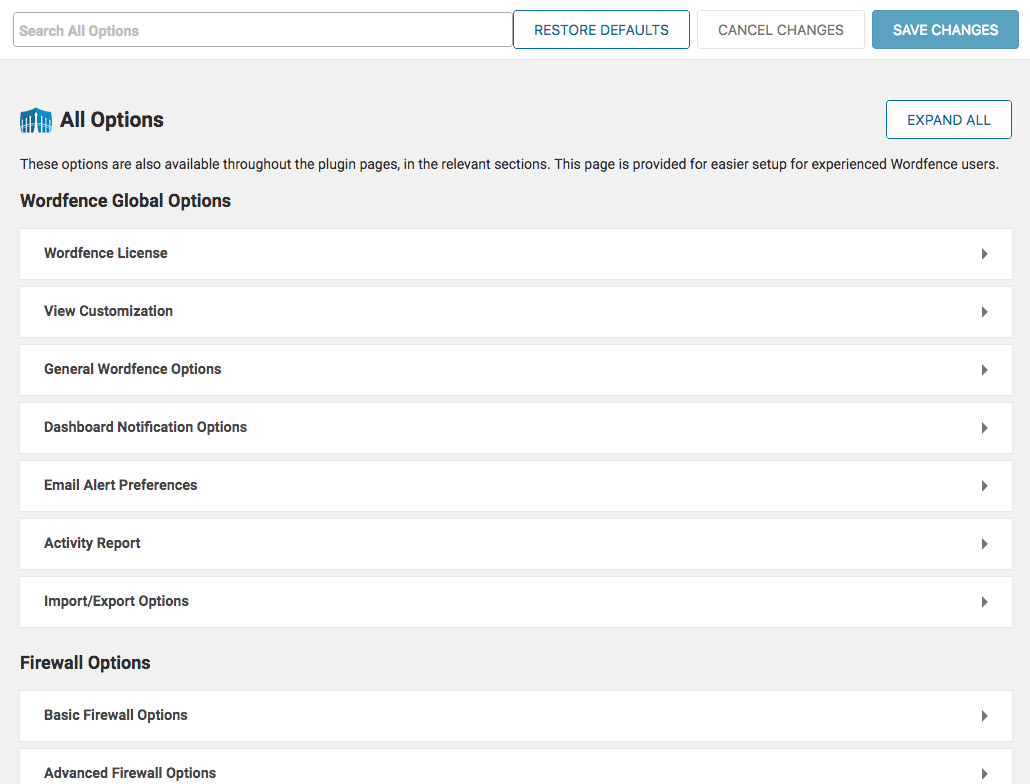
    With the release of Wordfence 7.0.3 we added a new page called All Options which you will find in the main Wordfence menu. This page includes 100% of the options available in the plugin.

    Prior to Wordfence 7, we did have an options page with most settings, but this only included about 85% of all available options. Your feedback indicated that you wanted that page back so that you can quickly access and configure Wordfence on a single page. We have brought that page back and improved it by making sure that 100% of all options are now on the new “All Options” page included in Wordfence 7.0.3.

    This is what it looks like:

    Options are grouped by category in collapsible sections. Sections can be expanded and collapsed both individually and as a group using a toggle at the top of the page. We also added a search feature at the top of the page which has proved to be very popular already.

    Everything is Still Available

    We took literally zero features away with Wordfence 7, free or otherwise. If you’re having a hard time finding something, we swear it’s still there! If you need help chasing it down please contact us via our awesome new Help page and we’ll get you straightened out.

    We Added a Toggle for the Expanded Live Traffic View

    We love the new condensed Live Traffic view and so do most of you. However, many of you prefer the expanded view, seen below, which is the closest to what things looked like before Wordfence 7. We learned that many people had a hard time finding the option to change the view, so we have now made it more prominent, in the form of a toggle at the top of the page.

    You Can Add Live Traffic and Blocking to the Main Wordfence Menu

    One of our goals with Wordfence 7 was to simplify the interface, putting more emphasis on the core features and less on the rest. With that in mind we made the tough decision to remove Live Traffic and Blocking from the main Wordfence menu. We knew that a small group of our users would dislike this change. That’s why Wordfence 7 launched with options to add them back.

    If you haven’t found that option yet, you can find it in the ‘View Customization’ menu either at Dashboard > Global Options or the All Options page.

    What’s on the Horizon

    2018 promises to bring many more positive improvements to the Wordfence plugin. We have a really exciting project we are working on to make it much easier to manage Wordfence across multiple sites. If you have any thoughts on that, we would love to hear more in the comments.

    In addition we have a long list of ways we plan to use Gravityscan technology to make Wordfence better. We’ll have more to share on those topics as the year progresses.

    Thank you very much for your feedback on the Wordfence 7 release. Our team will continue to listen and learn from our customers. Your input is extremely valuable and helps guide and shape Wordfence as it continues to be the most popular firewall and malware scanner for WordPress.

    The post Wordfence 7 Update appeared first on Wordfence.

  • Introducing Wordfence 7

    Wordfence is the most popular WordPress security software in the world for good reason. The protection offered by the endpoint firewall outperforms alternatives. The scanner delivers the best detection in the industry. A long list of other features like country blocking, two-factor authentication and password auditing make Wordfence the best and most comprehensive security solution available for WordPress.

    From the beginning, our development efforts have always focused on function over form. Having rapidly innovated for so many years, the resulting software does an extraordinary job of protecting WordPress websites, but it is also quite complex. Last summer we decided it was time to make a major investment in the user experience, making Wordfence not only the best security software available, but also intuitive and incredibly easy to use.

    For the last 6 months we have been hard at work rebuilding the Wordfence user interface from the ground up. Today’s release of Wordfence 7 revolutionizes WordPress security by making a deep and complex product easier and more intuitive to use. We think Wordfence 7 is amazing, and we know you will, too.

    Overview of Changes in Wordfence 7

    Our goal with Wordfence 7 was simple: make Wordfence intuitive and easy to use for all users.

    It needed to be easy for the novice to understand and configure without taking away any functionality from more advanced users.

    To achieve that, we made the following high-level changes:

    • Updated our design framework to use modern interface standards
    • Focused more on the core Wordfence security features, like firewall and scan, and less on everything else
    • Eliminated the ‘Options’ page and added options sections for each feature
    • Added feature status indicators for core features
    • Added a help page with links to documentation and support options

    Design Framework

    Based on current UI/UX patterns and trends, we’ve built a framework using standard interface and experience approaches. The dashboard and feature pages provide configuration status, alerts and reporting. Detailed configuration screens are easily accessible with relevant links throughout the experience. Status summaries are interactive, guiding the user directly to the security hardening opportunities and giving you real-time information on the impact of any changes you make. The resulting software is more discoverable, approachable and user-friendly.

    Feature Status Circles

    One of our objectives with Wordfence 7 is to provide security hardening opportunities to users in a simple, intuitive way. With that in mind, we are introducing status circles. They provide a clear status summary for each feature. By hovering over the status circle, you will trigger a popover detailing the list of things you can do to improve the percentage shown. All popovers include a link to detailed documentation.

    We also include status circles on the scan and firewall options pages, giving you immediate feedback as you improve your security posture.

    Here’s an example of the status circles on the new scan page in action:

    Simplified Dashboard

    The new version of the dashboard is similar to the one we added in Wordfence 6, but is now less busy and even more useful. We added feature status sections for the firewall, scan and Wordfence Premium. You’ll still find notifications here, primarily based on scan results. Global options for the plugin are now accessible via the link on this page (more on our options page approach later).

    Finally, we removed most of the charts from this page, leaving just a high-level Firewall Summary and a chart of attacks across the Wordfence network.

    Simplified Navigation

    We reduced the number of navigation options from 8 to 6. The two most important features, firewall and scan, are still available in the main navigation. Blocking is now accessible in the Firewall section and Live Traffic has been moved to Tools. Links for both features can be added back to the main navigation via their respective options, for those of you who prefer it.

    The Options page has been removed completely in favor of a new approach.

    New Options Sections

    Prior to Wordfence 7, the majority of the Wordfence configuration options were on a single page. While there are some advantages to that approach, we found that it caused a majority of our users to never discover many useful features and options.

    With Wordfence 7, you will now find an options link on all major feature pages. Global options are now accessible via a link on the Dashboard page. All options links can be found next to a gray gear icon.

    Help Page

    We know that security is a complex topic, and that configuring Wordfence can be challenging for less technical users, especially with some of the more exotic hosting configurations we sometimes come across. In an effort to make it easier to find the documentation or support you need, we added a Help page to the plugin. It includes links to our documentation organized by feature, along with links to our most popular help articles. Links to our free and Premium support options are also available, and you will find links to the new help section throughout the plugin.

    Alongside this project, we also completely revamped our documentation for the product. Our old documentation will still be available for a while, but we will no longer be updating it going forward.

    New Firewall Interface

    The firewall interface has changed significantly. The main firewall page now includes four status circles, providing a broad overview of your site’s configuration status at the top. All firewall-related options are now accessible via the options link on this page. All firewall-related reporting is now available here as well.

    Blocking and Rate Limiting are also now available via links on this page.

    New Scan Interface

    We’re really excited about the new scan interface. It’s exceptionally functional, very usable, and beautiful at the same time. At the top you’ll find status circles, summarizing your current configuration status. Below that, you will find the “Start new scan” button, along with links to Help and Options.

    The Scan Options area is now where you set up scheduled scans. We removed the Scan Summary section and replaced it with a new status summary bar, displaying what the scanner is working on. The Scan Detailed Activity is now hidden by default, but you can reveal it by clicking the “show log” link above the results table.

    The scan findings table has been revamped to show a summary view of each finding by default. You can view the details of the finding, and take action on it, by clicking the “Details” icon.

    We also added statistics to the top of the table showing a summary of what the scanner found the last time it ran.

    Other Updates

    The Blocking interface has been completely redesigned. IP, Country and Custom Pattern blocking features have all been combined, and block count reporting is now available for each blocking rule you create. You can now manage and monitor the effectiveness of blocking rules in one place.

    The Diagnostics page has been completely redesigned. All diagnostics sections are now collapsible, and collapsed by default, to make it easier to find what you’re looking for.

    We replaced the product tour with a new guide that runs as you access each area of the plugin. We will be leveraging this new capability when we roll out new features that require more in-depth explanations, including the launch of Wordfence 7.

    Live Traffic has been completely redesigned. The traffic table now shows summary data for each observation. You can view more detailed information by clicking the “View” icon. Viewing whois information and seeing recent traffic is now presented in a beautiful popover.

    Wordfence has always included a great comment spam filter. Unfortunately, it was buried in the Options page, split into two different sections. In Wordfence 7, it now has its own page in the Tools section, which now includes basic reporting.

    Thank You

    It took us many months to get this right, and many people contributed to making this release happen. A big thank you to the hundreds of beta testers who helped us over the last couple of weeks. Your feedback has been invaluable.

    With today’s release, we are excited to bring Wordfence 7 to the global Wordfence user community!

    If you do find an issue, please submit tickets via Premium support or the forums so we can get them fixed. And as always, we welcome your comments here.

    The post Introducing Wordfence 7 appeared first on Wordfence.

  • Wordfence Now Includes 1.4 Billion Leaked Passwords in Password Auditing Feature

    Last week, we reported a massive upsurge in brute force login attempts following the leak of a database of 1.4 billion cleartext credentials. No one had seen 14% of the exposed username/password pairs before, making this a ripe opportunity for hackers to attempt to break into WordPress sites.

    Historically, brute force attacks targeting WordPress have not been very successful. But this new database provides fresh credentials that, when matched with a WordPress username, may provide a higher success rate for attackers targeting sites that do not have any protection.

    Password Auditing Improvements

    Wordfence Premium includes a powerful Password Auditing feature. Using a GPU cracking cluster, we give you the ability to audit the strength of your admin and user passwords. You can learn more about how this feature helps protects your site here.

    In response to this latest leak, we’ve merged this updated password list into our own large password list that we currently use to audit administrator accounts. Our previous list contained 269 million known passwords from various breaches, such as LinkedIn, and eHarmony. After merging and removing duplicates, this new list comes in at 609 million known passwords against which we can test your users’ passwords.

    We ran some initial tests to compare how our previous list performed against the new list. In a random sampling of 100 user accounts, our previous list cracked 42% of the 100 password hashes. The current list cracks 57% when run against the same list. That’s a 36% increase over the previous capability. This means that a Wordfence password audit is now 36% more likely to find a weak password than before.

    Recommendations

    We strongly recommend that you upgrade to Wordfence Premium to benefit from the new capability we’ve added to our Password Auditing feature.

    We also recommend you follow these additional steps:

    1. Install a firewall like Wordfence that intelligently blocks brute force attacks.
    2. Ensure that you have strong passwords on all user accounts, especially admin. Wordfence provides an option to enforce strong passwords when creating/updating a user account under “Login Security Options”.
    3. Change your admin username from the default ‘admin’ to something harder to guess.
    4. Delete any unused accounts, especially admin accounts that you don’t use. This reduces your attack surface.
    5. Enable two-factor authentication on all admin accounts. Wordfence Premium provides two-factor.
    6. Enable an IP blacklist to block IPs that are engaged in this attack. Wordfence Premium provides a real-time IP blacklist.
    7. Monitor login attempts by configuring alerts for when an admin signs in to your website. Wordfence (free version) provides this.
    8. Do not reuse a password on multiple services. That way, if you have a password from a data breach in this new database, it won’t be the same as your WordPress admin password. You can use a password manager like 1password to manage many passwords across services.

    The post Wordfence Now Includes 1.4 Billion Leaked Passwords in Password Auditing Feature appeared first on Wordfence.

  • New Service Vulnerability Disclosure Policy

    The Wordfence team regularly discovers security issues with commercial services, such as WordPress hosting providers, that put their users at risk. In some cases, the issue is quite severe, putting thousands of websites at risk simultaneously. In these instances, our standard approach has been to contact the service provider directly, provide them with the details and work with them toward resolution. Lately these issues have become more common, so we’ve decided to formalize our approach going forward, updating our Vulnerability Disclosure Policy to specifically address these scenarios.

    What Is a Service Vulnerability?

    We define a service vulnerability as any issue with a technology service that represents an exploitable security risk for its users. We draw a distinction between service and software vulnerabilities, because in many cases, the service vulnerability is due to configuration issues instead of a software bug. For example, a WordPress host may set file permissions incorrectly, allowing an attacker to easily move laterally between sites in their environment. The hosting company may be running no vulnerable software while still opening their customers up to attack.

    How Does Wordfence Discover Service Vulnerabilities?

    Our Security Services Team cleans hundreds of hacked websites each month. As part of that service, they analyze the available server logs, configuration and other server information to try to identify how the website was compromised. This is really important, as it is the only way to be certain that they’ve closed the security hole the attackers used to hack the website in the first place. It is during this analysis that we occasionally discover security issues with hosting providers. In most cases, we will see a flood of site-cleaning cases immediately following the first discovery, all from the same host.

    Wordfence Service Vulnerability Disclosure Policy

    When the Wordfence Security Services Team discovers a security vulnerability in a service, such as WordPress hosting, we take the following steps to address the issue:

    1. Our research team verifies the vulnerability.
    2. We notify the service provider, using the following disclosure deadline, based on the day the service provider is notified:
      • 90 days
      • 14 days if the vulnerability is being actively exploited
    3. Where this service vulnerability directly affects a customer, we will notify that customer that they should consider changing hosting providers. We will not provide technical details of the service vulnerability until we disclose publicly. Instead, we use the following language: “We recommend at this time that you change hosting providers to resolve this security issue. We can not provide further details at this time, but have contacted the hosting provider directly about this issue.”
    4. The service provider releases a fix or the deadline passes, and we announce the vulnerability via our blog.

    Why We Impose Disclosure Deadlines

    When determining our approach to disclosure deadlines, we had to balance the needs of customers, service providers and the broader WordPress community. Let’s take a look at the perspectives we needed to balance:

    Customer Perspective

    As a customer of a service provider with a service vulnerability, I would want to know about the issue right away so I could take action. I also wouldn’t want additional attackers to be notified, increasing the odds that my site might be compromised, but if the vulnerability is being actively exploited, I would expect those involved to “drop everything and fix it!”  I would be able to tolerate you keeping it confidential for a short time to allow the service provider reasonable time to implement a fix, but not for very long. As a paying customer, I would feel I deserved to know so I could take action to defend myself.

    Service Provider Perspective

    As a service provider with an issue, I would want a reasonable time to develop, test and deploy a fix. Many service providers have massive customer bases and complex infrastructure challenges. I may also have other high priority issues that I’m in the middle of handling, forcing me to make difficult choices.

    WordPress Community Perspective

    The broader WordPress community needs to know that, in general, when service providers discover security issues, they are dealt with quickly. We all need service providers we can trust, and we rely upon each other to keep the WordPress ecosystem safe and hold service providers accountable.

    A Balanced Approach

    We had an animated discussion about how aggressive the deadline should be for service providers. Where we landed is quite simple: if a vulnerability is being actively exploited, we expect the service provider to literally drop everything and fix the problem. If they do that, our deadline of 14 days should be plenty of time to implement a fix that they’ve properly tested and doesn’t break other things. If the vulnerability isn’t being actively exploited, 90 days is still reasonable for even the largest providers in our industry.

    As always, we reserve the right to change deadlines based on discussions with the provider. Our interests are aligned with those of the community, and we will always do what we feel is the right thing.

    Software Vulnerability Disclosure Deadline Change

    As a result of this conversation, we also reviewed our policy for software vulnerabilities, and have decided to make a change to how we handle disclosure deadlines. In the past, we have always given the author a 30-day deadline to publish a fix. In the large majority of cases, the author posts a fix within a day or two. Unfortunately, some authors are not so responsive. Going forward, in cases where a software security vulnerability is being actively exploited, our disclosure deadline will now be seven days. We feel this is very reasonable, as fixing a security vulnerability in a piece of software like a WordPress plugin or theme is much easier than rolling out a configuration change to thousands of mission-critical production servers.

    Conclusion

    We take our role as the leading security vendor in the WordPress ecosystem seriously. We feel that these updates to our approach will benefit service providers, software authors, their customers and the broader WordPress community. We encourage other security researchers to adopt similar policies and invite you to reach out to us with any questions you have about implementing a similar approach.

    The post New Service Vulnerability Disclosure Policy appeared first on Wordfence.