Online Services

Tag: WordPress Security

  • Reminder to Update to WordPress 4.7.2 and Check Your Site

    During the past few weeks we have seen two WordPress core security updates. WordPress 4.7.1 was released on January 11th which was a security update. Then WordPress 4.7.2 was released a few days ago on January 26th.

    Both of these releases contain important security updates that fix known vulnerabilities in previous WordPress versions.

    These are ‘minor’ updates. That means that if you have a default install of WordPress, your site has probably been updated automatically, unless you have restrictive file permissions or some other restriction in place that prevents automatic updates.

    The Wordfence firewall currently protects against all vulnerabilities that are fixed in these two releases. This includes the privilege escalation vulnerability in 4.7.2 that was disclosed yesterday.

    If you do have automatic update enabled and your site has been updated to 4.7.2, we encourage you to visit your site and make sure that everything is functioning as expected. WordPress core releases are well tested, but it’s always better to be safe and to verify site functionality after a series of automatic updates like this.

    If you would like to learn how to change the automatic update behavior of WordPress, you can read about the WP_AUTO_UPDATE_CORE constant in wp-config.php. The default behavior of WordPress is to automatically upgrade your site to minor releases. And the default behavior is to not automatically update to major releases or development releases. Security releases like the ones mentioned above are ‘minor’ releases, so the updates are applied automatically.

    The post Reminder to Update to WordPress 4.7.2 and Check Your Site appeared first on Wordfence.

  • The January 2017 WordPress Attack Activity Report

    Last month we introduced a monthly attack activity report. This report gives you an indication of attack trends during the past month and how they have changed. Today we are releasing the January WordPress attack activity report which covers the period from January 1st until January 31st.

    Most Active IPs

    In the table below we have listed the most active attack IPs for January 2017. Note that the ‘Attacks’ column is in millions and is the total of all attacks that originated from each IP. Further right in the table (you may have to scroll right) we break out the attacks into ‘brute force’ attacks and ‘complex’ attacks.

    Brute force attacks are login guessing attacks. What we refer to as ‘complex’ attacks are attacks that were blocked by a rule in the Wordfence firewall.

    We have also included the netblock owner which is the organization, usually a company, that owns the block of IP addresses that the attack IP belongs to. You can Google the name of the owner for more information. A Google search for any of these IP addresses frequently shows reports of attacks.

    The hostname included is the PTR record (reverse DNS record) that the IP address owner created for their IP, so this is not reliable data but we include it for interest. For example, we have seen PTR records that claim the IP is a Tor exit node, but it is clearly not based on traffic.

    We also include the country and a country flag. To the far right of the report we show the date in January we started logging attacks and the date attacks stopped. For many of these IPs we logged attacks for the entire month. For some you can see there is a clearly defined attack ‘window’ where the IP started and stopped.

    The first interesting thing about our January attack data is that the same Ukraine IP holds the number one spot this January as we saw in December. Our top 3 attacking IPs all appeared in last month’s list.

    However, only 5 of the attacking IP addresses in this month’s top 25 also appeared in last month’s top 25 list. This is an illustration of how the IP addresses that attackers use are rotated out and new ones are used to launch attacks.

    The Seychelles attacker we saw last month has dropped off the list. In addition, we have Turkey appearing on the list for the first time with three IP addresses hosted at “Yalcin Kanbur trading as Webrano Hosting”, generating over 6 million attacks during January between them.

    India has also appeared on the list for the first time with an IP hosted at “Reliance Communications” generating around 2 million attacks during January.

    A Change in Complex Attacks vs Brute Force

    Last month we saw 66.7 million brute force attacks and 63.9 million complex attacks from our top 25 attacking IPs. You’ll recall that a complex attack is one that targets a plugin, theme or core vulnerability and is blocked by the Wordfence firewall.

    This month we’re seeing 64.1 million brute force attacks from our top 25 attacking IPs. However, this time around we’re only seeing 34.5 million complex attacks.

    This change indicates that the most prolific attackers have changed their strategy and are focusing more on brute force WordPress attacks than on trying to exploit vulnerabilities in WordPress core, themes and plugins.

    Brute Force Attacks on WordPress in January 2017
    Brute Force Attacks on WordPress in January 2017

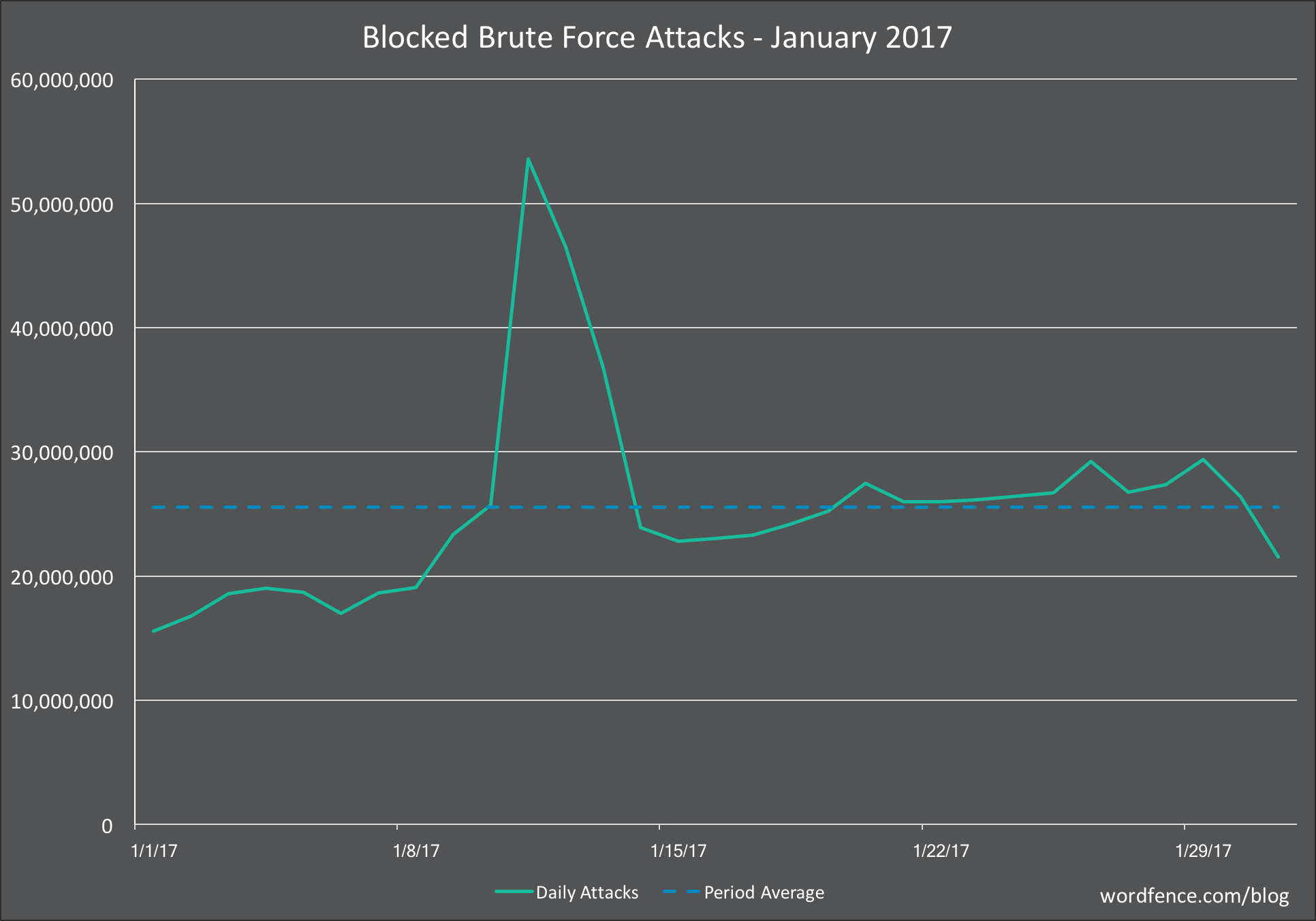
    The chart above shows the brute force activity on WordPress sites that we saw in January. You’ll notice a huge spike in activity just before the middle of the month. This really gives you an idea of the kind of volatility that can occur.

    We will occasionally see situations like this where an attacker will gain access to servers that they can use as an attack platform. They will generate a huge amount of activity until their IPs are shut down by the hosting provider or network admin.

    In December we saw a similar spike but it only peaked at about 46 million attacks per day. In January the peak was approximately 53 million attacks per day.

    This contributed to an increase in the average attacks per day for January which was 26 million attacks per day compered to 20 million for December.

    Complex Attacks on WordPress in January 2017
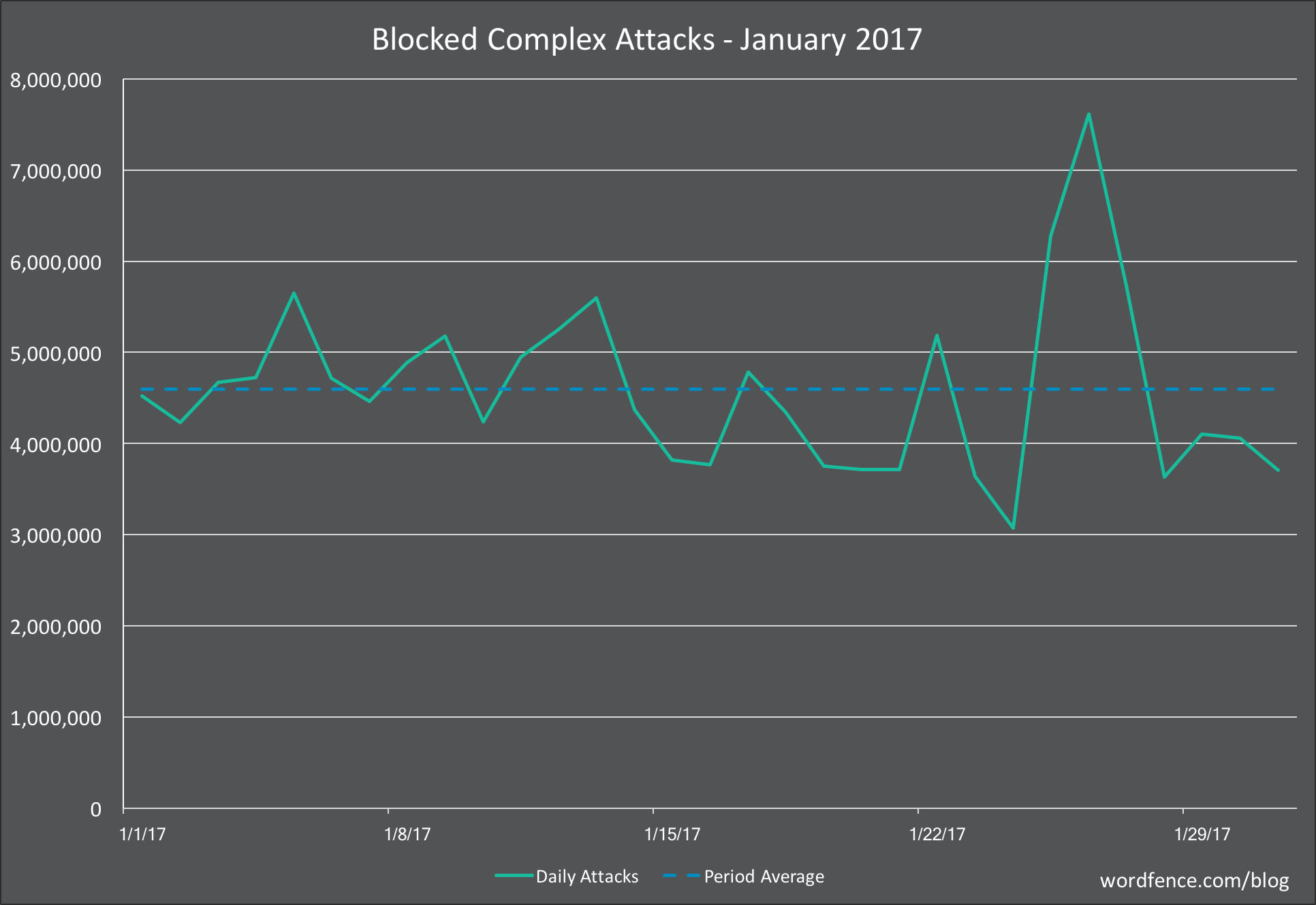
    We saw a decrease in attacks on the Wordfence firewall in January 2017. The average number of attacks dropped from 5 million attacks per day in December to 4.7 million attacks per day in January.

    This decrease in the number of attacks is due to only a single large spike in attack traffic in January compared to a sustained spike in December that lasted more than 1 week.

    However the number of attacks in January during the low periods was significantly higher than in December with 3.5 million in December compared to 4 million at the lowest activity in January.

    Attacks on Plugins

    The table above shows the top 25 plugins that experienced the most attacks during January 2017. The table shows the rank in January, and then the change in ranking compared to December. If you scroll to the far right you can see the number of attacks per plugin during the period.

    The WP-Mobile-Detector plugin saw the biggest gain in the number of attacks, jumping 25 points in our rankings to position 12. The plugin has been removed from the WordPress plugin repository, probably because a vulnerability was not fixed by the author, and the last review was posted over 7 months ago.

    The plugin continues to see attacks, which may indicate that some WordPress sites still have this installed and are still vulnerable. It may also simply be because attack toolkits that attempt to exploit multiple vulnerabilities incorporate this exploit and then throw a series of exploits at websites in the hope that one of them works.

    Let me know in the comments if you have any additional data you’d like to contribute that may indicate reasons for plugin gains or losses in number of attacks, or any other insight you’d like to share.

    Attacks on Themes

    The table above shows attacks we saw on themes in January and we’ve included the change in ranking since December. The rankings for these themes are incredibly stable. The largest change we saw is “linenity” which has a local file inclusion or LFI vulnerability that became public knowledge back in April 2014. The vulnerability allows an attacker to download the wp-config.php file.

    The stability of the rankings in theme attacks suggests that there is not much innovation among attackers targeting themes for attack. They are likely using the same old attack toolkits that try to exploit the same old theme vulnerabilities and the rankings stay stable as the attack toolkits remain relatively unchanged.

    Attacks by Country

    In this report for the first time, we are including data on the number of attacks originating in each country. Because this is a new addition to our monthly attack activity report, we won’t have ranking change data for this month.

    The number of attacks below are the sum of brute force and complex attacks that originate in each country. It’s important to note that this does not indicate that a specific country’s government is launching attacks. Instead this is a general indication of the state of security in each country.

    There are a few factors that may cause an increase in attacks from a particular country:

    • The country simply has a large number of servers hosted within it’s borders. This is likely the case with the United States which has the most servers hosted within it’s borders out of any other nation.
    • The country may have a lack of enforcement when complaints are received. In other words, if local law enforcement is lax, there may be malicious hosting providers within the country that are able to act as attack platforms.
    • There may simply be a large hosting provider within the country that has a security problem and is inadvertently providing an attack platform via compromised servers for the rest of the world.

    Conclusion

    That concludes our first Wordfence Attack Activity Report of 2017. As always we welcome you to download the data in the tables above to perform your own analysis and share it here in the comments.

    Please post any questions or feedback in the comments and as always I will be around to try to answer them.

    Regards,

    Mark Maunder – Wordfence Founder/CEO.

    Special thanks to Dan Moen and other Wordfence team members who produced this report and who also tirelessly manage the code and infrastructure that enables us to provide this insight to the community. 

    The post The January 2017 WordPress Attack Activity Report appeared first on Wordfence.

  • A Feeding Frenzy to Deface WordPress Sites

    In this report we share data on the ongoing flood of WordPress REST-API exploits we are seeing in the wild. We include data on 20 different site defacement campaigns we are currently tracking.

    We show how attackers have switched to the REST-API exploit and how it has increased their success rates. We have also seen an evolution in the attack method targeting the REST-API exploit and have evolved our rule-set accordingly. We also demonstrate how hackers are competing to deface sites using the REST-API exploit.

    This report highlights the immediate need to protect your site against this attack. Both our attack data and our site cleaning team’s observations are indicating that this attack is having a wide impact.

    Background on the REST-API Vulnerability

    On January 26th, WordPress released version 4.7.2 which contained a security fix for a vulnerability that allows attackers to modify content on a WordPress site. They did not announce the fix at the time so that attackers would not be aware of the vulnerability while the WordPress auto-update mechanism updated vulnerable sites.

    The hidden security fix was announced on  February 1st, six days later, at which time attackers became aware of the exploit. By that time a substantial number of WordPress websites had updated to version 4.7.2.

    We immediately deployed a firewall rule to our Premium customers on February 1st and started logging attacks targeting the REST API vulnerability. We didn’t see many attacks until February 3 when volume started picking up.

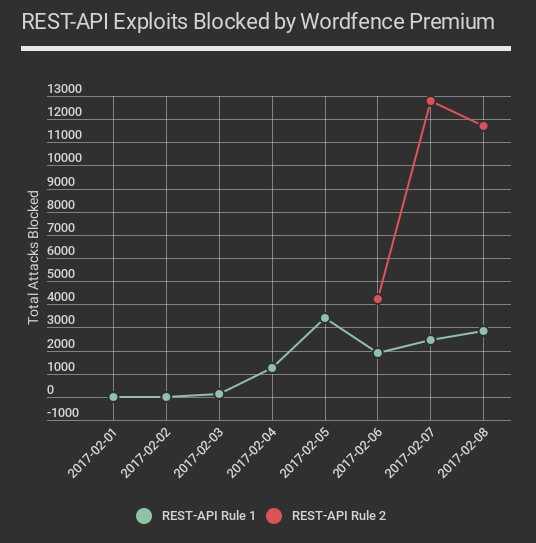
    Attacks continued and February 6th we saw attackers had discovered a new variant on the attack which bypassed our rule and the rules that other firewall vendors had put into place. We immediately deployed a second rule to our Premium Wordfence customers which was pushed out in real-time early on February 6th.

    The new rule is in red on the chart above and shows how attackers massively ramped up the volume of attacks they were launching using this new, more successful variant of the attack. The chart above is up to midnight last night, Pacific time. We have confirmed that the second newer variant of the attack still bypasses at least one major cloud firewall vendor as of 10am PST this morning.

    This vulnerability has resulted in a kind of feeding frenzy where attackers are competing with each other to deface vulnerable WordPress websites. During the past 48 hours we have seen over 800,000 attacks exploiting this specific vulnerability across the WordPress sites we monitor.

    If you are using Wordfence Premium, you are fully protected against this vulnerability, even if you are running an older vulnerable version of WordPress. There are multiple variants of the REST-API exploit and the Wordfence firewall Premium rule-set protects against all of them.

    Tracking REST-API Defacement Campaigns

    The attackers using the REST-API exploit are defacing websites by leaving their own signature on a defaced WordPress page. We are currently tracking 20 different defacement campaigns.

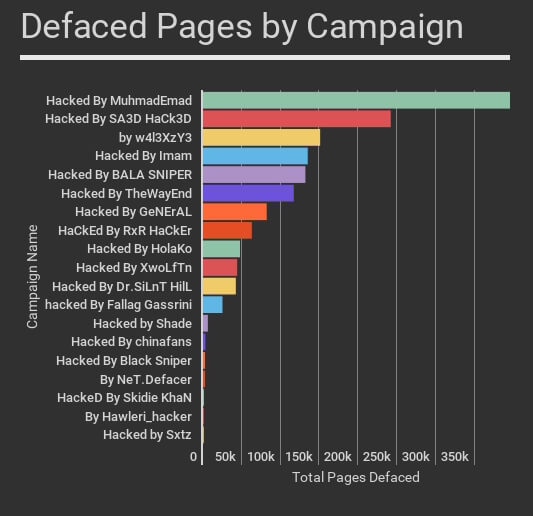
    The table below shows the total attacks for each campaign, the number of unique WordPress websites attacked and the number of IP addresses that each attacker is using. On the far right we also include the number of defaced pages for each campaign, according to this morning’s Google results.

    Success Rates for REST-API Attack Campaigns

    To determine which campaigns have the highest success rate, we did a Google search for each campaign name in quotes. This gives us an indication of the approximate number of defaced pages per campaign. The actual numbers are in the table above in the far right column.

    In some cases the attacker may have used a different exploit to deface a page. However, as you’ll see below, the number of defaced pages for each of these campaigns has increased dramatically since the emergence of the REST-API exploit.

    How the REST-API vulnerability has increased total compromised sites over time

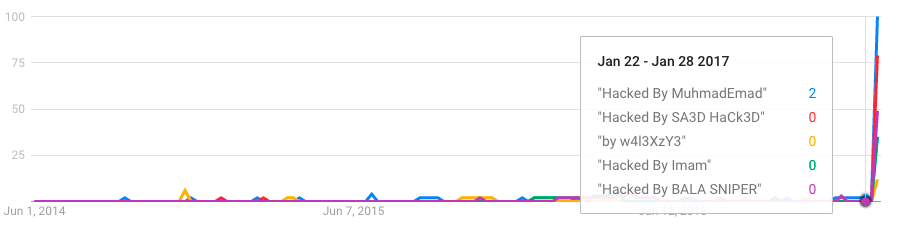
    By using Google Trends, we can get a good indication of the success rate of our attackers over time. Using Trends, we found that since mid 2014, these campaigns have had little success compromising websites.

    Then starting in early February when the REST API vulnerability was disclosed, the success rate for these campaigns massively increased. Google started indexing compromised pages and it shows up in Google trends:

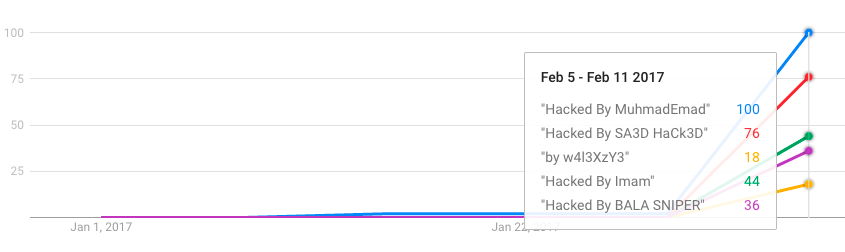
    If we change the scale of the chart to just show 2017, you can see the huge spike in success these attack campaigns have had infecting WordPress websites using the REST-API vulnerability. This spike coincides exactly with the date the REST-API vulnerability was disclosed.

    Well Known Attackers Switching to the REST-API Exploit

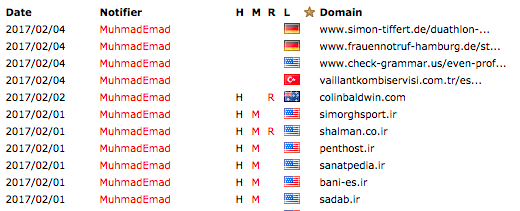
    Lets take a look at our top defacer. If we look at the list of MuhmadEmad’s compromised sites on Zone-H.org, he usually drops a file called krd.html or defaces the home page. The content usually looks like this.

    On zone-h, which is an archive of hacked sites, it is clear that he took a break for a couple of days after the REST-API attack emerged on February 1st, perhaps to develop a new exploit.

    Then he started attacking starting February 4th, and you can see the compromised URLs change to individual defaced WordPress pages:

    Hackers Competing to Compromise Sites

    In some cases we are seeing hackers competing to deface sites. On the defaced page below you can see HolaKo has defaced the current page, and the link to the next page shows that the following page is defaced by ‘Imam’.

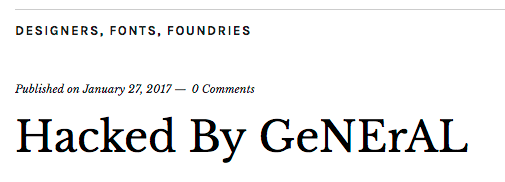
    In some cases we can see defaced pages being defaced again by another attacker. The hackers are getting hacked. This page was defaced by ‘Imam’:

    But when you visit the page, the title has now been changed to show another defacer has taken over.

    Sites that suffer from this vulnerability will continue to be defaced and re-defaced until they either install a firewall like Wordfence or upgrade to WordPress 4.7.2.

    Top 25 Attacking IPs Exploiting the REST-API Vulnerability

    The following is a list of the top 25 IP addresses by number of attacks, that are exploiting the WordPress REST-API vulnerability. If you are a security researcher you’re welcome to download this table and incorporate it into your own research.


    Conclusion

    This is one of the worst WordPress related vulnerabilities to emerge in some time. Our site cleaners have been working with site owners all week to help them clean defaced sites. In every case the customer was not running our Premium firewall and had not updated to WordPress 4.7.2.

    If you have not been able to update to WordPress 4.7.2 but are using Wordfence Premium, you have been protected against this since exploitation started.

    As always, I will be around to reply to your comments.

    Mark Maunder – Wordfence Founder/CEO.

    The post A Feeding Frenzy to Deface WordPress Sites appeared first on Wordfence.
  • 5 Things to be Aware of When Buying WordPress Security

    If you are new to WordPress or reevaluating your security strategy, you are overwhelmed by choice in today’s market. The reality is that there are only a handful of tools that truly protect your WordPress website from a hack and help you detect an incident. With all of the claims that vendors are making, it can be tough to choose the most effective product to protect your investment and your customer data.

    To help you in your decision making, I’m going to call out 5 things in this post that you need to be aware of before you choose a security plugin, a cloud solution or something that runs in the hosting environment that your hosting provider is selling.

    1. Not all security products include a firewall

    Many of the best known security plugins for WordPress don’t actually include a firewall. To understand this, it’s important to understand what a firewall actually is. The firewall in Wordfence is known as a Web Application Firewall or ‘WAF’.

    For a WAF to be effective, it needs to fulfill a few basic requirements:

    1. It needs to block a wide range of attacks based on it’s ability to recognize website requests as attacks. Types of attacks include SQL injection attacks, remote code execution, cross site scripting and cross site request forgery attacks.
    2. The WAF needs to have a rule-set that is continuously updated. These rules are used to recognize attacks and block them. They can’t be updated only when the software is upgraded. They need to be updated constantly via a ‘feed’.
    3. The WAF needs to analyze ALL requests, not just requests that hit a particular application. In other words, if you have installed a WordPress WAF, it must block requests that try to directly access a script in a WordPress subdirectory along with requests that hit WordPress itself.
    4. The WAF needs to be very high performance. It will be inspecting every request that hits your site and it’s very important it doesn’t slow your site down at all.

    Wordfence fulfills all these requirements. It has a comprehensive rule-set that blocks a wide range of attacks and is continuously updated via our Threat Defense Feed. The Wordfence WAF inspects every request made to a PHP application on your website. Whether it’s a WordPress request or a direct attack on a script like Timthumb, Wordfence will see it and analyze it and block it if necessary. Wordfence is extremely high performance. We use core PHP functionality for our rule-set that executes very fast, we pre-filter rules and only execute what is relevant and our rule-set is highly optimized.

    Many popular security plugins for WordPress don’t include a WAF, or firewall. They include features like brute-force protection, file change detection, backups, strong password enforcement and so called system ‘tweaks’. But they don’t include the most basic security component of them all: An effective web application firewall.

    When purchasing a security product, make sure it actually includes a firewall.

    2. Cloud firewalls can be bypassed and don’t have identity data

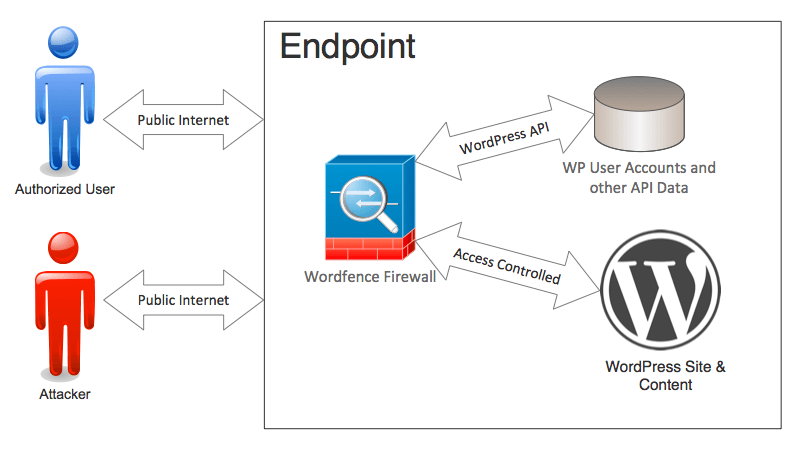
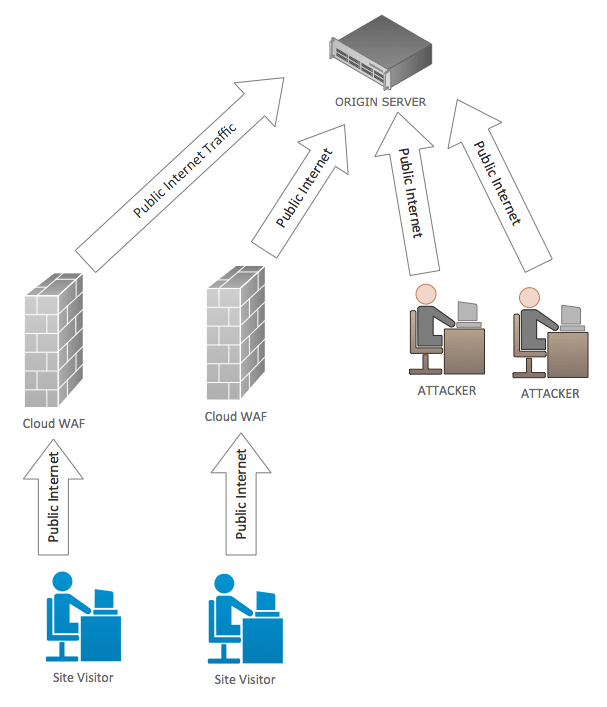
    cloud-waf-diagramBecause cloud firewalls execute on remote servers out on the Internet, it’s possible for an attacker to go around them and attack your site directly. We’ve written about this in some detail.

    Because cloud firewalls execute remotely, they don’t have access to your WordPress API and database. That means they don’t know basic things like: “Is a user signed into your website or not?” They don’t have this data so they can’t use it in their decision making about who to allow and who to block.

    If you don’t even know whether a request is coming from a site administrator or an attacker, how can you provide effective protection? We’ve written about the cloud WAF user identity problem in some detail.

    Cloud firewalls also use a rule-set that is generic. Their rules are designed for all websites. That means they don’t specialize in a specific platform. The result is that they can allow through some of the best known and most basic attacks on a platform like WordPress.

    Wordfence Protecting the EndpointWordfence is designed specifically for WordPress, it knows and uses user identity to make it’s decisions and it’s not possible to go around the Wordfence web application firewall because it runs directly on your WordPress website.


    3. Some malware scans don’t check very much

    When choosing a malware scanner for WordPress, it’s important to choose one that does a deep thorough scan of your site. Malware authors have become very creative in how and where they hide malware once they’ve compromised your website. Without a deep scan, your site may be infected and you won’t be aware of it.

    iThemes Security, the second most popular security plugin for WordPress, uses Sucuri Sitecheck to perform a malware scan. You have to pay for iThemes Pro to gain access to this feature, which currently costs $48 per year.

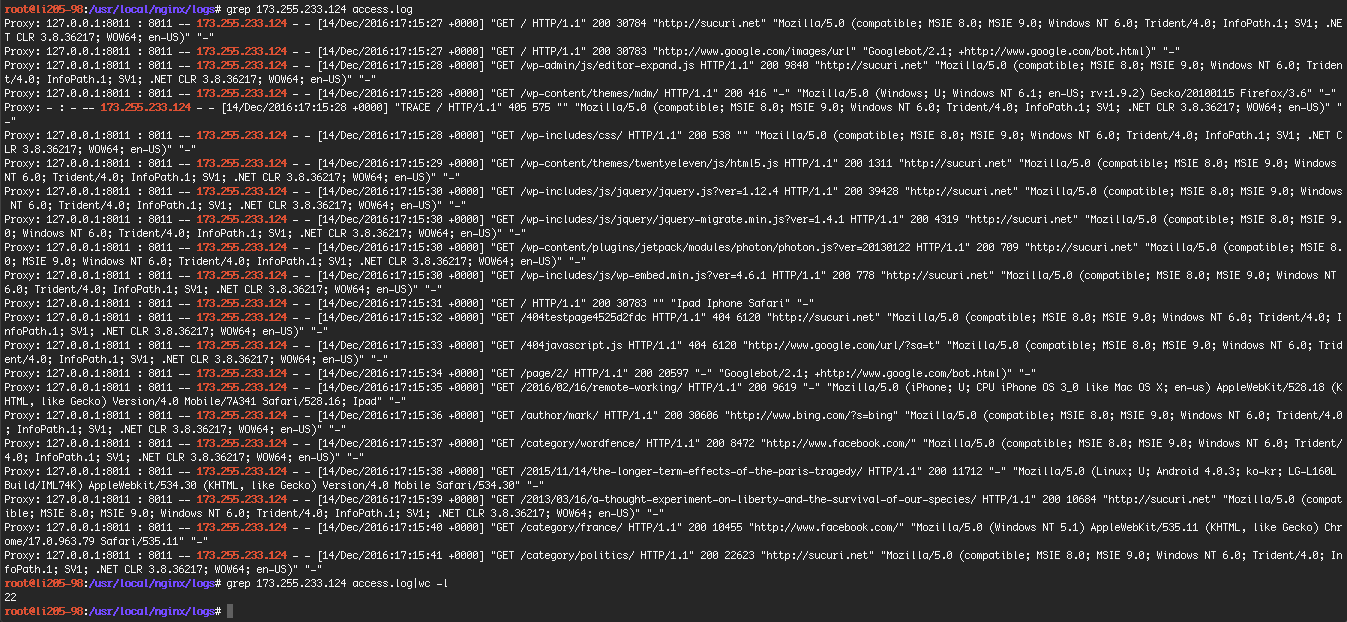
    Once you’ve paid for iThemes security and have access to the malware scan feature, you can launch a scan. A Sucuri scan using iThemes Security on my test WordPress site only performed 22 page requests. All the checks are remote, so no source code is inspected.

    After doing this scan, this is what my logfile looks like. Click for a larger image.

    ithemes sucuri malware scan

    As you can see, it didn’t do very much.

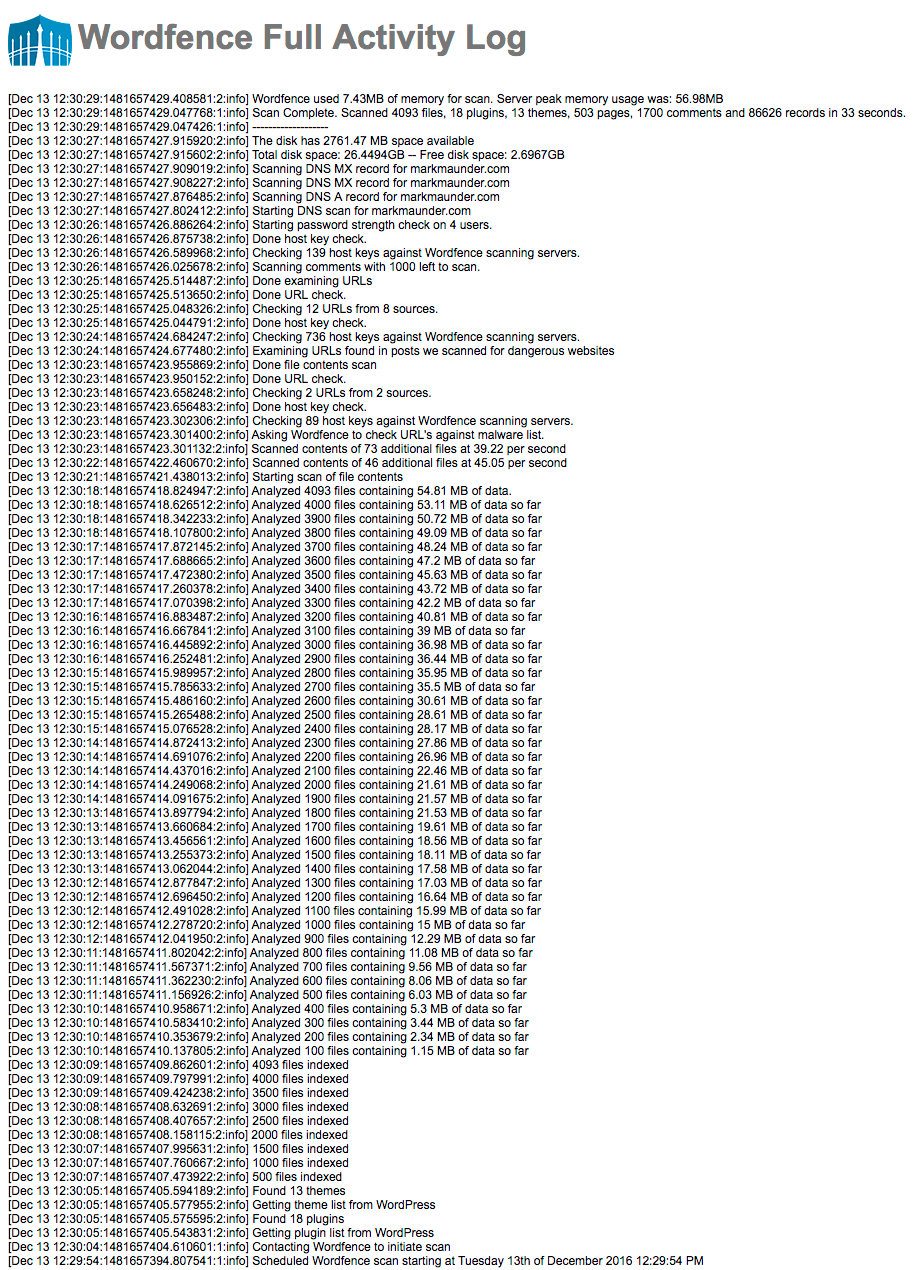
    Below we show what a typical free Wordfence scan looks like (it’s in reverse chronological order). As you can see we analyze the source code of over 4,000 files on the same site and perform a host of other checks. Click the image for a larger version in a new tab.

    screen-shot-2016-12-13-at-4-01-54-pm

    When choosing a malware scanner, make sure you pick one that performs a comprehensive scan of your website and doesn’t just do a cursory check. Malware can be hard to find and well hidden. Wordfence performs a deep and comprehensive scan of your site every time it runs.

    4. Malware scanning takes a team, forensic work and processes

    Forensic WorkHave you wondered why our Wordfence site cleaning service is is so reasonably priced, even though you get your own Wordfence analyst working closely with you to fix your hacked site?

    It’s because your hacked website is an amazing source of forensic data for us. We take the footprints that a hacker left behind and add that to our malware scan.

    To provide an effective malware scan, you need to perform hands-on forensic analysis of the latest attacks as they happen. That’s what our site cleaning team does.

    Then you need to take that attack data and run it through a process to turn it into threat intelligence and distribute it, in real-time to a great malware scanner. That is what our Threat Defense Feed is. The TDF describes our process of gathering, analyzing and distributing threat intelligence to the Wordfence malware scanner and firewall.

    I’m not currently aware of a single WordPress specific malware scanner that combines a high performance scan engine with a team and process like Wordfence does.

    5. Watch out for ‘automated‘ malware removal

    Some companies offer an ‘automated’ fix if they detect malware on your website. When we first heard about this we viewed the concept with deep skepticism. If malware is detected on a website, it has been compromised. The definition of a ‘compromised’ site is that someone unauthorized has gained access to the site.

    Incident response is a complex field. We have certified forensic investigators on our team who have developed our site cleaning process. To get an idea of how the a typical incident response process works, you can reference NIST publication 800-61 “Computer Security Incident Handling Guide” [PDF].

    In general, forensic analysts will divide incident handling into three phases:

    1. Detection and Analysis: This includes analyzing attack vectors, documenting the incident, prioritization and notification.
    2. Containment, eradication and recovery: This includes evidence gathering, identifying what has been attacked and evidence gathering.
    3. Post incident activities: In this phase forensic data is analyzed, evidence is retained and the data is used to prevent future incidents.

    There are several different approaches to incident response and you can visit OWASP to learn more about how they tackle the problem.

    If a site is compromised, an automated fix would leave out many of these steps. For example, it would not be able to determine how an attacker gained access and so the site may be repeatedly hacked.

    We currently recommend that you avoid products that claim an automated fix is possible for a compromised website. Instead we suggest that you use a security analyst trained in incident response to help fix your hacked website. One of our human analysts would be glad to assist you.

    The post 5 Things to be Aware of When Buying WordPress Security appeared first on Wordfence.