Yesterday, the popular WordPress plugin Ninja Forms released version 3.3.14, which disclosed and patched two security issues present in the plugin. Upon review of these issues we’ve determined their severity to be moderately low, however due to the plugin’s wide userbase of more than a million active installs we’ve elected to provide a detailed exploration of exactly what these vulnerabilities are and what risks they do pose if left unpatched. As usual, we recommend updating vulnerable versions of the plugin as soon as possible, despite the relatively low risk.
This post is Copyright 2018 Defiant, Inc. and was published on the wordfence.com official blog. Republication of this post without permission is prohibited. You can find this post at: https://www.wordfence.com/blog/2018/08/ninja-forms-security-updates-what-you-need-to-know/

Cross-Site Scripting (XSS) In Import Function
The first security issue we’ll look at can be found in the WordPress Vulnerability Database as Ninja Forms <= 3.3.13 – Cross-Site Scripting (XSS) in Import Function.
Ninja Forms contains Import/Export functionality which allows privileged users to create a form within the plugin, then save the configuration of that form in a portable .nff file downloaded to their local machine. This file can be used as a backup, migrated to other sites, etc. On import, the text data in the .nff file is parsed and converted into a functional web form.
Because the content of this imported file is ultimately converted into an HTML web form, it’s possible for a user to craft a working .nff file which contains malicious JavaScript code. When the form is displayed, this JavaScript can execute within the browser of anyone viewing the form. Because the Import/Export tool is only available to site administrators, this isn’t necessarily a vulnerability by itself, since if an attacker secured administrative access to the WordPress site they’d be able to install whatever malicious content they had regardless.
However, in unpatched versions of the plugin, it can be possible for malicious actors to manipulate a site administrator into unknowingly importing a bad .nff file. By crafting a link or redirect, or otherwise getting a logged-in administrator to visit an unsafe page, a Ninja Forms import can be triggered regardless of if the administrator has the Import page open at all.
 A formatted example of a malicious field in an
 .nff payload.
If this import successfully triggers, the XSS payload will launch in the browser of any user who views the malicious form. Unless the shortcode for the malicious form is placed on a page or post of the affected site, this is generally limited to only affecting logged-in users who preview the form within their WordPress dashboard.
The patch for this issue adds a nonce to the Import function in the Ninja Forms, which prevents malicious redirects from triggering the import, as the administrator will need to have opened the import page and uploaded the file themselves.
What is Cross-Site Scripting (XSS)?
Cross-Site Scripting refers to the practice of injecting malicious code (nearly always JavaScript) into a web page or application with the intention of the payload executing in the browsers of a site’s visitors or administrators. Flaws in vulnerable applications commonly render user input without sanitizing it first, allowing code to be inserted in unexpected ways.
For further reading on XSS flaws, what they are, and how to prevent them, check out How to Prevent Cross Site Scripting Attacks.
What Should I Do?
Once you’ve updated Ninja Forms, take a moment to ensure there are no unknown forms on your site by clicking the Ninja Forms link in the sidebar of your WordPress dashboard (again, you must be logged in with an Administrator account to see this). If there are no unfamiliar forms present, no further action is required.
In the event that you do confirm a malicious form is present, you can delete it from the list of forms by clicking the cog-wheel icon in the rightmost column of its row, then clicking Delete and following the subsequent prompt. Do not click into the form to see what’s inside, as you run the risk of launching a malicious JavaScript payload.
CSV Injection
The second vulnerability can be found on the WordPress Vulnerability Database as Ninja Forms <= 3.3.13 – CSV Injection.
Unrelated to the Import/Export functionality which allows the forms themselves to be exported, Ninja Forms also includes an Export function for users to archive the submissions to their forms in a .csv file, which can then be opened in a user’s spreadsheet software of choice. It behaves as you’d expect: the value in each field of a submitted form gets placed in its own cell in the spreadsheet, one row per submission.
In unpatched versions of Ninja Forms, if a user submission contains a CSV injection payload in any form fields, the exported .csv file has the potential to perform unsafe actions if opened as a spreadsheet.
What is CSV Injection?
Discussing CSV injection vulnerabilities in the context of web security is tricky, and requires some understanding of what exactly takes place.
Spreadsheet software like Microsoft Excel and LibreOffice Calc allow cells to be populated by a number of different elements. The most common are simple text and numeric values, but it’s likely that you’re also familiar with inserting formulas instead of static values.

Cell C1 displays the value “3”, but is actually a formula that sums the values of A1 and B1.
What many people may not be aware of are the sheer variety of things one can actually accomplish with this sort of syntax. Hyperlinks can be created, data from the affected spreadsheet and other open sheets can be exfiltrated, and system commands can even be executed.
The reason CSV injection is a tricky subject is because there isn’t really an agreement on where the finger should be pointed when it comes up. Fundamentally, the malicious execution takes place within the spreadsheet software itself, which is usually happy to parse and execute any function it sees. However, the argument from the other side is that automatic formula expansion works as intended, and untrusted input should be sanitized before being exported to a .csv document in the first place.
That said, in 2014 LibreOffice Calc and OpenOffice Calc both removed the DDE command execution functionality which allows this sort of command execution. Microsoft Excel instead implemented a warning dialogue, which prompts users to only allow execution if the file came from a trusted source. There’s a pretty strong issue here, though, because who doesn’t trust their own website? Outside of the fact that it’s well-known that most users are happy to click “allow” on any security pop-up they get on their computer, it’s less likely than usual that a user will know to block the execution.
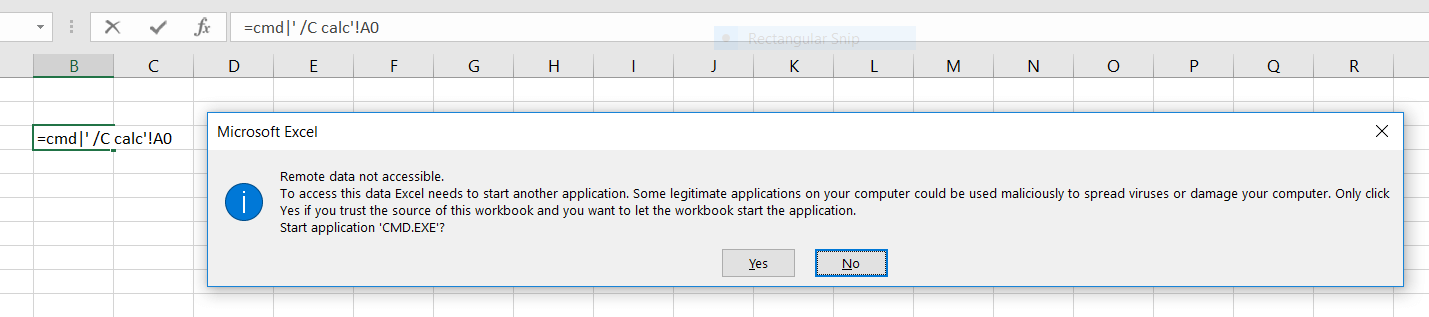
An example of the security prompt triggered by Microsoft Excel.
Any application that generates spreadsheets has the potential to create unsafe files if input from untrusted users is involved. This, combined with the fact that many bug bounty programs (including HackerOne’s own bounty program for its sites) explicitly exclude CSV injection flaws from the scope of their programs, make it a unique issue for the security community at large. Since the concept of CSV injection itself is less a vulnerability in any one piece of software than it is a flaw in the way spreadsheet logic is handled globally, it’s a tough one to squash.
Back On Subject
The original patched version of Ninja Forms sanitizes potentially malicious form fields when they’re exported to a .csv file by prepending a single quote ' to any cell whose value begins with an equals sign =. This effectively prevents any spreadsheet formula from executing when rendered. However, the OWASP recommendation for mitigating CSV injection recommends additionally sanitizing cells beginning with the characters @, +, and -, as certain systems and software may have similar rendering behavior associated with these characters.
With this in mind, I reached out to Zach Skaggs, product owner of Ninja Forms, in order to discuss potentially hardening this patch to prevent these edge-case evasions. Zach was already aware of these alternate characters, and originally determined after some testing that their exploitability was too low to be of concern. While the likelihood of these evasions being successfully implemented in the wild is indeed very low, after some discussion Zach agreed it was worth implementing a patch for these to be safe. A few hours ago at the time of this writing, Ninja Forms 3.3.14.1 was released, which adds this extra hardening.
What Should I Do?
If you’ve performed a CSV export of your Ninja Forms submissions prior to this patch, make sure that no values in any of the cells begin with the characters =, @, +, or -. You will need to perform this review via text editor or command line, as opening the file in spreadsheet software has potential to perform unsafe actions. You can also export a new CSV from a patched version of Ninja Forms to safely replace old exports if you wish.
Conclusion
Despite the potential for harm that can be caused by allowing a malicious spreadsheet document to execute, the flaws patched by Ninja Forms are of low severity. Successful exploitation of both vulnerabilities rely on a number of outside factors:
- Successfully triggering an import of a malicious
.nfffile requires some level of interaction by a logged-in administrator of an affected site.- If a malicious
.nfffile is imported, the resulting form needs to then be viewed for the script to execute.
- If a malicious
- Successful implementation of the CSV injection vulnerability requires an administrator to eventually perform a CSV export, which isn’t a behavior an attacker can rely on or predict.
- If an export is executed, most practical CSV injection payloads are specific to the spreadsheet software in use and the operating system it’s running on. While “Microsoft Excel On Windows” is the most likely combination, the increasing popularity of operating systems like OS X and Linux, as well as open source office software like OpenOffice and LibreOffice, makes this an attack unlikely to be launched outside of very targeted engagements.
To learn more about the cause of these sorts of vulnerabilities, and how to prevent them from popping up in your code, check out our educational series Understanding PHP Vulnerabilities & How They Originate.
The post Ninja Forms Security Updates: What You Need To Know appeared first on Wordfence.