Online Services

Blog

  • WordPress Used as Command and Control Server in 2016 Election Hack

    On Friday evening the Department of Homeland Security released a report [PDF link] containing updated and broader analysis of Russian civilian and military intelligence organization’s attempts to interfere with the 2016 US election.

    This Wordfence report is an analysis of the new ‘Enhanced Grizzly Steppe Report’ and the data it includes. We show that one of the websites used in the attack was a WordPress website that was (and still is) vulnerable to a SQL injection attack. We describe how it became part of the ‘cyber kill chain’ used in the attack described in the DHS Enhanced Grizzly Steppe report.

    Background

    ‘Grizzly Steppe’ is the name that the United States intelligence community, specifically the FBI and DHS, have assigned to Russian civilian and military intelligence services associated with trying to hack the US 2016 election.

    On December 29th, US intelligence released the first Grizzly Steppe report that provided several indicators of compromise or IOCs. These IOCs were indicators of the presence of hacking tools used by the attackers described in the Grizzly Steppe report.

    The day after the original Grizzly Steppe report, we released our own analysis of the data in which we shared the actual sample of the PHP malware described in the report, which we had reverse engineered.

    On Friday evening, February 10th, DHS released an ‘enhanced analysis’ of Grizzly Steppe with several new IOCs. The report includes 17 PHP malware samples. These all appear to be different variants of P.A.S. which is the malware in the original report which we reverse engineered.

    The new report includes some additional data on 9 domain names that were used in the incidents that DHS analyzed and how Windows malware communicated with those domains. In the report below we focus on one domain specifically which is a WordPress site that was used as a command and control (C2) server as part of the attack.

    Understanding the Cyber Kill Chain

    The term Cyber Kill Chain is a term that Lockheed Martin came up with to describe a sequence of steps that an attacker needs to achieve their objective. It is a way for security analysts to think about and analyze an intrusion.

    The diagram below is from Lockheed Martin and is an illustration of each of the steps in the Cyber Kill Chain. [Source: Lockheed Martin]
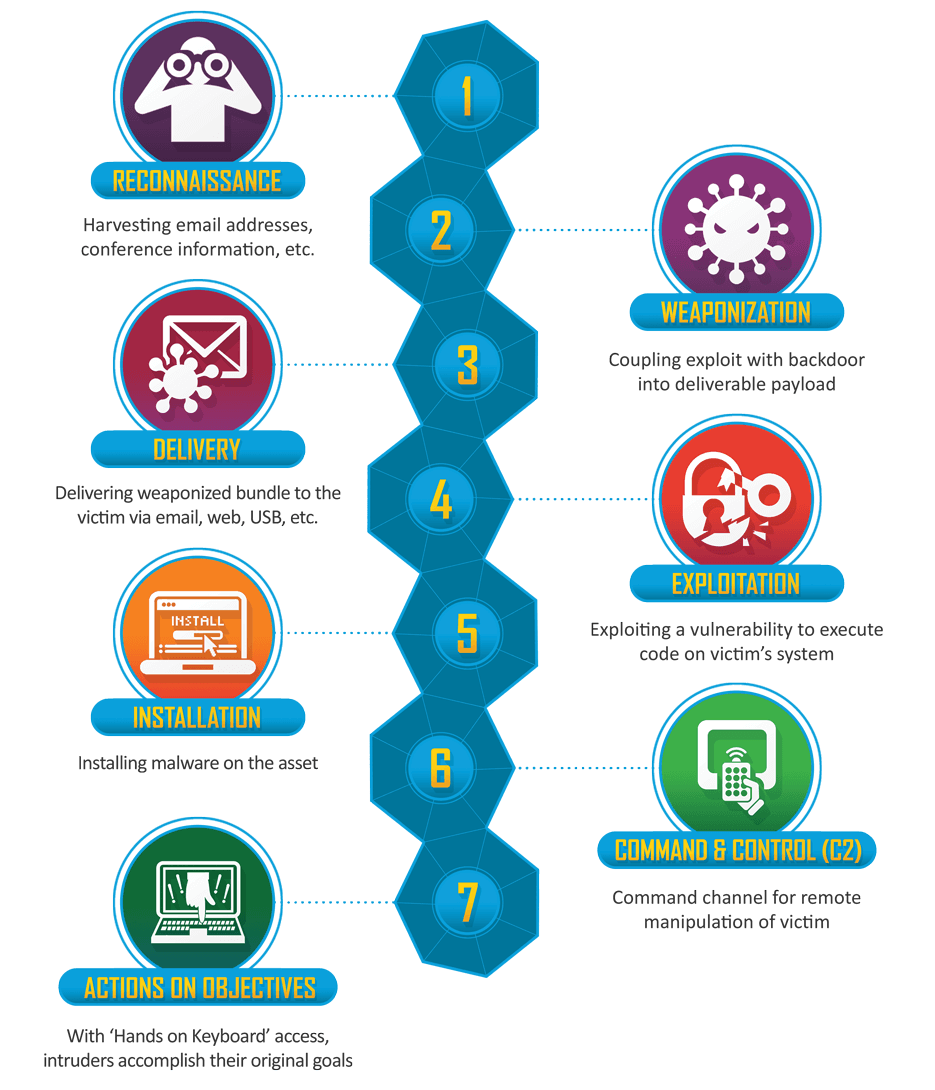
    This metaphor is used widely in the intelligence community as a way to think about intrusions. It is also used in the latest DHS Grizzly Steppe report. So we will use it here to analyze how WordPress was part of a kill chain targeting an individual or group.

    How WordPress Became Part of the Attack Chain

    One of the malware samples included in the Enhanced Grizzly Steppe report is a Windows DLL.

    The malware provides a range of capabilities to an attacker. According to the report:

    The program provides an operator access to a reverse shell on the victim system. Additionally, the malware provides an operator the capability to enumerate the victims Windows Certificate Store, and extract identified digital certificates, including private keys. The application also allows an operator to enumerate all physical drives and network resources the victim system has access to.

    The malware is relatively new in the security community and only appeared in VirusTotal on December 29th when the original Grizzly Steppe report was released.

    This malware falls into the Installation step in the kill chain above. To be useful, it needs to be able to communicate with its operator. That is where a command and control or C2 server comes in.

    WordPress as the Command and Control Server for Windows Malware

    According to the enhanced Grizzly Steppe report, the malware above communicates with a website called cderlearn.com. The report goes on:

    The application attempts to download data from a C2 server and write it to a randomly named .tmp file within the users %TEMP% directory. Some of the file names used to store this downloaded data within our lab environment are displayed below:

    -—Begin Sample File Names—-
    TEMPCab5.tmp
    TEMPTar6.tmp
    TEMPCab7.tmp
    TEMPTar8.tmp
    -—End Sample File Names—-

    Our Analysis of ‘cderlearn.com’ – How it was Compromised and Used

    The website this malware is communicating with is a WordPress site. Looking at archive.org, it has been a WordPress website at least since 14 March 2016.
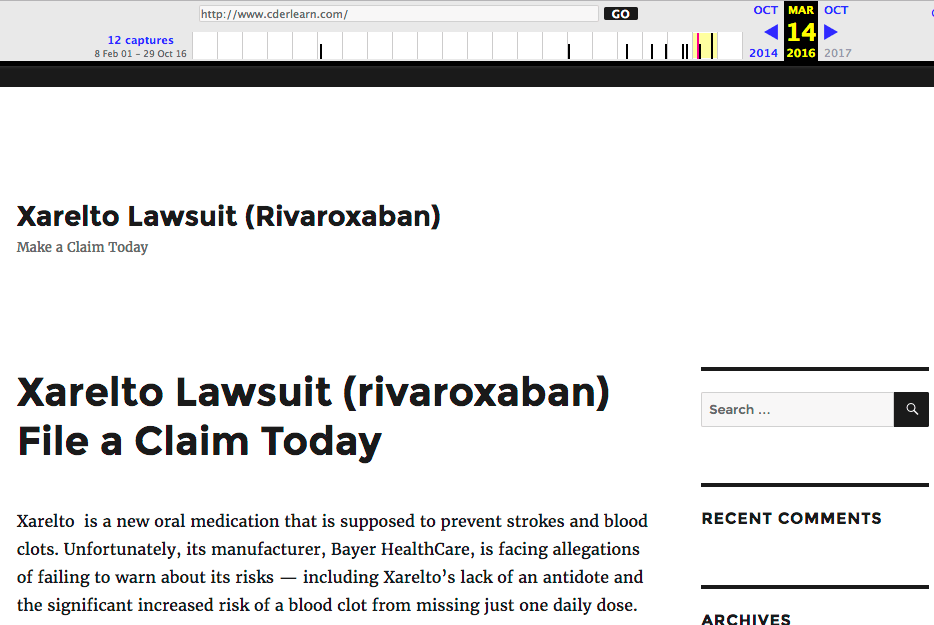
    On that date, if you view source on the archive.org snapshot of cderlearn.com, you can see that it was running a plugin called affiliate-wp, version 1.5.6.

    On March 16th, 2015, one year earlier, the vendor of Affiliate-WP announced that there was a serious SQL injection vulnerability in the plugin.
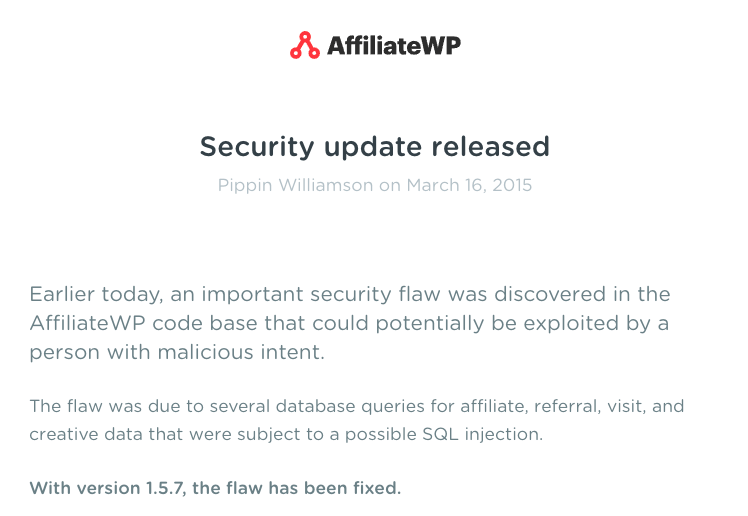
    cderlearn.com was running a vulnerable version of Affiliate-WPin March of last year, which may have been used to compromise the site.

    cderlearn.com was then used as a command and control server for malware that was designed to give an attacker remote control over a windows workstation. The DHS report provides a few samples of the network traffic between the Windows malware and cderlearn.com:
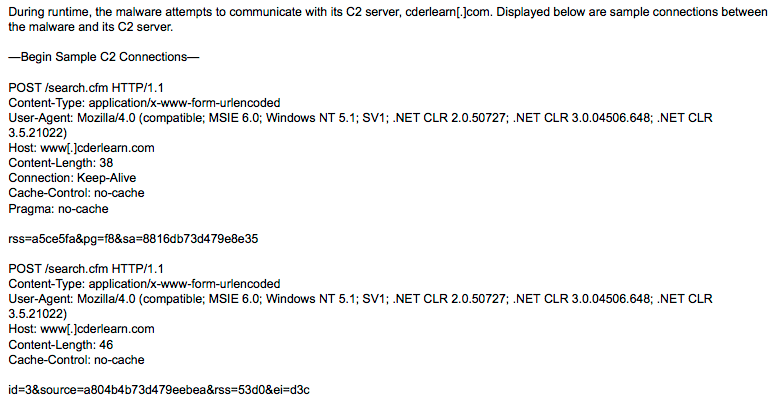
    The malware appears to be sending POST requests to a ‘search.cfm’ script which is part of the command and control malware installed on cderlearn.com and is disguising itself as a Cold Fusion search script.

    Surprisingly, the website in question appears to still be using the same vulnerable version of the Affiliate-WP WordPress plugin, even today.

    Conclusion

    In the example above, a vulnerable WordPress site was used in the ‘Command and Control’ step in the kill chain to provide a command channel for remote manipulation of a victim’s workstation. As you can see, this is a sophisticated attack that requires several distinctly separate hacks to achieve its objective. Compromising a WordPress site and using it as a C2 server is only one of those steps, but is a critical part of the kill chain that the attacker needs to achieve their objective.

    When we think about securing our WordPress sites, we usually think about the personal impact that a hacked site might have on us, our business and our customers. The story above illustrates how a compromised WordPress site can be used as part of a sophisticated kill chain, used by a nation state actor to attempt to change the outcome of an election.

    Securing your website by using a firewall and malware scanner like Wordfence is important, not just to protect your own interests and your customer data, but to help secure the wider Internet as a whole.

    Final note regarding comments: Please note that due to the political nature of this issue, we won’t be publishing any comments with political overtones. Our focus is simply on the data that DHS released and the data we are seeing ourselves and our analysis of it. Thank you.

    The post WordPress Used as Command and Control Server in 2016 Election Hack appeared first on Wordfence.
  • Wordfence In Depth: How Malware Becomes Scan Signatures

    One of the most effective ways the Wordfence team keeps the WordPress community and customers secure is through something we call the ‘Threat Defense Feed’. This is a combination of people, software, business processes and data. It’s an incredibly effective way to keep hackers out and provide our customers with early detection.

    Today I’m going to go into some depth describing how the malware detection part of the Threat Defense Feed works. This will be a fun journey into some of the internals here at Wordfence, and will give you insight into how we constantly innovate to keep you and your customers secure.

    The Decision to Vertically Integrate Threat Intelligence

    Some time ago the team and I realized that to give our customers the best protection available, we needed to know what attacks are occurring on the ground. We needed a constant flow of ‘footprints’ that hackers left behind that we could turn into threat intelligence and feed into our products to improve detection.

    We faced an important decision about where to get the forensic data we needed. We could either rely on hosting companies and open sources of malware samples, or we could go into the incident response business ourselves, getting what we needed from recently compromised sites while helping customers recover from a hack.

    The decision was obvious. So we kicked off an ambitious project to create a constant flow of new threat intelligence. We immediately entered the site cleaning market and built a highly competent team of forensic experts that can perform incident response, analyze hacked sites and get those customers back up and running with a clean site as quickly and effectively as possible.

    One of the products of our site cleaning activity is that our team finds malware samples and they feed that into a huge repository of malware that we have created. Our site cleaning customers are able to benefit from excellent customer service and an incredible forensic team at one of the lowest prices in the industry, because the malware we recover from their websites is used to help protect other Wordfence customers.

    In addition, we occasionally receive huge troves of malware from customers and hosting companies. We also feed these sample sets and those from several other sources into our malware repository on a continual basis.

    Removing Malware Duplicates and Creating Malware Signatures

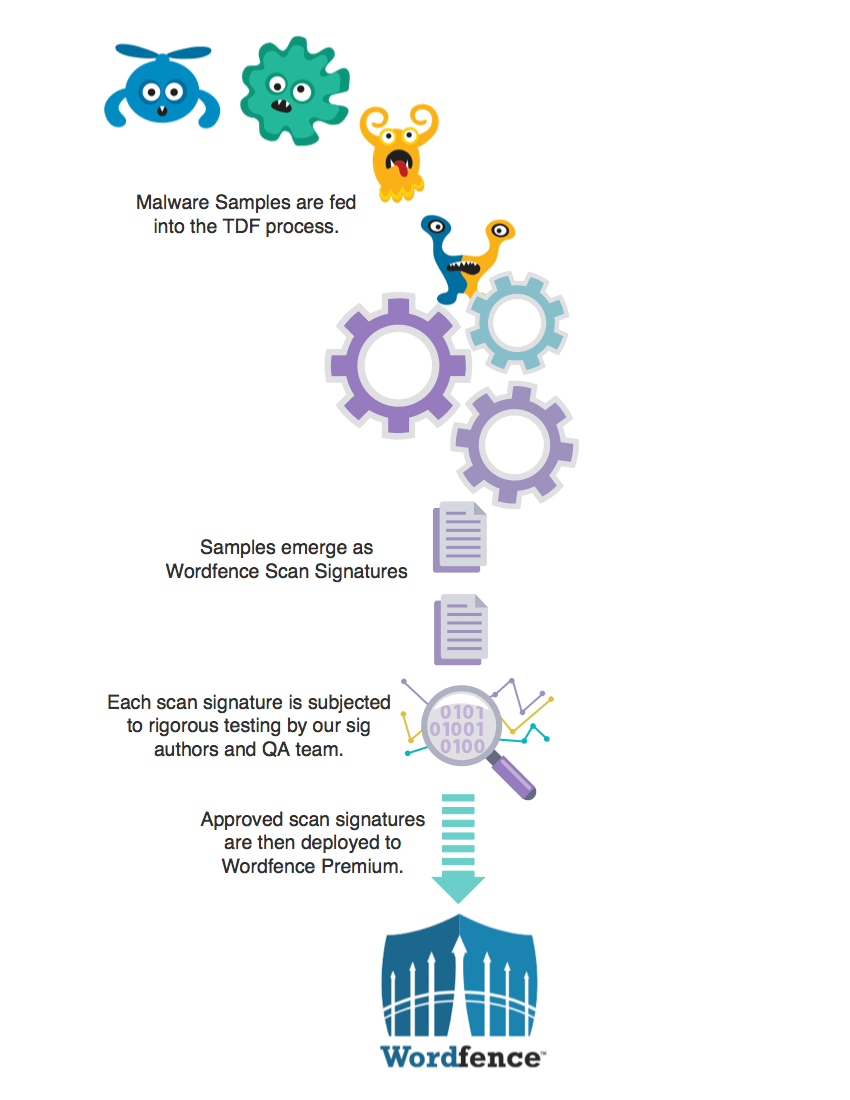
    When our analysts add a new sample to the malware repository, we have an internal tool we use to run a scan on the sample. It uses all our existing malware signatures and lets our analyst know what we already detect. Malware that we already detect is removed from the repository and not included in our workflow.

    Then the malware sample is handed to our malware signature authors who are experts in creating highly optimized regular expressions that are used by our scan engine to detect malware. The sig authors perform another de-duplicating step to ensure that a recently added malware signature isn’t already detecting something they’re working on.

    Once our sig authors are sure what they have is 100% unique malware that we haven’t seen before, they hand craft a new malware signature to detect it. Each signature is checked for compatibility with different versions of PHP and the PCRE regular expression library.

    When we have created several new malware signatures this way, the sig authors get together and combine a batch of new malware signatures which they move into a beta state.

    Avoiding False Positives in Malware Detection

    One of the worst things that a security product can do is to produce false positives. In malware detection, a false positive is a situation where the scanner tells you that it has discovered malware but it really hasn’t. It wastes your time and it also desensitizes you so that you don’t take notice when a true positive shows up. So we put a lot of time into making sure that our malware signatures don’t create false positives.

    Once our sig authors have moved a batch of malware signatures into beta, they run their own set of tests on the batch of signatures. Our sig authors have WordPress installations set up with over 3000 of the most popular plugins and themes installed on each test machine. As part of the early beta test they do, they will enable the ‘beta’ flag in Wordfence so that it uses the beta signatures, and then run a scan on these test machines.

    If the scan runs on a clean test machine and comes back with no false positives, they move the scan to the next phase which is a formal software quality assurance step. At this point a senior member of our quality assurance team performs a series of final tests to ensure that the batch of beta malware samples does not produce any false positives and that they detect the ‘true positives’ that each signature is designed to detect.

    Moving Malware Signatures to Production

    Once our malware signatures have been hand crafted, subjected to intense testing by our sig authors and have passed final QA, they are released into production. This step is as simple as turning off the beta flag on the new batch of malware signatures and they become instantly available to our Premium customers. Thirty days later, those new premium malware signatures become available to our community customers at no charge.

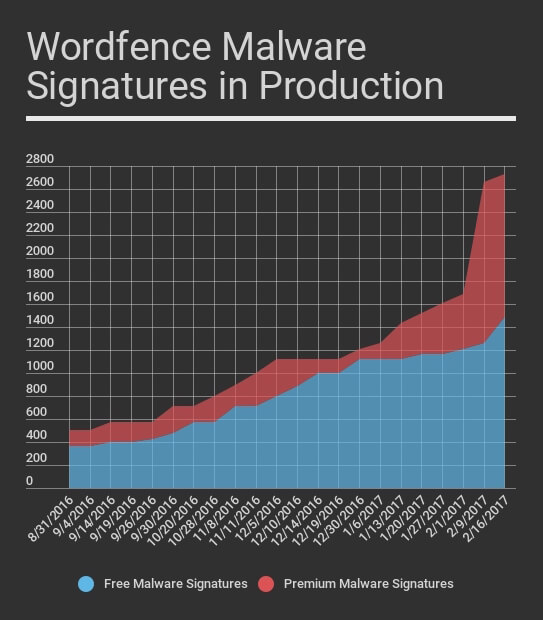
    The graph below shows the total number of malware signatures we have in production over time at one week intervals. The red graph shows the number of Premium Wordfence signatures we have in production.

    As you can see our community threat defense feed receives malware signatures 30 days later and the number of community malware signatures has grown significantly since September as the Premium signatures have been feed into the community ruleset during the past 5 months.

    During the past few weeks our team has added a significant number of new Premium rules based on new malware we are seeing that infects sites and injects links to Japanese spam websites. The malware our team found has a significant number of variants requiring a large number of new rules to be created. Those will start entering the community feed over the coming weeks.

    People, Software, Processes and Data

    At Wordfence we are continuously working to find new ways to efficiently deliver actionable threat intelligence to our customers in real-time so that we can better secure you, your website and your customers. We have a research project underway at present that is working on finding new ways to further improve the process I’ve described above.

    The most important component of our Threat Defense Feed (or TDF) is our people. The team at Wordfence has done an incredible job of taking ownership of the TDF and continuously improving it and the products, like the Wordfence plugin, that use the threat intelligence that the TDF provides. The result is that over the past year you have seen a significant improvement in detection rates both on the Wordfence Firewall and in the malware scanner.

    We’re all very proud to count you among our customers and will continue to innovate so that we can better protect you, your customers and your investment.

    Mark Maunder – Wordfence Founder/CEO.

    Special thanks to Wordfence team member Åsa for designing the super awesome malware characters in the diagram above. 

    The post Wordfence In Depth: How Malware Becomes Scan Signatures appeared first on Wordfence.

  • A Big Thank You to our Premium Customers for Powering Wordfence and Helping Secure the Community

    At Wordfence we are intensely customer focused. A few years ago when we made our first non-founder hires, we hired two amazing people: Matt Barry and Tim Cantrell. Matt is a spectacular engineer and immediately took ownership of the Wordfence code base and eventually wrote the core of what is the Wordfence Firewall today. Matt is also amazing to work with – one of the smartest and nicest people you’ll ever have the pleasure of meeting.

    Tim is a customer service engineer, and since day 1, he has done a spectacular job. He is also just a super nice guy. We have all worked closely together since then, and today we are a team of almost 30 people including a much larger engineering organization and a sizable customer service team. Our core focus still reflects those early hiring decisions: Great engineering and excellent customer service – and Tim and Matt have driven much of that ethos from early on.

    In our organization, we behave very much like most commercial software companies. We focus on code quality, stability and innovation. We have a constant feedback loop from our customer service team that feeds your wisdom and insights back into Wordfence. But the one thing that makes us a bit different from many large software organizations is that only 6% of the websites who use our product are paying customers. Or put differently, 94% of our users use the free Wordfence product.

    When I published our post last week describing how we turn malware into new detection capability in Wordfence Scan, I included a chart that shows the number of malware signatures we have added over time in the past 5 months:

    One thing that struck me when looking at this chart is how clear it is that our Premium Wordfence customers are powering an incredible free product for the community. The chart above really shows just one of the final products of the organization’s work: scan signatures that continuously improve the malware detection capability that Wordfence has.

    As you can see in the chart, all malware signatures eventually, after 30 days become available to everyone in the community. That big jump in Premium signatures recently will also be reflected in the free signatures in a couple of weeks, and those signatures are not going away. They are gradually accumulating over time. The same is true for our firewall rules.

    As we grow the Wordfence engineering team, customer service team, QA team and other areas, our free customers are all benefiting because most of Wordfence’s features are available to the community completely free. These free features include:

    • The best malware scanner for WordPress in the business – which includes the ability to help clean hacked sites.
    • A powerful web application firewall that blocks a huge number of attack variants.
    • The ability to view your website traffic, web crawlers like Google and attacks on a live dashboard and react to them in real-time.
    • Brute force attack prevention.
    • A rate limiting firewall to help protect your content.
    • A range of other tools like whois lookup, diagnostic tools and much more.

    Our Wordfence Premium customers are the ones that are powering all these features and the team behind them. Our Premium customers also power the free support you receive on the WordPress.org support forums from our team.

    Our Premium customers have also powered the incredible free WordPress Security Learning Center that we have created with tons of content, including professionally produced videos. It’s all free and exists to help secure the WordPress community.

    And finally our Premium customers are the ones who power our ability to produce and publish ground-breaking research here, on this blog. We are also able to help our team attain new security certifications and maintain existing certifications. In addition our team can attend security conferences like RSA and DefCon to share insights with other security professionals.

    Our Premium customers also empower us to continue to maintain and build a team of security professionals that are the best in the business when it comes to WordPress security.

    So today I would like to extend a sincere and heartfelt thank you from our team and from all our community Wordfence users to our Premium customers for your support. Your decision to upgrade to the Premium version of Wordfence has empowered our team and the Wordfence product, and by extension your decision has helped secure the WordPress community and the 94% of our customers who use the free version.

    Thank you!

    From Mark Maunder, Wordfence Founder & CEO and the whole Wordfence Team.

    The post A Big Thank You to our Premium Customers for Powering Wordfence and Helping Secure the Community appeared first on Wordfence.

  • Remote Working: No Bad Hair Days at Wordfence

    The core team at Wordfence is now 13 full-time employees, and with contractors we are a team of 29. We are still at that really fun size where you can have a full team meeting and everyone has a chance to have their say. Every day feels like a hacker conference where everyone knows everyone else, and we are here to help our customers be more secure.

    I have spent a considerable amount of time thinking about why our team is so amazing. Did we get lucky? Is it our hiring process? Are awesome people predisposed to work in information security? Perhaps it’s a bit of all of that. But one thing that has occurred to me relatively recently is that the way we work is unique, and it may be a contributing factor.

    Our team is 100% remote, and all our interaction is either via collaborative applications or voice calls. We don’t do video calls. We either use voice calls on Slack or an application called TeamSpeak, which is the most reliable VOIP system we’ve found. TeamSpeak actually grew out of the gaming community.

    Improving Signal-to-Noise with Voice Only

    Being 100% remote and using voice-only communications has an interesting effect on an organization. It filters out a lot of noise. Communication becomes more about relating to others at a purely intellectual level. Whether you’re making a joke (I make very bad jokes), solving a problem or just sharing an idea, it’s not about who has the biggest presence in the meeting room or whether someone has a new hairstyle. You are interacting with your colleagues in a purely intellectual capacity, and that changes the dynamic quite radically.

    Our team is incredibly effective, and I think this way of interacting is one of the reasons why. It really improves the signal-to-noise ratio. If you think about a brick and mortar organization and how many daily distractions you have: Commuting to work, finding parking, walking into the office, sitting down to work while other people wander into your office to chat, the endless in-person meetings that could have been a 1 minute conversation.

    Working remotely with audio only strips away all that and makes you and your team incredibly effective.

    For larger team meetings, we use TeamSpeak, and we all use push-to-talk or PTT. What is great about this is you can have a barking dog or noisy kids or a construction crew in the background, and the rest of the team can’t hear it.  When you want to speak, you hit your PTT button and the audio quality is amazing. If it gets bad for some reason, we can see packet-loss for each person connected and so we can figure out within seconds where the problem is. It usually results in someone moving closer to their WiFi hub.

    For meetings with two or three people, we tend to use Slack voice calls. Those calls don’t require PTT and you can hear everyone all the time. That creates a closer feeling, kind of like a coffee shop. Now that Slack seems to have ironed out the bugs, Slack voice audio quality is usually awesome.

    Occasionally I’ll have to speak with someone outside the company and do a video call. That usually means making sure I don’t have any dog toys lying around the home office, getting rid of the heavy metal t-shirt and putting on something gray and boring and making sure I don’t have crazy hair. I find it’s quite a recalibration when you’re used to just walking up to your desk and doing quick and easy voice calls with anyone in the team. Suddenly you have to worry about looking at them or looking at your camera. You can’t just stare out your office window as you focus deeply on the idea they’re conveying, because they might wonder if you are not paying attention.

    Entering the Golden Age of Online Collaboration

    In the past 10 years, user-friendly mainstream tools like Slack have emerged that make remote working incredibly easy and allow a company to have a remote working culture. Adjusting to this new reality will take time, even for companies that appear to be innovators and technology leaders, which is perhaps why so many tech companies still insist on brick-and-mortar offices.

    Working remotely doesn’t come without challenges. There is the honey do list that your spouse or cohabitants may think you are permanently and constantly available to help with during your new job. A few conversations explaining that ‘remote’ doesn’t mean ‘pretend’ usually helps resolve that.

    If you have a family, working from home can be life changing because you get to spend more time with your kids. Some of our team were in jobs before joining Wordfence where they worked long hours and would really only spend quality time with their kids on weekends. Being able to be home based has been transformative for them.

    We have evolved the way we work and the tools we use over time. What we have today at Wordfence is an incredible remote working environment where we relate to each other at an intellectual level as remote workers and we trust each other and love working together. It is better than any workplace I could have ever imagined.

    If you are a developer, security analyst, QA guru or customer service engineer, Wordfence is hiring. We would love to hear from you.

    The post Remote Working: No Bad Hair Days at Wordfence appeared first on Wordfence.