Today we are very excited to announce that we have launched a real-time IP blacklist for Wordfence Premium customers. This is something we have wanted to do for a long time because the benefits to our site owners are enormous.
The new blacklist will completely block thousands of malicious IPs from making any attempt to access a Premium customer website. It will significantly reduce the risk of a hack, will reduce load on WordPress sites and improve site performance.
What is the Wordfence Real-Time IP Blacklist?
At Wordfence we monitor over 20,000 attacks per minute from IP addresses across over 2 million active WordPress sites that we protect. During the past year, we have been working to analyze this attack data to determine who the bad actors are while making sure that we don’t include any good guys accidentally.
Using this data and powerful analysis capability that we brought online, we have the ability to distill our attack data into threat intelligence that shows us who the most dangerous IP addresses on the web are for WordPress websites at any instant in time.
Attackers are constantly switching IP addresses on the web, so our list of the most dangerous IPs is refreshed hourly.
How does Wordfence Premium Get the Real-Time IP Blacklist?
If you are a Wordfence Premium customer who has upgraded to Wordfence 6.3.4 or above, your site is already receiving the Wordfence IP Blacklist every 2 hours. The option is enabled by default and is active.
Internally, our systems generate the list once an hour using real-time attack reports.
Who are the bad guys that are being blocked?
Most of the attacks that we see on WordPress sites originate from compromised servers. About 25 million attacks per day are brute force login attacks. Another 3 to 5 million are what we refer to as ‘complex’ attacks which try to exploit a security vulnerability in your WordPress website.
We track the IPs that these attacks originate from and we monitor a range of metrics for each IP including the number of attacks, attack frequency, duration of the attack, the kinds of attacks they are engaging in, the number of unique sites attacked and much more. Using algorithms, we distill this data into a list of the most dangerous IPs that are attacking WordPress sites at any instant in time.
How does Wordfence prevent good guys from being blocked?
When we generate the blacklist, we run it through a series of filters which remove known VPN providers, reverse proxies, cloud WAF providers and other known IPs that can generate false positives.
We have a series of filters that use a wide range of metadata about each IP address to determine if it is a false positive or not. Once the final list has been produced, we regularly inspect it for false positives to ensure nothing slipped through our filters. What we end up with is a list of the most dangerous IP addresses on the web that are attacking WordPress sites, right now.
When an attacker is blocked using the Wordfence IP blacklist, this is what they see:

If a real visitor is blocked, this gives them the opportunity to report the false positive to us. They copy and paste an encoded block of text which communicates important information to us that we need to diagnose the false positive.
These reports are aggregated per IP address in our issue tracking system and our team has access to them in real-time as they arrive. If a false positive sneaks into the blacklist for some reason, we react very quickly to it.
Can I get access to the list of IP addresses?
Unfortunately not. Due to the sensitive nature of the data, we use a hashing algorithm to protect the addresses of these attacking IPs. Many of the attacking IP addresses are infected machines that have vulnerabilities themselves that can be exploited. If we distribute the real-time blacklist, this may provide other attackers with a list of target machines they can compromise.
For that reason, we have chosen to keep the list confidential. When your WordPress site is attacked by one of these IP addresses, Wordfence uses a hash prefix list to recognize a possible attack. We then confirm the attack by performing a lookup on our servers. If we confirm this is a malicious IP on our blacklist, the IP is blocked, and the block is cached.
Will this slow down my site?
Absolutely not. We use a smart algorithm to determine whether or not we should run a check on our servers for a particular IP address. This algorithm ensures that well behaved IP addresses are only checked in very rare cases. In fact, on most sites you will probably never see a check run on a well behaved IP address.
This algorithm also ensures that malicious IPs are checked 100% of the time. When your site gets the result back for an IP address, that IP is either allowed through or is blocked. In either case the ‘allow’ or ‘block’ is cached for a period of time so another lookup does not occur.
This keeps your site running incredibly fast while blocking 100% of the IPs on our blacklist so they can’t consume your resources.
Will this make my site faster?
Yes it will. In February, the top 25 attacking IP addresses alone generated over 80 million attacks during the month. You can see charts of the number of daily brute-force and complex attacks we monitored throughout the month, below:
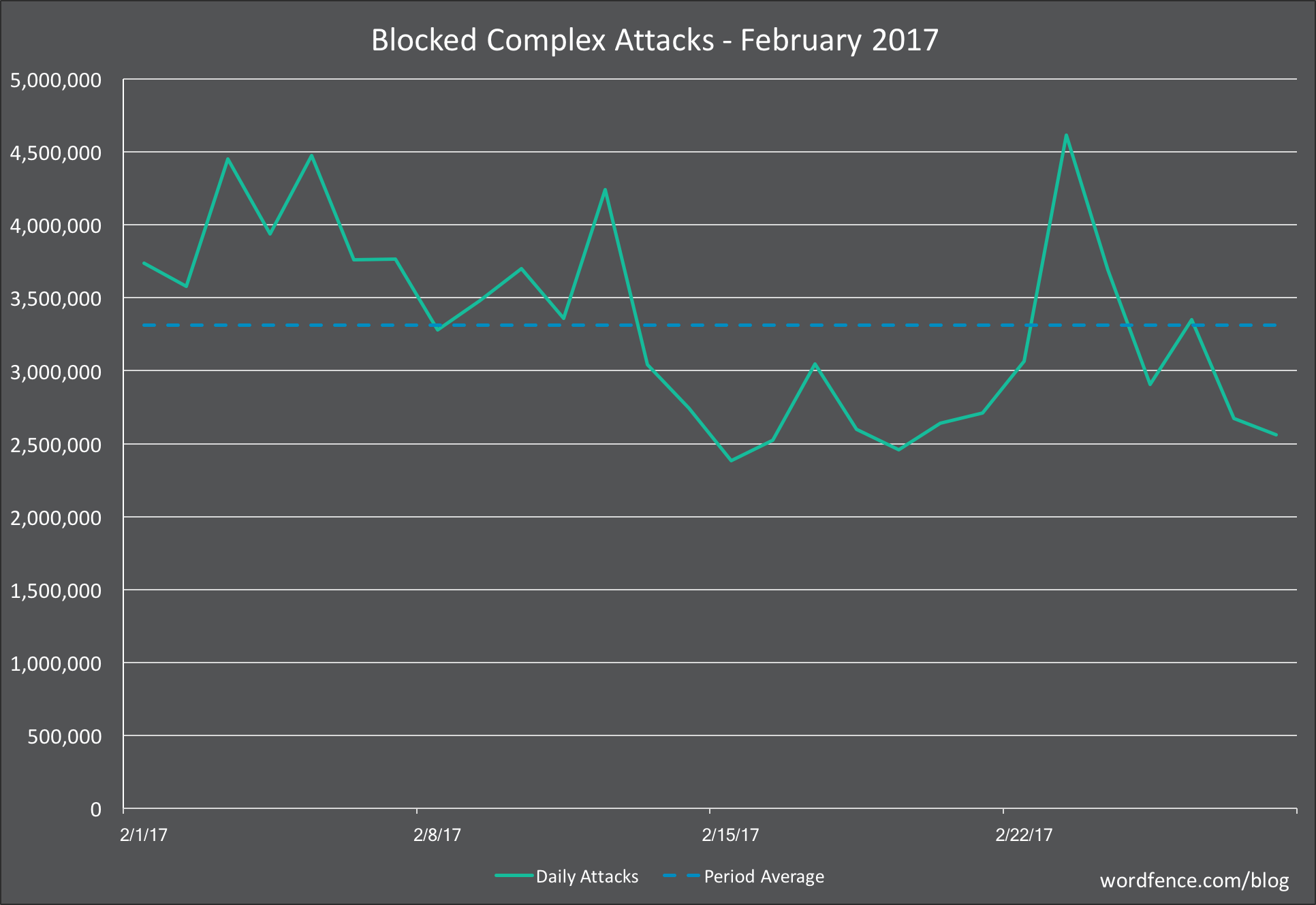
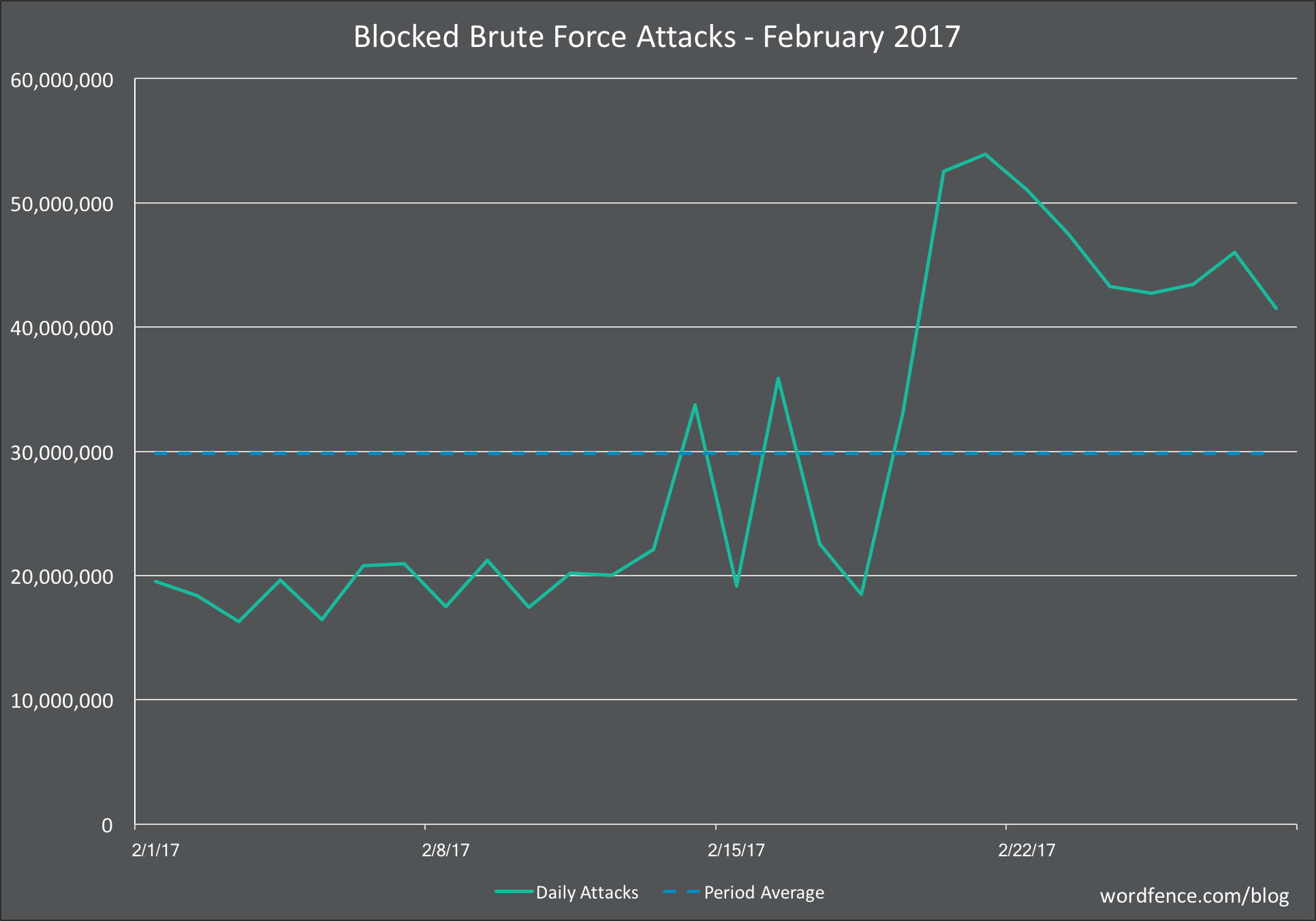
These attacks use a lot of resources on the target websites. Many of these attacks are brute-force login attacks which submit a form, perform a database lookup and slow down your site.
With the new real-time blacklist, we block far more than just the top 25 websites. All of that malicious traffic doesn’t ever get to submit a login form or make any requests on your site. The Wordfence firewall executes before WordPress even loads and blocks these malicious IPs outright.
By blocking these requests, Wordfence frees up resources on your site to improve performance for real visitors and search engines indexing your content.
How is Wordfence launching this feature?
We have spent a great deal of time making sure that the algorithms we use to generate the real-time blacklist are only filtering out the bad guys and letting the good site visitors through. The code that does the blocking has already been released and is active on our Premium customer websites.
We have already released a small IP blacklist to our Premium customer sites. These are a few hundred IP addresses. Over the coming weeks we will gradually increase the size of that list until it covers several thousand IPs that are attacking WordPress sites across the web in real-time.
As we expand the blacklist we are carefully monitoring false positive reports and responding to them in real-time by immediately removing an accurate false positive report.
How is this different from the network based IP blocking that Wordfence has done in the past?
The new IP blacklist is proactive. That means that if we know an IP is being malicious, it will be completely blocked from your site and won’t be able to access anything, make any malicious requests or consume any resources.
In the past, Wordfence has used a reactive IP blacklist. This feature is still available to our free customers and appears on the Wordfence options page as an option titled “Participate in the Real-Time WordPress Security Network”. If this option is checked, a known malicious IP address is blocked from attempting to sign-in multiple times. The IP will get a single attempt, your site looks up the IP address status and, if it is malicious, the IP is completely blocked from accessing your site.
The free brute force protection is reactive in the sense that an IP address has to attempt to sign into your site before we check its status and block it.
The new blacklist is proactive in that every request from a known bad IP is completely blocked from ever accessing your site. This provides better performance and secures you completely against known malicious threat actors.
Can I disable this feature?
Yes you can. Simply go to the “Firewall” menu on your Wordfence plugin menu. Scroll to the bottom where you see a checkbox titled “Preemptively block malicious IP addresses “. You can uncheck that box and save your options to disable the feature.
This is what the option looks like:

At what point in the Firewall are IPs blocked?
Wordfence uses a chain of execution to make decisions about what it should allow through and what it should block. The chain of execution is as follows:
- The Wordfence Firewall rules execute first. This happens before any WordPress code is loaded and before any database queries have occurred. If a request breaks a firewall rule, it is blocked. We execute firewall rules first so that you can still see malicious requests being blocked in live traffic and which firewall rule they broke.
- The IP blacklist checks run next. These also execute before any WordPress code is loaded and before any database queries occur. If an IP is on the list, it is blocked at this point without generating any load on your database and without loading the bulky WordPress code.
- If a request makes it past the firewall and blacklist check, the WordPress code is loaded, database connections are made and the rest of the checks that we do are quickly completed. These include country blocking, brute force login protection and rate limiting. If they pass, WordPress handles the request and the user receives a response.
By executing the firewall rules and blacklist check first, we massively reduce load on WordPress and your database. This prevents malicious IPs from taking resources away from your site visitors.
How will the IP blacklist change over time?
At Wordfence we have made a significant investment in our team and operations to give us the ability to mine attack data and produce high quality threat intelligence. We have also developed internal processes to operationalize that threat intelligence, as we have done with the Wordfence Threat Defense Feed and the new IP blacklist.
Our threat intelligence capabilities are constantly evolving and improving. The list of blocked IPs will grow over time until it includes the ‘long tail’ of IPs that are engaging in less attacks and are using less common attack techniques. The list of attacking IPs at any instant is very large and we intend to get as close as possible to including every malicious actor in the IP blacklist.
What if I have more questions?
As always you are welcome to respond in the comments and I will do my best to reply in a timely fashion. You are also welcome to post questions in our support forums or via our Premium support website.
We are very excited about this new feature. It is is a significant level-up in the protection we provide our customers and will massively reduce malicious requests across all the Premium sites that we protect.
Mark Maunder – Wordfence Founder & CEO.
The post Wordfence Launches Real-Time IP Blacklist for Premium Customers appeared first on Wordfence.