Online Services

Category: Security

  • New WannaCry Ransomware and How to Protect Yourself

    This is another Wordfence public service announcement (PSA) that describes new WannaCry ransomware variants that have emerged in the past few hours and describes how to protect yourself against the WannaCry ransomware, also known as the WannaCrypt ransomware. We occasionally send out alerts that are outside the WordPress space when we feel that they are in the interests of our WordPress publishers and the broader global community. This is, unfortunately, one of those alerts.

    How to protect yourself against WannaCry ransomwareOn Friday we alerted you to a global ransomware campaign a few hours after it started. That campaign has now infected over 10,000 organizations and 200,000 individuals in 150 countries. This includes the UK National Health System which saw ambulances divert from affected hospitals.

    On Friday a researcher accidentally stopped the ransomware from spreading by registering a domain that served as a kill switch for the ransomware.

    A few hours ago new variants of the WannaCry ransomware started emerging. One of the variants was also stopped today by registering a kill switch domain, the same way the ransomware was stopped on Friday. A second variant is not encrypting infected machines due to an error in programming, but it is spreading.

    We expect new variants to emerge all week that continue to exploit the vulnerability in SMB that WannaCry has been using. It is critical that Windows users protect themselves immediately against this threat.

    WannaCry Ransomware: How to protect yourself

    1. If you use Windows, install the patch that Microsoft has released to block the specific exploit that the WannaCry ransomware is using. You can find instructions on this page in the Microsoft Knowledge Base. You can also directly download the patches for your OS from the Microsoft Update Catalog.
    2. If you are using an unsupported version of Windows like Windows XP, Windows 2008 or Server 2003, you can get the patches for your unsupported OS from the Update Catalog. We do recommend that you update to a supported version of Windows as soon as possible.
    3. Update your Antivirus software definitions. Most AV vendors have now added detection capability to block WannaCry.
    4. If you don’t have anti-virus software enabled on your Windows machine, we recommend you enable Windows Defender which is free.
    5. Backup regularly and make sure you have offline backups. That way, if you are infected with ransomware, it can’t encrypt your backups.
    6. For further reading, Microsoft has released customer guidance for the WannaCry attacks and Troy Hunt has done an excellent detailed writeup on the WannaCry ransomware.

    Get the word out

    The second wave of attacks appears to have just started within the past few hours. This is going to be a rough week for Windows users. We recommend you get the word out by sharing this post to help keep friends and family secure.

    Additional resources:

    The post New WannaCry Ransomware and How to Protect Yourself appeared first on Wordfence.
  • Massive Global Ransomware Attack Underway, Patch Available

    This is a Wordfence public service security announcement for all users of computers running any version of Windows.

    We have confirmed that a serious virulent ransomware threat known as WannaCrypt0r/WannaCry has affected Windows computers on shared networks in at least 74 countries worldwide, with 57,000 reported individual cases being affected. And according to the analysis team at Kaspersky Lab, that number is growing fast.

    Once one computer on a network is affected, the malware infection easily spreads to other Windows computers on the same network, shutting down entire government agencies and national infrastructure companies. Hospitals across the UK were being forced to divert patients and ambulance routes as of Friday afternoon, and several utility companies across Europe reported infection across their computer networks according to BBC News.

    What Is Ransomware?

    Ransomware is a kind of malicious script or software that installs itself on your computer without your knowledge. Once it’s installed and running, it will lock down your system and won’t allow you to access any files or programs on that computer. Usually, as in this current WannaCry exploit, it will alert you to the lockdown with an impossible-to-ignore pop-up screen which informs you that your computer is being held for ransom. To unlock your system and regain access to the computer being held hostage, the lock screen informs you that you must purchase an unlock tool or decryption key from the hacker.

    Where Did This Threat Originate?

    In this case, Microsoft has been aware of the vulnerability since March 2017, when it published a Security Bulletin covering the potential risk. According to the Spanish newspaper El Mundo, early indicators seem to point to the attack originating in China, but more information is needed.

    How Can You Tell If Your Computer Is Infected?

    The most obvious way to tell if your computer has been affected is if you are seeing a ransomware pop-up screen when you start up your computer. But because we don’t know how long the malware sits on your computer or network, not seeing this pop-up isn’t necessarily an indication that you haven’t been infected. The bottom line: if your Windows computer has connected to a shared network, such as those found in schools, public places, cafes and businesses, and you don’t have complete control over every computer on that network and haven’t been keeping Windows up-to-date, your computer may be infected.

    How to Protect Yourself From the Vulnerability

    According to Microsoft a fix for this vulnerability was released on March 14th for all affected versions of Windows. If you are running Windows and have automatic updates enabled you should be okay. If you don’t and haven’t updated recently you should update to the most recently released version immediately. It is important to note that unsupported versions of Windows, like XP, did not receive this security update. Those systems should either be isolated or shut down.

    Please pass this along to your friends and family. Those that are less technical may not have updates auto-enabled, and may need a helping hand updating their operating system.

    The post Massive Global Ransomware Attack Underway, Patch Available appeared first on Wordfence.

  • 22 Abandoned WordPress Plugins with Vulnerabilities

    As an interesting research project, Pan Vagenas, one of our researchers, took a closer look at abandoned plugins in the WordPress repository. His work was inspired by a recent post by Isabel Castillo where she lists the oldest abandoned plugins in the WordPress plugin repository.

    An abandoned plugin is one that has not been updated for several years. According to Isabel’s post there are several plugins that have a large install base that haven’t been updated for some time:

    “Exec-PHP plugin by Sören Weber has over 100,000 active installs despite that it has not been updated since June of 2009. Category Order by Wessley Roche has over 90,000 active installs even though it was last updated in May of 2008. Ultimate Google Analytics by Wilfred van der Deijl has over 80,000 installs even though it was last updated more than nine years ago.”

    We took a look at the plugin repository and discovered the following:

    • There are currently a total of 37,300 plugins available in theWordPress.org repository
    • 17,383 of those plugins have not been updated in the past 2 years.
    • 13,655 plugins have a compatibility tag of 3.x. WordPress 4.0 was released in September 2014.
    • 3,990 plugins have not been updated since 2010 which is over 7 years ago.
    • There are 29,892 additional WordPress plugins in the plugin source code repository that are not listed in WordPress.org in the plugin directory.

    Unmaintained Plugins with Vulnerabilities

    During our analysis, we found 18 abandoned plugins that are currently available for installation from the WordPress plugin repository that appear to have vulnerabilities that have not been fixed. In each case the plugin has not been updated for 2 years or more. Some of them have thousands of active installs.

    We also found 4 plugins (marked with asterisks in the table below) that have fixed a vulnerability, but their fix was released in such a way that existing users are not updated to the newest fixed version. In each case, the author committed a fix to trunk but did not increment the version number and tag it properly in the plugin repository, so their users remain vulnerable.

    The following table lists the plugins that we found, along with number of active installs and the details about each vulnerability. Several plugins are listed multiple times because they have had multiple vulnerabilities reported.

    Note that all vulnerabilities published here have been publicly known for 2 to 3 years. These are all old vulnerabilities which have been publicly disclosed and have not been fixed by the plugin author. Please see our suggestions after the table on what to do if you are the plugin author or if you are a plugin user.

    What to do if you use one of the plugins above

    If the plugin is not marked with an asterisk, we suggest you disable the plugin and remove it from your system. Then immediately contact the plugin author and ask for clarification on whether the plugin has a vulnerability or not. You can direct the author to this blog post which includes suggested actions for plugin authors below. You should start with the plugin support forum on wordpress.org for a particular plugin.

    If the plugin is marked with an asterisk, you can disable and remove the plugin. Then reinstall it and you should have a newer version. We have not audited individual plugins for security so we can not verify whether a vulnerability has been comprehensively fixed.

    What to do if you are the author of a plugin mentioned above

    If you are the author of one of these plugins and have not fixed one of the reported vulnerabilities, we recommend you do so immediately and release a fix to your customers. Then follow the steps in the bullet list below.

    If your plugin is marked with an asterisk, we suggest you read the section on the WordPress codex on updating your plugin. Create a new version for your plugin so that existing users will be updated to the fixed version, tag the release and follow the additional steps we suggest below.

    If you have fixed a vulnerability in your plugin and we included it above, then you did not mention it in your changelog and it has not been recorded on the wpvulndb website, the source of our data above.

    We suggest you take the following actions:

    • Update your changelog and mention that you fixed a vulnerability and what the vulnerability was that was fixed.
    • Contact the wpvulndb project and ask them to update their database to indicate that your plugin has been fixed. Right now their database shows no entry for a version that your vulnerability was fixed in.
    • You should also consider visiting the source of wpvulndb’s data which is often a security mailing list. On that list you’ll find the researcher who discovered your vulnerability. You should drop them a note letting them know the vulnerability has been fixed.

    Evaluating Plugins

    If you are a WordPress site owner, it is important that you evaluate each plugin carefully before you install it. Check how long it has been since the last update. If it has been more than 2 years, you should think twice before installing the plugin because it is no longer actively maintained. You may consider reaching out to the author or posting on the support forum to find out more information.

    The plugin repository is one of WordPress’s greatest assets because it provides a huge amount of code and a large number of applications that extend WordPress. It is also completely open and anyone can contribute. There is no formal source code auditing process or security analysis done on a plugin when it is submitted. There is also no ongoing auditing process for each subsequent release.

    A large number of plugin updates are submitted to the WordPress repository every day. For this reason it is important that you gain at least a basic understanding of who is behind a particular plugin before you install it. Here are a few steps you can take to evaluate whether you should use a plugin:

    • Check the average plugin rating.
    • Check when it was last updated.
    • Check that it is compatible with the current version of WordPress.
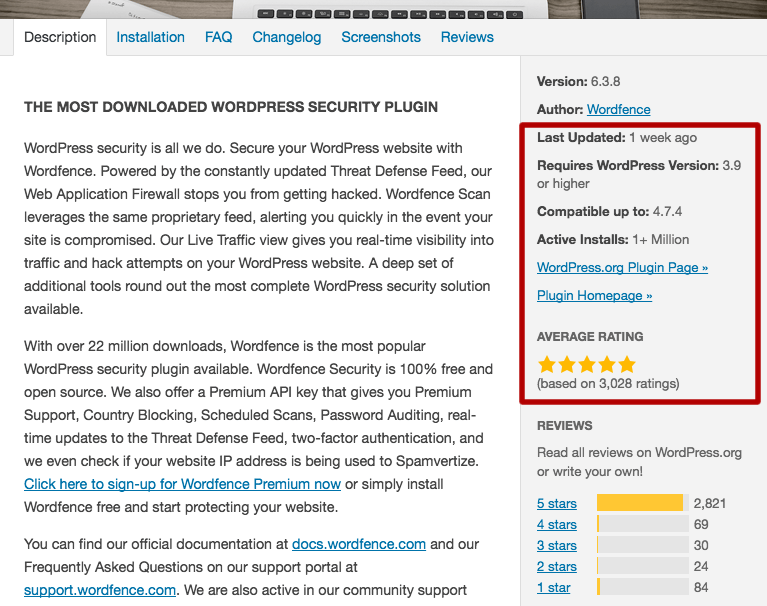
    • Check the number of active installs the plugin has. Some reliable and useful plugins have low install numbers but you should examine a plugin carefully if it has a low install base (below 1,000 active installs). It may not be maintained.

    You can find all this information when you add the plugin in WordPress. Simply click on the plugin title and you’ll find the following. We have highlighted the section you should pay attention to below:

    Conclusion

    Plugins can make adding functionality to your website incredibly easy and are a big part of why WordPress is such a popular platform. The plugin repository on WordPress.org is an incredible resource, but as we have shown above it contains both abandoned plugins and ones with known vulnerabilities. Every plugin you add to your site increases your security risk, and you should evaluate each one to make sure it is being properly maintained.

    As always we welcome your comments below. Special thanks to our security researcher Pan Vagenas who compiled the research we included in this post.

    The post 22 Abandoned WordPress Plugins with Vulnerabilities appeared first on Wordfence.

  • Fake WordPrssAPI Stealing Cookies and Hijacking Sessions

    Fake WordPrssAPI Stealing Cookies and Hijacking Sessions

    Fake WordPrssAPI Stealing Cookies and Hijacking Sessions

    Cookies are stored in the user’s browser to track behavior on a specific website. They also keep a user logged in during the active browsing session. Without cookies a user would need to log in, in order to authenticate every action they take. Essentially, cookies keep a user logged in until they either log out or the cookie expires.

    Cookie Stealing and Session Hijacking

    If an attacker is able to steal active cookies, the attacker can pretend to be that user and perform any actions the user has permissions to perform.

    Continue reading Fake WordPrssAPI Stealing Cookies and Hijacking Sessions at Sucuri Blog.