Online Services

Category: Security

  • Malware: 139,000 WordPress Sites Saved in 30 Days

    Malware: 139,000 WordPress Sites Saved in 30 Days

    Wordfence provides two core security capabilities to the websites we protect. Our firewall prevents your WordPress site from getting hacked. Our malware scanner detects if you have been hacked or if malware has somehow been installed on your system.

    Today I’d like to share a few malware statistics, how we put new malware detection into production and a story about one prolific piece of malware we’re seeing.

    139,766 Unique WordPress Sites Saved in 30 Days!

    During the past 30 days, 139,766 unique websites have detected malware of some kind using Wordfence scan. That’s an incredible number. I like to think of it in terms of baseball stadiums. Our local Safeco Field, home of the Seattle Mariners, can fit just under 50,000 people. If each website belongs to a person, we could fill the stadium almost three times with website owners we’ve helped protect in the last 30 days alone! That’s incredible. 

    At Wordfence we provide a free community version of our plugin for WordPress and a paid version. We send out threat intelligence to the plugin via our Threat Defense Feed. This includes new scan ‘signatures’ for new malware that we have discovered during our forensic research. It also includes new firewall rules to protect you against new kinds of attacks.

    Wordfence Premium receives the updates in real-time. Our community edition is delayed by 30 days. So new scan signatures only become available to the free users of Wordfence 30 days after they are released.

    During the past 30 days the malware signatures that our Premium customers have early access to detected malware on 5.2% of our Premium customer websites.

    How many free and premium scan signatures do we currently have?

    Wordfence currently has 364 free scan signatures that each detect a different kind of malware. In some cases a signature will detect many different kinds of malware because it’s designed to detect common malware patterns.

    When you do a scan with the free version of Wordfence, you are checking every file you scan against all 364 of these signatures to try and detect the most common malware we’re seeing. It’s worth noting that we actually retire some malware signatures because sometimes, a piece of malware just isn’t seen anymore or we improve our detection capability.

    For our Premium customers we have an additional 118 signatures (sigs) currently in production. We continue to add to those sigs and the older sigs become available to our free customers 30 days after they are released.

    Those 118 Wordfence Premium sigs were added at different times, so they become available to the free community at different times.

    • Thu Sep 08 2016: 38 new Premium sigs will be released to our free customers
    • Sun Sep 25 2016: 24 Premium sigs will be released
    • Wed Sep 28 2016: 15 Premium sigs will be released
    • Thu Sep 29 2016: 41 Premium sigs will be released

    How does Wordfence develop, test and release scan signatures?

    The way Wordfence adds new scan signatures is we develop and then test them internally. The testing involves running each sig against the top 5,000 WordPress themes and plugins along with multiple versions of WordPress core to ensure there are no false positives. We have developed internal tools to do this very quickly.

    Then we add them to our ‘beta’ feed. If you are a Wordfence Premium customer you can enable the Beta Threat Defense Feed which includes our beta scan signatures by going to the ‘Diagnostics’ menu, scrolling to the bottom and checking the ‘beta’ checkbox. This is only available for Premium customers.

    Once we’ve verified the new sig is not creating problems for our beta community, we flag the sig as ‘production’ and it enters production for our Wordfence Premium customers. Those customers receive the new sig automatically and don’t need to upgrade or take any action. 30 days later the sig enters the community version of Threat Defense Feed.

    Wordfence currently has 112 scan signatures in ‘beta’ and they will enter production for our Wordfence Premium customers over the next few days and weeks. We tend to release scan sigs in batches, as you can see from the date schedule above.

    The Premium Threat Defense Feed gets the newest scan signatures which means that those signatures have an unusually high detection rate. The detection rate is high because the new sigs we add are things we have recently seen in the wild.

    What does “In the Wild” actually mean? Where do Wordfence scan signatures come from?

    So what does it mean when we say we saw an infection ‘in the wild’ and we added it to the Threat Defense Feed as a scan signature?

    At Wordfence we have built a team of some of the finest cyber forensic investigators in the industry. We have two major efforts that help us find new WordPress malware samples and threats.

    The first is our site cleaning service. Wordfence offers site cleaning at a very reasonable price and one of the things we get from providing that service is on the ground intelligence of what is infecting real WordPress sites. Our site cleaning team has a very efficient process to turn the samples they find on infected sites into scan signatures in production. The process ensures we remove any duplicates and are able to prioritize samples where we’re seeing a widespread infection.

    The second way we gather threat intelligence is by mining attack data. When an attack occurs on a WordPress site, that attack is reported to us. Some of those attacks include malware payloads. We are able to aggregate those malware samples into a database and prioritize them by the malware we are seeing most frequently. This has become a huge source of new malware signatures for us which has accelerated the pace at which we are able to add new signatures to our scan engine.

    What is the most widespread new malware Wordfence is seeing?

    To illustrate how powerful it is to have the newest malware signatures in your scan feed, lets take a look at a specific example. Below we have a scan signature that was added on the 27th of July, last month.

    Screen Shot 2016-08-30 at 10.44.22 PM

    The image above shows selected database fields for this signature’s record.

    Internally at Wordfence this signature has the codename Backdoor: PHP/eawtluil. Not very attractive sounding. Our more technical audience will recognize the scan ‘rule’ as a regular expression or ‘regex’.

    During the past 30 days this signature has detected over 1 million infected files across all Wordfence customers. This infection has a habit of infecting a lot of files when it hits a WordPress site. That is more malware infected files than the next 10 signatures combined.

    This signature was added on the 27th of July last month. That means it was in our Premium feed for 30 days and only recently became available to the free community users of Wordfence on the 27th of August, 4 days ago. Now that it’s running in our free feed, it is detecting a huge number of malware infected files across the WordPress ecosystem. And that’s just one signature!

    So what does this sig actually detect? This is what the malware actually looks like: (click to open a larger image in a new tab)
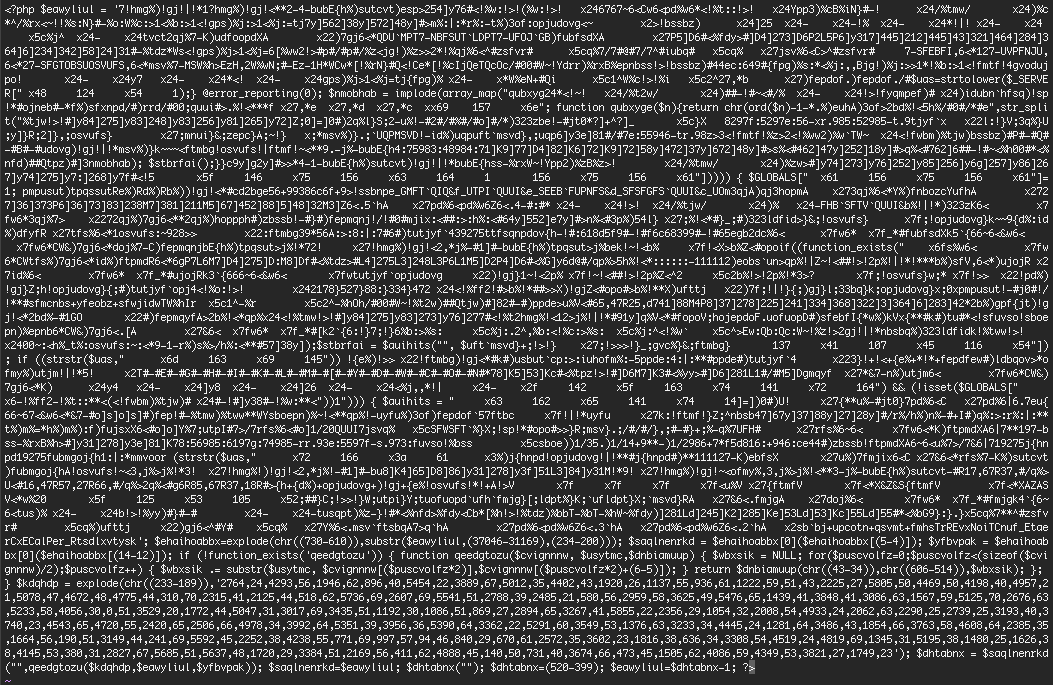
    As you can see the malware is heavily obfuscated (encoded to hide the meaning of the code).

    As attackers realize we are detecting their malware, they will use new obfuscation, or code hiding techniques. This signature will become less effective and new signatures we add will have a higher detection rate. That is why we refer to our scan signatures as a ‘feed’ or the Threat Defense Feed. Our forensic work is ongoing and we are continually adding to the feed and optimizing what is in it.

    In closing…

    I hope this has given you some insight into a small part of our operations at Wordfence – specifically our forensic efforts into gathering threat intelligence and how we turn part of that data into the scan signatures that provide you with early detection of a hack or malware on your WordPress website.

    If you would like to install Wordfence free on your WordPress website, simply go to the Plugins menu and use the search box on the top right to search for Wordfence. To upgrade to Wordfence Premium and get your scan and firewall rules in real-time, 30 days earlier than everyone else, you can visit our home page to learn more about the Threat Defense Feed and how to get Wordfence Premium.

    As always I welcome your questions or comments. Thanks for using Wordfence and stay safe.

    The post Malware: 139,000 WordPress Sites Saved in 30 Days appeared first on Wordfence.

  • Hacking a WordPress Botnet

    Hacking a WordPress Botnet

    While analyzing some of the attacks we see on the Wordfence Web Application Firewall, we discovered code that an attacker was trying to upload that was part of a botnet. In case you’re not in the information security space, a botnet is a network of ‘bot’ or ‘zombie’ machines that is controlled from a central command and control or C&C server.

    In the case of this botnet, it was controlled via a chat service called IRC or Internet Relay Chat. IRC is a popular way of controlling botnets because you can have all the ‘bot’ or zombie machines connect to the chat server and join a channel to receive broadcasts. This allows the botnet owner to simply sign into the chat server and broadcast commands to all the zombies which they run at the same time.

    The code below shows a typical hack attempt where the attacker is trying to inject their botnet code into a targeted WordPress site. Wordfence blocks this attack and any attack that includes this botnet code.

    Once a WordPress site is compromised with this attack, the infected server connects to an IRC chat server, ready to receive commands and do the botnet owner’s bidding.

    The owner might use those zombie WordPress sites to attack more sites. Or he might use them to launch a distributed denial of service or DDoS attack on someone, overwhelming them with traffic. He could also simply deface all the sites in his botnet with SEO spam.

    The hashed password is shown next to LND-Bloodman’s username above. We’ve blurred the encoded command and control server IP address. The content length is over 25K so this is a reasonably long script.

    The Wordfence team decided to analyze the botnet code and try to identify who was running the botnet.

    Going After the Command and Control Servers

    During our analysis of the malicious code, we found five IP addresses of IRC command and control servers (C&C servers) for this botnet. Two of them were down. Three were still up.

    We created modified zombie code to connect to the C&C servers and do further analysis. Our code was designed to save all files it was commanded to download. It would also log all commands sent to it and not actually do anything malicious.

    The botnet owner’s nickname/handle appears to be Bloodman.

    One of the things we were hoping to get by doing this is Bloodman’s password that he uses to control his botnet. He had built his botnet zombie code so that whenever he sent a command to the zombies via the C&C server, it included a password.

    The zombies would hash that password, compare the hash to what is stored in the code and if it matches, would know it’s Bloodman sending the command and would run the command.

    The hash we found in the code, as you can see in the above image, is:

    2cbd62e679d89acf7f1bfc14be08b045

    Googling this hash shows that the malware with this password has been seen before. A blogger saw an attack containing this hash in September last year.

    The oldest Google result mentioning this hash is from December 2012 and is a request to crack the hash and turn it into the password which is still unsuccessful. This indicates with a high degree of certainty that Bloodman has been active and using this password since December 2012.

    If one can reverse this hash, you can simply sign into any IRC server that Bloodman is using and have immediate control of his botnet.

    We connected to all three of his C&C servers and after watching and waiting for about 48 hours we hit the jackpot. He signed in and sent a command to the botnet. We captured his password. The first part of it is:

    1x33x7.0wnz-your.************


    We’ve intentionally starred out the rest of the password (which is long) to prevent anyone else from taking control of these botnets.

    This allowed us to take control of his botnet if we wanted to. It turns out Bloodman also refers to himself as 1x33x7.

    At this point we connected to one of the botnet servers:

    We’ve blurred out any IP addresses or identifying information. The server is named to look like some kind of FBI honeypot. Considering it’s actively hacking WordPress sites, we’re guessing it’s a joke on the hacker’s part.

    Joining the channel #1x33x7 where all the bots hang out shows us the following when we ask for a list of users:

    There are 31 infected machines shown excluding the three users. And there is also LND-Bloodman hanging out in the channel.

    The format of the nicknames shows some information about the compromised system including what web server software it’s running.

    Running IRC’s ‘whois’ command on a few of the zombies shows that some of them are FreeBSD unix boxes. Others are running Windows Server 2012 or Windows 8 – both identify as “Windows NT 6.2 Build 9200.”

    Running ‘whois’ on the two Bloodman accounts gave us two IP addresses and a possible email address with a first name.

    At this point we have enough information to go ‘active’ and take control of the botnet and shut it down. The botnet has enough functionality for us to first delete any infected code and then kill the processes running on remote machines, thereby destroying the part of the botnet that is connected to this command and control server.

    We chose not to shut down the botnet for two reasons:

    Firstly the Computer Fraud and Abuse Act does not allow us to hack the hackers. So even though we had passively connected to this hacker’s command and control system, going active and changing the system could land us in some hot water with the FBI. We would rather observe and report because that is all the law allows unless you work for the military or a military agency in the United States.

    Secondly, we were concerned that we may not have all the information and we may actually do harm by trying to disinfect remote machines.

    We don’t think that shutting down a single C&C server or even all three C&C servers and their respective bots would do much good. Bloodman would simply regroup and reinfect new sites with new C&C servers.

    Attribution – Who is doing this? 

    To try to determine who controls this botnet, we started with both usernames that appear in the source code: Bloodman and 1x33x7.  One of those usernames pointed us to a Twitter account.  The Twitter account contains a german slogan “I am root” and various images of what is probably the botnet owner’s face.

    The Twitter account links to a YouNow profile which is a live video broadcasting service – it uses the same username.

    The YouNow profile linked to a YouTube account that uses the second username, which contains plenty of identifying information and a video of the botnet controller bragging about his botnet. He speaks German, likes to play with fireworks and we know what car he drives and have images of various German roads.

    In addition to the open source intelligence above, we mined public data leaks and found a user profile on a hacker website that includes one of the usernames and the IP address the user last signed in from. That IP address is in Germany and belongs to Deutsche Telekom. Providing this to the authorities would probably reveal his full identity from ISP logs.

    Conclusion

    This is a small botnet with under 100 infected machines when you combine all the C&C servers together. This individual is launching under 2000 attacks per week. While they are inconvenient and consume resources, they are all blocked by the Wordfence Firewall.

    We are working with net block owners to let them know about machines, particularly C&C servers that are on their network and are likely compromised.

    We think that discussing the tactics, techniques and procedures of attackers, both small and large helps us all better understand what we are protecting our WordPress sites against and how to do a better job.

    The post Hacking a WordPress Botnet appeared first on Wordfence.

  • We will always put our customers and community first

    We will always put our customers and community first

    On Tuesday we published a blog post about the 404 to 301 plugin inserting ad links into page content that only search engines could see. This is a technique called cloaking and will incur a penalty from Google.

    Since then we have received some criticism from the maintainers of the WordPress plugin repository for the way we handled this. We have also received some criticism from the community for victimizing a plugin author.

    I’d like to share a few additional facts and then explain why I wholeheartedly stand by our decision to publish and the way we handled this.

    • The plugin inserted links to websites into page content that would only show up when Google or another search engine crawled the site.
    • The content was hidden to the site owner or anyone who did not visit the site with a search engine user-agent (browser identification string).
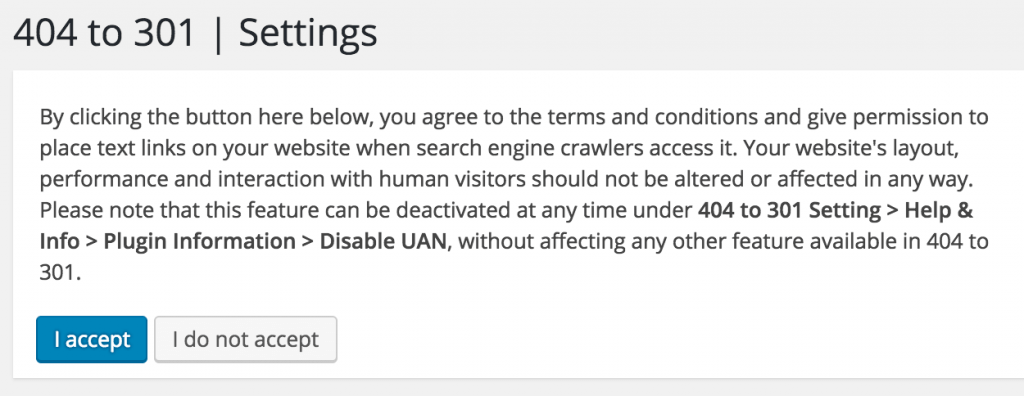
    • The plugin asked you for permission to do this by displaying terms of service that described exactly what it was intending to do. The ‘cloaking’ portion of the terms of service was at the end after a long copy of the GNU general public license that was included. It was below the fold in a scrolling element, so would not have been noticed by anyone who didn’t scroll down. (See below for screenshot)
    • On further investigation the ad domain, which is wpcdn.io, serves up three things:
      • The Payday Loan content we already disclosed. (See below for content)
      • A link to an adult UK based escort service. (See below for censored screenshot and content).
      • A string of text that is somewhat unique: sdf98jhk (See below for content)
    • If you google the string of text it returns 8,620 results and these appear to be WordPress sites that have had content injected by this plugin and that content has been indexed by Google. Random checks confirm that these sites are running the affected plugin. This confirms over 8,000 sites at a minimum were affected.
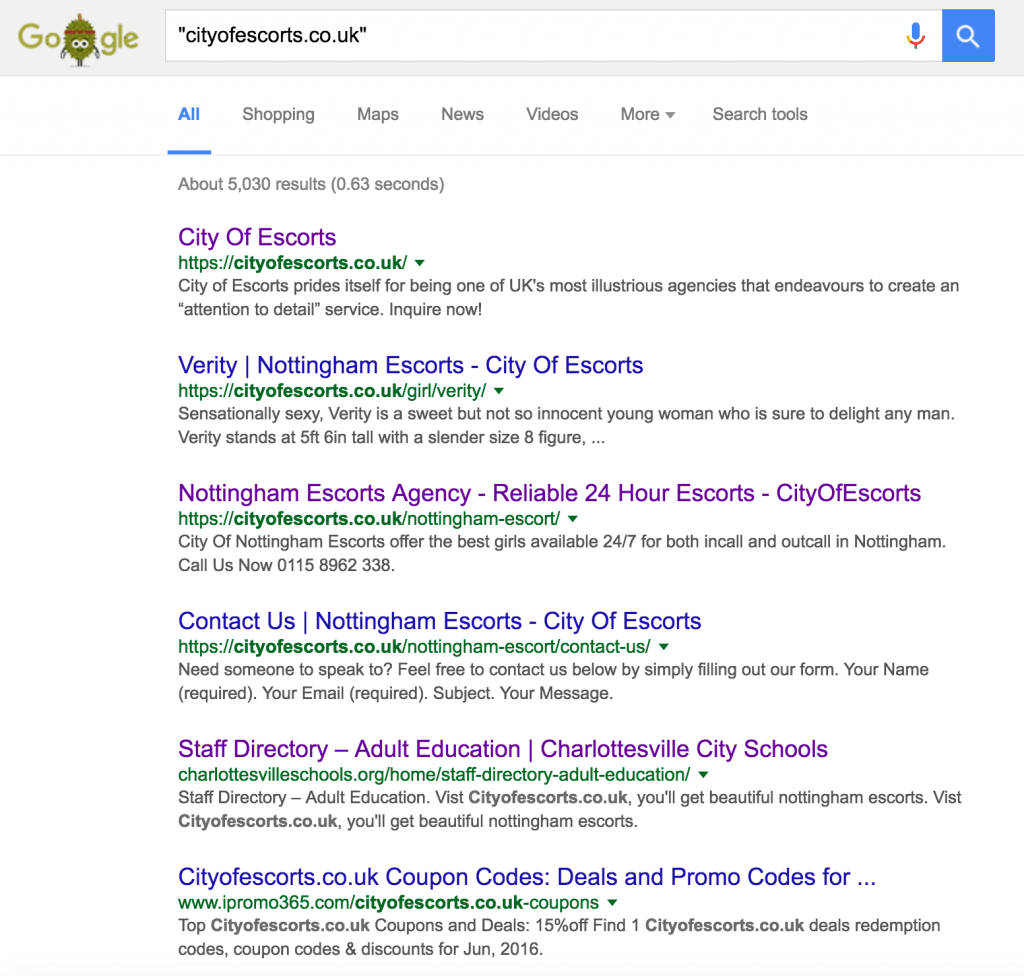
    • Sadly if you google the adult domain that is being served, it appears to have infected many other websites including a school’s site that is now serving adult content to Google. (See below for screenshot)
    • The ad domain was registered on January 14, 2016.
    • The plugin author’s account was used to upload the changes.
    • We were alerted to this plugin by a customer and upon investigation found that their site was surreptitiously serving up blackhat SEO content.

    This was not a vulnerability

    This is not a security hole in a plugin that requires the usual ‘responsible disclosure’ to the plugin author. This was a plugin that had malware pre-installed by the author’s account and was active on over 70,000 websites.

    It was urgent that we notify the community and our customers about this so that they could immediately react and limit the damage.

    The fact that the terms of service in the plugin actually ask for permission to engage in cloaking (see below for screenshot) indicated to us that this was done with the plugin author’s blessing, rather than being a case where a plugin author’s account was hacked. The exact wording from the ToS was:

    “By clicking the button here below, you agree to the terms and conditions and give permission to place text links on your website when search engine crawlers access it.”

    We were under absolutely no obligation to look after the plugin author’s interests when we discovered this because it wasn’t a security hole that was accidentally written by the author. Someone had intentionally placed spam on a large chunk of the WordPress community’s websites and was profiting from it. The terms of service indicated it was intentional.

    We needed to react quickly and that’s what we did.

    How we handled this incident

    On Tuesday this week Wordfence immediately notified our large security mailing list about the problem by posting on our blog and sending out an email linking to the post.

    We also notified the plugins@wordpress.org email address about the issue.

    We made no attempt to notify the author. Presumably he already knew he was doing bad things based on his terms of service.

    What happened once we sent out the notification

    We were criticized for our approach by the WordPress.org plugin repository maintainers. We were told we should have contacted the developer first. Then if they don’t reply or we can’t find out how to contact them, we should contact plugins@wordpress.org second. And only then should we post, preferably after something has been fixed.

    I strongly disagree with this approach and stand by our actions because this was a plugin that had malware intentionally pre-installed by the author. Why notify the author that they’ve been discovered?

    It seems more helpful to put the community in the driver’s seat. Let them take immediate action to limit damage that has already been intentionally done to their websites and their Google reputation. And then worry about the plugin author’s interests.

    And so that’s exactly what we did. We sent out an immediate notification to the community and included plugins@wordpress.org in that notification.

    What has the plugin author done?

    The plugin author now says that he has removed the malicious code as per his changelog. We have not independently verified this.

    The author has posted a blog post which you can find here:

    https://thefoxe.com/blog/404-to-301-plugin-detected-by-wordfence-here-is-what-actually-happened/

    We are intentionally not linking to the post to avoid promoting his website.

    The post starts by saying “There are people, making money from other’s mistakes, instead of correcting them.”.

    We’d like to point out the author was making money by surreptitiously injecting spam links into website content and as a side effect, destroying those website’s search engine rankings. How are we obligated to correct his greed and lack of morals?

    He was “shocked” that he received negative reviews of his plugin. We’d like to point out that there may be justification for those reviews.

    The author says “I found that the links and ads are being shown at the top of the page content instead of showing small credit text at very bottom, for crawlers.”. This suggests he knew he was cloaking, was doing it intentionally and thinks the problem is that the ads appeared to regular browsers too (in addition to search engines). We’d like to suggest he read up on what cloaking is and why it’s bad.

    He blames another developer who isn’t named, conflates security vulnerability with intentional malware, paints himself as the victim, accuses us of censoring his comments on our blog (we didn’t) and claims we profited by demonizing him.

    Final thoughts

    I created Wordfence because my own personal site was hacked by the Timthumb vulnerability back in 2012. I discovered the vulnerability which was a zero day, I wrote code that patched timthumb and then went on to lock myself in a room and code for 8 months straight to create Wordfence to help prevent this from happening to anyone else ever again.

    Today, Wordfence is a team of more than 20 highly trained and qualified individuals that come from a wide range of sectors in the security profession and community. We provide a world-class firewall that is free for the community and open source. We invest heavily in providing additional free resources to help the community like our free WordPress security Learning Center and like the prolific free support we provide on the wordpress.org forums.

    I know what it feels like to have someone intentionally install their own malicious code on your site and profit from that code. It hurts your livelihood and reputation and it was such an awful experience I’ve dedicated my career for the last 5 years to making sure that does not happen to anyone else.

    That is what happened in this case.

    In this case we were under no obligation to protect the plugin author’s interests. We notified the community first and we did it loudly. My team and I stand by our actions and we will do it again if we discover anyone else intentionally installing malware on community or customer websites.

    We will always put our customers and the community first.

    I welcome your comments but I’d like to ask you for a favor: Please avoid any witch-hunting or personal attacks on any individuals involved in this, including the plugin author and anyone else associated with the plugin or this incident.

    Yours Sincerely,

    Mark Maunder – Wordfence founder/ceo.

    References:

    The link to a UK based adult escort service that was being injected under certain conditions:

    Censored screen capture of the home page of cityofescorts, an adult site injected into content by this plugin:

    The payday loans content that was being injected under certain conditions. This affected our customer in the initial report and is how we discovered the issue:

    Payday loans content

    The text “sdf98jhk” that was being injected under certain conditions and that allows you to find affected sites using a google search.

    sdf1

    The section (once you scroll down) in the terms of service of the plugin that describe that the plugin will be cloaking content on your site.


    Google results for the adult website that was being injected by this plugin. It looks like a schools website is now serving adult content to google and we haven’t been able to confirm if this plugin is the culprit or it’s other malicious code.

    The post We will always put our customers and community first appeared first on Wordfence.
  • Top 50 Most Attacked WordPress Plugins This Week

    Top 50 Most Attacked WordPress Plugins This Week

    Last week we shared the top 20 most attacked WordPress themes and an explanation of why many of them are targeted. This week we’ve dug deep into the data and we are publishing the top 50 most attacked WordPress plugins during the past 7 days.

    The data we’re sharing today is based on the following high level metrics:

    • During the past week Wordfence blocked 20,644,496 unique attacks across all the sites we protect.
    • We saw attacks from 73,629 unique IP addresses during the period.
    • 20,622,975 attacks came from IPv4 addresses and 15,160 of those attacks were IPv6 addresses.
    • Of the approximately 1.5 million active websites that we protect, 581,689 of those sites received attacks during the past week.

    The following is a list of plugins that received the most attacks during the past week – counted as the most recent 7 days starting on Tuesday evening August 16th and looking back 7 days. Once again we are showing the plugin ‘slug’ which is the unique directory name that the plugin uses when it installs into WordPress.

    This week we are ordering things slightly differently. We have the plugins ordered by number of unique sites that received attacks, labeled as “Sites attacked”. We feel this is a more useful order because it shows how widespread an attack is on a particular plugin, rather than just raw volume of attacks.

    “Total Attacks” indicates the total number of attacks that we logged on that plugin. “IPs” is the total number of unique IP addresses that an attack targeting the plugin originated from.

    “Type” is the type of attack – in most cases it’s a “Local File Inclusion” attack which allows an attacker to download any file they want to on the target system. The vast majority of files that are targeted are either the wp-config.php file which contains the database username, password and server name or /etc/passwd which contains the host operating system usernames.

    Where we’ve labeled the Type as “Shell” it indicates an attack that allows an attacker to upload a shell to the target site which gives them full remote access. These are the most serious vulnerabilities and attacks.

    All attacks are on vulnerabilities that are already publicly known. If you run any of these WordPress plugins, make sure that:

    1. You are using the newest version of the plugin.
    2. That version does not have any known vulnerabilities.
    3. You are running Wordfence with the Firewall enabled because we protect against all vulnerabilities shown.

    The list of the top 50 most attacked plugins during the past week follows:

    Plugin Sites attacked Total attacks IPs Type
    recent-backups 182,525 351,014 3,467 LFI
    wp-symposium 149,860 242,715 3,460 Shell
    google-mp3-audio-player 138,282 307,743 2,032 LFI
    db-backup 129,519 287,043 2,189 LFI
    wptf-image-gallery 107,000 131,938 2,846 LFI
    wp-ecommerce-shop-styling 103,471 131,011 2,887 LFI
    candidate-application-form 103,017 127,359 2,820 LFI
    wp-miniaudioplayer 91,546 196,557 1,381 LFI
    ebook-download 88,461 189,640 1,408 LFI
    ajax-store-locator-wordpress_0 86,051 119,192 1,396 LFI
    hb-audio-gallery-lite 82,041 105,618 1,505 LFI
    simple-ads-manager 70,683 166,131 6,476 Shell
    revslider 53,549 145,626 407 Shell
    inboundio-marketing 53,063 112,696 874 Shell
    wpshop 51,609 111,546 830 Shell
    dzs-zoomsounds 51,089 225,032 731 Shell
    reflex-gallery 49,853 111,624 699 Shell
    wp-mobile-detector 38,764 115,235 800 Shell
    formcraft 25,192 52,604 668 Shell
    sexy-contact-form 19,076 50,649 316 Shell
    filedownload 12,584 19,400 353 LFI
    plugin-newsletter 11,982 23,887 451 LFI
    simple-download-button-shortcode 11,558 21,502 427 LFI
    pica-photo-gallery 11,059 16,587 262 LFI
    tinymce-thumbnail-gallery 10,972 16,429 263 LFI
    dukapress 10,814 16,235 333 LFI
    wp-filemanager 10,756 16,634 331 LFI
    history-collection 10,427 24,371 607 LFI
    s3bubble-amazon-s3-html-5-video-with-adverts 10,312 24,011 595 LFI
    simple-image-manipulator 7,268 8,272 448 LFI
    ibs-mappro 5,555 18,738 448 LFI
    image-export 5,442 6,047 266 LFI
    abtest 5,431 5,885 297 LFI
    wp-swimteam 5,119 5,433 238 LFI
    contus-video-gallery 4,921 17,866 345 LFI
    sell-downloads 4,393 4,746 240 LFI
    brandfolder 4,268 4,619 230 LFI
    thecartpress 4,164 4,534 274 LFI
    advanced-uploader 4,066 4,351 203 LFI
    aviary-image-editor-add-on-for-gravity-forms 3,548 5,749 247 Shell
    wp-post-frontend 1,811 16,690 294 Shell
    [redacted]* 1,716 2,133 65 Shell
    mdc-youtube-downloader 1,039 5,517 199 LFI
    document_manager 915 4,450 148 LFI
    paypal-currency-converter-basic-for-woocommerce 797 1,133 129 LFI
    justified-image-grid 788 17,852 35 LFI
    cherry-plugin 539 3,919 31 Shell
    aspose-cloud-ebook-generator 531 720 25 LFI
    gwolle-gb 331 406 46 LFI

    *The redacted plugin in the list was removed before publication. It is an undocumented older shell upload vulnerability which is being targeted. The vulnerability does not exist in the current version of the plugin. Because it’s undocumented it is technically a zero day vulnerability, even though the vulnerability has been fixed in newer versions of the plugin, so we decided to remove the plugin name.

    Notes

    The large number of local file inclusion vulnerabilities that are being exploited is surprising. I should also note that many of these LFI’s were discovered by Larry Cashdollar who I had the pleasure of seeing speak at Defcon in Las Vegas 2 weeks ago. So I suspect that many of these are being used in an attack script of some kind which may explain their prevalence in the attacks we’re seeing.

    Backlit keyboardThe clustering of LFI’s together and Shell exploits together in the list order is odd, but I don’t have a theory to explain that and there is no error in the data that accounts for that. It appears to be coincidence.

    The vulnerability in the Recent Backups plugin at the top of the list was disclosed in August 2015 and the plugin has now been removed from the repository, probably because it was not being maintained. The large number of exploits targeting this plugin are puzzling because as far as I can tell from archive.org, the plugin only had a few thousand installs. It may be because it is quite easy to “google dork” to find sites that are vulnerable and the abundance of target sites may make this an attractive target.

    As a final note, I’d like to add that this data is simply an indication of the volume of attacks that we are seeing on plugins in the wild across the large attack surface that is WordPress websites who are protected by Wordfence. It does not give any indication of whether a plugin in this list is more or less secure than others. It does not include data on how successful attacks on the plugins shown may or may not be. It is purely an indication of attack activity in the wild on WordPress plugins during the past week.

    Your comments are welcomed as always.

    The post Top 50 Most Attacked WordPress Plugins This Week appeared first on Wordfence.