Online Services

Tag: WordPress Security

  • Ask Wordfence: Why Is an Insignificant Site Like Mine Being Attacked?

    This question came in from Keith, a Premium Wordfence customer. We’ve dealt with this question a few times in different ways on the blog, but pulling it all together sounds like a great post. Let’s dive in!

    Why is my site being attacked?

    At a high level, an attacker views a vulnerable website as a juicy collection of resources that they can steal or exploit:

    • It’s backed by a server that they can use to run their own programs
    • It’s connected to the internet and likely has a squeaky-clean reputation
    • It might include interesting user data
    • It probably has traffic coming to it
    • It is likely important to you

    Most of the time, they use those resources to make money. And they continue to find new creative ways to make a buck.

    Using Your Server to Run Their Own Programs

    If you’re running a WordPress site, your web server is most likely a fully functioning Linux server with MySQL and PHP installed. Depending on your hosting situation, it may also have a meaningful amount of processing power.

    Cryptocurrency Mining

    In December, we wrote about a massive cryptomining campaign targeting WordPress sites. In the most intense period of attacks we had ever recorded, an attacker was compromising sites and using them to both attack other WordPress sites and to mine for Monero, a cryptocurrency that can be mined efficiently using web server hardware.

    I encourage you to read the article if you haven’t already. We were able to identify how the the attackers were controlling the compromised servers and discovered evidence that they had earned almost $100k via their mining efforts.

    Leveraging Your Reputation

    In November, we wrote about the fact that your site reputation makes you a target. I encourage you to read it along with the post that inspired it, by Troy Hunt.

    Hosting Phishing Pages

    A phishing page is one that attempts to fool you into sharing sensitive information, like your password, credit card number or social security number. An example of a phishing page is a fake login page that gives you the impression you are on, for example, the GMail login screen. You enter your credentials and the attacker logs them and can now sign into your real GMail account and steal data.

    In January 2017, we wrote about a new and highly effective GMail phishing technique that was having a wide impact.

    Your site has a squeaky clean reputation. When attackers host phishing pages on your site, services like Google Safe Browsing that would normally warn users about suspicious websites won’t know to alert visitors to the danger of the phishing page hosted on your site.

    Hosting Spam Pages and Injecting Spammy Links

    Your site is legitimate, so search engines like Google assume that your content, including outbound links, is also legitimate. Attackers love to plant SEO spam in the form of pages and links on your site, boosting SEO rankings for their malicious businesses.

    A great example of this is the supply chain attack we discovered back in September that spanned 4.5 years and impacted 9 WordPress plugins. In our blog post about this SEO spam campaign, we exposed how someone purchased the plugins and then used them to embed spammy links in the sites that were running them. The attacker used these links to improve search engine rankings for websites offering payday loans, escort services and other shady things.

    It’s important to remember that while your site alone isn’t capable of boosting an attacker’s SEO results, thousands of compromised sites can really move the needle.

    Sending Spam Email

    Getting spam email past spam filters is a difficult endeavor. Email clients use myriad techniques to identify and block spam. Almost all spam filters rely on IP blacklists to block everything from IPs known to send spam.

    That’s where your web server comes in. Not only does your server have all of the hardware and software spammers need, but the reputation of your IP is likely perfect. By sending spam from your web server, cybercriminals have a much better chance of getting their spam delivered.

    Eventually, spam filters pick up on what is happening and blacklist your IP as well, so the attacker simply moves on to the next victim, leaving the reputation of your IP address in ruins.

    Attacking Other Sites

    Sometimes attackers will compromised WordPress sites to attack additional sites. We saw hackers use this approach in the cryptocurrency mining attack we discussed earlier in this article, where an attacker was controlling a botnet made up of thousands of other people’s WordPress sites that were simultaneously mining for cryptocurrency and attacking other websites. Your website is an attractive attack platform because your IP address is likely not on any blacklists.

    Hosting Malicious Content

    Hackers will sometimes use your web server to host malicious files that they can call from other servers. They are essentially using your hosting account as a file server.

    Leveraging Your Site Traffic

    Malicious Redirects

    One very common thing attackers do with hacked websites is add redirects to the content. Visitors to your site don’t even have to click on a hyperlink to visit the spam site: the redirect will just take them there directly. In some cases, attackers will go so far as to redirect all of your traffic to malicious sites. But in most cases, they employ measures to avoid detection, only redirecting traffic to specific URLs or for specific browsers or device types.

    In August 2017 we wrote about the TrafficTrade infection which injects malicious JavaScript into websites and redirects visitors to pages that host spam and malicious browser plugins.

    Defacements

    In some cases, the attacker just wants to get their message out. By taking over your website, they are able reach your website visitors, at least until you figure out what they’ve done. Attacks of this nature often represent a political movement or are just looking for “street cred” in the hacker community.

    In February last year, we saw a huge WordPress defacement campaign that exploited a WordPress REST API vulnerability. It grew at incredible speed over a period of days, and after just 24 hours we had tracked 19 separate attack campaigns significantly impacting WordPress sites.

    Distributing Malware

    One especially nefarious way attackers monetize hacked websites is to use them to spread malware. They install website malware that installs malware on your visitors’ computers or devices when they visit your site.

    As a site owner, this is especially scary, as not only do you risk having your site flagged by search engines and other blacklists, but your visitors are not going to be happy with you. Your reputation, both online and with your site visitors, could be damaged for a long time. In addition, a hacked website can have a long-term negative impact on your search engine rankings.

    Stealing Data

    Even if you don’t accept credit cards on your site, an attacker may still find valuable data to steal. For example, if you capture other data via forms on your site, there might be something there worth taking. Additionally, attackers can use stolen username and password pairs to try to log in to other sites.

    Ransomware

    We’ve learned over the years that websites almost always represent something that matters to people, even if it’s not a business site. Unfortunately, cybercriminals have, too. Last year we wrote about a ransomware attack campaign targeting WordPress sites. While we haven’t seen much of this lately, we believe the threat of WordPress ransomware will continue and will increase in future.

    Conclusion

    Regardless of the size of your website audience or the cost of your hosting plan, criminals will happily find a way to monetize it if they can break in. Luckily, you don’t need to be a security expert to keep your site safe. With a little knowledge and Wordfence Premium, you should be able to stay a step ahead of attackers.

    The post Ask Wordfence: Why Is an Insignificant Site Like Mine Being Attacked? appeared first on Wordfence.


  • PSA: Replace Your SSL/TLS Certs by Symantec, Thawte, VeriSign, Equifax, GeoTrust and RapidSSL

    This is a public service announcement and a reminder to site owners. Google’s Chrome browser has already started the process of ending support for Symantec SSL/TLS certificates. This includes companies owned by Symantec including Thawte, Verisign, Equifax, GeoTrust and RapidSSL.

    Chrome 66 is ending support for Symantec certificates issued before June 1, 2016 on the following schedule:

    • The ‘Canary’ release already ended support for these certificates. It was released on January 20th, 2018.
    • The Beta release for Chrome 66 will be released on March 15th.
    • The Stable release for Chrome 66 will be released on April 17th.

    If you are running a Symantec certificate issued before June 1, 2016, and you do not replace that certificate, then from April 17th onwards this is what your site will look like to site visitors:

    As you can see, the error is described as NET::ERR_CERT_SYMANTEC_LEGACY, meaning that your site is using a legacy Symantec certificate that is no longer supported.

    Starting with Google Chrome version 70, all remaining Symantec certificates will stop working, including those issued after June 1, 2016. Chrome 70’s release schedule for Canary, Beta and Stable is July 20th, September 13th and October 16th respectively.

    To check if your certificate will be affected by this change, you can visit this page and enter your website’s hostname in the form provided: https://www.websecurity.symantec.com/support/ssl-checker.

    If your site will have an issue, the page should give you a warning. Make sure you just enter the hostname and remove the https:// prefix and the ending slash.

    An alternative way to check if your website will have a problem is to download Chrome’s bleeding edge ‘canary’ version and visit your website. Then check the DevTools in Chrome for any warning message regarding your SSL/TLS certificate.

    You can find more info on the official Google Security Blog.

    Please help spread the word so that site owners are not caught by surprise when this change goes live next month.

    The post PSA: Replace Your SSL/TLS Certs by Symantec, Thawte, VeriSign, Equifax, GeoTrust and RapidSSL appeared first on Wordfence.

  • New Guides From Wordfence To Help Clean a Hacked Website

    At Wordfence, one of our goals is to empower you as much as possible to be self-sufficient, at no additional cost. To do that, we provide Wordfence as a free security plugin. Over the years we have also developed a comprehensive WordPress Security Learning Center that provides readers with a complete understanding of WordPress Security and how to run a secure website. We have also published a number of articles explaining how to recover from a hack, should that worst-case scenario ever arise.

    This  morning we updated our WordPress Security Learning Center to add 9 new guides to clean specific hack types. We also updated our main guide on how to clean a hacked WordPress website. You can now find the following new guides in the Learning Center that will help you clean specific infection types:

    If you haven’t already checked out our WordPress Security Learning Center, I recommend you do. We have a huge number of articles and guides to help you learn about WordPress Security in a structured way. They range from beginner to intermediate to advanced and each article makes it clear what the technical level is.

    These articles are designed to empower you to help recover your own website from a hack. If you still need assistance, or don’t have the time to clean a compromised website, definitely check out our site cleaning service. We are the best in the business with consistently high ratings from our customers. We also provide a Priority Service where cleanings are started within 2 business hours.

    The post New Guides From Wordfence To Help Clean a Hacked Website appeared first on Wordfence.

  • New Feature Protects Against Password Leak Attacks

    To better protect our users’ websites, we work with a lot of data from sources like our Security Services Team and the Wordfence network. We try to understand not just what attackers are doing, but also how and why. Our research into a recent campaign revealed an interesting method of attack, and contributed to the development of a new feature.

    Password Leaks Are a Rich Source of Information for Hackers

    During the last several years, hackers have compromised a wide range of organizations and harvested account details from them. The details almost always include usernames or email addresses, along with hashed versions of passwords (or even worse, plain-text passwords). These compromised accounts are often bought and sold on the dark web, but occasionally they’re also leaked publicly.

    For hackers, the value of a stolen user account goes well beyond being able to log in to the compromised website. Hackers are well aware that people are unlikely to use best practices when it comes to password management. In other words, they’re likely to use weak passwords and to repeat the same passwords across multiple accounts. So the hackers try to explore every account they may be able to hijack with a given username and password.

    As we’ve discussed before, hackers can do a lot with a hijacked website. We wrote that post two years ago, but all of those criminal activities are still going on today, with the new addition of cryptojacking attacks. WordPress websites are still attractive targets for hackers.

    Leaked Accounts Used in Malware Campaigns

    We observed a few interesting techniques hackers have been using with leaked accounts during the last several weeks. Normally, they would face several obstacles when trying to take over a WordPress website’s administrator account:

    • They don’t know the administrator username
    • They don’t know the password
    • They fail too many times to log in, so they get blocked by plugins, servers, or networks

    But the leaks have helped some attackers overcome these obstacles and find valid accounts on a lot of WordPress sites. Imagine that Bob Smith runs a WordPress site at example.com. If he used bob.smith@example.com as his primary email address at a website whose accounts were leaked, his details in the leak would look something like this:

    bob.smith@example.com:pony123

    This yields several pieces of information for hackers to use: Bob’s email address, some likely usernames, and a password he uses (pony123). Some published leaks combined data from several other leaks, yielding two or more accounts that probably belong to the same person. If Bob used his Gmail account at another compromised site, then the leak might look like this:

    bob.smith@example.com:pony123

    bob@gmail.com:pony123456

    Finding WordPress Sites in the Leaks

    It seems that hackers are using a direct approach to find WordPress sites among the leaked accounts. In our example, they simply check example.com to see if it’s running WordPress. But they also seem to be following redirects: in a case where example.com redirects to example2.com, these login attempts were being made against example2.com even though it never appeared in the leaks.

    We observed an interesting twist, though: sometimes email addresses on completely unrelated domains (like Gmail) were being used during login attempts. In this example, we observe bob@gmail.com and pony123456 being attempted on example.com. How did the hackers know to try it? It’s unlikely they actually got into the Gmail account and found emails from WordPress there; if they had, they could have simply used the “reset password” feature to take over the site. Instead, in the cases we observed, the email address was actually publicly used as a contact address in the site’s DNS registration. In other words, Bob used bob@gmail.com when he registered example.com. So the hackers may be searching DNS records for leaked email addresses to find target sites.

    Getting Valid Usernames From the Leaks

    The attackers behind the most recent campaign use email addresses to create a small set of usernames that are likely to be real administrator users on target sites. First they try “admin” since it’s the default username, and presumably the most common. Then they also try the full email address (like bob.smith@example.com), and then a couple of variations on the first part of the email address: one with all dots removed (bobsmith) and another with anything before the first dot (bob). Altogether, they only try to log in four times. The leaked accounts give them a much higher chance of success than brute-force attacks or guessing common passwords, while keeping the number of failures small enough that they don’t get blocked.

    Leaks Being Used

    We have copies of public leaks, so we’ve been able to locate the source of some of the compromised credentials used in the attacks. Many of them came from the set of 1.4 billion accounts leaked in December (which includes several previous leaks). Of the rest, every single one we checked was listed in at least one leak on HaveIBeenPwned. This demonstrates the tenacity of the attackers, and the way they can find value even in seemingly unrelated breaches.

    What We’ve Done to Address This

    Because of the small number of login attempts these attackers make, standard brute force login protection is not enough to block these kinds of attacks. Wordfence currently has two additional features that can have an effect in stopping this attack: Two Factor Authentication and “Immediately lock out invalid usernames.” But we decided we needed a more robust tool to deal with these kinds of attacks thoroughly.

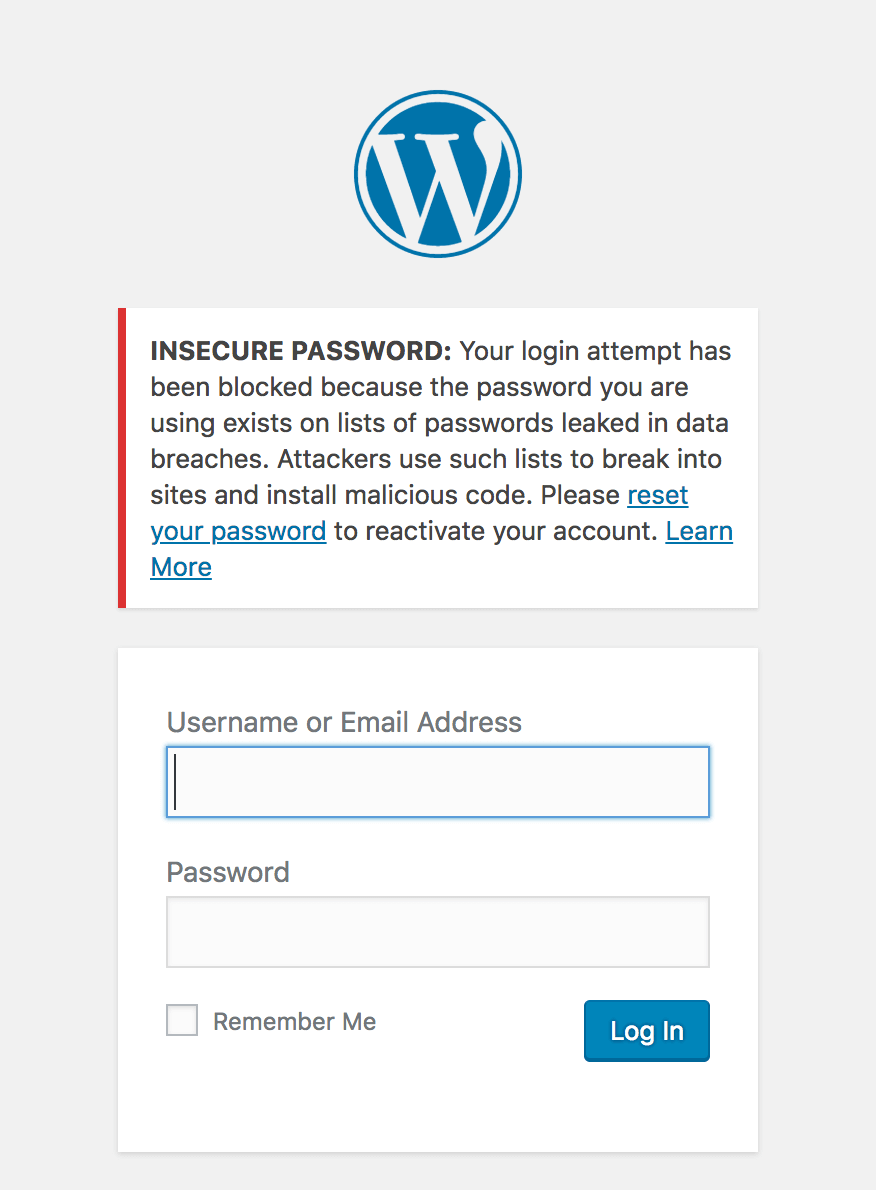
    So, we’ve introduced a new feature within Wordfence to block logins for administrators that use a known compromised password. Any administrator using a password previously seen in a breach will need to reset their password to log in. The new feature is available as of today with the release of Wordfence 7.1.0.

    We’ve done this by integrating Wordfence’s login security with the database provided by Troy Hunt’s version 2 of the Pwned Passwords API. Troy has built a substantial list of 501 million compromised passwords across 270 breaches. We’d suggest you read his post describing the new features and data that have gone into this new version.


    Privacy Improvements in Version 2 of Pwned Passwords

    We’ve looked at integrating Pwned Passwords in the past, but have been reluctant to risk sending insecure data about any non-compromised passwords to a third-party service. The options that version 1 of the Pwned Passwords API provided allowed users to send either the SHA1 hash of a password (which is insecure, as far as password hashes go), or the plain text password to check if it’s been used in a breach. The other option would be to include the full password list in order to compare it to the user’s password, but that’s not feasible to include within Wordfence, given that it’s around 30GB of data total.

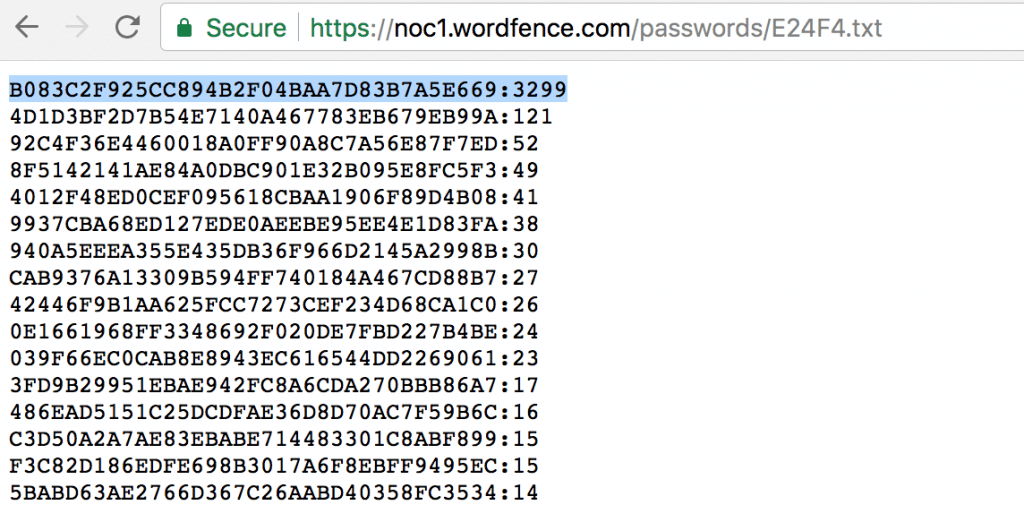
    Version 2 of Pwned Passwords introduces a new feature to detect if a password is compromised without sending enough information about the password to be useful in case a hacker tried to reverse it. It works by sending the first 5 characters of the SHA1 hash of the password to the API. The API responds with a list of all SHA1 hashes from the full list of 501 million that start with those 5 characters. It ends up averaging around 475 hashes returned for each 5 character prefix.

    To illustrate with an example:

    The SHA1 hash of Bob Smith’s password “pony123” is E24F4B083C2F925CC894B2F04BAA7D83B7A5E669. We’d send the first 5 chars (E24F4) to our API:


    We can then check to see if the remaining 35 characters of the hash (B083C2F925CC894B2F04BAA7D83B7A5E669) is in the list, and we can see it’s the first item in the list. The format of each item in the list is the remaining 35 characters hash suffix and the number of times this password has appeared in breaches, so we can see that Bob Smith’s password has been seen 3299 times across multiple breaches by multiple users. It’s probably a good idea that Bob Smith (and anyone else using “pony123”) update his password.

    How We’ll Be Rolling Out This Feature

    Since we have the number of times each password has been seen across all breaches, this allows us to gauge the severity of password reuse and risk to the site owner. Any password that’s been seen 10 or more times in previous breaches will blocked from logging in. We will gradually expand this to include all passwords in the database over the next week.

    Farewell to the Password Audit

    With the introduction of this new login protection, Wordfence will be removing the password audit feature. The password audit dictionary was based on password lists leaked from breaches. The functionality provided by the password audit is mostly redundant if we’re able to prevent the same compromised passwords from being used to login in the first place. This approach takes a more active role in preventing weak passwords from being used maliciously.

    Recommendations

    This new feature is enabled by default for administrators. To manage the settings of this feature, log in to your WordPress admin panel and navigate to: Wordfence → Firewall → Manage Brute Force Protection → Prevent the use of passwords leaked in data breaches.

    1. Ensure that you have strong passwords on all user accounts, especially admin. Wordfence provides an option to enforce strong passwords when creating/updating a user account under “Login Security Options”.
    2. Change your admin username from the default ‘admin’ to something harder to guess.
    3. Delete any unused accounts, especially admin accounts that you don’t use. This reduces your attack surface.
    4. Enable two-factor authentication on all admin accounts. Wordfence Premium provides two-factor.
    5. Verify your email address has not been part of a breach.
    6. Verify your password has not been exposed in a breach.
    7. Do not reuse a password on multiple services. That way, if your password from a data breach appears in this database, it won’t be the same as your WordPress admin password, or across multiple sites you manage. You can use a password manager like 1password to manage many passwords across services.

    The post New Feature Protects Against Password Leak Attacks appeared first on Wordfence.