This is a post written by James Yokobosky who works on the Defiant Threat Intelligence team. In his daily job he analyzes new WordPress threats as they emerge and adds detection capability to the Wordfence malware scanner. In addition to making sure we detect new malware, James also researches the pieces of malware we find to learn more about how they work, what they do and who is behind each campaign.
This post is Copyright 2018 Defiant, Inc. and was published on the wordfence.com official blog. Republication of this post without permission is prohibited. You can find this post at: https://www.wordfence.com/blog/2018/05/wordpress-tracking-emerging-cryptomining-threats/
This post will give you an idea of what the workflow looks like for one of our Threat Analysts at Defiant, and will give you some insight into the emerging malware variants that we are seeing that target WordPress, how they work and what they do.
In this post, James describes his analysis of a Monero cryptocurrency miner that he recently examined, and explains how he tracked down and communicated with the command and control infrastructure for this malware variant. This post provides a clear illustration of how we rapidly add detection capability to the Wordfence malware scanner for emerging threats.
Fresh Malware Arrives for Analysis
 One of our sources of threat data at Defiant is cleaning hacked websites. In this case, Ivan, a member of our SST team had cleaned a hacked site and handed me the forensic data for analysis. The site had been hacked for months before the owner discovered that it had been compromised.
My normal routine is to start by verifying the files we already detect to check if there is any new information inside any of them. Usually there is not, and this infection did not yield any surprises in the files that Wordfence already detected.
What did surprise me is that the server had a large number of malicious files we have not seen before. The server had been infected for a long time, which may have left the attacker feeling confident enough to upload more valuable code. For us, a server with code we have not seen before is a treasure trove, because it immediately allows us to add new detection capability to the Wordfence malware scanner. If an attacker is caught in this situation, they generally have a bad day, because many of their files that may have previously been undetected by malware scanners will now be detected by our scan.
The first thing that made this attacker different from others is that, instead of using a standard javascript code obfuscator that just scrambles the code, they were using a finite wordlist to replace variable and function names in the code. When you look at the code, the variable and function names just seem like gibberish:
function flu(sake,immobilitys)
    {
        chains = neatly / seehis;
        plotted = airs / lucky;
        storm = immediately + lowly;
        guests = soothed - lucie;
    }
I immediately searched for other similar files out of the remaining samples and found several, then proceeded to write new signatures to detect those files. That accomplished, I moved on to the next file in the list. That was a basic PHP file that selectively redirects regular users, not search engines, to a malicious website. This is a standard thing we see, so I wrote a signature to detect this updated malware variant and moved on.
A Cryptomining Binary is Found
The third file was a bit more interesting. It was an ELF 64-bit LSB shared object, x86-64, dynamically linked and stripped executable. It is a compiled file designed to run on a Linux system with a specific architecture, which has meaningful debugging data removed. It is similar to a Windows .exe file. These are relatively rare to see on WordPress infections because most web servers are not set up to allow arbitrary executables to run, and for this to work, an attacker needs to do more work on their end.
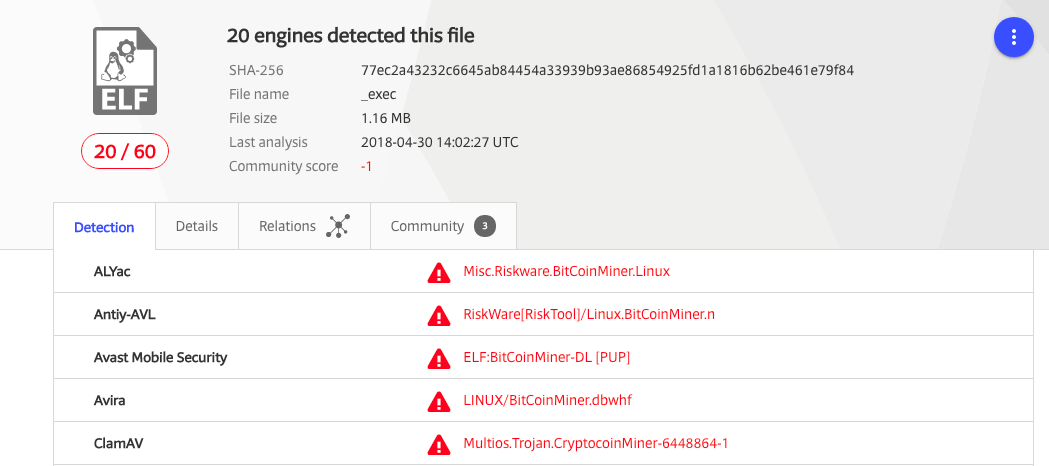
Because we already know this mystery file is doing something malicious, a good first step is to see if other antivirus software has already identified it. VirusTotal is an industry-standard way to achieve this, and sure enough a handful of the supported vendors do detect and identify the file.

The names VirusTotal returned provide a hint of what the file is:
- Misc.Riskware.BitCoinMiner.Linux,
- LINUX/BitCoinMiner.dbwhf,
- not-a-virus:HEUR:RiskTool.AndroidOS.Miner.b,
and similar suggest this is a cryptocurrency miner. At this point I performed a cursory inspection of the binary file to search for plaintext strings or recognizable disassembly and quickly identified the specific build: This is a mostly-stock xmrig ( https://github.com/xmrig/xmrig ) Monero-focused miner, well known in that community. Other artifacts inside the file allow me to confirm it was compiled on 2018-01-16 with a modern version of GCC.
I could tell there had been some modifications from the original source code. A quick look revealed that the change was hardcoding the addresses to send results – the pool addresses – so anyone running this specific file will be sending money to the attacker. At this point I had more than enough information to write a reliable signature to detect this malware, and I quickly did. We have more samples and I had yet to discover how the attacker runs and manages this hacked, zombie miner.
Analyzing the Configuration File
The next unique file shows another unusual level of technical sophistication from the “average” WordPress attacker: A separate configuration! Having just seen xmrig, it is easy to tell this JSON file contains instructions for how to run the mining executable.
It includes instructions to run in the background (hidden), use only 40% of the maximum available CPU, to slow down if the machine is otherwise busy, and other specific technical details related to the mining process. Luckily for us it is normally a terrible idea to run cryptominers on your WordPress web server if you are the person paying for it, so I can safely add a signature to identify this otherwise-benign configuration code without creating false positives.
Discovering the Command and Control Servers
With our next sample we hit the jackpot. It is a Python backdoor script that, while running, will check for new instructions against a centralized command and control server every 5 minutes. The backdoor itself is written to hide from system administrators. It masquerades as php-fpm ( https://php-fpm.org ) which is a normal process to be running on that server, and it is “well-behaved.” That is to say, it sits quietly and most of the time is not doing anything unusual or malicious.
Built into the backdoor is a report function, used to give the attacker data about the hacked machine and status updates on any activity, and a variety of normal system administration tasks related to downloading files, controlling processes, and executing commands. The code is well-formed and has obvious updates and adjustments made, implying the attacker has been developing and using this backdoor for some time. The method of hiding and the interval to check for new commands are easily configurable to evade intrusion detection systems and firewalls.
Most importantly, the command and control server’s IP address and method of communication is now available to us. I checked that it is still “up” – online and responding to requests – and put a pin in it. First I needed to develop a signature so that Wordfence detects this backdoor, then I inspected the remaining samples for more hints about the attacker before I risked exposing myself as infiltrating his botnet.
Only one of the remaining samples is noteworthy and related to the backdoor. It is a short Bash script used to start the backdoor running. Two things here again indicate a relatively sophisticated attacker: The backdoor is installed to look like a common part of a Linux shell and is executed in such a way that it looks like the legitimate owner of the server ran an innocuous command. This is easy to write a signature to detect, now that we have seen it. But this technique is an effective misdirect for a sysop trying to identify where the malicious activity is coming from. Had the attacker deleted this remnant file it would probably have been impossible to identify how the backdoor started, given the lack of forensic logging on the server.
Deploying Signatures to our Premium Customers
I confirmed that all of the previously undetected samples are detected by Wordfence with our new signatures and I immediately entered them into our Premium BETA feed. This allows us to receive instant feedback about possible bugs or false positives from our users who are aware of the Wordfence beta feed for scan signatures.
We do a more rigorous QA over the following hours and, once completed, the signatures proceed out into our production Premium feed so that our Premium customers receive this new detection capability in real-time. The important part is getting that protection to our users as quickly as possible before engaging in other research.
Going Deeper Down the Rabbit Hole
But now, of course, I was free to spend some time doing that research! As mentioned earlier, I had all of the information I needed to communicate with the attacker’s command and control server (C&C server). Rather than setting up a controlled infection and monitoring how the script runs, I can manually act as the “infected server” and see what other data I can gather by sending my own status updates.
The C&C server works via HTTP and includes several different endpoints. For the developers in the audience, it’s a REST-like API. When an infected server first executes, it encodes a set of values that give the attacker information about the operating system, hardware, and active processes and requests a configuration file.
I started by sending a false report for a non-existent server and I receive a customized configuration. What I receive is very similar to the JSON configuration file I examined earlier, with lower settings to match the lower quality machine I’m pretending to be, along with some other settings tailored to improve that machine’s specific performance during cryptomining. At this point the backdoor will wait quietly for several minutes so I did the same.
On the next report I sent the same machine information and a plausible change in the active processes and this time receive a set of commands. The C&C server instructed the backdoor to download a file, apply basic cloaking techniques, execute the file, and report the output of that file on the next instruction. I downloaded the file and it is another more recently compiled xmrig build. It also matches the different architecture I am claiming to have. The initial command is a test to confirm the program works correctly, and I simulated this and at the next report interval sent the expected data.
Finally the C&C server sent back an instruction set to run the miner, reconfigure the interval to send status reports, and to continue checking for a change of commands every 5 minutes. The goal of the attacker is to make money and this miner will use the server resources to mine Monero, a cryptocurrency which we have written about extensively in the past.
Monero is uniquely suited for this sort of hack for two reasons. Firstly, it is designed for individual anonymity and identifying the person who is receiving the mined coins is extremely difficult. Secondly, the mining algorithm is meant to be run on a CPU rather than GPU. Most web servers don’t have GPUs, and so mining a currency that allows you to effectively use a CPU is an ideal way to turn stolen web server processing power into hard cryptocurrency. When you aggregate a thousand or tens of thousands of hacked web servers together, that can result in a significant profit for an attacker.
Wrapping Up
Once I completed my analysis and ensured that Wordfence detects all variants of this new malware, I documented the tactics, techniques and procedures (TTPs) of this new attacker along with logging the malware and other indicators of compromise (IOCs) into our internal threat intelligence platform.
It’s worth noting that the attacker who controls machines compromised by this infection is controlling a large cluster of stolen compute power. You can think of this as a private AWS cloud that the attacker can use for anything that needs computing resources. They are currently using their stolen cluster for cryptocurrency mining, but there is nothing preventing them from using these resources to conduct DDoS attacks, email spam campaigns, to brute force crack stolen password hashes or use the machines as proxies for misdirection while attacking other sites. They could even lease the compute resources to other attackers.
That is why I am excited whenever we have an opportunity to add detection for these kinds of new infections to the Wordfence malware scan. By analyzing a single compromised website and deploying detection to Wordfence, we have a good chance of shutting down this attacker once all sites running Wordfence detect this infection.
Closing Notes
I’d like to thank James for taking the time out of his busy schedule chasing malware to write this comprehensive post. If you have any questions, please don’t hesitate to post them in the comments below. Both James and I will be around to answer any questions. ~Mark Maunder
This post was written by James Yokobosky and edited by Mark Maunder with assistance from Dan Moen.
The post WordPress: Tracking Emerging Cryptomining Threats appeared first on Wordfence.