Online Services

Tag: WordPress Security

  • Ask Wordfence: Should I Permanently Block IPs That I See Wordfence Blocking?

    This is the fifth installment in a new series we started last month called Ask Wordfence. You can access previous posts here.

    Today’s question comes from Brooke in Harrisonburg:

    When I see IPs blocked by firewall, or blocked for trying to log in, is there a benefit to permanently blocking them, one by one, or is it enough that Wordfence just blocks them each time?

    This great question is likely shared by a broad audience. We know that the blocking features in Wordfence are incredibly popular. In short, there is a potential benefit to permanently blocking these IPs, but there are also risks associated with it.

    To help you decide how you want use blocking as part of your security strategy, we’ve pulled together a number of factors you should consider.

    The Amount of Attacking IPs Can Be Overwhelming

    In our monthly WordPress attack report for October, we reported that we had added 123,277 IPs to the Wordfence real-time IP blacklist during the month. That’s over 4,000 per day and 166 per hour. It is literally impossible for a site owner to keep up with the massive, ever-changing list of IP addresses that attack WordPress sites. By manually blocking even 1,000 malicious IP addresses, you are barely making a dent.

    To visually illustrate the scale of the challenge we created this motion chart, which shows the total number of IPs we added and removed for just the top 10 countries this past Monday, by hour.

    Attackers Cycle Through IPs Quickly

    One of the most important factors to consider when developing your blocking strategy is how long IPs continue to attack. It varies dramatically by IP address. 91.200.12.91, for example, was the top attacking IP in our WordPress Attack Report in both September and October and was number 24 on the list in August. On the other side of the spectrum, many IPs stop attacking after just a few hours. Back in September we did a deep dive on the Wordfence real-time IP blacklist and found that the average IP address spends just 10 hours on the list.

    The criminals that attack WordPress websites know that the IPs they use are going to be blocked by site owners and blacklists. In an effort to avoid being blocked, they regularly cycle through different IP addresses.

    Attackers Don’t Reuse IPs as Often as You Might Think

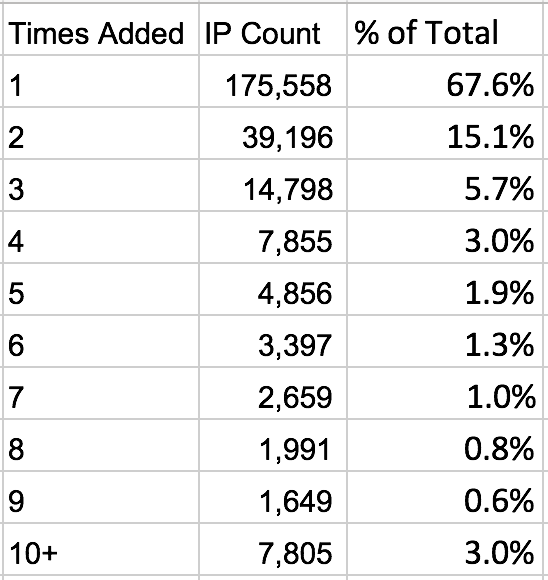
    In the blacklist deep dive we mentioned in the previous section, we also looked at how often attackers reuse IPs. We found that, for the most part, they used an IP address just once, with less than a third being used twice or more. The table below shows the breakdown of the number of times we added IPs to the Wordfence real-time IP blacklist during the month of August.
    Many Attacking IPs Actually Belong to Other Attack Victims

    As we’ve discussed above, attackers need access to lots of IP addresses. Being criminals, they generally don’t solve that problem by going out and paying for them. Instead they find ways to take over the IPs of victims who have clean reputations. As we wrote last week, in many cases it is your clean reputation that makes you a target.

    One source of clean and fresh IPs that we see attacking WordPress websites is hacked home routers. You might remember our posts earlier in the year about a large home router botnet being used for WordPress brute force attacks. The IPs belonged to a long list of ISPs from around the globe, and each one represented an unsuspecting victim’s home.

    Putting It All Together

    Blocking IPs manually is generally an ineffective security tactic. Attackers generally cycle through IPs quickly and tend not to reuse them. Attacking IPs often belong to victims, so you risk blocking real users who want to access your website.

    Blocking large groups of IPs, like entire countries, is a popular approach many site owners use. But there are significant risks and headaches associated with blocking legitimate requests from online services like Google Adwords, search engines and service providers. If you can overcome those challenges, however, this can be a very useful layer of security for some site owners.

    Let Wordfence Do the Work For You

    Wordfence Premium includes an IP blacklist that we update in real time. We add thousands of IPs to the list each day, staying a step ahead of attackers as they cycle through IPs in their attempts to evade IP-level blocks. We also remove thousands of IPs  each day, minimizing the impact of blocking IPs that belong to the unsuspecting victims’ routers and other devices. The most you’ll pay for Premium is $99 per year, which means you can enable 24/7 real-time blocking at scale for less than 30 cents per day. Considering how much time is typically involved in manually trying to manage your own IP block list, we think that’s a great value.

    The post Ask Wordfence: Should I Permanently Block IPs That I See Wordfence Blocking? appeared first on Wordfence.
  • SQL Injection in bbPress

    SQL Injection in bbPress

    SQL Injection in bbPress

    During regular audits of our Sucuri Firewall (WAF), one of our researchers at the time, Slavco Mihajloski, discovered an SQL Injection vulnerability affecting bbPress. If the proper conditions are met, this vulnerability is very easy to abuse by any visitors on the victim’s website.

    Because details about this vulnerability have been made public today on a Hackerone report, and updating to the latest version of WordPress fixes the root cause of the problem, we chose to disclose this bug and make the details public.

    Continue reading SQL Injection in bbPress at Sucuri Blog.

  • Your Site Reputation Makes You a Target

    I’ve mentioned Troy Hunt a few times on this blog. He’s one of the good guys in our industry and runs a website called haveibeenpwned.com. If you want to scare your friends and family at a get together, send them to haveibeenpwned.com and get them to type in their email address. You’ll discover that we’ve all been hacked at some point in the past decade and your data is already out there. The site will tell you which breaches you have been affected by.

    Troy wrote an awesome blog post yesterday that I think is a message that I’d really like to get out into the WordPress community. I’m going to give you the cliff notes here with my comments, and then suggest that you head over to his blog to read the full post.

    All of us WordPress site owners are targets, even if we don’t collect credit cards, even if we don’t capture and store user data and even if we just have a plain old static website. The reason is because our websites have a clean reputation. Notice I’m not using the word ‘good’. You don’t even have to be popular, you just have to be ‘clean’ for a hacker to be able to use your site. If your site is not blacklisted by Google’s Safe Browsing list or any other blacklist, then you are ‘clean’.

    Hackers want to gain access to your site so that they can host their own malicious content. In Troy’s post he provides plenty of examples of hackers hosting phishing pages to try and capture user credentials as part of a phishing campaign. He includes hacked WordPress websites in his examples.

    So the next time you’re at a WordCamp, on a WP forum or chatting about WordPress in the community, let your friends know that even if you don’t have valuable data or capture credit cards, you are a target because hackers want to exploit your website’s reputation. Make sure you have a great firewall, like Wordfence, installed, learn how to secure your WordPress site, stay up to date on the newest WordPress security news and make sure you take security seriously.

    Now head on over to Troy’s blog and read the full post where he provides examples showing how ordinary sites are being exploited by hackers for their reputation. You can also follow him on Twitter.

    The post Your Site Reputation Makes You a Target appeared first on Wordfence.

  • Ask Wordfence: How to Limit Security Risks From Plugins

    This is the fourth installment in a new series we started last month. You can access previous posts here.

    Today’s question comes from Michela in Pordenone, Italy:

    Plugins are necessary for enhanced functionality of each WP site but the more plugins we add the higher the risk to potential threats. How can we limit this risk and what can we do to prevent in general these kinds of attacks (through the installed plugins)?

    This is a great question. According to survey results we published last year, vulnerable plugins are the top way that attackers gain access to WordPress sites. Reducing your plugin security risk is one of the most important aspects of protecting your site. There are a number of things you can do to limit this risk.

    Use as Few Plugins as Possible

    Every plugin you install on your website increases your “attack surface”. You are running more code, so your odds of having a security vulnerability exploited go up. Every plugin you add to your site also represents another developer you are relying on to keep you safe. That includes writing secure code, responding quickly to vulnerability reports and keeping your best interests in mind.

    Only Download Plugins From Reputable Sites

    If possible we recommend that you limit your plugin downloads to the official WordPress.org plugin directory. A great team of volunteers manages it, alongside a large community of users and security researchers helping out.

    If you need to download a plugin from another site, you can use these tips to help determine whether the site is reputable:

    • The site should pass the “eye test”: professionally designed and using clear language to describe the plugin.
    • Look for a valid company name in the footer.
    • Terms of service and a privacy policy readily available.
    • You should be able to find a physical contact address on the contact page or in the terms of service.
    • If you Google the domain name in quotes (e.g., “example.com”) you shouldn’t find any reports of malicious activity. Adding the words “malware,” “exploit” and “vulnerability” to your search may reveal additional information.

    Use summary data to assess plugin security risks

    Choose Reputable Plugins

    The WordPress.org plugin directory makes it really easy to evaluate plugins by providing a nice summary that gives you almost everything you need. Here’s what we suggest you pay attention to:

    • The more recent the last update, the better.
    • Check the number of active installs the plugin has. Some reliable and useful plugins have low install numbers, but you should still examine a plugin carefully if it has a low install base (below 1,000 active installs). It may not be maintained.
    • It should be compatible with the current version of WordPress, though please note that immediately after a WordPress core release, a lot of reputable plugins will show a “Test up to:” value that is behind, as authors finish testing their plugin with the latest WordPress version.
    • The average plugin rating should be high enough to instill confidence. The higher the rating, the better, obviously.

    You should also periodically review your installed plugins to make sure they have maintained their good standing.

    Delete Plugins Immediately When You Stop Using Them

    We have written at length about the fact that the best way to secure data is to get rid of it. The same concept applies to WordPress plugins: removing plugins reduces your risk.

    Keep Your Plugins Up to Date

    Security vulnerabilities are constantly being discovered in WordPress plugins. In many cases, the details of the vulnerability will be made public, meaning that the entire world is given the information necessary to exploit the security vulnerability. In fact, the large majority of attacks we see on WordPress sites are attempts to exploit well-known security holes, some many years old. Instead of looking for new vulnerabilities, attackers look for site owners who don’t keep things up to date. Unfortunately, they continue to have success. You can stay ahead of the curve by simply keeping things up to date.

    Many plugins like Wordfence include an auto-update feature. You should enable this in as many plugins as you can. For those for which you can’t, you should update to the latest version as soon as possible, especially if it includes a security fix.

    Replace Abandoned and Removed Plugins

    Have you ever started a project or hobby and gotten bored with it? That happens to WordPress plugin authors, too. In fact, it happens a lot. Back in May we wrote a post about abandoned plugins and found that, at the time, over 46% of plugins had not been updated in over 2 years.

    Does that mean that they include a security vulnerability? Most likely not. What it does mean is that they represent a much higher risk than actively maintained plugins. We recommend that you not run plugins that haven’t been updated in over 2 years.

    Another risk to keep an eye on is plugins that have been removed from the WordPress.org plugin directory. There are many reasons why the WordPress plugin team might remove a plugin, including having a security vulnerability that hasn’t been fixed. Since their policy is to not disclose why they removed a plugin, we recommend that you immediately remove plugins from your site that are removed from the WordPress.org directory.

    This spring, we added a feature that alerts you when plugins have been abandoned or removed from WordPress.org.

    Install a WordPress Firewall

    Every now and then an attacker will discover a zero-day vulnerability in a WordPress plugin and start attacking sites. In these cases, if you are unlucky enough to be running the vulnerable plugin, having the latest version installed will not help protect your site. That’s where a web application firewall, or WAF, comes in. Web Application Firewalls examine the traffic hitting your site, filtering out malicious requests.

    The Wordfence firewall includes a robust set of protections against the most common attacks on WordPress websites. These include SQL Injection, Cross Site Scripting, Malicious File Uploads, Directory Traversal and many more. In addition, when a new security vulnerability emerges, our security analysts quickly develop code to protect for that specific threat in the form of a “firewall rule.” These firewall rules are deployed in real time to Wordfence Premium customers via the Threat Defense Feed. Free sites receive them 30 days later.

    We wrote in depth about about how the Wordfence firewall works earlier in the year.

    Conclusion

    As a WordPress site owner, managing your plugins is a critical component of keeping your site safe. Understanding the risks and actively managing them is an ongoing activity. By using careful criteria in selecting which plugins to install, keeping your existing plugins updated to the latest versions, and using a robust web-application firewall on your website, you can ensure that you’re doing everything you can to protect your site data from malicious attackers.

    How do you choose what plugins to install on your site? How do you evaluate which plugins are safe? We’d love to hear your thoughts in the comments below.

    The post Ask Wordfence: How to Limit Security Risks From Plugins appeared first on Wordfence.