Online Services

Category: Ideas Blog

  • Instagram Marketing: A Simple Guide That Will Help Grow Your Instagram Account

    Instagram Marketing: A Simple Guide That Will Help Grow Your Instagram Account

    Facebook acquired Instagram for one billion dollars in 2012.

    Within six years, this visuals-focused social network has exploded to now be worth more than $100 billion dollars. According to one study, Instagram is the second most popular social network in the United States in terms of mobile reach.

    Globally, there are over one billion users who log on to Instagram at least once each month.

    more than 80% of Instagram users follow at least one business account.

    If these stats above do not underline the importance of Instagram to businesses, consider this – according to one study,

    What’s more, there are over two million advertisers on Instagram each month.

    Add to this the fact that the average time users spend on Instagram has been increasing by eighty percent each year, it is obvious why businesses need Instagram to reach their customers.

    What makes Instagram unique_

    grow your instagram account


    Social media marketing is not exactly new.

    Thousands of marketers have successfully rode on the popularity of Facebook to grow their business.

    Instagram is however not like many other social networks. It is uncommon for marketers to republish or retweet their content multiple times on Facebook and Twitter to maximize reach.

    With Instagram however, the focus is on fresh and unique content.

    want to measure your content marketing success

    14 days for FREE

    The cost of producing Instagram-worthy content can thus be higher than the associated costs for Facebook or Twitter marketing.

    Despite this, the ROI of Instagram marketing can be many times higher than Facebook or Twitter marketing.

    This is because engagement on Instagram is several times higher than what it is on the other popular social media channels.
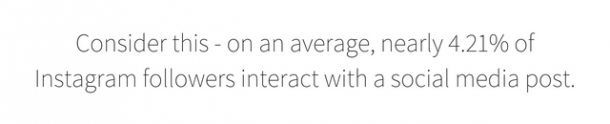
    Consider this - on an average, nearly 4.21% of Instagram followers interact with a social media post.

    This could be in the form of likes, comments or reshares. The corresponding numbers for Facebook and Twitter are 0.07% and 0.03% respectively.   

    This makes your investments in producing content for Instagram all the more worthy.

    What kind of content works?

    grow your instagram account

    The success of an Instagram marketing strategy depends to a great extent on what kind of content you produce.

    One study published by the Arizona State University sorted content posted by nearly 100,000 users and found that almost each one of them fit into one of the following eight categories:

    • Friends
    • Food
    • Gadget
    • Captioned Photo
    • Pet
    • Activity
    • Selfie, and
    • Fashion

    Some categories here are more popular than the others.

    For example, while Selfies and photos with Friends were most popular making up between 22% to 24% of the collection, pets and fashion were the least favorite with less than five percent of the images.

    Interestingly, however, the study further found no real correlation between the kind of images you post and the follower count. In other words, it does not matter what kind of content you post.

    Your users are likely to engage with your submission as long as it is interesting.

    How to create a content strategy

    grow your instagram account


    Although the content you post does not have a direct impact on the number of followers you gain, it can still influence the kind of followers you attract to your account.

    The objective of any marketing strategy is to reach your target customers. The content format you choose can have a significant impact on this outreach.

    The first step in this process is to identify the competitors in your space and understand their strategy.

    It is worth pointing out that unlike search engine optimization (SEO) where your webpage directly competes for visibility against nine other competitors, social media platforms like Instagram have room for all businesses to grow equally.

    Want to measure your content marketing success14 days for FREE

    So the objective here is to not outdo your competitors but to instead analyze their content to see what works and what doesn’t.

    Specifically, look for answers to the following questions:


    • What is the average interaction rate per post?
    • What is the average frequency of submission?
    • Do the posts have a specific content theme?
    • How does the post-tie-in with the competitor’s marketing message?
    • How does the marketer integrate their Instagram marketing with other channels?


    The answers to the first two questions tell you how successful the brand is with their Instagram marketing strategy. It is a good idea to discard competitors who do not enjoy great engagement and only focus on accounts that have a high interaction rate.


    • Content theme

    This is very much a subjective term and there is no scientific way to analyze the content theme. However, you may analyze the following factors:


    • Do the visuals focus solely on the product or do they focus on the placement (runner wearing the brand shoe, for example)
    • Is there a common element to all submissions (filters, color theme, etc.)?
    • What is the purpose of the submissions – is it about reinforcing the brand? Is it to show product utility? Or, is it to build a community through user-generated submissions?


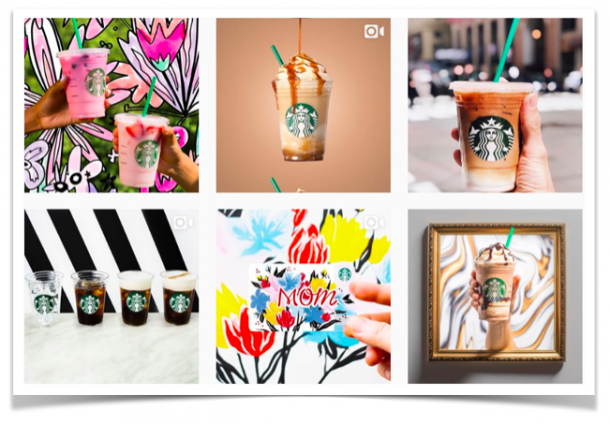
    Take the Instagram account of Starbucks, for example. You may be hard-pressed to find a post where the logo and branding are not reinforced.
     

    grow your instagram account


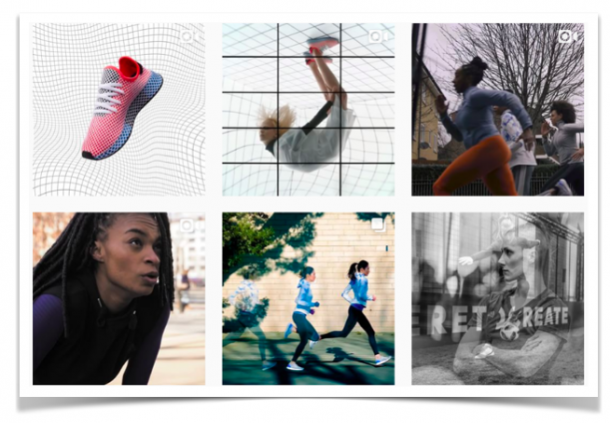
    Adidas, on the other hand, is all about reinforcing the marketing message of the being a sports brand.
     

    grow your instagram account


    • Omnichannel marketing

    Instagram is just one of the many marketing channels to reach and engage with your target audience. Your content strategy for Instagram should thus be integrated with the brand messaging across all your other channels.

    For instance, here is a series of Instagram posts from Coca-Cola that coincided with their ‘Share A Coke’ campaign.


    grow your instagram account


    Once you have studied your competitor strategies completely, you will have a better sense of what works and what doesn’t for your particular target group.

    This should provide you with a bunch of strategies that you could deploy for your own Instagram marketing campaign.


    How to Implement a plan

    grow your instagram account

    As it is with any marketing campaign, success depends on three factors:


    • How well you implement your strategy
    • How you monitor your campaign performance
    • How you benchmark success


    One of the most significant challenges with Instagram marketing is that you do not have ambient control over your followers’ timeline.

    Your submission could thus appear right against a competitor’s post or against any of the other unrelated accounts that your followers have subscribed to.

    This makes it difficult to build a narrative for your marketing communication.

    This is one of the main reasons why brands make use of unique content themes or filters in their submission.

    The idea is to enhance brand-recall and association with your submissions. As we already pointed out earlier, each of Starbucks’ Instagram posts reinforces their logo.

    Going back to Coca Cola’s example, you may notice that the brand retains their trademark red color in all their submissions.

    The idea is to reinforce their customers’ association of the color with the brand with the help of Instagram.


    grow your instagram account


    It is important to identify the factors that can help your brand stand out from the crowd in Instagram’ timeline.


    While brand reinforcement is definitely something to strive for, your marketing strategy may fail to achieve its objective in the absence of engagement. Luckily, Instagram provides brands with a bunch of different options to interact and engage with your followers.


    • Polls

    Instagram Stories allow brands to conduct simple polls among their followers. You may, for instance, ask followers to choose between two slogans for your business or their opinion on your latest jingle. The idea is to involve them in your marketing campaign and thus enhance their sense of brand ownership.


    • Livestreaming

    Users may also now live stream events of up to one hour long to their Instagram account. This is highly effective in increasing the time your followers spend engaging with your brand.


    • Advertising

    There are two ways to advertise on Instagram. The first strategy involves native advertising where brands may widen their reach by boosting their posts among target followers. Another way to do it would be for brands to tie up with social media influencers who can spread the word about the brand to their target audience. Influencers enjoy high levels of engagement in their niche and their word of approval can have a significant influence on your brand popularity.


    Monitoring the performance of your campaign and benchmarking it is an extremely important step in Instagram marketing.

    To do this, measure the engagement that your posts receive and compare it against the top competitors you pit your brand against.

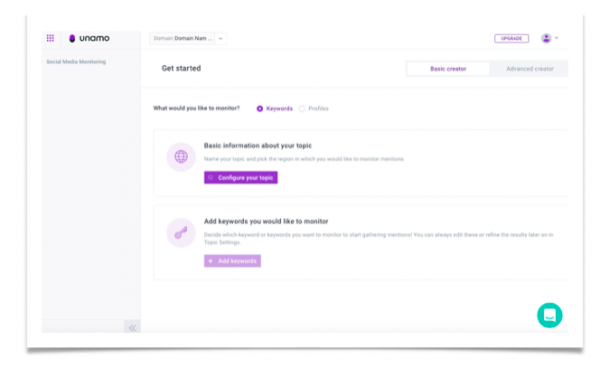
    You can use tools like Unamo Social Media Monitoring that allows you to measure your profile’s efforts.

    Ideally, your strategies should fetch you more likes and comments per post than what your competitors receive.

    If not, it is important to identify the factors driving higher engagement for your competitors and execute a new campaign.

     

    track your profiles and activity

    Conclusion

    Instagram marketing is a long-term strategy and the objective is to not just to gain followers and engage them, but also translate these metrics into higher sales.

    It is a good idea to periodically launch platform-specific flash sales and coupon marketing programs to understand the impact that your marketing strategy is having on customer acquisition.

    The post Instagram Marketing: A Simple Guide That Will Help Grow Your Instagram Account appeared first on Unamo Blog.
  • A 5 Step Guide to Social Media Management for Online Business

    A 5 Step Guide to Social Media Management for Online Business

    Having a social business account for an online business is no longer optional. With billions of people using popular networks like Facebook, Twitter, Instagram, and LinkedIn, trying to connect with them there makes a perfect sense.

    Businesses understand that. Today, the vast majority of them have social media accounts; in fact, according to AdWeek, 88 percent of U.S. companies use social media for marketing purposes, which means that the competition is unbelievable.

    This finding, however, doesn’t mean that a business cannot stand out from the crowd. Marketing your business on social media doesn’t cost an arm and leg compared to traditional advertising methods, but rather requires following the latest, evidence-based techniques.

    If you’re wondering what those techniques are, read on. This article is an ultimate guide to social media management for small and medium-sized businesses that will have on your way to build brand awareness, drive sales, and attract new customers.


    Step #1. Develop Social Media Guidelines

    Social media guidelines are a collection of principles that guide employee and brand behavior on social media. Essentially, these principles are best practices and suggestions on how to act in certain situations to avoid damaging reputation and providing quality service (if applicable).

    For you as a business owner, having these practices and suggestions in place is very important because they provide social media managers with specific instructions in situations that require special consideration. By introducing these guidelines, you’re also letting everybody know that they shouldn’t mess with the brand’s image online because they may be consequences.

    These are the main goals and considerations that your social media guidelines have to cover:

    • The priorities of your company
    • Sensitive areas of social media activity (responding to comments, reviews etc.)
    • The desired image and reputation online
    • Activities that could undermine your brand
    • Guidelines for interacting with customers and influencers (we’ll discuss this later in this post)
    • Activities that enhance social media presence.

    A terrific example of social media guidelines comes from IBM. The company has a page on their website dedicated specifically for “IBM Social Computing Guidelines,” where it lists all policies related to the use of social media. Some of the policies include:

    • “Respect copyright, fair use and financial disclosure laws”
    • “Respect your audience”
    • “Be the first to correct your own mistakes”
    • “Don’t cite or reference clients, partners or suppliers on business-related matters without their approval”
    • “If you publish content online relevant to IBM in your personal capacity it is best to use a disclaimer.”

    Check out the full policies at IBM Social Computing Guidelines page and see what you can use for your own social media policy, too.


    Step #2: Develop a Content Plan

    There are a wide variety of content types out there, so you have to know what ones will work for you. The best-performing ones in the recent years are described in the Social Media Marketing Trends Survey Summary Report chart below.

    Image Source: Social Media Marketing Trends Survey Summary Report


    Let’s discuss some of these content types.

    • Video and Live Streaming. Here are some facts: according to statistics compiled by Biteable, Facebook videos receive 135 percent more organic reach than a photo. No wonder 60 percent of marketers used videos in their social media marketing in 2016, right?
    • Infographics. This type of content also performs well because people are visual learners and prefer to consume information in a form that ensures easy understanding. Creating infographics isn’t that hard; you just need good content, and the rest can be taken care of by free tools such as Canva Infographic Maker and Venngage.
    • Educational written content. People are increasingly using social media to find instructions, tips, and instructions on doing things they love, so being an authoritative source of reliable information is every brand’s dream. The examples of such content include how-to articles, and in-depth guides (like the one you’re reading right now).


    The power of quality content for brands is amazing. In fact, check out these stats.


    You can reach similar results only using quality content. By ‘quality’ content, I mean the one that follows these content marketing guidelines.

    • First and foremost, create interesting content social media users actually want to engage with. One of the laws of content marketing says that epic content fills the need. This means talking about your audience’s problems, wants, needs, and aspirations.
    • Second, forget about talking about your brand. Gone are the days when companies were in charge of dictating market trends and content creation. Now, it is the customer who is the center of the universe. If consumers find “sales speak” in your content, most of them will leave right away.
    • Third, good content uses natural language. Let’s suppose you’re running a coffee shop and you need to write an article about how to choose a coffee maker. Would the academic style of writing be a good idea in this case? Of course not, this is not a Wikipedia page or a college history paper. Write in a simple, natural language that your readers will find easy to understand.
    • Fourth, create only original content that uses reliable evidence. People are not going to listen to your content if you don’t support what you’re saying with credible evidence.
    • Fifth, be consistent. A hallmark of a good content producer is consistency. You absolutely need to be consistent (in fact, this principle applies both to quality and delivery) to show your reliability as a source of information. If you’re not consistent, there’s no point in asking readers to subscribe to your newsletter.


    Step #3: Develop a Posting Schedule

    Quality reigns supreme here. It’s tempting to put as much content out there as you can in an attempt to attract some attention quickly, but this strategy will ultimately make quality suffer. A better way is to focus on quality and share content that delivers value using a specific posting schedule.

    Simply said, you have to figure out the ideal frequency for your social media posts. The frequency is based on a number of factors, including the time when your target audience is active on social media. Here are typical social media guidelines, according to data compiled by John Rampton, a Forbes contributor:


    Facebook:

    Daily Posts: 1-2

    Maximum number of posts on workdays: 2

    Maximum number of posts on weekend: 1

    Ideal time to get the most shares: 1 pm

    Ideal time for optimal value: any time between 9 am and 7 pm

    Ideal time to get most clicks: 3pm


    Twitter:

    Daily Tweets: no more than 5

    Most popular time to tweet: between noon and 1 pm (during the lunch)

    Least popular time to tweet: between 3 am and 4 am


    LinkedIn:

    Daily Posts: 1

    Ideal time for posting: noon or during the lunch break

    The worst time to post: between 10 pm and 6 am.

    Remember: this is the generic best time for these platforms that work for most businesses. Figuring out the best time for your business may require more research of your target audience. For example, you’ll have to figure out when your audience is online.


    Step #3: Build Authority of Your Brand

    Being an authoritative brand means that you have expert knowledge of your industry/niche/products. Customers pick brand very carefully; otherwise, company review sites wouldn’t have existed.

    Many consumers rely on social media to determine what products and services to use, so being a brand that gives this advice means an increased trust and a positive reputation.

    To build brand authority, consider the following

    • Creating quality content (created by real experts in the field if possible) that solves specific issues and concerns of your target audience. In-depth articles, infographics, and videos are the most popular content types for that.
    • Be consistent in style, theme, and quality. People reading your awesome content rely on you for quality information, so you have to make it happen on a regular basis. Also, consider adding your brand’s logo and colors to social media information to help viewers memorize them.
    • Reach out and engage. Being a good brand means reaching out to the target audience and communicating with them regularly. This makes them feel appreciated and valued; moreover, they will be much more likely to return the favor if needed (more on this in the next step).


    Step #4: Engage with Potential and Existing Customers

    The importance of two-way communication on social media for businesses cannot be overstated. The stronger the relationship is between your brand and its customer base, the better the former is positioned to sell and develop.

    So, here’s what your social media guidelines should contain in terms of engaging with customers:

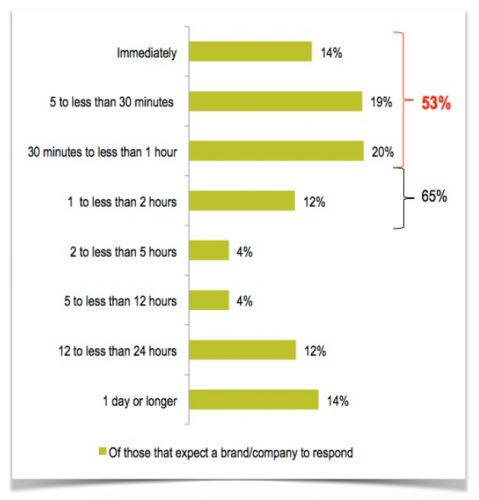
    • Always respond to comments and complaints. Customers expect your brand to reply as soon as possible, so you should do that. In fact, Search Engine Watch described the research produced by Lithium Technologies which found that 53 percent of Twitter users expect to hear back from a brand they’re interacting within an hour!

    Image Source: Search Engine Watch

    • Stick to what you know. Don’t give any advice on something that you don’t know. Even one mistake like this could cost you reputation on social media and lots of customers.
    • Share user-generated content. Doing so makes customers feel part of the topic, so consider sharing some content produced by your followers. Just make sure it’s quality!


    Step #5: Get Positive Reviews

    Online reviews are powerful PR tools because they are important for social media users to believe in your brand’s reputation. Take a look at the results of the Local Consumer Review Survey that sought to determine how influential online reviews are:

    • 85 percent of consumers trust online reviews as much as personal recommendations
    • Yelp and Facebook are the most trusted review sites
    • Consumers read an average of 7 reviews before trusting a business

    Here are some tips for you to manage reviews on your social media page effectively:

    • Ask satisfied customers to leave reviews using calls to reviews on your website, product pages, email newsletters, and during communicating with customers on social media
    • Always respond to negative reviews. Customers expect you to reply and offer assistance in case if they have a negative experience with your business. If you don’t, chances are they’ll use others businesses in the future. Besides, an unfavorable review is a great opportunity to discover where your business needs improvement, so ask the customer to provide as many details as possible to know what happened and why.
    • Put positive social media reviews on your website. They’ll serve as an additional proof of your reliability and facilitate positive associations. For WordPress websites, for example, special social testimonials and reviews plugins such as Repuso and Youtpo are available.


    Tools for Social Media Management

    Automation is a big deal these days because it speeds up business processes (social media publishing, analytics etc.), so check out these popular tools to see how they can benefit your social media management and marketing.

    • Google Analytics. Data collected by this tool can help to focus your effort on areas that drive conversions.
    • A-writer. Resource where you can get professional help on how to write, proofread and make relevant and engaging social media content.
    • Buffer. Automatic scheduling and posting of social media content.
    • Canva. We’ve already mentioned Canva’s Infographic Maker in this article, but this tool has so much more to offer, including templates and design tools for social media posts, flyers, documents, and posters.
    • Unamo Social Media. You can track mentions about your brand in social media, track your competitors, measure your efforts or find your brand’s ambassadors.

    Unamo SEO free trial

    Try Unamo Social Media FREE for 14 days

    Conclusion

    Success on social media doesn’t happen overnight.

    While the tips above are not requirements for success, they can greatly enhance your social media presence and increase the chances of becoming a popular, authority brand with an army of loyal followers.

    The post A 5 Step Guide to Social Media Management for Online Business appeared first on Unamo Blog.

  • The Definitive Facebook Image Sizes and Dimensions Guide

    The Definitive Facebook Image Sizes and Dimensions Guide

    What’s the biggest social media platform? We all know that; it’s Facebook! As of the second quarter of 2018, Facebook reached the number of 2.23 billion monthly active users.

    The community is growing by the day, and the opportunities for businesses to promote themselves on Facebook grow as well.

    When you start a business page, you have to keep in mind that Facebook users favor visual content.

    With the latest updates that favor community posts, it’s important for brands to gain visibility through impressive visual content. Clickbaits no longer work, and even business page posts barely work.

    Businesses have to invest in ads and post high-quality content more than ever before.

    Oh; let’s not forget the 360-degree photos that Facebook recently introduced. You can use them in various ad formats, so you’ll engage your audience on a whole other level.

    One feature after another, it gets kind of difficult to realize how to properly format the visual content. What worked before may not work now. Image sizes and dimensions, in particular, should be a straightforward issue.

    After all, Facebook will automatically fit any image to the required format, right?

    Wrong!

    If the image is badly cropped or stretched out the ad or the entire page will look like it’s under construction. You don’t want blurry visual content that doesn’t make your brand look professional enough. As if you didn’t have enough details to pay attention to, now this? Well, the good news is that we created the definitive Facebook image size and dimensions guide for you.

    All you need to do is take a look at these numbers and your visual content will be good to go.

    The Profile Picture Size

    When someone lands at your profile, it’s the cover photo that gets the most attention (just look at the screenshot above and everything is clear).

    The profile picture, however, is still crucially important. In fact, it represents your brand and it’s what people see when your posts and ads appear in their timelines.

    Most brands opt for their logos.

    That’s a good approach since it clarifies who the post is from. If you take a look at the Barnes & Noble profile photo, however, you’ll notice it doesn’t read that well when showed in the circle ahead of a post. It’s impossible to crop it well enough so it would fit in that circle.

    So you have to be mindful of the way your profile photo would look in a square and a circle. That being said, these are the dimensions to keep in mind:

    • The recommended size for a profile photo is 180 x 180 pixels. Pretty simple. The image will appear 128 x 128 pixels on smartphones and 170 x 170 pixels on desktop.
    • The photo thumbnail will appear at 32 x 32 pixels.

    You probably noticed that on a business page, the profile photo appears on the left side, and the cover photo is entirely visible. That’s different from a personal account, where the profile image is positioned over the cover image. The purpose is to differentiate business pages from personal pages, but the sizes still remain the same.

    Unamo SEO free trial

    The Cover Photo Size

    The cover photo is the most prominent part of your Facebook page. It’s way bigger than the profile picture, and it’s not something your brand is necessarily recognized for.

    It’s not recommended to change the profile photo that often since it appears all over Facebook and it’s good when people remember it. The cover photo is a different issue.

    I mean; you could change it quite often, so you’ll promote different products or campaigns.

    It has to be very catchy, and it needs to convey the vibe of your brand.

    As for the size, these are Facebook’s recommendations to consider:

    • It must be at least 400 x 150 pixels. But if you go for this size, Facebook will automatically stretch it out.
    • The cover photo displays at 820 x 312 pixels on desktop and 640 x 360 pixels on smartphones.                                                  

    Those are the acceptable dimensions. But what’s the recommended size? The one that loads fastest, of course! Facebook gives you such a recommendation: the cover photo loads fastest at 851 x 315 pixels in sRGB JPG format, less than 100 kB size.                                    

    It doesn’t get any more straightforward than that.

    Group Cover Photo Size

    Facebook is all about community, so it’s no wonder why so many businesses are making efforts to bring their followers together in a group. In groups, the discussion runs more smoothly. Needless to say, you still have to make the cover photo stand out.

    If you take a look at any group page, you’ll notice that there’s no profile picture, and the cover photo is larger.

    Facebook recommends a different size for group cover photos: 1,640 x 856 pixels. In ratio, that would be 1.91:1.

    On a mobile device, the users will see a narrower version of the image, which is why it’s important to avoid placing important information at the top and the bottom.

    Ad Image Size

    Businesses are practically forced to consider Facebook ads since their posts are less visible than they used to be. The latest updates made it difficult for a business to promote itself without any investment.

    But what about the ad image? What size and format should it be?

    • Facebook recommends 9:16 to 16:9 ratio for ad images.            
    • The file should be uploaded in png or jpg format.
    • You may include text of up to 125 characters.
    • Use the highest resolution possible; there are no restrictions on that.
    • Don’t use too much text in an ad, since it may experience less delivery if the text takes more than 20% of the ad. Facebook gives you a convenient tool to check the proportion of text to image.
    • If you want to include a clickable link to the image, it will be cropped to 1.91:1 ratio. In that case, the minimum recommended image resolution is 1200 x 628 pixels.
    • You’re allowed to use a headline of up to 25 characters and a link description of up to 30 characters.

    Carousel Ads Image Size

    Carousel ads are awesome because they give you more opportunities to represent an offer.

    Michelle Brown, part of the marketing team at BestEssays, explains how useful carousel ads are: “We love these because they allow us to feature several promotions in a single ad. Instead of creating different ads for research papers, essays, and dissertations, we launch a single ad that encompasses all these services. You just have to make it attractive enough, so it will engage the users to hit the arrow and see what else there is.”

    These ads are a bit tricky for beginners, but you’ll do just fine if you follow the recommendations.  

    • You may use a minimum of 2 and maximum of 10 cards in the carousel ad.
    • The supported image formats are png and jpg, but supported video files are also good for carousel ads.
    • The recommended ratio for a carousel ad image is 1:1. Yup, it should be a square.
    • The minimum recommended resolution is 1080 x 1080 pixels.
    • The maximum image file size is 30 MB.                             

    Shared Image Size

    This is one of the most common types of content you’re going to share on Facebook. Yes; businesses are now paying to get their content promoted across the network, but that’s not what their activity is limited to. In fact, we encourage you to share more content and work on its quality more than ever. Native engagement still works, and you can still make it happen.

    But what kinds of images should you share? – Good ones! As for the format and dimensions, these are the recommendations to follow:

    • The recommended upload size is 1,200 x 630 pixels.      
    • Facebook will automatically resize and format your photos once you upload them. Since you don’t want them butchered, it’s best to resize the photo to a supporting width, which may be 720, 960, or 2048 pixels.
    • On your page, the image will appear at maximum width of 504 pixels.
    • In people’s feeds, the image will appear at maximum width of 470 pixels.
    • The recommended format is JPEG with sRGB color profile.
    • The file size should be smaller than 100 kB, so you’ll avoid compression.        
    • To make sure you’re always uploading high-quality photos, go to your account settings in the Facebook app and choose to always upload photos in HD. It will be the default option, so you won’t have to worry about it.

    Event Post Image Size

    If you want to invite your followers to attend an important event, you’ll create an event on Facebook. All your followers will see it as a suggestion, and the friends of those who are interested in your event will also get a notification. That’s a great way to expand your reach.

    This image will be displayed as a thumbnail in the upcoming events section of your followers. Facebook will show it in large format on the event page, too.

    Of course, you’ll need a cover photo for your event, too. It should convey the purpose of the event, clarifying what it’s about. However, it should also make the page look attractive.

    • For the best possible results, Facebook recommends you to upload a photo or video that’s about 2:1 in ratio.
    • The recommended size for photos is 1,200 x 628 pixels.
    • If you upload a video, the recommended length is from 30 seconds to 5 minutes.

    Shared Link Image Size

    Since Facebook allows you to share any links, that’s a great opportunity to promote your blog posts and website content. When you create that content, however, you have to be aware of the way it will appear on Facebook.

    Screenshot 7

    Facebook recommends some best practices for sharing. First of all, you have to make sure the Facebook Crawler can access your site. Then, you may worry about optimizing the images, so the link will have an ideal preview when it shows up in people’s Facebook feeds.

    • The minimum recommended size for ideal display is 1200 x 630 pixels.                       
    • To display link page posts with larger images, you should use images that are at least 600 x 315 pixels. As for the size, the images can be up to 8 MB.
    • The image will still appear in the linked post if it’s smaller, but it won’t be attractive at all. It will be too small for people to notice.          

    Facebook Panoramas Size

    360 photos, also known as Facebook panoramas, are great for engaging your audience with an interactive experience. Their curiosity will be triggered, so they will certainly want to explore the environment you’ve captured in the panorama.

    Facebook recognizes these photos and processes them through the camera-specific metadata that’s already available in photos taken in this format.

    Needless to say, some guidelines are necessary:

    • This photo must have 2:1 ratio; there’s no flexibility about it.
    • The 360 photo must be less than 135,000,000 pixels in total size, and less than 30,000 pixels in any dimension.
    • Since mobile uploads come with stricter limitations, it’s best to upload from web if you want to get close to the maximum size.

    Facebook Canvas Size

    This mobile-only feature allows businesses to engage their audience on a whole other level. The Canvas is an expanded in-feed story, which your followers see on full screen. They can watch great photos and videos, explore tagged products, and swipe through carousels. The Canvas loads really quickly, and it’s quite easy to create. You just have to be aware of the recommendations.

    Facebook gives you a great guide to creating Canvas, so check it out before you start developing such content.

    • The main image (called Hero) has to be of 16:9 ratio, and it has to be 1,200 x 628 pixels in size. There’s no flexibility here.   
    • Below the Hero, the Canvas will show four other images in thumbnails. By default, Facebook sets the thumbnail as the center square of the chosen image. If you want to adjust the thumbnail, you can choose any square section that’s 100 x 100 pixels in size.


    There you have it!

    That was the ultimate guide to Facebook image sizes for businesses. It covers most types of images you’ll need to use for your Facebook marketing campaign.

    You’re basically ready to start!  


    Unamo SEO free trial

    The post The Definitive Facebook Image Sizes and Dimensions Guide appeared first on Unamo Blog.

  • 6 Ways to Increase Traffic to Your Website with Social Media Monitoring Tool

    6 Ways to Increase Traffic to Your Website with Social Media Monitoring Tool

    How to increase traffic?

    If you’re not already using social media to boost your web traffic you’re missing out on 2.5 billion potential consumers. The sheer scope of social media users means that social media is not only useful for boosting web traffic but essential.

    Every (successful) business-to-consumer facing company and many business-to-business facing companies use social media to spread brand awareness and drive traffic to their landing pages.

    You simply can’t afford to get left behind. At the very least using social media levels the playing field.

    But just because you’re on social media doesn’t mean you’re using it well. Think about your non-millennial relatives. That one uncle who has Facebook but never posts anything? He represents how not to run your brand’s social presence.


    What’s more, even if you’re frequently posting on social media, if people aren’t following links back to your landing pages you won’t see any conversions.

    So then, how do you use social media to increase traffic to your website? Analytics.

    You need to know where that traffic comes from, what people think of your social content, what’s trending, what your competitors are doing, and more.

    Today, we’re breaking down how to find out all of that analytic data using Unamo’s Social Media Monitoring tool.

    1. Content is King

    First thing’s first. Social Media is all about posting content. When it’s your personal page you’re posting photos, videos, your thoughts, and links to other content. This doesn’t change for your business page.

    People want timely, relevant, engaging, useful content. They’ll read your posts and look at your pictures because they entertain or help solve some problem. And creating this useful content means understanding what’s trending.

    Unamo helps you stay on top of trending content and hashtags for each of your social accounts. Plus, with a few choice keywords, you can find what’s trending within your specific niche.

    Once you’re drawing followers you start pushing people towards your landing pages to increase traffic to your web.

    project social media monitoring

    2. Know Your Brand Image

    Once you’re posting content you can start cultivating a social media presence. First, decide what your brand stands for. What do your consumers like? Do their interests fit with the trending content you’re posting? Stay open to content personalization.

    It’s important that your brand image resonates with your consumers, and also that it stays consistent. You need people to recommend your social accounts to their friends and to come back for more content.

    Today more than ever consumers care about what brands stand for. They want to feel a moral connection with your brand. So you need to know what people say about your brand on social media.

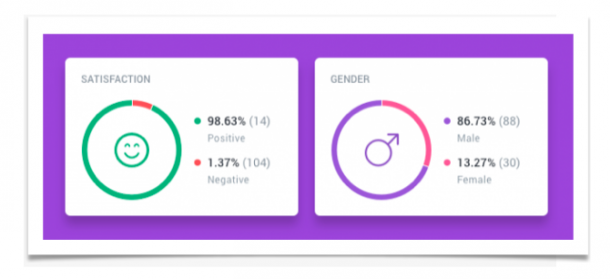
    Using Unamo Social Media Monitoring, you can get alerts every time someone mentions your brand on social media. It’s an excellent way to keep tabs on how people view your brand. With the sentiment analysis feature, you can see a visual break down of both positive and negative brand mentions.

    What’s more, Unamo also breaks down mentions by the audience so you can see how your brand does across different niches. People who think positively of your brand are more likely to click through to your website and thus boost your web traffic.

    sentiment analysis unamo social media monitoring


    3. Pick and Choose Your Platforms

    Not every social platform works the same or has the same intent, and which you choose can have an enormous impact on your potential web traffic. Simply put, if your niche doesn’t use Instagram, you shouldn’t post content on Instagram.

    Likewise, if your content doesn’t translate well to 160 characters, don’t post on Twitter.

    Using Unamo’s aforementioned sentiment analysis feature you can not only find out what consumers think of your brand but also which platforms have consumers with a positive take on your product. So if people on Instagram aren’t big fans of your posts don’t focus on Instagram.

    Though it is important to maintain as many social accounts as possible without sacrificing quality. The more social followers you amass, the more opportunities you have for driving traffic to your website.

    social media platforms

    4. Follow the Consumer

    You can build a millions-strong social media following but see no traffic boost if people don’t click through from your posts to your landing pages. No matter what content you’re posting it’s important that it’s pushing people toward your website.

    It’s vital then, to follow your social media traffic. You need to know what platforms and posts drive clickthroughs. Unamo keeps track of where your social traffic comes from and where it’s headed.

    With Unamo, you can track which posts turn customers into conversions and identify your better-performing content. Once you know what drives your traffic you can replicate that success and really watch your traffic numbers soar.

    project social media monitoring


    5. Study the Competition

    Research on social media, even with help from Unamo, takes time. Likewise, implementing new strategies based on uncovered data isn’t foolproof. Sometimes things expected to work fail for seemingly no reason, wasting both time and potential income.

    That’s why studying the competition is an excellent way to find working strategies without actually implementing them yourselves.

    Think of your competitors like your own personal R&D team. Their failures are your warning and their successes your template.

    Unamo’s Social Media Tool has an entire competitor analysis section that breaks down the competition’s content, clickthroughs, and more. You can find out what kind of content gets the most views and what content converts to clickthroughs.

    You can also figure out which of their social platforms perform best and use those same platforms for your niche. Further, you can find out what those niches say about the competition’s content and formulate your own content based on those opinions.


    6. Influencers

    Last but not least there’s an unconventional (though quickly becoming commonplace) way to boost your web traffic using social media without actually posting anything, or even using your own social media accounts.

    Enter influencers. People who advocate for your brand, influencers are an excellent way to drive an already engaged following to your website. People trust online opinions as much as in-person recommendations.

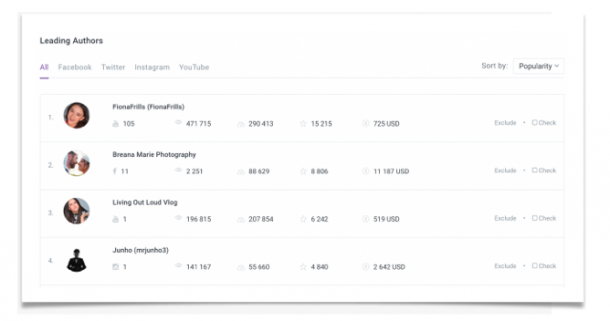
    Unamo can track influencers across each social platform that are talking about your niche, brand, product, and more. You can then sort by popularity, audience reach, mentions, and more.

    All that’s left is getting in touch with influencers you’d like to work with. They share your content with their already established audience and advocate for clickthroughs to your landing page.

    The better the influencer the more clickthroughs and the more web traffic to your landing pages.

    influencers unamo social media


    Summing it All Up

    Driving traffic to your website using social media takes combining different aspects of your social strategy. You’ll need quality content, strong analytics, a positive brand image, and influencers to truly maximize your traffic.

    Though most importantly, you need a program that helps keep your social media strategy organized, cohesive, and successful.

    Luckily enough, Unamo does just that. The social media monitoring suite has everything you need to ensure your social media strategy drives landing page traffic.

    So if you’re ready to take your social media marketing to the next level, get in touch with us and try out Unamo.

    Their social media suite combined with SEO and conversion web analytics can help your products and keywords to rank, in turn, optimize your business web traffic.

    In a world where internet branding is ubiquitous, you need to not only keep up with the competition but drive more clickthroughs and conversions than ever before.

    Let Unamo Social Media help get you started on the road to internet marketing success.


    The post 6 Ways to Increase Traffic to Your Website with Social Media Monitoring Tool appeared first on Unamo Blog.