Online Services

Category: Security

  • Optimizing Wordfence Security Settings: Brute Force Protection

    As a part of the Wordfence Client Partner initiative, we’ve recently had some in depth conversations with organizations using Wordfence at scale. These conversations have been enlightening, and we wanted to share some of the stories we’ve heard about how different organizations use Wordfence.

    This post is Copyright 2018 Defiant, Inc. and was published on the wordfence.com official blog. Republication of this post without permission is prohibited. You can find this post at: https://www.wordfence.com/blog/2018/07/optimizing-wordfence-security-settings-brute-force-protection/

    Wordfence is the most robust security solution available for WordPress site owners, and the number of security features available is unparalleled. This ensures that Wordfence can be customized to be an optimal security solution for your specific environment and security needs.

    Wordfence Brute Force Protection

    Getting Started with Wordfence

    When you install Wordfence for the first time, the plugin defaults to recommended settings that are a perfect starting place for customization. You won’t need to do much else. However, Wordfence is highly configurable, allowing you to tailor how it works to meet your needs.

    How our Customers Use Brute Force Protection:

    Wordfence includes a number of powerful brute force protection features that can be used to prevent malicious bots from gaining access to your site, including the integration with Troy Hunt’s version 2 of the Pwned Passwords API that prevents access using passwords previously seen in a breach. In this post we will focus on Brute Force Protection and how our customers can customize this feature, based on their security needs.

    Factors to consider when modifying your site’s Brute Force Protection settings include:

    1. How adept are your users? Do you have users that forget their passwords often? Are they logging in sporadically and have a high probability of losing their passwords? You’ll want to take them into consideration and allow room for user error.
    2. Is this a high traffic, high profile site that often experiences hacking attempts?
    3. Is your site under repeated attack from brute force attempts?

    The following customer scenarios serve as great real-world examples of how Wordfence can be customized to meet specific needs.

    Kyle’s Agency Customer Site

    One of our agency partners, Kyle, manages a number of WordPress installations for his customers. His customers rarely perform any administrative tasks, but they have editor access in order to add and modify new content. The agency has administrator access, and they have set up Wordfence Premium to protect the site. In addition to the premium features of country blocking and two-factor authentication for administrators only, he has tightened Brute Force Protection. Some of his customers often forget their passwords, and he wants to ensure they can still access the site to post content without causing too much administrative work for his team.

    Kyle sets up his sites so that failed logins lockout after 5 attempts, forgot password attempts are set to 10 and a user is locked out for 24 hours. He does not set the site to immediately lock out invalid usernames, but he immediately blocks anyone who uses ‘admin’, ‘administrator’, or any other failed logins he sees. He routinely audits his site’s failed logins and adjusts this setting accordingly.
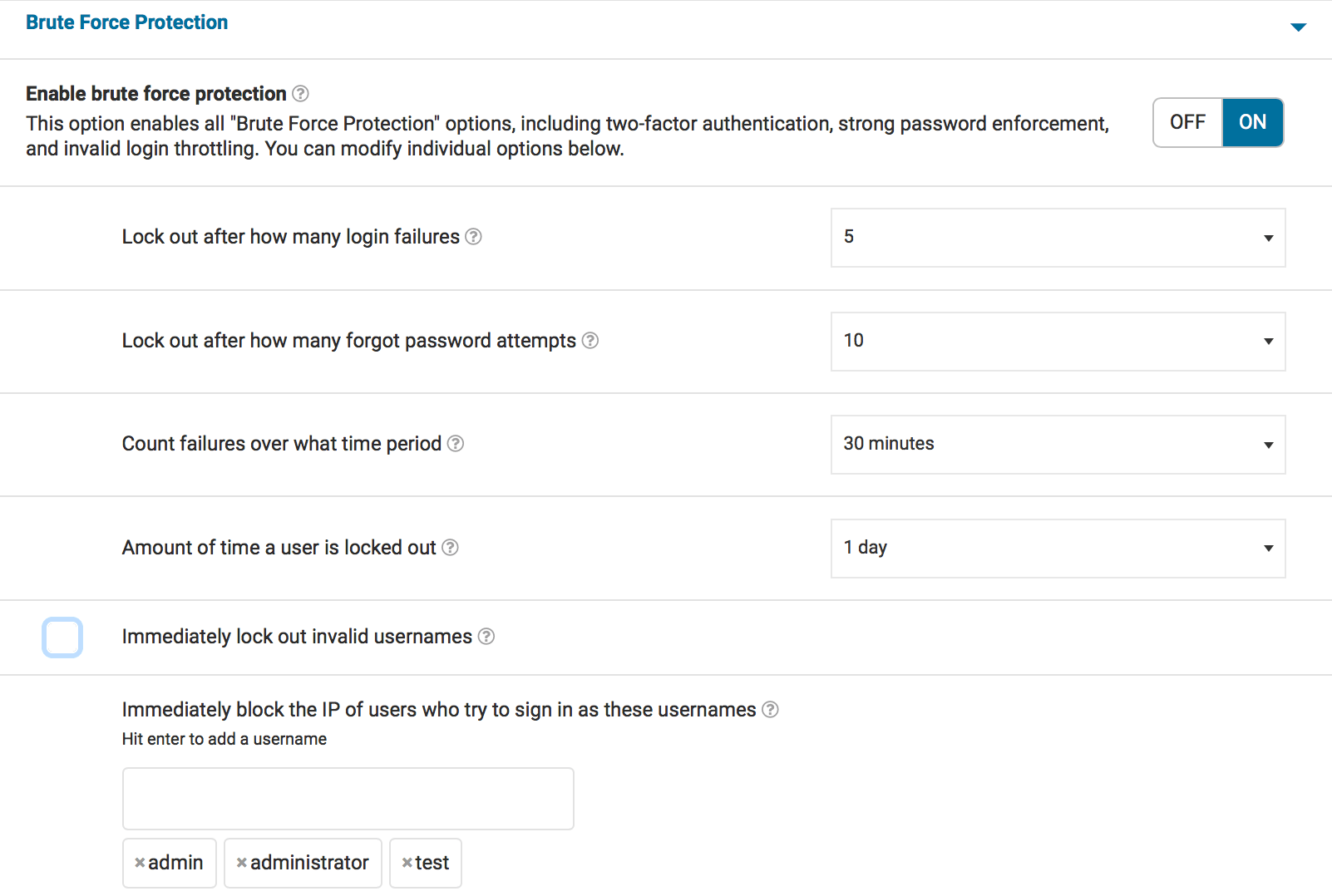
    brute force protection

    Maria’s Membership Site

    Maria uses Wordfence on a WordPress membership site. She has a team of publishers and administrators and a large number of members who need to login in order to access content. Some of them use good password hygiene, but others do not. Maria’s site is also protected by Wordfence Premium, and she has made some adjustments to her brute force protection settings.

    Maria has set her failed logins lockout to 5 attempts, forgot password attempts are set to 10, and a user is locked out for 24 hours. She does not set the site to immediately lock out invalid usernames because she has a large user base. She immediately blocks anyone who uses ‘admin’ or ‘administrator’, but does not go further than that. She uses Wordfence Premium’s two-factor authentication and some minor country blocking to augment her site’s security.
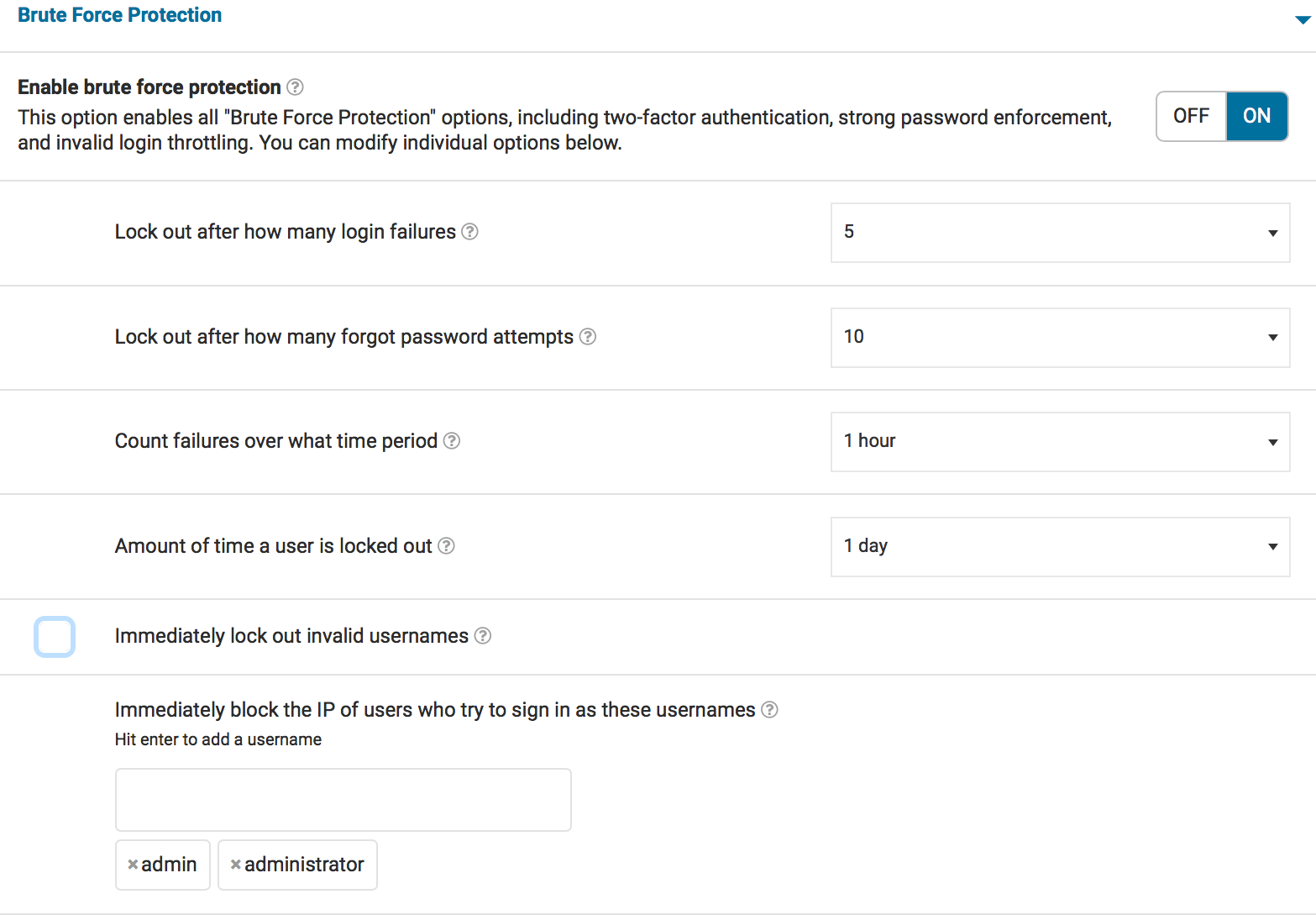
    brute force protection

    Dave’s Personal Site

    Dave has a personal blog. He has one login for himself and no other users. He knows his password, and also has access to FTP in order to easily deactivate Wordfence if he ever locks himself out. He has tightened his Brute Force Protection settings because he’s quite confident in his ability to store his password safely.

    Dave sets up his sites so that failed logins lockout after 2 attempts, forgot password attempts are set to 3, and IP addresses that reach these limits are locked out for one month. He immediately locks out any invalid users and also immediately blocks anyone who uses ‘admin’, ‘administrator’, or any other failed logins he sees.

    He also uses two-factor authentication to ensure that logging in is difficult for anyone other than himself should his credentials ever be discovered.

    brute force protection

    Sam’s Small e-commerce Site

    Sam has a small e-commerce site that is growing rapidly. He has a number of contractors on the site updating product information. He has users that need to login for various business functions and needs to ensure that everyone can log in, but doesn’t want to risk his site’s security given how sensitive e-commerce data is. He’s invested in Wordfence Premium and requires his administrators to use two-factor authentication for logging in.

    Sam sets up his sites so that failed logins lockout after 5 attempts, forgotten password attempts are set to 5, and a user is locked out for 4 hours. He does not set the site to immediately lock out invalid usernames. He has set his Wordfence installation to block any passwords from data breaches to anyone who can publish as well as administrators because of the turnover in the contractors he is using to update product information.

    brute force protection

    How are you using Brute Force Protection?

    We hope this deeper look at our Brute Force Protection settings has been helpful. If you’ve been using Wordfence for a while, how are you using Brute Force Protection? Are there rules you’ve set that work well for your unique site requirements?

    Are you seeing any new brute force attack patterns that concern you? Let us know in the comments.

    We’ll be covering more ways that our customers use Wordfence in upcoming posts.

    The post Optimizing Wordfence Security Settings: Brute Force Protection appeared first on Wordfence.


  • Details of an Additional File Deletion Vulnerability – Patched in WordPress 4.9.7

    Today WordPress released version 4.9.7, a security release which addresses two separate arbitrary file deletion vulnerabilities requiring Author privileges. Some details can be found on the WordPress.org blog.

    This post is Copyright 2018 Defiant, Inc. and was published on the wordfence.com official blog. Republication of this post without permission is prohibited. You can find this post at: https://www.wordfence.com/blog/2018/07/details-of-an-additional-file-deletion-vulnerability-patched-in-wordpress-4-9-7/

    The first arbitrary file deletion vulnerability was disclosed June 26, 2018 on the RIPS Tech blog with no official patch to WordPress in place. We released a firewall rule the same day to protect Wordfence users from attacks against this vulnerability.

    A Second Vulnerability Discovered

    After developing a proof of concept of the attack to aid in writing the Wordfence firewall rule, we decided to have a closer look at the code used to create and delete attachments. During this review, we discovered a second arbitrary file deletion vulnerability exploitable by authors. We released a Wordfence firewall rule to our Premium customers on July 2nd to protect against this vulnerability.

    The details of the second vulnerability are as follows: In WordPress core, there is an “upload-attachment” AJAX action used by the media uploader. The AJAX call will handle the file upload and pass an array of additional data about the attachment to wp_insert_post, since media attachments are a specific post type within WordPress.

    function wp_ajax_upload_attachment() {
        
        ...
        
        // Post data from user input.
    	$post_data = isset( $_REQUEST['post_data'] ) ? $_REQUEST['post_data'] : array();
    
    	// If the context is custom header or background, make sure the uploaded file is an image.
    	if ( isset( $post_data['context'] ) && in_array( $post_data['context'], array( 'custom-header', 'custom-background' ) ) ) {
    		$wp_filetype = wp_check_filetype_and_ext( $_FILES['async-upload']['tmp_name'], $_FILES['async-upload']['name'] );
            
            ...
            
    	}
    
    	$attachment_id = media_handle_upload( 'async-upload', $post_id, $post_data );
    

    The vulnerability lies in the way wp_insert_post populates the meta data for the attachment. The path to the attachment file is stored in the meta key _wp_attached_file. By supplying post_data[meta_input][_wp_attached_file] in the request to the “upload-attachment” AJAX action, we can pass in ../../wp-config.php which WordPress will treat as the attachment file.

    Similar to the first arbitrary file deletion vulnerability, when an author deletes this attachment, the wp-config.php is deleted allowing the author to go through the initial WordPress installation process which allows them to fully compromise the site.

    WordPress Releases a Fix in 4.9.7

    The WordPress security team has just released version 4.9.7 which addresses both of these issues by performing some additional checks before deleting attachment files. Specifically, they have added the function wp_delete_file_from_directory which they use to verify the file is within the uploads directory before deleting it.

    /**
     * Deletes a file if its path is within the given directory.
     *
     * @since 4.9.7
     *
     * @param string $file      Absolute path to the file to delete.
     * @param string $directory Absolute path to a directory.
     * @return bool True on success, false on failure.
     */
    function wp_delete_file_from_directory( $file, $directory ) {
    	$real_file = realpath( wp_normalize_path( $file ) );
    	$real_directory = realpath( wp_normalize_path( $directory ) );
    
    	if ( false === $real_file || false === $real_directory || strpos( wp_normalize_path( $real_file ), trailingslashit( wp_normalize_path( $real_directory ) ) ) !== 0 ) {
    		return false;
    	}
    
    	wp_delete_file( $file );
    
    	return true;
    }
    

    Timeline

    • 2018-06-29 11:26 AM (-500) – Initial report of second arbitrary file deletion vulnerability submitted to WordPress security team.
    • 2018-07-02 1:14 PM (-500) – Firewall rule released to Wordfence Premium customers to address second vulnerability.
    • 2018-07-05 12:00 PM (-500) – WordPress releases version 4.9.7 which fixes both vulnerabilities.

    What To Do

    We strongly encourage you to update to 4.9.7 as soon as possible. If you have automatic updates enabled, your site should update within the next 24 hours. Automatic updates are enabled by default in WordPress for minor releases.

    Credits: Congrats to Matt Barry, our lead developer at Wordfence for finding this vulnerability and writing up technical details. Thanks to Mikey Veenstra for editing this post. As always, thanks to the WordPress security team for being super responsive and for their hard work helping secure WordPress core.

    The post Details of an Additional File Deletion Vulnerability – Patched in WordPress 4.9.7 appeared first on Wordfence.

  • CoinImp Cryptominer and Fully Qualified Domain Names

    CoinImp Cryptominer and Fully Qualified Domain Names

    CoinImp Cryptominer and Fully Qualified Domain Names

    We are all familiar with the conventional domain name notation, where different levels are concatenated with the full stop character (period).

    E.g. “www.example.com”, where “www” is a subdomain, “example” is a second level domain, and “com” is a top level domain.

    However, very few know that there is also a DNS root domain and it can be also specified in the fully qualified domain names.

    Continue reading CoinImp Cryptominer and Fully Qualified Domain Names at Sucuri Blog.

  • Google and Facebook Used in Phishing Campaigns

    Google and Facebook Used in Phishing Campaigns

    Google and Facebook Used in Phishing Campaigns

    We’ve all seen sketchy looking emails or texts with malicious links to click on. There are still people who fall for these more obvious types of scams, however, phishing scam messages are designed to be deceiving. They use methods that appear valid or of some urgent matter, encouraging its victim to hand over their data.

    Phishing Campaigns

    Phishing attempts happen in many ways, such as:

    • deceptive email campaigns,
    • suspicious SMS alerts (called smishing),
    • fake websites designed to look and sound authentic, and more.

    Continue reading Google and Facebook Used in Phishing Campaigns at Sucuri Blog.