Online Services

Category: Security

  • PSA: Highly Critical Drupal Core Vulnerability Impacts Over 1 Million Sites

    Yesterday the Drupal security team announced a highly critical unauthenticated remote code execution vulnerability in Drupal core. The vulnerability allows an attacker to leverage multiple attack vectors and take complete control of a website. The Drupal team estimates that, at the time of the announcement, over one million sites are affected – about 9% of Drupal sites. They also reported that, to their knowledge, it was not being actively exploited.

    We normally don’t cover Drupal vulnerabilities on this blog, but given the nature and scope of the issue, we felt compelled to help spread the word via this public service announcement (PSA).

    Site owners should upgrade to a safe version of Drupal core immediately. While the reports of no active exploits are comforting, the announcement will draw a lot of attention from attackers. Given the nature of the vulnerability, there will literally be a race between site owners upgrading and attackers figuring out an exploit.

    Here is a high-level summary of the versions impacted and recommended actions:

    • Sites running Drupal 8.x should update to version 8.5.1
    • Sites running Drupal 7.x should update to version 7.58
    • There are patches available for 8.3.x and 8.2.x versions
    • Sites running end of life versions will need to upgrade to a supported version of Drupal

    A more detailed overview of upgrade recommendations from the Drupal security team is available on Drupal.org. They have also published a detailed FAQ.

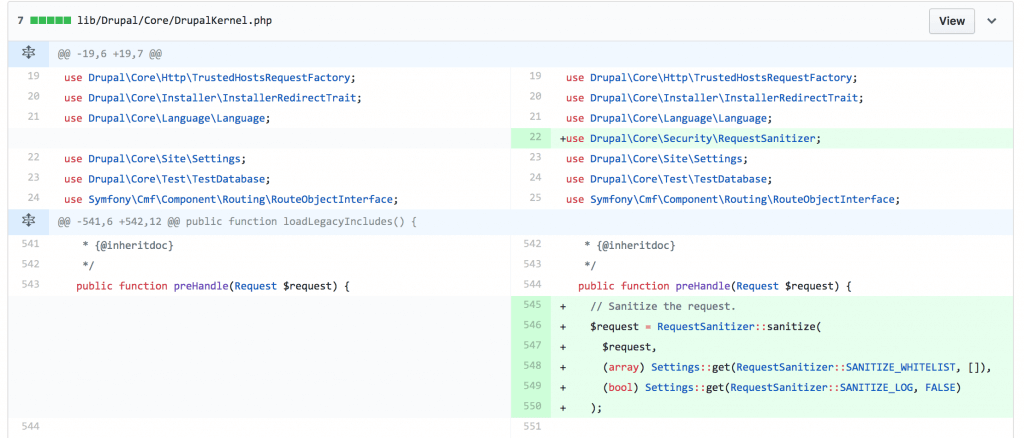
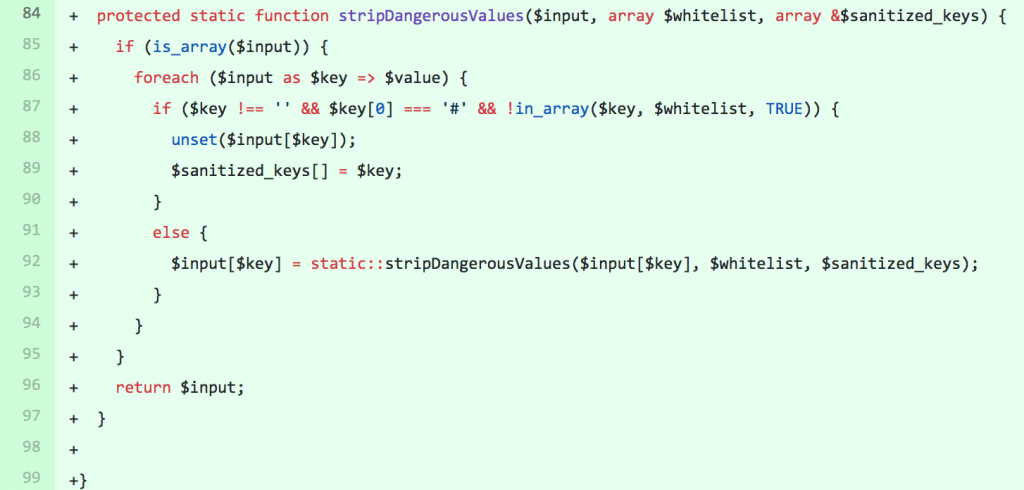
    Looking at the diff of the patches provided by the Drupal team, they reveal a new DrupalRequestSanitizer class used to sanitize user input.

    This class is used to filter values from the query string, post body, and cookies that begin with #.

    A proof of concept demonstrating the attack has not yet been made public, but we expect that one will be made available soon.

    This attack has been nicknamed “Drupalgeddon 2.” The previous Drupalgeddon was as high in severity as this, and had automated attacks against unpatched Drupal sites within a matter of hours after the public announcement of the vulnerability was made.

    Please help us spread the word about this potentially nasty vulnerability to other site owners so they can stay a step ahead of attackers.

    The post PSA: Highly Critical Drupal Core Vulnerability Impacts Over 1 Million Sites appeared first on Wordfence.

  • Service Vulnerability: MelbourneIT Fixes NFS Permissions Problem

    In February, we wrote about a vulnerability on three shared hosting services.  Following our Vulnerability Disclosure Policy, we had alerted them about vulnerable permissions on shared drives on their servers. They fixed the problem, making things safer both for their customers and for their customers’ site visitors.

    During the past month we noticed the same kind of attacks happening on websites hosted with MelbourneIT (and NetRegistry.com.au, which they own). We were able to verify the same vulnerability on their platform, and we disclosed it to them. We’re happy to say they moved quickly to fix it as well.

    A Note on Disclosure and Responsible Vendors

    It’s important to note that vulnerabilities are a fact of life in any service, system or software. Finding, confidentially disclosing and fixing vulnerabilities is how our industry works with the information security community to improve the products and services we all use and to keep the public safe. The process that we use is well-established, and widely used by organizations that include Google’s Project Zero.

    When we find vulnerabilities and vendors are responsive, you benefit as a customer of those vendors and can know that your vendor reacts quickly to fix security problems and will likely do so long term, keeping you and your data safe.

    A disclosure like this is not an opportunity for “vendor shaming” or a witch hunt. All developers who write enough code will write vulnerabilities at some point in their career. Instead, it’s a moment to celebrate responsive vendors and a well-handled incident that left customers and the online community safer.

    At Wordfence, we are excited when a vendor works closely with us to fix a vulnerability, and responsive vendors garner the greatest respect from our engineering team.

    Vulnerability Details

    Customer files on MelbourneIT cloud hosting are housed in a couple of different shared drives, and the directory names follow a set pattern. For example:
    /clientdata/apache-www/e/x/example.com.au/www

    As in the platforms we wrote about in February, all of the folders down to /clientdata/apache-www/e/x belonged to the root account, and did not permit directory listing to other users. But they were all world-traversable, and the directories containing the site files were world-readable (along with the files themselves). So any user who knew the full path to a site root directory could list and read the files in it.

    For example, a hacker could take over example.com.au. Then, using DNS tools, they could find other WordPress sites running on the same IP address. They might find otherexample.com.au and correctly guess that it was stored in /clientdata/apache-www/o/t/otherexample.com.au/www. Knowing that full path, they could read the wp-config.php file and use the credentials in it to tamper with the database of otherexample.com.au.

    Remediation

    As in the previous cases, there was little anyone could do to prevent exploitation. Thankfully, the team at MelbourneIT took the issue very seriously, and moved quickly to fix it. Our disclosure to their security team was on March 6. They notified us on March 14 that they were rolling out a patch, and notified us on March 19 that deployment was complete.

    What You Need to Do

    If you use the cloud hosting service on MelbourneIT or Netregistry.com.au, use Wordfence to check your site for issues. In particular, there may be rogue administrator accounts created, or passwords changed on existing administrator accounts. The attackers are also adding malicious scripts and cloaked spam into posts and pages. If your site has these issues, we recommend our comprehensive learning center resources to help you resolve them.

    Conclusion

    We are pleased with the positive impact adding service vulnerabilities to our Vulnerability Disclosure Policy is already having. The hosting companies we have worked with have been generally responsive, deploying fixes to issues that were leaving many WordPress sites vulnerable to hacking.

    With the popularity of WordPress today, the security of the WordPress community at large is critically important. We are pleased to see that our new approach is working to support that need and bringing about an improved overall security posture for the community.

    Our Security Services Team continues to analyze hundreds of hacked websites each month, so we expect to find more of these on an ongoing basis. We will continue to provide updates here on the blog.

    Note: All product names, logos, and brands are property of their respective owners. All company, product and service names used in this website are for identification purposes only. Use of these names, logos, and brands does not imply endorsement.

    The post Service Vulnerability: MelbourneIT Fixes NFS Permissions Problem appeared first on Wordfence.

  • PSA: Lessons From The Atlanta Ransomware Situation

    In the past few days the City of Atlanta has been hit with a ransomware attack. Several major computer systems that provide city services have been encrypted by an attacker. The attacker is demanding $51,000 worth of bitcoin to decrypt the systems, and the city has not yet ruled out paying the ransom. The attack occurred five days ago, and as of this writing, the systems remain inaccessible.

    Yesterday, Mayor Keisha Lance Bottoms held a press conference to chat about the problem.  So far the mayor and her team seem to be doing a great job of putting together a coordinated and multipronged response to deal with the incident.

    What struck me about the conference is that it was the kind of conference a city holds when dealing with a physical disaster. The mayor actually described it as a “hostage situation” towards the end of the conference. This is the tangible impact of a cyber attack on a local government.

    The City of Atlanta is working with the Secret Service, FBI, Department of Homeland Security and academic and private institutions, including Georgia Tech and SecureWorks. They have completed the investigation and containment phase of the incident response and have moved on to the restoration phase where they work to bring critical systems back online, but at this time the affected systems are still encrypted.

    Many of Atlanta’s systems have now been down for five days, though critical systems such as police, fire, rescue, 911, water services and airports are operational and continue without interruption. The departments affected include:

    • Department of City Planning and Office of Buildings: Processing times are longer than normal.
    • Office of Zoning and Development: Processing times are longer than normal.
    • Office of Housing and Community Development: Office is unavailable to process disbursement requests.
    • Municipal Court: The Department of Corrections has switched to a manual ticketing system for defendants who have been arrested and taken into custody. No “failure to appear” for court will be generated at this time and all cases will be reset.
    • Department of Watershed Management: Online bill payments and in-person bill payments are down.

    Mayor Bottoms has described this as: “Bigger than a ransomware attack. This is an attack on our government, which makes it an attack on all of us.” She goes on to say that “what has been attacked is digital infrastructure. As elected officials, we tend to focus on things people see. But we have to make sure that we focus on the things that people can’t see and digital infrastructure is very important.”

    The city does not currently have a time estimate for when they will get all of their systems back up and running. They are working around the clock, and they are actually concerned that some of the team that has responded to this incident may burn themselves out, so they are managing that aspect of the task, too.

    They have confirmed that it was a remote attack that compromised their systems. The city was reportedly hit by the SamSam ransomware. This ransomware variant has made the attackers $850,000 since December 2017. According to CSO Online, the city had many services exposed to the public, which could have provided an attacker with a point of entry, including “VPN gateways, FTP servers, and IIS installations.” Many services had SMBv1 enabled, which has known security issues.

    One thing I found interesting about the mayor’s comments was an analogy she used. She uses as an example an old truck she had. She didn’t think she had to replace it until she was in a wreck. And then she had to replace it. Her analogy makes it clear that the city should have updated their security posture before this incident occurred, and now that it has occurred, they are forced to take action to resolve the issue and secure their systems going forward, but at great cost and inconvenience.

    I think this is a valuable lesson, and something that WordPress site owners should take to heart. It is important to be proactive when it comes to securing your systems and educating yourself about cybersecurity. Don’t wait until you get hacked before you take action. If you have a WordPress website, install a malware scanner and firewall like Wordfence and use our blog, learning center and Wordfence documentation to empower yourself and secure your website. We have also written about ransomware as an emerging threat to WordPress in the past.

    Ransomware mainly targets desktop systems. To protect your home or office systems from a ransomware attack, take the following steps:

    • Ensure you have regular backups and that those backups are offline. They must not be accessible from the workstation that is being backed up to ensure that ransomware cannot also encrypt your backups when you get infected.
    • Install the latest security patches for Windows, OSX, Android, iPhone and any other operating system that you use. Along with backups, this is the most effective thing you can do to protect yourself.
    • Install any application updates, especially browser updates. Make sure you are not running an old vulnerable browser, or else simply visiting a compromised website can infect you.
    • Install a desktop antivirus solution and ensure it has updated virus signatures, or alternatively, enable Windows Defender, which is free.
    • Do not open attachments or dowloaded files from untrusted sources. Avoid using file attachments completely if you can, and use cloud services like Google Docs instead.
    • Do not click links in emails from people you do not trust. 

    Bringing Cybersecurity Education to Atlanta in April

    WordCamp is a WordPress conference that happens in cities around the world throughout the year. WordCamp Atlanta will be held April 13-15, 2018. Our team will be there, and we will be hosting a unique event to help participants learn more about WordPress security and cybersecurity in general.

    Our team will be hosting a ‘Capture The Flag’ or CTF event at WordCamp Atlanta. A CTF is a contest where participants have to complete a series of challenges to capture ‘flags’. The challenges range from completing a technical task to solving a puzzle to hacking into a system. CTF’s are designed to teach participants how to secure computer systems better. They get participants to think like a hacker, and in doing so, participants learn how to better defend against attacks.

    As far as I know, this is the first time that a CTF is going to be held at a WordCamp. These events are usually found at hacker conferences like DefCon and BSides. The CTF that we are hosting has been created by our top security researchers and is focused around WordPress security. We will also have five of our team members there to help you get started and to chat with you about security, including several senior Wordfence developers.

    If you are just starting out in WordPress or security, don’t panic! Our team has worked hard to make sure that this CTF has something for everyone. So visit us at our booth at WordCamp Atlanta and we’ll help you get set up and capturing your first flags in no time at all! You may even win a prize or two!

    Our top prize for the contest is a PlayStation 4 with full Virtual Reality setup, including a headset, motion controllers and a VR game. We also have a ton of other prizes I think you’ll really like. If you can make it to WordCamp Atlanta this year to participate, I highly recommend you give the CTF contest a shot. Not only do you have the chance of winning an amazing prize, but participating in the CTF will empower you to secure WordPress and your websites.

    If you don’t have a ticket for WordCamp Atlanta yet, I suggest you buy one now if you plan to attend. At the time of writing there were only 87 tickets left, and those will probably go quickly. You can purchase your ticket here. When you arrive, make sure you come over and visit us at our booth and we’ll help you get set up to participate in the CTF.

    If you can’t make it to WordCamp Atlanta, don’t despair. We will be hosting future events, and will let you know about them via our blog.

    The post PSA: Lessons From The Atlanta Ransomware Situation appeared first on Wordfence.

  • Ask Wordfence: Why Is an Insignificant Site Like Mine Being Attacked?

    This question came in from Keith, a Premium Wordfence customer. We’ve dealt with this question a few times in different ways on the blog, but pulling it all together sounds like a great post. Let’s dive in!

    Why is my site being attacked?

    At a high level, an attacker views a vulnerable website as a juicy collection of resources that they can steal or exploit:

    • It’s backed by a server that they can use to run their own programs
    • It’s connected to the internet and likely has a squeaky-clean reputation
    • It might include interesting user data
    • It probably has traffic coming to it
    • It is likely important to you

    Most of the time, they use those resources to make money. And they continue to find new creative ways to make a buck.

    Using Your Server to Run Their Own Programs

    If you’re running a WordPress site, your web server is most likely a fully functioning Linux server with MySQL and PHP installed. Depending on your hosting situation, it may also have a meaningful amount of processing power.

    Cryptocurrency Mining

    In December, we wrote about a massive cryptomining campaign targeting WordPress sites. In the most intense period of attacks we had ever recorded, an attacker was compromising sites and using them to both attack other WordPress sites and to mine for Monero, a cryptocurrency that can be mined efficiently using web server hardware.

    I encourage you to read the article if you haven’t already. We were able to identify how the the attackers were controlling the compromised servers and discovered evidence that they had earned almost $100k via their mining efforts.

    Leveraging Your Reputation

    In November, we wrote about the fact that your site reputation makes you a target. I encourage you to read it along with the post that inspired it, by Troy Hunt.

    Hosting Phishing Pages

    A phishing page is one that attempts to fool you into sharing sensitive information, like your password, credit card number or social security number. An example of a phishing page is a fake login page that gives you the impression you are on, for example, the GMail login screen. You enter your credentials and the attacker logs them and can now sign into your real GMail account and steal data.

    In January 2017, we wrote about a new and highly effective GMail phishing technique that was having a wide impact.

    Your site has a squeaky clean reputation. When attackers host phishing pages on your site, services like Google Safe Browsing that would normally warn users about suspicious websites won’t know to alert visitors to the danger of the phishing page hosted on your site.

    Hosting Spam Pages and Injecting Spammy Links

    Your site is legitimate, so search engines like Google assume that your content, including outbound links, is also legitimate. Attackers love to plant SEO spam in the form of pages and links on your site, boosting SEO rankings for their malicious businesses.

    A great example of this is the supply chain attack we discovered back in September that spanned 4.5 years and impacted 9 WordPress plugins. In our blog post about this SEO spam campaign, we exposed how someone purchased the plugins and then used them to embed spammy links in the sites that were running them. The attacker used these links to improve search engine rankings for websites offering payday loans, escort services and other shady things.

    It’s important to remember that while your site alone isn’t capable of boosting an attacker’s SEO results, thousands of compromised sites can really move the needle.

    Sending Spam Email

    Getting spam email past spam filters is a difficult endeavor. Email clients use myriad techniques to identify and block spam. Almost all spam filters rely on IP blacklists to block everything from IPs known to send spam.

    That’s where your web server comes in. Not only does your server have all of the hardware and software spammers need, but the reputation of your IP is likely perfect. By sending spam from your web server, cybercriminals have a much better chance of getting their spam delivered.

    Eventually, spam filters pick up on what is happening and blacklist your IP as well, so the attacker simply moves on to the next victim, leaving the reputation of your IP address in ruins.

    Attacking Other Sites

    Sometimes attackers will compromised WordPress sites to attack additional sites. We saw hackers use this approach in the cryptocurrency mining attack we discussed earlier in this article, where an attacker was controlling a botnet made up of thousands of other people’s WordPress sites that were simultaneously mining for cryptocurrency and attacking other websites. Your website is an attractive attack platform because your IP address is likely not on any blacklists.

    Hosting Malicious Content

    Hackers will sometimes use your web server to host malicious files that they can call from other servers. They are essentially using your hosting account as a file server.

    Leveraging Your Site Traffic

    Malicious Redirects

    One very common thing attackers do with hacked websites is add redirects to the content. Visitors to your site don’t even have to click on a hyperlink to visit the spam site: the redirect will just take them there directly. In some cases, attackers will go so far as to redirect all of your traffic to malicious sites. But in most cases, they employ measures to avoid detection, only redirecting traffic to specific URLs or for specific browsers or device types.

    In August 2017 we wrote about the TrafficTrade infection which injects malicious JavaScript into websites and redirects visitors to pages that host spam and malicious browser plugins.

    Defacements

    In some cases, the attacker just wants to get their message out. By taking over your website, they are able reach your website visitors, at least until you figure out what they’ve done. Attacks of this nature often represent a political movement or are just looking for “street cred” in the hacker community.

    In February last year, we saw a huge WordPress defacement campaign that exploited a WordPress REST API vulnerability. It grew at incredible speed over a period of days, and after just 24 hours we had tracked 19 separate attack campaigns significantly impacting WordPress sites.

    Distributing Malware

    One especially nefarious way attackers monetize hacked websites is to use them to spread malware. They install website malware that installs malware on your visitors’ computers or devices when they visit your site.

    As a site owner, this is especially scary, as not only do you risk having your site flagged by search engines and other blacklists, but your visitors are not going to be happy with you. Your reputation, both online and with your site visitors, could be damaged for a long time. In addition, a hacked website can have a long-term negative impact on your search engine rankings.

    Stealing Data

    Even if you don’t accept credit cards on your site, an attacker may still find valuable data to steal. For example, if you capture other data via forms on your site, there might be something there worth taking. Additionally, attackers can use stolen username and password pairs to try to log in to other sites.

    Ransomware

    We’ve learned over the years that websites almost always represent something that matters to people, even if it’s not a business site. Unfortunately, cybercriminals have, too. Last year we wrote about a ransomware attack campaign targeting WordPress sites. While we haven’t seen much of this lately, we believe the threat of WordPress ransomware will continue and will increase in future.

    Conclusion

    Regardless of the size of your website audience or the cost of your hosting plan, criminals will happily find a way to monetize it if they can break in. Luckily, you don’t need to be a security expert to keep your site safe. With a little knowledge and Wordfence Premium, you should be able to stay a step ahead of attackers.

    The post Ask Wordfence: Why Is an Insignificant Site Like Mine Being Attacked? appeared first on Wordfence.