Online Services

Category: Security

  • Your Site Reputation Makes You a Target

    I’ve mentioned Troy Hunt a few times on this blog. He’s one of the good guys in our industry and runs a website called haveibeenpwned.com. If you want to scare your friends and family at a get together, send them to haveibeenpwned.com and get them to type in their email address. You’ll discover that we’ve all been hacked at some point in the past decade and your data is already out there. The site will tell you which breaches you have been affected by.

    Troy wrote an awesome blog post yesterday that I think is a message that I’d really like to get out into the WordPress community. I’m going to give you the cliff notes here with my comments, and then suggest that you head over to his blog to read the full post.

    All of us WordPress site owners are targets, even if we don’t collect credit cards, even if we don’t capture and store user data and even if we just have a plain old static website. The reason is because our websites have a clean reputation. Notice I’m not using the word ‘good’. You don’t even have to be popular, you just have to be ‘clean’ for a hacker to be able to use your site. If your site is not blacklisted by Google’s Safe Browsing list or any other blacklist, then you are ‘clean’.

    Hackers want to gain access to your site so that they can host their own malicious content. In Troy’s post he provides plenty of examples of hackers hosting phishing pages to try and capture user credentials as part of a phishing campaign. He includes hacked WordPress websites in his examples.

    So the next time you’re at a WordCamp, on a WP forum or chatting about WordPress in the community, let your friends know that even if you don’t have valuable data or capture credit cards, you are a target because hackers want to exploit your website’s reputation. Make sure you have a great firewall, like Wordfence, installed, learn how to secure your WordPress site, stay up to date on the newest WordPress security news and make sure you take security seriously.

    Now head on over to Troy’s blog and read the full post where he provides examples showing how ordinary sites are being exploited by hackers for their reputation. You can also follow him on Twitter.

    The post Your Site Reputation Makes You a Target appeared first on Wordfence.

  • Ask Wordfence: How to Limit Security Risks From Plugins

    This is the fourth installment in a new series we started last month. You can access previous posts here.

    Today’s question comes from Michela in Pordenone, Italy:

    Plugins are necessary for enhanced functionality of each WP site but the more plugins we add the higher the risk to potential threats. How can we limit this risk and what can we do to prevent in general these kinds of attacks (through the installed plugins)?

    This is a great question. According to survey results we published last year, vulnerable plugins are the top way that attackers gain access to WordPress sites. Reducing your plugin security risk is one of the most important aspects of protecting your site. There are a number of things you can do to limit this risk.

    Use as Few Plugins as Possible

    Every plugin you install on your website increases your “attack surface”. You are running more code, so your odds of having a security vulnerability exploited go up. Every plugin you add to your site also represents another developer you are relying on to keep you safe. That includes writing secure code, responding quickly to vulnerability reports and keeping your best interests in mind.

    Only Download Plugins From Reputable Sites

    If possible we recommend that you limit your plugin downloads to the official WordPress.org plugin directory. A great team of volunteers manages it, alongside a large community of users and security researchers helping out.

    If you need to download a plugin from another site, you can use these tips to help determine whether the site is reputable:

    • The site should pass the “eye test”: professionally designed and using clear language to describe the plugin.
    • Look for a valid company name in the footer.
    • Terms of service and a privacy policy readily available.
    • You should be able to find a physical contact address on the contact page or in the terms of service.
    • If you Google the domain name in quotes (e.g., “example.com”) you shouldn’t find any reports of malicious activity. Adding the words “malware,” “exploit” and “vulnerability” to your search may reveal additional information.

    Use summary data to assess plugin security risks

    Choose Reputable Plugins

    The WordPress.org plugin directory makes it really easy to evaluate plugins by providing a nice summary that gives you almost everything you need. Here’s what we suggest you pay attention to:

    • The more recent the last update, the better.
    • Check the number of active installs the plugin has. Some reliable and useful plugins have low install numbers, but you should still examine a plugin carefully if it has a low install base (below 1,000 active installs). It may not be maintained.
    • It should be compatible with the current version of WordPress, though please note that immediately after a WordPress core release, a lot of reputable plugins will show a “Test up to:” value that is behind, as authors finish testing their plugin with the latest WordPress version.
    • The average plugin rating should be high enough to instill confidence. The higher the rating, the better, obviously.

    You should also periodically review your installed plugins to make sure they have maintained their good standing.

    Delete Plugins Immediately When You Stop Using Them

    We have written at length about the fact that the best way to secure data is to get rid of it. The same concept applies to WordPress plugins: removing plugins reduces your risk.

    Keep Your Plugins Up to Date

    Security vulnerabilities are constantly being discovered in WordPress plugins. In many cases, the details of the vulnerability will be made public, meaning that the entire world is given the information necessary to exploit the security vulnerability. In fact, the large majority of attacks we see on WordPress sites are attempts to exploit well-known security holes, some many years old. Instead of looking for new vulnerabilities, attackers look for site owners who don’t keep things up to date. Unfortunately, they continue to have success. You can stay ahead of the curve by simply keeping things up to date.

    Many plugins like Wordfence include an auto-update feature. You should enable this in as many plugins as you can. For those for which you can’t, you should update to the latest version as soon as possible, especially if it includes a security fix.

    Replace Abandoned and Removed Plugins

    Have you ever started a project or hobby and gotten bored with it? That happens to WordPress plugin authors, too. In fact, it happens a lot. Back in May we wrote a post about abandoned plugins and found that, at the time, over 46% of plugins had not been updated in over 2 years.

    Does that mean that they include a security vulnerability? Most likely not. What it does mean is that they represent a much higher risk than actively maintained plugins. We recommend that you not run plugins that haven’t been updated in over 2 years.

    Another risk to keep an eye on is plugins that have been removed from the WordPress.org plugin directory. There are many reasons why the WordPress plugin team might remove a plugin, including having a security vulnerability that hasn’t been fixed. Since their policy is to not disclose why they removed a plugin, we recommend that you immediately remove plugins from your site that are removed from the WordPress.org directory.

    This spring, we added a feature that alerts you when plugins have been abandoned or removed from WordPress.org.

    Install a WordPress Firewall

    Every now and then an attacker will discover a zero-day vulnerability in a WordPress plugin and start attacking sites. In these cases, if you are unlucky enough to be running the vulnerable plugin, having the latest version installed will not help protect your site. That’s where a web application firewall, or WAF, comes in. Web Application Firewalls examine the traffic hitting your site, filtering out malicious requests.

    The Wordfence firewall includes a robust set of protections against the most common attacks on WordPress websites. These include SQL Injection, Cross Site Scripting, Malicious File Uploads, Directory Traversal and many more. In addition, when a new security vulnerability emerges, our security analysts quickly develop code to protect for that specific threat in the form of a “firewall rule.” These firewall rules are deployed in real time to Wordfence Premium customers via the Threat Defense Feed. Free sites receive them 30 days later.

    We wrote in depth about about how the Wordfence firewall works earlier in the year.

    Conclusion

    As a WordPress site owner, managing your plugins is a critical component of keeping your site safe. Understanding the risks and actively managing them is an ongoing activity. By using careful criteria in selecting which plugins to install, keeping your existing plugins updated to the latest versions, and using a robust web-application firewall on your website, you can ensure that you’re doing everything you can to protect your site data from malicious attackers.

    How do you choose what plugins to install on your site? How do you evaluate which plugins are safe? We’d love to hear your thoughts in the comments below.

    The post Ask Wordfence: How to Limit Security Risks From Plugins appeared first on Wordfence.

  • WordPress Plugin Banned for Crypto Mining

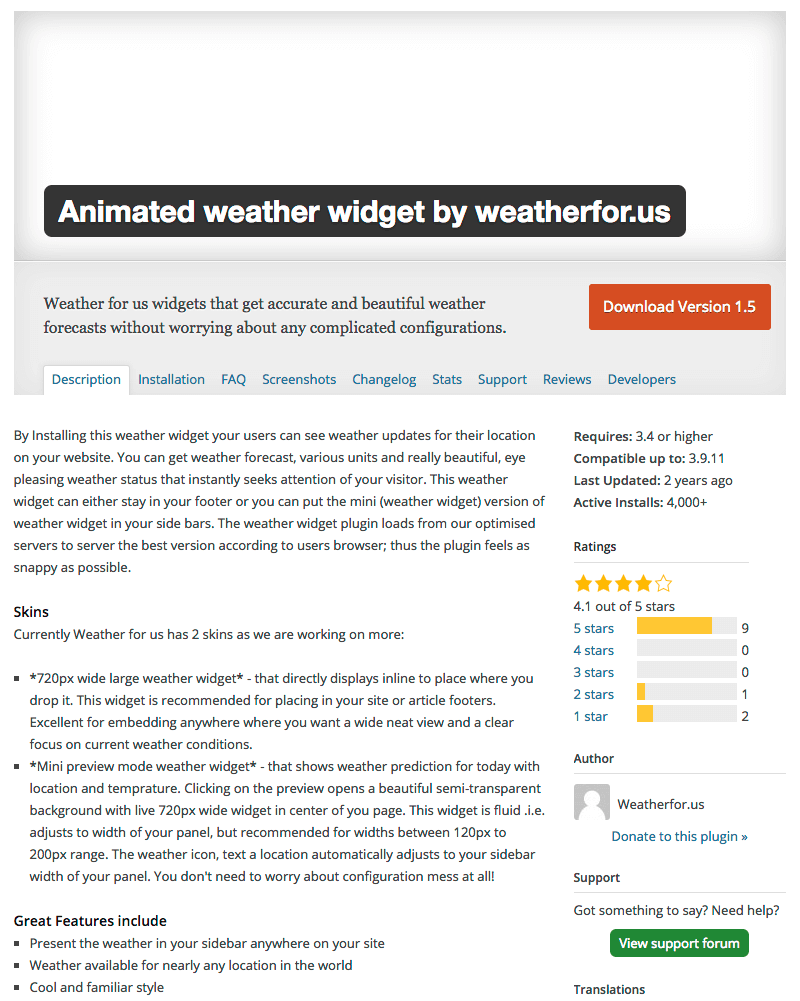
    The WordPress plugin repository recently removed a plugin known as “Animated Weather Widget by weatherfor.us.” We dug a little deeper, and it appears that the plugin was removed for including JavaScript code that would mine cryptocurrency using the CPU resources of site visitors.

    It works as follows:

    • A WordPress site owner installs the “Animated Weather” plugin.
    • The plugin loads an iframe. This allows the owner to include any code they want in visitors’ browsers, and to change the code at any time.
    • The iframe loads code from CoinHive that mines the Monero cryptocurrency. The mining activity uses significant site visitor CPU resources.
    • Earnings are sent back to CoinHive and aggregated into the account owner’s bank account. Presumably, the account owner in this case is the owner of the “Animated weather” plugin. CoinHive keep 30% of the profits.

    This allows the plugin owner to earn money by using the CPU resources of visitors to sites using the “Animated weather” plugin.

    The following is a screen capture from a debugger showing an iframe that loads from the www.weatherfor.us domain. In this, we show the JavaScript that loads the CoinHive code that actually does the mining.

    While researching this post, we found that visiting a site that includes this plugin’s CoinHive Monero mining code generates a huge amount of CPU usage. This becomes audible when your CPU fans all increase their RPMs. I’ve included a short cellphone video below to show the effect.

    Two months ago, the Showtime websites showtime.com and showtimeanytime.com were found mining cryptocurrency. It is still unclear whether they were hacked, or if they placed the code there voluntarily. Other websites like The Pirate Bay have added the CoinHive Monero mining code to try to earn additional revenue. Earlier this month, CoinHive mining code was discovered on the UFC website UFC.tv. It is unclear whether they were hacked or if they placed the code on the site themselves.

    I reached out to the WordPress.org plugin repository maintainers, and Otto had this to say regarding this plugin:

    “Yes, the plugin was removed because the site it connected to, weatherfor.us, started putting hidden mining code in their widgets. The plugin itself was not altered in any way, it was the site which it gets the widget from that had this code added.

    Currently, we treat hidden insertion of any undisclosed code as potentially malicious, and crypto-mining is not an exception to this general principle. If a plugin that is unrelated to such activities is modified to include that code, then we will remove the plugin and potentially remove the offending code ourselves, to protect users.

    In the same way that plugins are not allowed to, say, insert hidden advertising on sites in a way that benefits the plugin author, plugins are not allowed to insert hidden code in a way that benefits the plugin author. Which is to say that plugins are not allowed to include any form of crypto-mining code which pays back to the plugin author.

    That said, a plugin that is explicitly intended for a site admin to include a crypto-miner on their site is allowed, and there’s a few of them in the directory already. The important difference is that these are not hidden, and do not pay the plugin author. The site owner is the one operating the miner, not a plugin author doing it on their behalf.”

    What has become clear to me during the past two years is that WordPress plugin authors experiment with a wide range of business models. This leads to plugin authors embedding code that may produce spam on websites, selling their plugins to shady individuals, and in this case, using web browser resources to earn income.

    Perhaps if we provided clear guidance and mentoring within the community for plugin authors on how to earn a living from their plugins, this issue would not be as prevalent. I can’t help but think of the Apple App Store and similar models, where a clear business model with clear guidance has created a healthy ecosystem and funding to root out bad actors.

    Have you experimented with putting CoinHive mining code on your site? Or have you visited a site that was mining? What was your experience? I’d also like to learn more about our community’s views on plugin business models. I’ll be around to read and reply to your comments.

    ~Mark Maunder – Wordfence Founder & CEO

    The post WordPress Plugin Banned for Crypto Mining appeared first on Wordfence.

  • The October 2017 WordPress Attack Report

    This month’s WordPress Attack Report is a continuation of a series we have been publishing since December 2016. Reports from the previous months can be found here.

    This report contains the top 25 attacking IPs for October 2017 and their details. It also includes charts of brute force and complex attack activity for the same period, along with a new section revealing changes to the Wordfence real-time IP blacklist throughout the month. We also include the top themes and plugins that were attacked, and which countries generated the most attacks for this period.

    Real-time IP Blacklist

    For the second month, we are sharing information on changes to the Wordfence real-time IP blacklist throughout the month. Sites protected by Wordfence Premium block all traffic from the malicious IP addresses that attack WordPress sites at any given time. In an effort to evade blocks by blacklists and manual blocking actions, attackers rotate through IP addresses constantly.

    In the graph below, we show the number of IPs added to the blacklist each day in green and the number removed in blue. We added a total of 123,277 IPs during October, an average of just over 4,000 per day, up 5% from last month. That means that, on average, we added three new IPs per minute throughout the month.  The number of IPs we removed was nearly identical.

    The Top 25 Attacking IPs

    The next section is our standard explanation of how the table below works. If you are familiar with our attack reports, you can skip down to the table below this section, which contains the data for October along with some commentary.

    Brief Introduction (If You Are New to Viewing These Reports)

    In the table below, we’ve listed the most active attack IPs for  October 2017. Note that the “Attacks” column is in millions, and is the total of all attacks that originated from each IP. Farther right in the table (you may have to scroll right) we break down the attacks into “brute force” attacks and “complex” attacks.

    Brute force attacks are login-guessing attacks. You can learn more about how brute force attacks work in our Learning Center article about them. What we refer to as “complex attacks” are attacks blocked by a rule in the Wordfence firewall.

    We have also included the netblock owner, which is the organization (usually a company) that owns the block of IP addresses that the attack IP belongs to. You can Google the name of each owner for more information. A Google search for any of these IP addresses frequently shows reports of attacks.

    The hostname included is the PTR record (reverse DNS record) that the IP address owner created for the IP, so this is not reliable data, but we still include it for interest. For example, we have seen PTR records that claim an IP is a Tor exit node, when, based on traffic, it is clearly not.

    We also include the city and country, if available. To the far right of the report, we show the date in August when we started logging attacks and the date the attacks stopped.

    The Top Attacking IPs

    The total attacks from the top 25 attacking IPs were down 3% from September.

    Brute force attacks made up 95% of total attacks for October, up slightly from September.

    With 13 of the top 25 IPs, Turkey dominated the list for the second consecutive month. PP SKS-Lugan from the Ukraine once again dominated the very top of the list, hosting four of the most active malicious IPs.

    Brute Force Attacks on WordPress in October 2017

    In the chart below, we show the number of daily brute force attacks on the sites we monitor for the month of October.

    The average number of daily brute force attacks was down 9% from September. Daily attack volumes grew toward the latter half of the month, but remain very low relative to earlier in the year.

    Complex Attacks on WordPress in October 2017

    In the graph below, we show the daily complex attacks (attacks that attempt to exploit a security vulnerability) for the month of October.

    Average daily attack volume for October was down 23% from September for the sites that we protect at 3.6 million. This marks the second month of declining attack volumes. Daily activity was relatively consistent throughout the month, with a slight increase in daily volumes toward the back half of the month.

    Attacks on Themes in October 2017

    The table below shows the total number of attacks on WordPress themes. We identify each theme using its slug, which is the directory where it is installed in WordPress.

    There was a lot of change in the top 25 attacked themes in October as usual. The biggest mover was the ‘sketch’ theme, moving up 161 spots to number 22. None of the attacks that we looked at were attempting to exploit a security vulnerability in a theme. Instead, they appear to be either probing for the existence of malicious files that had been added to the theme or attempting to send commands to them.

    The next two big movers on the list were the ‘twentyfifteen’ and ‘twentysixteen’ themes. The attacks on these themes follow the same pattern we saw with the ‘sketch’ theme.

    Coming in at number 7 on the list is ‘template-parts’, which isn’t even a valid theme. Over 99% of the attacks originated from a single Latvian IP address. Based on the requests, it appears that attacker is attempting to probe for or send commands to malicious files in a directory that sounds like a legitimate theme file.

    Attacks on Plugins in October 2017

    The table below shows the total number of attacks on WordPress plugins. As with themes, we identify each plugin by its unique slug, which is the unique installation directory where the plugin is installed.

    As usual, the top 25 list for plugins was very stable at the top, with almost no movement in the top 10. There were 8 plugins on the list that weren’t in the top 25 in September. We looked into the details behind the first big mover toward the top of the list, ‘Wp-LayerSlider’. As far as we can tell, this is not even a real plugin. It appears to be a name that attackers are using for a web shell that they are disguising as a slider plugin.

    The next biggest mover on the list was ‘easyrotator-for-wordpress’. The majority of attacks on this plugin appear to be attempts to upload malicious files via any backdoor files that may already exist on a site.

    The next to big movers on the list were ‘shortcodes-ultimate’ and ‘wp-filemanager’. The large majority of attacks on both plugins are attempts to exploit an old vulnerability in timthumb.php. Any sites that are running updated versions of these two plugins should be immune to these attempts.

    Attacks by Country for October 2017

    The table below shows the top 25 countries from which attacks originated in the month of October on the WordPress sites that we monitor.

    The top of the list was pretty stable, with Russia and the United States holding their spots at first and second place, respectively. China, Ukraine and Turkey all remained in the top 5, though in different spots than the previous month. Latvia was the biggest mover on the list, climbing 52 spots to number 16 overall.

    Conclusion

    That concludes our October 2017 WordPress attack report. We were very pleased to see drops in complex and brute force attack volumes once again, potentially marking a trend. Regardless of the volume of attacks, WordPress website owners should not let their guard down, but instead stay vigilant about their site security with up-to-date firewalls and other security best practices to keep their sites safe.

    The post The October 2017 WordPress Attack Report appeared first on Wordfence.