Online Services

Category: Security

  • Zero Day Vulnerability Fixed in Ultimate Form Builder Lite

    Last month, we identified three plugins with critical object injection vulnerabilities, all being exploited in the wild. We deployed new and improved firewall rules to block that kind of exploit.

    While analyzing our attack data, we recently discovered that hackers were actively exploiting a similar vulnerability in the Contact Form for WordPress – Ultimate Form Builder Lite plugin by AccessPress Themes. The plugin has 50,000 active installations according to WordPress.org.

    The exploit being used combines a SQL injection vulnerability and a PHP object injection vulnerability. It allows attackers to take over a vulnerable site using just one request to /wp-admin/admin-ajax.php.

    We notified the plugin’s author on October 13th, when we found the problem. We also deployed firewall rules on October 13th to protect Wordfence Premium customers, within an hour of discovering the issue and notifying the author.

    The author has fixed this vulnerability in an update, version 1.3.7, which was released yesterday, October 23rd.

    CVSS Score: 9.8 (Critical)

    What To Do

    We published a firewall rule to block this exploit within an hour of finding it, on October 13. If you are running the Premium version of Wordfence and have the firewall enabled, this rule is already protecting you.

    Free users of Wordfence and paid users who have the Wordfence firewall disabled and are running this plugin should update to version 1.3.7 immediately. This firewall rule will become available to free Wordfence users on November 12th.


    The post Zero Day Vulnerability Fixed in Ultimate Form Builder Lite appeared first on Wordfence.

  • New Attacker Scanning for SSH Private Keys on Websites

    Wordfence is seeing a significant spike in SSH private key scanning activity. We are releasing this advisory to ensure that our customers and the broader WordPress community are aware of this new activity and of the risk of making private SSH keys public, and to explain how to avoid this problem.

    Quick SSH Review

    SSH is a secure way to connect to servers and communicate with them. You can use it to get a terminal on a remote server and enter commands. More commonly in the WordPress world, SSH is used for SFTP, or secure FTP.

    There are two common ways to sign in to a server when using SSH or SFTP. You can use a username and password, or you can use “key-based” authentication.

    When using key-based authentication, you create a public and private key. You place the public key on the server you want to sign in to. You keep the private key saved in a local SSH configuration directory. Then when you fire up your SFTP client, it authenticates using key-based authentication.

    When SSH Private Keys Become Public

    If your private SSH key ever gets out, anyone can use it to sign in to a server where you have set up key-based authentication. It is very important to keep your private key safe.

    There are a variety of ways an SSH private key can end up in a public web directory. Website owners occasionally upload their SSH private key to their website by accident. They may also accidentally “commit” their private key into website source code using a version control system like Git.

    When this happens, all it takes is a determined attacker and a scan to locate your SSH private key and download it. Once downloaded, the attacker can start trying to use it to sign in to other servers you control and potentially gain access to your other websites.

    An attacker can locate websites that belong to your SSH key through a variety of methods.

    They may run the command “ssh-keygen -lf ”.

    This outputs a fingerprint for your SSH key that looks something like this:

    2048 17:16:40:f9:23:1f:a0:ed:07:b7:d6:51:8f:19:31:27 yourname@example.com (RSA)

    This fingerprint uniquely identifies your private key and contains your email address, or a unique identifier, which can help an attacker determine who a key belongs to and which servers to target. For example, if they discover the key belongs to me, they may try to target my personal blog or other systems they know belong to me.

    A Spike in SSH Private Key Scans in the Past 48 Hours

    In the past 24 hours, we have seen a new attacker start mass-scanning websites for private SSH keys. Here is a sample showing some of the requests these scans are generating:

    As you can see, the attacker is trying a variety of paths to access private SSH keys, including /root/.

    The following graph shows the rapid growth we are seeing in this scanning activity:

    The graph shows a massive spike in scanning activity in the past 48 hours. We think this increase of activity may indicate that an attacker is having some success scanning for private keys and has decided to increase their efforts. This may indicate a common bug or operational mistake that is being made by WordPress site owners, by which private keys are being accidentally made public.

    How to Ensure Your SSH Keys Are Safe

    Your SSH keys are usually kept in a private directory on your workstation. On Apple workstations, the keys are kept in the following directory:

    /Users//.ssh/

    On Windows workstations, the location where SSH keys are stored depends on which software you are using, so check your vendor documentation.

    To set up SSH authentication, you will need to copy your public SSH key to a directory on the server you want to sign in to. This key usually ends in a .pub extension. NEVER copy the private key to the remote server you want to sign in to. This misunderstanding may result in many private keys landing in publicly accessible web directories.

    Your private key is usually a file that does not end in .pub. The private key has no extension. This file must remain private. If it gets out, an attacker can use it to sign in to services that you use.

    Make sure that you don’t accidentally copy your private SSH key into your web site or web application source code. If you do this, you may inadvertently upload it to your site and make it publicly accessible, allowing an attacker to steal it.

    Password Protecting SSH Keys

    We also recommend you protect your private SSH keys using a pass phrase. This is presented as an option when you initially generate the keys. Password protected SSH private keys are not usable by an attacker unless they can guess the password.

    Many users opt not to protect their SSH keys with a password, because typing the password every time they want to authenticate to a remote server is an inconvenience, which is why stolen SSH keys can often be used by an attacker.

    Scan Your Site to Check for Readable Private SSH Keys

    In the past few hours, we added the capability to Gravityscan to scan websites for publicly accessible SSH keys. Simply head over to www.gravityscan.com and run a scan on your site to check if you have any publicly accessible keys. If you do, Gravityscan will let you know. We may be adding similar capability to the Wordfence plugin in the near future.

    Running a secure WordPress website requires a layered approach to security. On this blog we regularly discuss the various approaches you can use to keep your site and your customers secure. Understanding how to securely sign in and how to protect your credentials is one of the important components in a layered approach to securing your website. If you use SSH or SFTP to manage your site with SSH keys, protecting your private key is critically important to staying secure.

    As always, I will be around to reply to your comments and questions.

    ~Mark Maunder.

    The post New Attacker Scanning for SSH Private Keys on Websites appeared first on Wordfence.

  • PSA: Severe Vulnerability in All Wi-Fi Devices

    This is a public service announcement (PSA) from the Wordfence team regarding a security issue that has a wide impact.

    Today is being called “Black Monday” in many information security circles. We have had a major Wi-Fi vulnerability announced that affects absolutely every device that supports Wi-Fi. The vulnerability allows attackers to decrypt WPA2 connections. A second vulnerability also emerged today, and we will cover that at the end of this post.

    The Wi-Fi vulnerability is being called “KRACK”, which is short for Key Reinstallation Attacks.

    I’m going to cover the problem in relatively non-technical terms in this post so that you are able to clearly understand how this affects you and what you can do about it, right now.

    Once you are done reading this, I strongly recommend you spread the word, because this Wi-Fi weakness can allow attackers to crack WPA2 which was previously thought of as a secure Wi-Fi encryption protocol.

    The WPA2 Wi-Fi Vulnerability

    WPA2 is a protocol that secures all modern protected Wi-Fi networks. According to statistics by Wigle.net, it secures 60% of the world’s Wi-Fi networks.

    Researchers at KU Leuven, a university in Flanders in Belgium, have discovered a way for an attacker to read sensitive information that is sent over a Wi-Fi network using WPA2.

    Attackers can use this to steal sensitive information like credit card numbers, passwords, chat messages, emails, photos and more. The attack works against all modern protected Wi-Fi networks.

    It may also be possible for an attacker to inject malicious information into the Wi-Fi network. This could include ransomware and malware.

    The vulnerability is in the Wi-Fi standard itself, and not in individual products or their implementations. That means that all products that correctly implement the WPA2 standard are affected.

    If your device supports Wi-Fi, it is likely affected by this vulnerability. 

    Products that are known to be affected by this at this time include Android, Linux, Apple, Microsoft Windows, Linksys and more. The list of affected vendors is enormous, and vendors including Amazon, Cisco and Netgear are scrambling to release patches to fix this issue.

    BleepingComputer has compiled a running list of vendors that will be growing over time as more information about patches becomes available.

    You can find out the technical details on the KRACK attack from the researchers themselves at krackattacks.com. This includes an academic paper and demonstration video, shown below:

    What to Do About the WPA2 Vulnerability

    This affects every device you own that uses Wi-Fi. If your device uses public Wi-Fi, you are at higher risk. The vendors that make your products are working on patches which they will release in the coming days. As they release the patches, you will need to update your devices and hardware.

    The good news is that this vulnerability does not require you to replace any hardware. It is fixable through a software update.

    The devices and hardware you will need to update, once patches are released, include the following:

    • Desktop workstations
    • Laptops/notebooks
    • Mobile phones
    • Tablets and e-readers that use Wi-Fi
    • Home and office routers
    • Home devices like NEST, Amazon Echo and Google Home
    • Printers, both home and office, that use Wi-Fi
    • Any other device that uses Wi-Fi

    You should prioritize devices that use public Wi-Fi higher than your other devices. This puts mobile phones and tablets at the top of the list.

    How to Stay on Top of Updates

    Your desktop, mobile and tablet devices will prompt you when an important security update is available. Many may update automatically. Most devices also provide an option to manually check for updates. We recommend you do that periodically this week so that you catch any updates as soon as they are released.

    For routers, printers and other “Internet of things” devices, you may have to sign into the device to manually update the device “firmware.” For routers, you can contact your Internet service provider for help if you are unsure how to update. You may need to consult the manual of other devices or do a Google search to learn if they are affected.

    Black Monday

    Another vulnerability known as “ROCA” was also announced today. This vulnerability involves an attack on public key encryption which may weaken the way we authenticate software when installing it. It affects many other systems that rely on public/private key encryption and signing. Fixing this also requires you to update your devices using vendor-released software updates, so keep an eye out for security updates for your devices and workstations that fix any ROCA-related issues.

    The combination of KRACK and ROCA is why we are referring to today as “Black Monday.” These are both severe vulnerabilities, and they emerged on the same day.

    It is imperative that we get the word out about these vulnerabilities so that our friends and colleagues can update their devices before they are exploited. Please spread the word.

    The post PSA: Severe Vulnerability in All Wi-Fi Devices appeared first on Wordfence.

  • 12.8% of Sites Have Sensitive File Disclosure Vulnerabilities

    As you probably know we launched Gravityscan this May. Gravityscan is a security scanner for any website that serves as a great complement to Wordfence. Yesterday we were analyzing aggregate scan result data from Gravityscan, and we noticed data that surprised us: 12.8% of sites we scan have at least one sensitive file visible to anyone on the internet.

    That means that 1 in 8 of you likely have a self-inflicted security vulnerability on your site that needs attention. The good news is that this problem is easy to fix once you know about it.

    What does this mean?

    A sensitive file exposure vulnerability is a situation where a file that is supposed to be private is accessible to the outside world via your web server. Gravityscan checks for hundreds of files that our security analysts deem to be potentially sensitive. They fall into one of the following categories:

    Configuration Files – these are files that tell WordPress (or other website software) how to function. Examples of configuration files are ‘wp-config.php’ and ‘php.ini’. Files of this type often contain information an attacker could use to compromise your site including database credentials. An attacker with database access can create an admin user for themselves and take over your site.

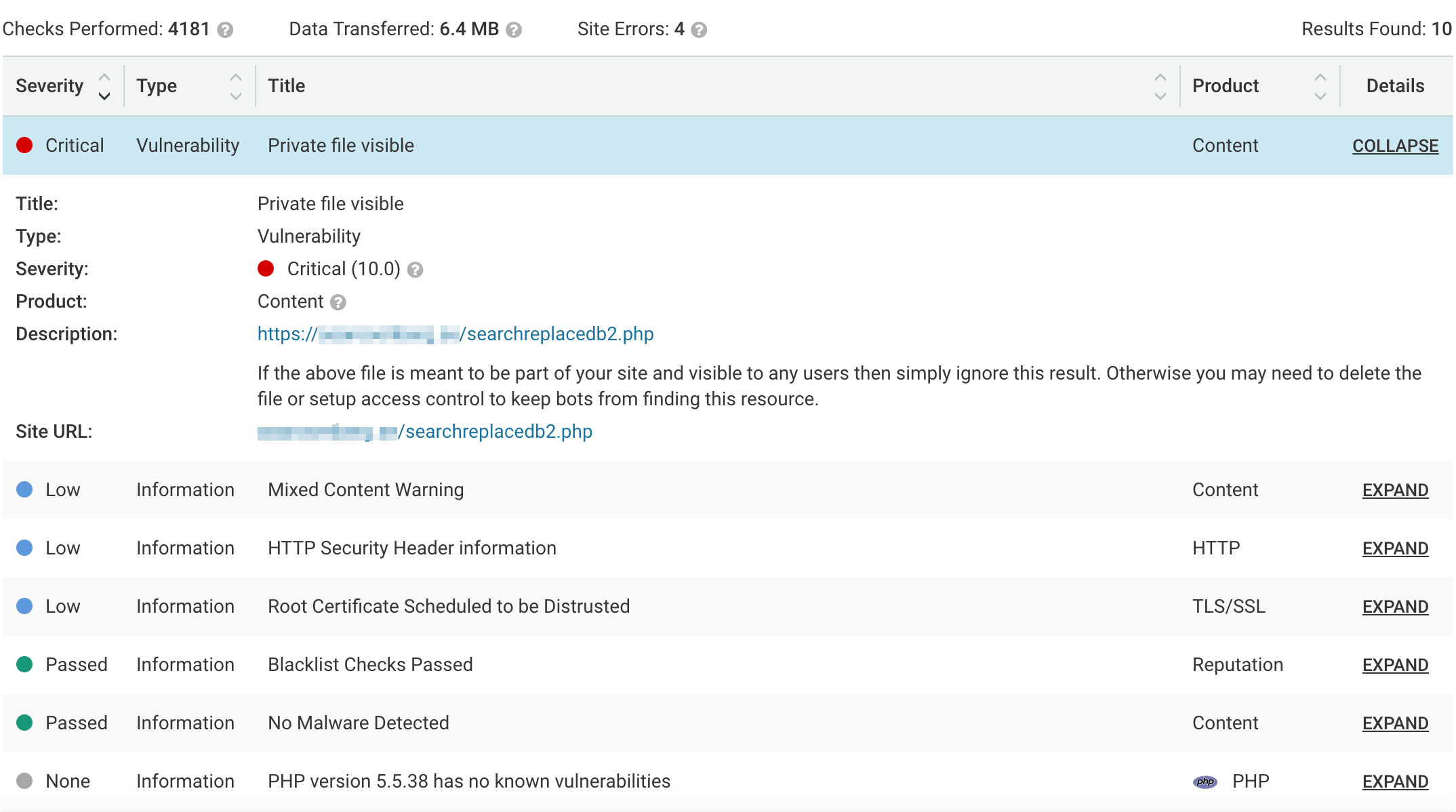
    Utilities – Utilities are scripts that can be used for a wide variety of administrative and debugging tasks. They are often quite powerful, giving the user the ability to do things like query your database and make changes to files. Popular examples include phpMyAdmin and Adminer. We wrote about a popular one back in July called searchreplacedb2, that hackers were actively probing for and exploiting.

    Log Files – Your operating system and other software on your web server records events in log files. These files are often helpful for site owners and administrators who are troubleshooting an issue. In many cases entries will include information that an attacker might find useful.

    Test and Backup Files – Often test sites and backup files are left laying around on a web server. In many cases they include sensitive information an attacker might use to exploit your production website.

    How to check your site

    As you know, we make Wordfence, which is a firewall and security scanner designed specifically for WordPress. And our team also created Gravityscan to find vulnerabilities and malware in a large number of other web applications, including WordPress, Joomla, Drupal, Magento and others.

    If you use Wordfence, you can simply run a Wordfence scan and it will find file disclosure vulnerabilities that are WordPress specific, like backup and leftover temporary copies of wp-config.php.

    Alternatively, you can use Gravityscan to find file disclosure vulnerabilities in WordPress and other products like Drupal, Joomla, Magento and more.

    In this case we could like to recommend that you run a Wordfence scan and a Gravityscan if you are a WordPress user. The reason we suggest this is because there are actually hundreds of file disclosure vulnerability checks that Gravityscan does. Some of these checks are for utility scripts like searchreplacedb2. These are not WordPress specific scripts, but they are occasionally used by WordPress site owners. By using Gravityscan, you check for these non-WordPress scripts too.

    To scan with Wordfence, simply sign into your WordPress website and hit the Wordfence “Scan” button.

    To check your site with Gravityscan, simply head over to Gravityscan.com and run a scan. Make sure you install the Accelerator for faster and more thorough scans.

    The title for these findings will be ‘Private file visible’ and will be assigned a type of ‘vulnerability’ and the product will be ‘Content’. You will need to upgrade to Pro to see the vulnerability details (14 day free trial available). The description will show you the name and location of the file, something like ‘https://yoursite.com/phpMyAdmin-2.6.3-rc1’.

    What to do if your site has this issue

    The first thing you need to do is to decide whether you really need the file on your website. In many cases, old log or test files are no longer needed. If possible, delete them from your server to solve the issue.

    In some cases the file may be necessary, needs to be public-facing, is in the right place and doesn’t contain sensitive data. In those cases simply mark the scan finding as a false positive in Gravityscan.

    Finally, for configuration files, you need to make sure you have permissions set correctly. Here are resources for some of the most important WordPress files:

    Conclusion

    A high percentage of website owners inadvertently leave sensitive files exposed on their websites. To secure your website, it is important to avoid leaving test files, backups, log files and utilities lying around in public facing web directories. If you don’t need a file anymore, delete it. If you need it, store it somewhere that isn’t accessible to the world.

    Make sure the permissions for the configuration files on your website are set up with security in mind. A huge percentage of the malicious requests the Wordfence firewall blocks are attempts to download configuration files, especially wp-config.php.

    Finally, scan your site regularly with a full featured security scanner like Wordfence or Gravityscan. With free security monitoring available, there is no excuse not to.

    The post 12.8% of Sites Have Sensitive File Disclosure Vulnerabilities appeared first on Wordfence.