Recently, the Wordfence team has seen ransomware being used in attacks targeting WordPress. We are currently tracking a ransomware variant we are calling “EV ransomware.” The following post describes what this ransomware does and how to protect yourself from being hit by this attack.
A Quick Introduction to Ransomware
Ransomware is malicious software that an attacker installs on your computer or on your server. They use an exploit to gain access to your system, and then the ransomware executes, usually automatically.
Ransomware encrypts all your files using strong unbreakable encryption. The attackers then ask you to pay them to decrypt your files. Usually payment is via bitcoin. Bitcoin gives the attackers a way to create an anonymous wallet into which the ransom can be paid.
Ransomware has been around for a long time. It originally dates back to 1989 with the “PC Cyborg trojan horse virus” that would extort its victims into sending $189 to a PO Box in Panama to get their files decrypted. The encryption on that virus was easily crackable.
Ransomware today is growing fast. In 2017, 100 new ransomware variants were released into the wild, and there was a 36% year-over-year increase in ransomware attacks worldwide. The average ransomware demand increased 266% to an average of $1077 per victim. [Source: Symantec Threat Report 2017]
This year we have seen ransomware attacks on a scale that would have been hard to imagine several years ago. In May of this year, the WannaCry ransomware attack affected hundreds of thousands of people in over 150 countries. The UK National Health System was affected and had to divert ambulances away from affected hospitals.
In June we saw the Petya (eventually dubbed NotPetya or Netya) ransomware rapidly spreading, starting in Ukraine. A large number of high-profile organizations were affected, including Ukraine’s state power company, the Chernobyl nuclear reactor, Antonov aircraft, shipping company Maersk and food giant Modelez.
Today a large number of affected people and organizations actually pay attackers when they are hit by ransomware, and sometimes their files are successfully decrypted. Security organizations, including the FBI, generally advise customers to not pay attackers because this encourages the spread of this kind of attack. However, many organizations simply do not have the option of not recovering their data – and so they pay, which perpetuates this criminal business model.
Ransomware Now Targets WordPress
Most ransomware targets Windows workstations. However, the Wordfence team is currently tracking an emerging kind of ransomware that targets WordPress websites.
During our analyses of malicious traffic targeting WordPress sites, we captured several attempts to upload ransomware that provides an attacker with the ability to encrypt a WordPress website’s files and then extort money from the site owner.
The ransomware is uploaded by an attacker once they have compromised a WordPress website. It provides the attacker with an initial interface that looks like this:
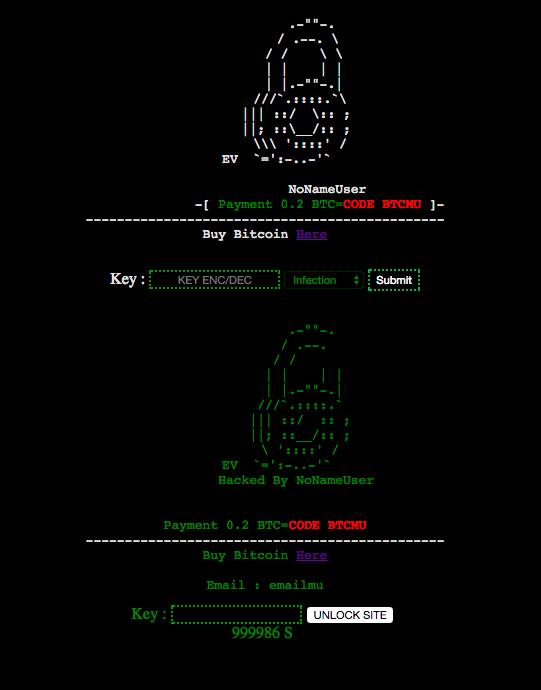
This interface provides both the encryption and decryption functionality to an attacker. The attacker then chooses a complex key, enters it into the “KEY ENC/DEC” field and hits submit.
The site is then encrypted. The result looks like this:

The ransomware will not encrypt files that have the following patterns:
- *.php*
- *.png*
- *404.php*
- *.htaccess*
- *.lndex.php*
- *DyzW4re.php*
- *index.php*
- *.htaDyzW4re*
- *.lol.php*
For each directory that the ransomware processes, it will send an email to “htaccess12@gmail.com” that informs the recipient about the host name and the key used to perform the encryption.
All files affected are deleted and another file takes their place with the same name, but with the “.EV” extension. This new file is encrypted.
For our technical audience: The encryption process uses mcrypt’s functionality, and the encryption algorithm used is Rijndael 128. The key used is a SHA-256 hash of the attacker-provided encryption key. Once the data is encrypted, the IV used to encrypt the file is prepended to the ciphertext, and the data is base64-encoded before it is written to the encrypted .EV file.
Decryption Is Incomplete
When the encryption process starts, the ransomware creates two files in its installation directory. The first is named “EV.php,” a file containing an interface that is supposed to allow the user to decrypt their files if they have a key. This file contains a form, but it does not work because it does not include decryption logic.
The second file is a .htaccess file that redirects requests to the EV.php file. Once your site has been encrypted, it will look like this:

This ransomware provides an attacker with the ability to encrypt your files, but it does not actually provide a working decryption mechanism. It does, however, give attackers what they need to trick affected site owners into paying a ransom. Their only goal is to encrypt your files. They don’t actually have to prove they can decrypt your files to get you to pay a ransom.
If you are affected by this ransomware, do not pay the ransom, as it is unlikely the attacker will actually decrypt your files for you. If they provide you with a key, you will need an experienced PHP developer to help you fix their broken code in order to use the key and reverse the encryption.
How to Protect Yourself
This ransomware was first seen by Wordfence being used in a single attack attempt on July 7th. We released a malware signature to our Premium Wordfence customers on July 12th that was specifically designed to detect this ransomware and any variants.
That means our Premium customers’ firewalls have been blocking any attempts to upload this ransomware since then. The Wordfence scan also has detected the presence of this ransomware for Premium customers since July 12th.
30 days later on August 11th, this rule became available for our free community customers. If you are running Wordfence Premium or Wordfence free on your websites, you are currently protected against this attack.
Wordfence will protect you from being hit by this in the first place. We also recommend that you have reliable backups. It is important that you don’t store your backups on your web server. If, for example, they’re stored in a ZIP archive on your server, then if your site is taken over by this ransomware, the backups will also be encrypted and will be useless. Your backups should be stored offline, either with your hosting provider or using a cloud storage service like Dropbox.
Who Is Responsible
The earliest variant of this ransomware appeared in May of last year on Github. Version 2 of the ransomware is what attackers are currently using.
The first time we observed this ransomware being used in the wild to target WordPress websites was last month.
The authors of the ransomware on Github are bug7sec, an Indonesian group with a Facebook page who have listed themselves as a “business consultant.”
The source code uses Indonesian words like “kecuali,” which means “except” in English. You can see this in the source code samples below:

The function above determines whether it should exclude a file from encryption, so the word ‘except’ makes sense in this context as an Indonesian function name.
When you load the ransomware, it loads a YouTube video which is invisible, but you can hear the audio playing in the background when you view the ransomware user interface. The video plays an Indonesian rap tune and the lyrics appear to mention hacking.
The title of the video is “ApriliGhost – Defacer Kampungan.” If you look up @aprilighost on Twitter, you find this account, which links to this Indonesian Facebook account. ApriliGhost may not be the attacker, but the video is Indonesian in origin – a further Indonesian connection.
Another clue is that the ransomware seems to be connected with the website errorviolence.com. When you view the ransomware in a web browser, after a certain amount of time it will redirect you to that site, which is an Indonesian hacking forum and website with resources for hackers.

Our attack data has logged related attacks from IPs with the location of Jakarta, the capital of Indonesia. We have seen related attacks originating from several other non-Jakarta IPs, but these do not resolve to any specific location, but rather to organizations that may be used to proxy attacks. So far, Jakarta is the only location with a clear link to these attacks.
Conclusion: This ransomware was created in Indonesia, probably by bug7sec, and used by at least one Indonesian-based hacking group, from Indonesia, to target WordPress websites.
We Expect This to Evolve Into Fully Functional and Widespread Ransomware
The EV ransomware that we have documented above is incomplete, in that the decryption function does not work correctly. It does work well enough to extort money from unsuspecting website owners, although we have not yet received any reports of extortion taking place. So far we are only seeing attempts to drop this ransomeware on WordPress websites.
We expect this to evolve over the next few months into fully functional ransomware that targets both your files and database in WordPress. We also expect to start seeing incidents of extortion. For websites that do not have a firewall like Wordfence and regular backups, this may turn into a profitable business for attackers who can ransom a few thousand websites.
So far, attackers targeting WordPress have earned money only indirectly from compromised WordPress sites through techniques like email and SEO spam.
Major vulnerabilities in the WordPress ecosystem emerge from time to time – for example, the defacement campaign that the WordPress community experienced earlier this year. The next major vulnerability may see attackers switching from older business models to using ransomware to directly monetize compromised WordPress websites.
Stay Safe
As I mentioned above, Wordfence has been blocking this ransomware for our Premium customers since we first saw it used in an attack in early July. I strongly recommend that you install Wordfence Premium to protect yourself against these kinds of threats.
In September of last year, Wordfence integrated our malware scan into our firewall. This allows Wordfence to use malware signatures that we create to recognize files like this ransomware variant in our firewall. By using this technique, Wordfence will block an attempt to upload ransomware, even if the attacker used an unknown exploit.
To get the most benefit from Wordfence, I encourage you to upgrade to Premium. Not only do you get your firewall rules in real time, but you also get our malware signatures in real time from our team. In this case, you would have been protected from this new ransomware detection for over a month already by now.
An additional layer of protection against a ransomware attack is to ensure that you have good offline backups. Make sure your backups don’t live on your web server. They need to be backed up to a separate server or a cloud storage service like Dropbox or Google Drive. Keep in mind, though, that your backups are your last line of defense. It is better to avoid getting hacked in the first place.
I hope you have enjoyed this detailed post on ransomware and how it is beginning to target WordPress. If you have any questions or comments, post below and I will be around to reply.
Regards,
Mark Maunder – Wordfence Founder/CEO
Thank you to Pan Vagenas for his research which contributed to this post. Also thanks to Andie La-Rosa and Dan Moen for their assistance editing this post.
The post Ransomware Targeting WordPress – An Emerging Threat appeared first on Wordfence.