Online Services

Tag: WordPress Security

  • The July 2017 WordPress Attack Report

    This post is a continuation of the WordPress Attack Report series we’ve been publishing since December 2016. Reports from previous months can be found here:

    This report contains the top 25 attacking IPs for the month of July and their details. It also includes charts of brute force and complex attack activity for the same period. We also include the top themes and plugins that were attacked and which countries generated the most attacks for this period.

    The Top 25 Attacking IPs

    The next section is our standard explanation of how the table below works. If you are familiar with our attack reports, you can skip down to the table below this section, which contains the data for July along with some commentary.

    Brief Introduction (If You Are New to Viewing These Reports)

    In the table below, we’ve listed the most active attack IPs for July 2017. Note that the “Attacks” column is in millions, and is the total of all attacks that originated from each IP. Farther right in the table (you may have to scroll right) we break down the attacks into “brute force” attacks and “complex” attacks.

    Brute force attacks are login-guessing attacks. (You can learn more about how brute force attacks work in our Learning Center article about them.)  What we refer to as “complex attacks” are attacks that were blocked by a rule in the Wordfence firewall.

    We have also included the netblock owner, which is the organization (usually a company) that owns the block of IP addresses that the attack IP belongs to. You can Google the name of each owner for more information. A Google search for any of these IP addresses frequently shows reports of attacks.

    The hostname included is the PTR record (reverse DNS record) that the IP address owner created for the IP, so this is not reliable data, but we still include it for interest. For example, we have seen PTR records that claim an IP is a Tor exit node, when, based on traffic, it is clearly not.

    We also include the city and country, if available. To the far right of the report, we show the date in July when we started logging attacks and the date the attacks stopped.

    The Top Attacking IPs

    The total attacks from the top 25 attacking IPs decreased slightly from 133 million in June to 124 million in July.

    Brute force attacks made up an amazing 87% of total attacks for July, up from 67% in June. Complex attacks accounted for 13% of the volume.

    As usual, the list is dominated by Ukraine and Turkey followed by the United States.

    Brute Force Attacks on WordPress in July 2017

    In the chart below, we show the number of daily brute force attacks on the sites we monitor for the month of July.

    The average number of daily brute force attacks increased 21% from last month, which was up substantially from May. Daily attack volumes were incredibly stable throughout the month, with no big peaks or valleys. It’s almost like the attackers went on vacation and left their malicious bots running on autopilot.

    Complex Attacks on WordPress in July 2017

    In the graph below, we show the daily complex attacks (attacks that attempt to exploit a security vulnerability) for July.

    Average daily attack volume for July was up 6% from June for the sites that Wordfence protects at 7.2 million. As with brute force attacks, daily volume was incredibly stable.

    Attacks on Themes in July 2017

    The table below shows the total number of attacks on WordPress themes. We identify each theme using its slug, which is the directory where it is installed in WordPress.

    We saw a lot of movement in the top 25 this month when compared to June. The biggest mover on the list was the ‘clockstone’ theme, coming out of nowhere to take the #3 spot in the rankings. Digging into the details the attacks are all malicious file upload attempts, attempting to exploit a vulnerability that has been public knowledge since August of 2014. Furthermore, the theme appears to no longer be supported by the author. The attacks targeting this plugin originated from 1336 unique IPs during the month, suggesting that the attacker (or attackers) are using a botnet to launch the attack. The top 10 IPs were responsible for just over two thirds of the attacks.

    Another big mover on the list is the ‘sealight’ theme, moving up 32 places to number 12 on the list. Looking at the detailed attacks they are all attempting to exploit a very well known vulnerability in TimThumb, which was discovered in 2011. The vulnerability impacted many WordPress themes, apparently including the ‘sealight’ theme. The attacks on this theme originated from 130 IP address, with the top 10 account for 75% of attacks.

    The last big mover on the list that we looked into was the ‘typebased’ theme, which moved up 26 places to number 17. This is another theme that appears to no longer be supported or available for download. Looking at the the attacks they are all trying to exploit the same TimThumb vulnerability that the attacks on the ‘sealight’ theme are targeting. Attacks came from 136 unique IP addresses during the month, with the top 10 accounting for over 68% of the total.

    Attacks on Plugins in July 2017

    The table below shows the total number of attacks on WordPress plugins. As with themes, we identify each plugin by its unique slug, which is the unique installation directory where the plugin is installed.

    The top 25 list for plugins also changed a lot toward the bottom, with six plugins month weren’t on the list in June. We looked into the details of the biggest mover on the list, ‘wp-pagenavi’, which moved up 38 spots to number 11. The surge in attacks are attempting to exploit the TimThumb vulnerability we discussed in the theme section. We couldn’t find reference to the plugin including TimThumb, but given that the TimThumb vulnerability in question is over 5 years old now it would be difficult to say for sure.

    The next biggest mover on the list was ‘wp-rocket’, a caching plugin that is running on over 260k sites according to their website. The surge in attacks are attempts to exploit a Local File Inclusion vulnerability that was fixed and publicly announced in June when version 2.10.4 was released.  Attacks originated from over 89k unique IP addresses, with the top 10 accounting for just under 50% of the total.

    Attacks by Country for July 2017

    The table below shows the top 25 countries from which attacks originated in the month of July on WordPress sites that we monitor.

    The top 3 countries remained the same, with very little movement throughout the list.

    Conclusion

    That concludes our July 2017 WordPress attack report. We were disappointed to see attack volume up yet again in July and hope to see that trend reverse itself again in August.

    The post The July 2017 WordPress Attack Report appeared first on Wordfence.

  • TrafficTrade Infection Spreading – How to Protect Yourself and Detect TrafficTrade

    We have seen a significant increase in the number of websites affected by malware we refer to as ‘TrafficTrade’. This malware is a piece of javascript that an attacker drops into your website content once they have compromised it. Your visitors are then redirected to websites that install malicious browser plugins or serve up spam advertising.

    How TrafficTrade infects your website

    So far the Wordfence Security Services Team has seen two infection vectors (methods of infection). The first is websites that are infected because they left the searchreplacedb2.php script lying around. This is a relatively uncommon infection vector. We wrote about this risk a few weeks ago.

    The second vector is by far the most common. The attackers are exploiting a vulnerability in the WordPress ‘Newspaper’ theme. This vulnerability allows them to inject malicious code into the WordPress ‘wp_options’ table which then redirects your traffic to malicious websites or ad campaigns. Our Security Services Team has seen several other themes that are based on the Newspaper WordPress theme that suffer from the same vulnerability.

    Wordfence released a Premium firewall rule about 40 days ago which prevents these attackers from exploiting the Newspaper theme. Even if you had a vulnerable theme, you would have been protected. About 10 days ago, that rule became available to our free customers too.

    The chart below shows how attacks on the Newspaper theme have completely dominated the distribution. Attacks on searchreplacedb2.php have only been 4% of total attacks over the past few weeks.

    How The TrafficTrade.life Attack Campaign has Ramped Up

    The traffictrade.life domain was registered on July 3rd, a little over 1 month ago. It is protected by WhoisGuard, a Panamanian company that provides domain registration anonymity services.

    We started seeing attacks that were attempting to drop malware with a malicious redirect hosted at traffictrade.life starting on July 10th. The total number of attacks per day have ranged from just 1 per day up to as many as 630. Then things really took off in the past week as you can see from the chart below. We started seeing up to 15,000 attacks per day attempting to drop the traffictrade.life malicious redirect.

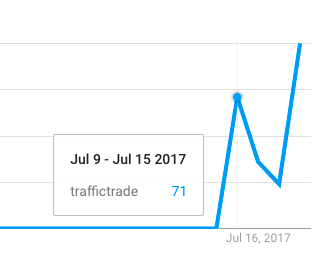
    Even Google Trends is showing an increase in search volume for the phrase ‘traffictrade’ towards the end of July as attacks ramped up and affected webmasters started searching Google for help:

    What to Do To Protect Yourself

    As always we recommend running Wordfence Premium. In this case, our Premium customers have been protected for over 40 days from TrafficTrade by a Premium firewall rule that was deployed by our team in real-time.

    The firewall rule became available to our free community users about 10 days ago. Both Wordfence free and Premium are now protecting your sites from these attacks.

    Because this infection is so wide-spread, we have released additional detection in the Wordfence malware scan to detect a newer variant of TrafficTrade. We are seeing attackers modify your wp_options table to inject the malicious code into that table. A Wordfence scan will now detect this.

    This new feature is immediately available for free and Premium Wordfence customers with Wordfence version 6.3.16 which was released this morning. Simply install Wordfence or update to 6.3.16 and run a scan.

    What TrafficTrade Malware Does On Your Site

    Once you have been infected with TrafficTrade, it injects Javascript onto your site that loads from the TrafficTrade.life domain. The actual script is very simple. If you load the URL manually, it looks like this:

    It redirects your visitors to a ‘trafficreceiver’ domain which then does further redirects to whichever campaign they are running. In the case of my test, you are redirected to a site that wants you to install a Chrome plugin – most likely malicious.

    Where The Attacks Are Coming From

    The majority of attacks that we have intercepted and that are dropping the TrafficTrade malicious redirect code come from four IPs:

    • 79.110.128.128 – 13,698 attacks
    • 79.110.128.17 – 11,071 attacks
    • 79.110.128.63 – 4,798 attacks
    • 79.110.128.252 – 607 attacks

    We are seeing attacks originating from several hundred other IPs, but the numbers are very low – ranging from single to double digits. The above IPs are by far the top offenders.

    The above IPs belong to UnderNet LLC, based in Kiev in Ukraine. They are part of a block of 2048 IP addresses in the range 79.110.128.0 – 79.110.135.255.

    UnderNet LLC’s website is at under.net.ua. This is a snapshot of their home page:

    A Change In Hosting and Tactics on July 31st

    The threat actors behind the TrafficTrade campaign were using a well known “bulletproof” hosting company to host traffictrade.life until July 31st. They were based at HostSailor with servers in the Netherlands, which Brian Krebs has written about in depth in August 2016. According to Krebs, HostSailor has a long history of hosting malicious content and services, as does their owner.

    On July 31st, the campaign switched their primary domain IP address as they also switched tactics. The IP address that the traffictrade.life domain pointed to, changed from 185.183.96.33 hosted at HostSailor in the Netherlands to 200.7.105.43 which is hosted by “HZ Hosting Ltd”, also known as HostZealot.

    Source: RiskIQ


    The HostZealot website is at www.hostzealot.com and the company is based in Plovdiv in Bulgaria.

    On July 31st we also saw a change in tactics. The attackers switched from trying to exploit searchreplacdb2.php to exploiting the Newspaper Theme in WordPress. The number of attacks we saw also ramped up significantly on July 31st when that domain IP change occurred. We saw 15,000 attacks on a single day.

    When the attackers switched to HostZealot, they immediately ramped up attacks to 15,000 per day as the graph below shows.


    The threat actors behind TrafficTrade may have switched away from HostSailor because it is blacklisted by many security companies and firewalls online, including Wordfence. Switching to a lesser known bulletproof host may have allowed them to bypass some blacklists with their attack campaign.

    Spread The Word

    The Wordfence team has seen a wide impact from this malware. Many of our site cleaning customers have been hit by this. We have also seen a significant rise in the number of infection attempts during the past few days.

    We are not isolated in observing this infection. Dan Fennel wrote about this on July 24th. This is showing up on StackOverflow (July 17th). And we initially covered this on July 25th when we wrote about the risks of searchreplacedb2.php – although at the time we didn’t realize the attack would become so prolific starting July 31st.

    To help protect the WordPress and online community, please share this with your friends and colleagues.

    Thanks to Brad Haas and Dan Moen for their assistance and contributions to post. 

    Mark Maunder – Wordfence Founder/CEO.

    The post TrafficTrade Infection Spreading – How to Protect Yourself and Detect TrafficTrade appeared first on Wordfence.

  • Why Choose An Endpoint Firewall Like Wordfence

    When choosing a firewall for your WordPress website to protect it against attacks, you have a handful of choices. Wordfence is one of the only effective “endpoint” firewalls available. The alternative is a “cloud” firewall from vendors like Sucuri (now owned by GoDaddy) and Cloudflare.

    I’d like to explain the difference between a cloud firewall vs an endpoint firewall like Wordfence. I would also like to explain the risks of choosing cloud versus the peace of mind and simplicity of an endpoint firewall like Wordfence. I will also explain why endpoint firewalls are far more effective at protecting your WordPress website.

    The Difference Between Cloud and Endpoint Firewalls

    A “cloud” firewall is a server that is located in a remote data center belonging to another company. Your website traffic goes from your visitors to that remote data center and then back out over the internet to your website.

    When vendors use the word “cloud” they really mean “our data center”. When you store photos in the Apple’s “cloud”, you are storing photos in Apple’s data center. When you host your website in the “cloud” you are hosting it in some company’s data center.

    “Cloud” firewalls are the same. The actual firewall is just located in another company’s data center. The important thing to note is that your traffic passes across the internet from your visitor, to that company’s data center, then back out over the Internet to your website.

    Configuring a cloud firewall is a bit more complex because you need to point your domain name away from your own server and at the cloud firewall vendor’s servers. That way your traffic can be routed through their data center.

    When we talk about “cloud” firewalls we refer to your website as the “origin server”. Because your origin server is also on the internet, it can still be reached by anyone on the internet provided they have your server IP address. That includes attackers. Here is a diagram to illustrate:

    An endpoint firewall like Wordfence is different in that it runs on the actual server it is protecting. That means there is no way to bypass it over the internet. Your traffic is also routed directly from your site visitor to your server. You have total control over your firewall and it is not shared by any other website. You don’t have to point your domain at someone else’s servers or data center.

    The diagram below illustrates how an endpoint firewall like Wordfence runs on your server and cannot be bypassed. It also shows how we integrate with WordPress and have “local knowledge” of user access levels via the WordPress API.

    The Risks Associated With Cloud Firewalls

    The Cloud Firewall Bypass Problem

    When you run a cloud firewall, the firewall server lives out on the open internet. That server can be bypassed by an attacker and they can still access your website directly. It is not possible to bypass an endpoint firewall.

    We have discussed the Cloud Firewall bypass problem in detail in the past. This problem is a fundamental flaw in cloud firewall design. Unless you move the firewall to the endpoint, as Wordfence does, you can’t get around this issue.

    The Cloud Firewall Data Leak Problem

    Cloud firewalls use a single server on the internet to provide firewall functionality to hundreds, perhaps thousands of different websites. If I told you 2 years ago that a major cloud provider would accidentally start sending data for one site visitor to other visitors, you would probably say I’m crazy.

    That is what happened in February of this year. Cloudflare experienced a data leak over a 5 month period that mixed sensitive data between websites and visitors. A visitor to one website using Cloudflare may have seen data from another website using Cloudflare that was being sent to a completely different site visitor.

    If you use a cloud firewall, you are sharing your firewall with many other websites. You trust your vendor to keep your data and configuration information segregated and secure. Vendors are not perfect. They experience bugs and breaches too. By adding a shared firewall to your configuration, you are introducing an additional point of risk and failure.

    The Cloud Firewall User Identity Problem

    Cloud firewalls run on servers that are on the internet. They are completely separate from your WordPress server. They don’t know who a user is or what access level they have. Cloud firewalls don’t even know if a user is logged in or not. 

    What this means is that they don’t have identification, authentication and authorization data for any visitor to your website. They can’t use that data in their rules. Cloud firewall vendors may make bold claims, but when their firewall makes decisions about who to grant access to and who to block, those decisions do not take into account who a visitor is, what access level they have and whether they are logged in or not.

    In contrast, Wordfence is an endpoint firewall that integrates deeply with the WordPress API. Wordence knows who a user is, what access level they have and whether they are signed in or not. Wordfence uses this data to make effective decisions on who to allow and who to block.

    Cloud Firewalls are Generic and Not Designed for WordPress

    In the past we have seen cloud firewalls that have let through some of the best known WordPress attacks. Cloud firewalls run on remote servers and are not designed to integrate with WordPress or to work specifically with WordPress. They usually have a generic rule-set that is not tailored for WordPress specifically.

    Wordfence is designed specifically for WordPress. It integrates deeply with the platform and is designed to block well known and emerging attacks that specifically target WordPress.

    Cloud Firewalls Break End-to-End Encryption

    In order to inspect your web traffic to determine if it is malicious, cloud firewalls have to decrypt your website traffic. That decryption happens on another company’s servers away from your servers and outside of your data center.

    Wordfence is a strong supporter of end-to-end encryption on the web. We don’t think that encryption should be intercepted and decrypted in transit. We think that website visitors have a reasonable expectation of privacy and their data should remain secure from their web browsers all the way to the destination server they are communicating with.

    Endpoint firewalls like Wordfence do not break end-to-end encryption. Your data stays encrypted and secure from your site visitor all the way to your website.

    Secure Your Site At The Endpoint

    Securing your website using an endpoint security product like Wordfence has many advantages over a cloud product. Wordfence provides a robust endpoint firewall that is continuously updated. Wordfence Premium customers receive firewall rules in real-time and free users receive new rules 30 days later.

    Wordfence includes a malware scanner. Cloud firewalls only provide firewall functionality – they do not have the ability to scan your website for malware. Wordfence Premium customers receive malware rules that are updated in real-time as new threats emerge.

    Wordfence also provides a range of other features like two factor authentication, brute force protection, country blocking and more. Our Premium customers also benefit from an IP blacklist that is updated in real-time. Because we only protect WordPress websites, our attack data is specific to WordPress. We know who is targeting WordPress websites and we can block them on your website, immediately.

    Install the free version of Wordfence today to immediately secure your website at the endpoint. Then consider upgrading to Wordfence Premium to receive real-time firewall rule updates, real-time malware signature updates and protection by our real-time IP blacklist.

    Note: All product and company names are trademarks or registered trademarks of their respective holders. Use of them does not imply any affiliation with or endorsement by them.

    The post Why Choose An Endpoint Firewall Like Wordfence appeared first on Wordfence.

  • Hackers Find Fresh WordPress Sites Within 30 Minutes

    Last week our team attended Black Hat and DefCon in Las Vegas, two of the biggest information security conferences on earth. DefCon alone attracts approximately 20,000 information security professionals, researchers, government employees and fans. To say it is very busy is an understatement.

    One of the interesting presentations at DefCon this year discussed a way for attackers to quickly find new WordPress installations to target. The presentation was given by Hanno Böck, and in it he discusses a method attackers can use to find a WordPress website just 30 minutes after it has been installed for the first time.

    About three weeks ago, we published a blog post titled “The WPSetup Attack: New Campaign Targets Fresh WordPress Installs” where we discuss how we are seeing attackers specifically target fresh WordPress installs and how to avoid being attacked. Hanno expands on this risk in his presentation.

    Certificate Transparency is an open standard that allows the online community to monitor SSL certificates that have been issued to websites. This allows, for example, websites like Facebook to monitor if someone has ordered an SSL certificate for one of their domains. It also allows security teams to monitor if a certificate authority (companies that issue SSL certificates) has mistakenly issued a certificate it shouldn’t have.

    Anyone can use certificate transparency data to see new SSL certificates that have been issued. The data includes the website domain name. Hanno’s research showed that within 30 to 60 minutes of a new SSL certificate being issued, attackers can see it in the certificate transparency report. This provides attackers with a way to discover new websites to attack.

    The sequence of events would go something like this:

    1. You order a new website hosting package from a hosting provider. Your order includes a free or paid SSL certificate for your domain.
    2. The SSL certificate is issued once your order completes.
    3. 30 minutes later, attackers see your fresh website listed in the certificate transparency report.
    4. At that time – 30 minutes later – you are halfway through completing your website setup and are just beginning to install WordPress.
    5. An attacker is constantly monitoring your new domain, and as soon as they see the setup script, they run it, install a back door and then reset your site to the state it was in so that you don’t notice.

    We described how the WPSetup attack works in our post three weeks ago. This new technique gives attackers a way to reliably find and attack fresh websites as they are being set up.

    Last week we also discussed the risk of using utility scripts like searchreplacedb2.php which don’t have any authentication, and that anyone on the Internet can access. The technique described above to discover freshly installed websites could also target these utility scripts. Thirty minutes after installing a new website, you probably think no one knows about it yet and that it is OK to install a utility script that isn’t protected by a password. Using the above technique, an attacker can scan your site for temporary utility scripts and also use them to gain entry if they are unprotected by a password or authentication.

    To avoid all of the attacks above while you are setting up your new website, we suggest either limiting access to your IP or setting up basic authentication. Both of these can be done using .htaccess.

    How to Limit Access to Your Site Based on IP Address

    You can limit access to your website so that only your IP address can access the site. Here are the steps to do that.

    1. Find out what your IP address is by visiting whatsmyip.org.
    2. Create a file called .htaccess in your website root directory.
    3. Place the text below in the file and replace the marker with your IP address.
    order deny,allow
    deny from all
    allow from 

    That should block anyone who isn’t from your IP address from accessing your web applications. Test it by using FTP or SSH to change the IP slightly and you should lose access to the website. Make sure you aren’t using a web based file manager, or you will block yourself when you do this test.

    Once you have set this up so that only your IP can access your site, you can go ahead and continue setting up WordPress and anything else knowing that no one else can abuse your setup scripts.

    To remove the access control, simply delete the above lines from your .htaccess file and access for everyone else will be restored.

    How to Set Up Basic Authentication

    Setting up basic authentication is a bit more complex. You will need access to a Linux shell to be able to create your password file. Once you have set up basic authentication, your browser will pop-up a prompt to enter a username and password whenever you access your site.  The basic procedure is as follows:

    First you need to use the htpasswd utility on the Linux command line to create a password file. The command to create the file looks like this. Replace ‘mark’ with your own username. You should be prompted for a password.

    htpasswd -c /homedir/webroot/.htpasswd mark

    If you need to install htpasswd to run the above command, you can find it in the apache2-utils package on Ubuntu Linux. If you don’t have access to htpasswd, we suggest you contact your hosting provider for help creating the password file.

    Once you have created the password file, you need to add the following to a .htaccess file in your website root. Make sure you replace the path to the .htpasswd file with your own path to your password file.

    Authtype Basic
    AuthName "Put anything here"
    AuthUserFile /homedir/webroot/.htpasswd
    Require valid-user

    Once you are done, you should see a prompt for a username and password when you try to access any part of your website. Enter your username and password to access your site and continue setup. This will prevent an attacker from accessing your site while you are busy setting it up.

    To remove the above access control, delete the above lines from your .htaccess file and access for everyone else will be restored.

    Stay Vigilant

    This is another great example of attackers using evolving techniques to identify targets and attack websites. We now know that attackers can easily identify new websites and attack them while they are being configured. As long as you use the techniques described above while your site is in setup mode, you should be safe from this kind of attack. Please share this post with the community to make them aware how attackers quickly find fresh WordPress installs.

    The post Hackers Find Fresh WordPress Sites Within 30 Minutes appeared first on Wordfence.