Online Services

Tag: WordPress Security

  • Gravityscan Introduces Free Daily Security Monitoring With Trust Badge

    Today our team is launching a very exciting program at Gravityscan: a free trust badge program for your website that comes with daily security monitoring. You can find the full announcement on the Gravityscan blog.

    Wordfence provides a comprehensive security solution for WordPress publishers, including the best available firewall and malware scan for WordPress. The Gravityscan badge includes a few additional benefits, which I describe in this post.

    Blacklist Monitoring

    Wordfence currently checks two blacklists to ensure that you don’t have a problem with your site reputation. The free monitoring included with the Gravityscan badge checks 20 additional blacklists. These checks happen daily, and if we find a problem, we start serving a transparent badge, which quietly removes the badge from your website and ensures your content flow remains the same.

    We then send you an alert email letting you know there is a problem. Gravityscan will continue monitoring your website, and once the problem is fixed, your badge automatically reappears. This gives you a reliable trust badge with daily monitoring that you can react to without disrupting your users’ experience.

    Content Monitoring

    Gravityscan’s badge program can work with any platform, including WordPress, Joomla, Drupal, Magento and many others. If you have additional software running alongside WordPress, Gravityscan will scan that too.

    Gravityscan also checks your external website links against blacklists. If we find a link that has appeared on a blacklist, we quickly let you know about it so that you can remove the link.

    By making sure that your external links are not on any blacklists, the Gravityscan badge program makes sure that your site visitors avoid visiting any sites that may harm their computer. We also help you avoid any Google penalties by ensuring all your external links have a good reputation.

    Malware Scanning

    Gravityscan’s malware scan works with any website and does not require that you run WordPress. You can choose between Gravityscan’s standard remote scan, or you can install the Gravityscan Accelerator which provides a faster and deeper scan that includes source-code scanning. The only requirement to use Accelerator is that your site must support PHP. Otherwise, it will run on any website and will give you deep daily scheduled malware scans.

    Earn Your Visitors’ Trust

    As you can see, the Gravityscan badge provides several additional benefits to help secure your website and protect your search engine rankings. One of the most important benefits is that it makes it clear to your website visitors that you take security seriously.

    Trust badges improve conversion rates on your site by letting your users know that you are proactive in securing your website and keeping their data secure. This goes a long way toward earning your visitors’ trust and loyalty, and can provide you with an instant boost in revenue, especially if you run an ecommerce website.

    Peace of Mind for Any Website

    The Wordfence team recommends that if you run a website, you participate in the free Gravityscan trust badge program to help secure your site, protect your investment and let your visitors know you take security seriously.

    I’m incredibly proud of our team for once again creating an innovative security solution for our customers that helps secure their websites and improves online security overall. Setting up the badge on your site is easy, fast, and best of all, completely free.

    Install the Gravityscan Trust Badge on your site today.

    ~Mark Maunder – Wordfence Founder & CEO.

    The post Gravityscan Introduces Free Daily Security Monitoring With Trust Badge appeared first on Wordfence.

  • The June 2017 WordPress Attack Report

    Today’s post is a continuation of the WordPress Attack Report series we’ve been publishing since December 2016. Previous months’ reports can be found here:

    This report contains the top 25 attacking IPs for the month of June and their details. It also includes charts of brute force and complex attack activity for the same period. We also include the top themes and plugins that were attacked, and which countries generated the most attacks for this period.

    The Top 25 Attacking IPs

    The next section is our standard explanation of how the table below works. If you are familiar with our attack reports, you can skip down to the table below this section, which contains the data for June along with some commentary.

    Brief Introduction (If You Are New to Viewing These Reports)

    In the table below, we’ve listed the most active attack IPs for June 2017. Note that the “Attacks” column is in millions, and is the total of all attacks that originated from each IP. Farther right in the table (you may have to scroll right) we break down the attacks into “brute force” attacks and “complex” attacks.

    Brute force attacks are login-guessing attacks. (You can learn more about how brute force attacks work in our Learning Center’s article about them.)  What we refer to as “complex attacks” are attacks that were blocked by a rule in the Wordfence firewall.

    We have also included the netblock owner, which is the organization (usually a company) that owns the block of IP addresses that the attack IP belongs to. You can Google the name of each owner for more information. A Google search for any of these IP addresses frequently shows reports of attacks.

    The hostname included is the PTR record (reverse DNS record) that the IP address owner created for the IP, so this is not reliable data, but we still include it for interest. For example, we have seen PTR records that claim an IP is a Tor exit node, when, based on traffic, it is clearly not.

    We also include the city and country, if available. To the far right of the report, we show the date in June when we started logging attacks and the date the attacks stopped.

    The Top Attacking IPs

    The total attacks from the top 25 attacking IPs decreased slightly from 144 million in May to 133 million in June.

    Brute force attacks made up 67% of total attacks for June, up from 72% in May. Complex attacks accounted for 33%.

    Ukraine had the most IPs on the top 25 list with 7, followed by the United States with 7.

    Brute Force Attacks on WordPress in June 2017

    In the chart below, we show the number of daily brute force attacks on the sites we monitor for the month of June.


    The average number of daily brute force attacks increased 36% from last month, a return to “normal volumes” after a relatively quiet May. As we discussed in our June 15th post, a home router based botnet resumed attacking mid-month. The peak day for the month was much higher, at over 41 million versus just over 30 million in May.

    Complex Attacks on WordPress in June 2017

    In the graph below, we show the daily complex attacks (attacks that attempt to exploit a security vulnerability) for June.

    Average daily attack volume for June was up 32% from May for the sites that Wordfence protects at 7.2 million.

    Attack volume was quite a bit higher in the second half of the month, peaking at over 11 million attacks in a single day.

    Attacks on Themes in June 2017

    The table below shows the total number of attacks on WordPress themes. We identify each theme using its slug, which is the directory where it is installed in WordPress.

    As usual, there was quite a bit of change in the rankings from last month. There were four new themes on the list: elegance, awake, infocus and dejavu. The large majority of the attacks on all of the themes are attempts to exploit a well known vulnerability in a php file they all shared that was publicly disclosed a few years ago. Almost 98% of these attacks originate from just two IP addresses: 194.28.115.252 and 194.28.115.228. Both are from the same ISP: SpeciaList S.R.L. in the Netherlands. The jump in attack volume is almost certainly due to the actions of a single attacker.

    Attacks on Plugins in June 2017

    The table below shows the total number of attacks on WordPress plugins. As with themes, we identify each plugin by its unique slug, which is the unique installation directory where the plugin is installed.

    The top 25 list for plugins also changed quite a bit. Five plugins in the top 25 this month weren’t on the list in May.

    We took a look at the plugin with the biggest jump in the ranking, dzs-zoomsounds, to see what is behind the increase. The attacks are all malicious file upload attempts, trying to exploit a vulnerability that was disclosed over two years ago. Over 99% of the attacks originate from the same Russian IP address: 194.28.115.252.

    Attacks by Country for June 2017

    The table below shows the top 25 countries from which attacks originated in the month of June on WordPress sites that we monitor.

    The top 3 countries remained stable, with the United States and Ukraine swapping places at 2 and 3. There was a lot of movement at the bottom of the list, primarily driven by the home router botnet resuming its attacks. You’ll notice that Algeria is back on the list, climbing 65 spots. It was Algeria’s rise in the rankings in our March report that led to our original discovery of the home router botnet.

    Conclusion

    That concludes our June 2017 WordPress attack report. We were disappointed to see attack volumes up in June after a quieter-than-normal May. Let’s hope that trend reverses itself in July.

    The post The June 2017 WordPress Attack Report appeared first on Wordfence.

  • The WPSetup Attack: New Campaign Targets Fresh WordPress Installs

    At Wordfence, we track millions of attacks from a wide variety of sources every day. From this data we create a list of the worst-of-the-worst attackers and add those to our IP blacklist to protect our Premium customers. We also carefully monitor the activity that those known bad IP addresses engage in.

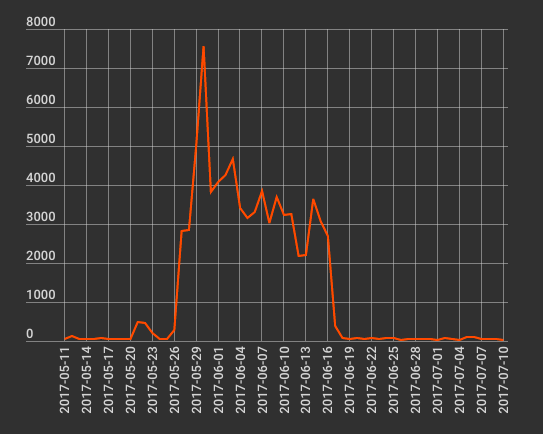
    In May and June, we saw our worst-of-the-worst IPs start using a new kind of attack targeting fresh WordPress installations. We also had our first site cleaning customer that was hit by this attack.

    Attackers scan for the following URL:

    /wp-admin/setup-config.php

    This is the setup URL that new installations of WordPress use. If the attacker finds that URL and it contains a setup page, it indicates that someone has recently installed WordPress on their server but has not yet configured it. At this point, it is very easy for an attacker to take over not just the new WordPress website, but the entire hosting account and all other websites on that hosting account.

    The graph below shows the campaign we tracked and the number of scans per day for /wp-admin/setup-config.php that we saw from several known bad IPs:
    How the WPSetup Attack Works

    There are several ways you can install WordPress. You can simply unzip the ZIP archive into a directory on your hosting account, or many hosting providers provide a one-click install that does the same thing.

    At this stage, even though you have the base WordPress files installed, there is no configuration file yet, so it needs to be created. You used to have to do this manually, but new versions of WordPress guide you through creating this file using a web interface.

    If you unzip WordPress or use a one-click installer and don’t immediately complete the installation steps, an attacker who is scanning for fresh installs on your server can use your fresh install to take control of your website.

    Let’s walk through the steps to understand how the attacker takes control of your site once they have located your fresh WordPress installation. The first step is to select your language:
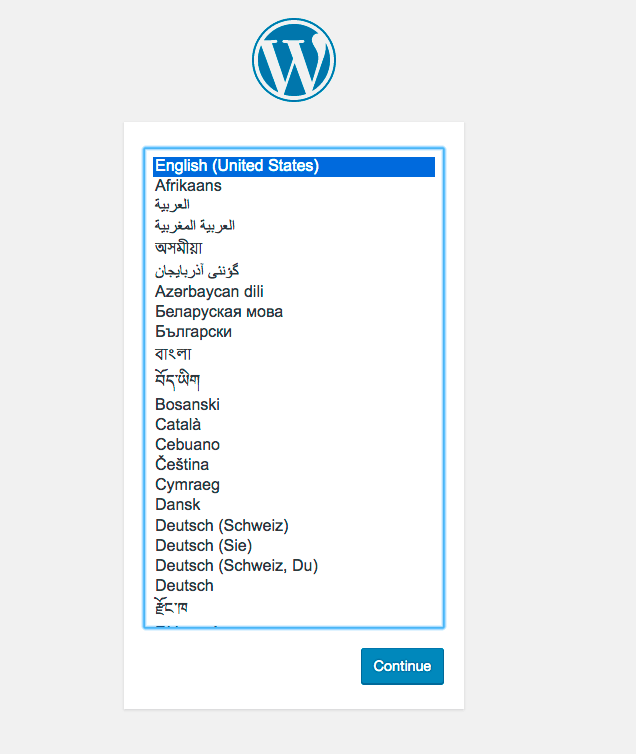
    Then you see an introductory message:

    And finally, you let WordPress know your database name, username, password and which server it lives on.

    If an attacker finds your fresh install, they can easily click through the first two steps and then enter their own database server information in this final step. Their database can be on their own server, and it doesn’t have to contain any data – it can simply be an empty database. They just need to get a working WordPress installation running on your site that they have admin access to.

    Once this step is complete, WordPress confirms that it can communicate with the database – in this case, the attacker’s database:

    Once the attacker clicks “Run the install,” they are prompted to enter information to create the first admin-level account.

    They enter their own account information, click the Install button and receive a confirmation that WordPress has been installed and the admin account has been created.

    The attacker then retypes the admin credentials they created in the setup process…

    … and is signed into a fresh WordPress install on your server using their own database.

    How the WPSetup Attack Gets Full Control of Your Hosting Account

    Once an attacker has admin access to a WordPress website running on your hosting account, they can execute any PHP code they want in your hosting account. There are several ways they can do this.

    Executing PHP Using the Theme or Plugin Editor

    WordPress gives you the ability to edit the code of themes and plugins within the administrative interface. To execute their own code, an attacker simply launches the theme or plugin editor and inserts their own PHP code. The next time a page is refreshed, their code will execute.

    Executing PHP Using a Custom Plugin

    Once an attacker has admin access to a WordPress site, they can upload any plugin with any PHP code, including their own custom plugin. To execute their code, they spend a few minutes creating a basic WordPress plugin and then upload it to the site and activate it.

    What an Attacker Does Once They Can Execute PHP Code

    Once an attacker can execute code on your site, they can perform a variety of malicious actions. One of the most common actions they will take is to install a malicious shell in a directory in your hosting account. At that point they can access all files and websites on that account. They can also access any databases that any WordPress installation has access to, and may be able to access other application data.

    How to Protect Yourself Against the WPSetup Attack

    This attack is gaining popularity. To avoid falling victim, we have provided two procedures you can use below:

    Procedure 1: The Safe Way to Install WordPress

    Before you install a fresh WordPress installation, create a .htaccess file in the base of your web directory containing the following:

    order deny,allow
    deny from all
    allow from 


    Replace the ‘’ with your own IP address. You can find this out by visiting a site like whatsmyip.org.

    This rule ensures that only you can access your website while you are installing WordPress. This will prevent anyone else from racing in, completing your installation and taking control of your hosting account by uploading malicious code.

    Once complete, you can remove the .htaccess rule and allow the rest of the world to access your website.

    Procedure 2: The Risky Way to Install WordPress

    This procedure is risky because, if an attacker is fast enough, they can still take control of your site. We don’t recommend this, but include it for completeness.

    Instead of creating the .htaccess rule above, you can use the standard WordPress installation method. To reduce the risk of being attacked, you need to shorten the time between installing the WordPress files and completing installation as much as possible.

    1. Install your WordPress files by unzipping them or doing a one-click install.
    2. Access your site immediately and complete the installation steps as quickly (though accurately) as you can.
    3. Once your site is up and running, an attacker can no longer run the installation and your site is no longer vulnerable.

    Recommendations for Server Administrators and Hosting Providers

    If you operate a server or a network of servers that provides WordPress hosting to customers, we recommend the following to mitigate this attack:

    Scan your hosting accounts for WordPress installations that do not have a wp-config.php. These may be fresh installations that have not yet completed setup. If navigating to the base URL of the site redirects you to /wp-admin/setup-config.php then you have confirmation that setup is incomplete. We suggest you alert your customer they should either complete setup or remove the files.

    If you have an IDS (intrusion detection system), you should consider monitoring traffic from your web servers to the open Internet for any MySQL traffic. This may indicate an attacker has configured a WordPress site on your network using their own database on the Internet.

    If you have any other mechanisms in place to monitor or prevent connections from your web servers to arbitrary databases on the open Internet, we recommend you use those to mitigate this attack.

    Final Advice and Your Thoughts

    I recommend that you take the additional step of auditing your own hosting account to make sure you have not accidentally left any unconfigured WordPress installations lying around. If you don’t want to do this yourself, consider our WordPress Site Audit service, which provides a comprehensive site security audit and will include a check for incomplete installations.

    As always, I welcome your feedback in the comments below. If you have additional ideas to help mitigate this attack or to help WordPress improve the setup process to avoid this attack, I’d love to hear them.

    ~Mark Maunder – Wordfence Founder/CEO

    PS: Please share this with the WordPress community to create awareness of the risks of unconfigured WordPress installations.

    The post The WPSetup Attack: New Campaign Targets Fresh WordPress Installs appeared first on Wordfence.

  • Vulnerability Roundup: 3 Vulnerable WP Plugins and Update Your Joomla

    It’s been a tough week for the WP Statistics plugin. Last Friday, Sucuri (now owned by GoDaddy) discovered a SQL injection vulnerability in the WP Statistics plugin version 12.0.7 and older. To exploit the vulnerability, an attacker needs to register an account (or use a compromised account) with subscriber-level access. They can then exploit a weakness in a WP Statistics shortcode to launch a SQL injection attack. This allows them to, for example, create an admin-level user and sign in to your website as an admin.

    Then, 2 days ago Ryan Dewhurst discovered a cross site scripting vulnerability in the same plugin, which was fixed within a few hours of discovery.

    Over 300,000 websites use WP Statistics. If you use the plugin, you should immediately update to version 12.0.9 which fixes both of these vulnerabilities.

    Wordfence includes built-in protection against SQL injection attacks and cross site scripting (XSS) attacks. As a precautionary measure, we’ve released an additional rule to our Wordfence Premium customers in real-time to protect them against the specific SQL injection attack that targets this plugin.

    Other WordPress Vulnerabilities You Should Be Aware Of

    The All-in-One WP Migration plugin for WordPress reportedly suffered from a cross site scripting vulnerability which was fixed about 6 weeks ago. Wordfence free and Premium has built-in XSS protection, as mentioned above, so even if you were running the vulnerable plugin, you would have been safe. Nevertheless, if you haven’t already, we recommend you update to 6.51, the newest version of All-in-One WP Migration.

    A few weeks ago, a reflected cross site scripting vulnerability was discovered in the WordPress Download Manager plugin versions 2.9.51 and older. We suggest you update to 2.9.53, which is the newest version of this plugin. Wordfence also protects against this exploit (free and Premium).

    Don’t Forget to Update Your Joomla Installations

    Joomla released a security update 48 hours ago which fixes three vulnerabilities. The new release is Joomla 3.7.3 and includes fixes for two XSS vulnerabilities and an information disclosure vulnerability. If you run Joomla on your website, you can visit https://www.gravityscan.com/ to run a quick scan on your Joomla site and find out if you are vulnerable and need to take action. Details on the release can be found on Joomla.org and we also mentioned this update on the Gravityscan blog.

    That’s all for today’s updates. As always, I’ll be around to reply to your comments if needed.

    The post Vulnerability Roundup: 3 Vulnerable WP Plugins and Update Your Joomla appeared first on Wordfence.