Online Services

Category: Ideas Blog

  • How to Link Build from Lost or Broken Links

    How to Link Build from Lost or Broken Links

    If you’ve ever been to the beach, you may have seen old men in bucket hats waving metal detectors over seas of sand, hoping for an inordinate line of beeping to suddenly become static.

    It’s not much different if you’re trying to link build by claiming broken links.

    You scour through websites and look for any broken links that may be relevant to your site, craft nicely worded emails asking webmasters to fix them, and hope in a few days or weeks that they oblige and boost your SEO.

    It’s an alternative to guest posting for link building that has its value in volume; however, it can be hit or miss as many webmasters may ignore emails or not choose the piece you’re offering to replace the broken link with.

    It can be tedious to build the database for it as you’ll need to mine through potentially hundreds of website’s tracking down contact info for reaching out to webmasters, but they payoff is worth it if you can earn some extra link power.

    Webmasters get an easy page fix and you get a link that will boost your content’s SEO rankings.

    Sound good?

    Here we’ll outline the steps needed to build your backlink profile from lost or broken links.

    Build a Database of Target Websites

    You may already have a good idea of some websites you want to target for link building through link reclamation.

    If you don’t, then you can start by perusing through websites in your target niche that aren’t your direct SEO competitors.

    Targeting Blogs

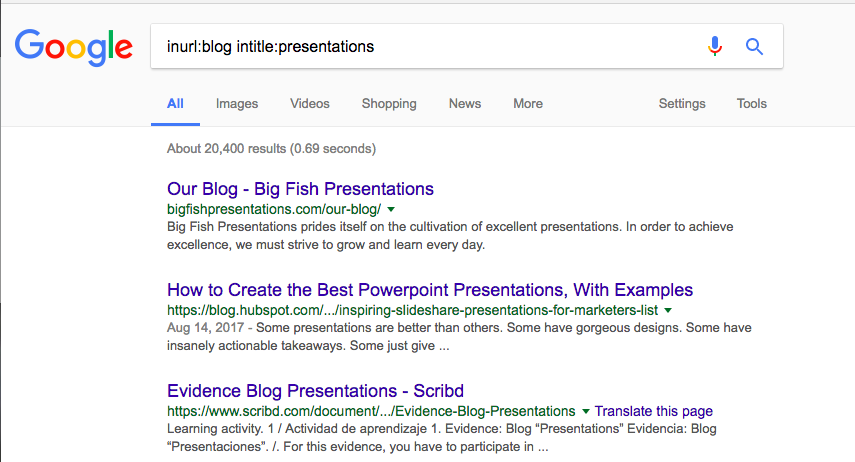
    A good way to find target websites to claim broken links from is to use the following formula in a Google search:

    inurl:blog intitle:[keyword]”

    inurl google search for similar websites with keywords in title

    This will give you a series of blogs that feature the keyword you select as a title.

    From there you can go through and catalogue each blog to be used later when performing an on-page seo check for broken links.

    Industry Intelligence

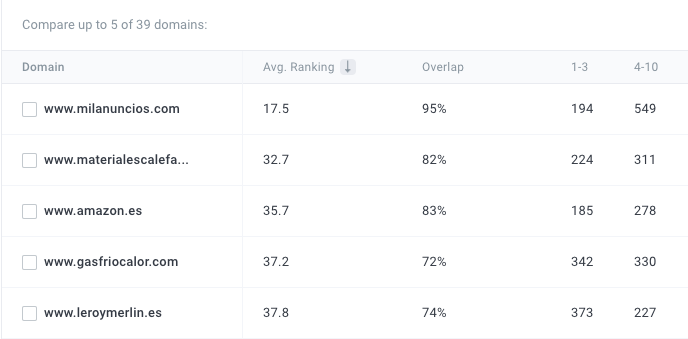
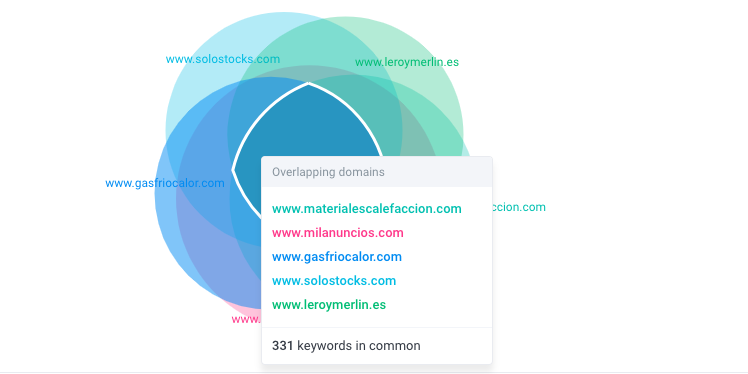
    There a variety of tools out there that are great for competitor research; however, you can get a multitude of domains listed by adding in a group niche of keywords and then having a domain list populated based on rankings for those keywords.

    This SEO beta tool does just that.

    The higher the overlap percentage, the more keywords in common they have with the keywords submitted.

    From here you have a large list of websites you can target for link reclamation.

    You can put them in a spreadsheet after you’ve found a decent amount and begin running tests for broken links.

    Scanning for Lost Links

    You’ll need a decent toolset to scan through for lost or broken links of a website.

    Some tools that are great for this include:

    These tools offer different starting points in regard to how you’ll spot broken or lost links.

    If you’re using Majestic, you can enter the site blog URL as a path URL and begin your scan.

    You’ll want to look at the lost links section to find links that were pointing to this blog and go to the pages where the links were lost.

    You can also do this on your own website to reclaim any links you may have lost.

    This is a reverse-engineering kind of method where you’ll work backwards to try and steal links that your competitor websites have lost.

    Add these pages and the links to your database so you have distinct pages you want to target to claim the broken backlinks from.

    If you’re using a tool like Screaming Frog, you can take the path blog URL and scan it. Once you scan it you’ll get a full list of links and their corresponding pages.

    You’ll want to hit the external links and check specifically look for 404 errors. Add these pages to your database to reach out to the webmaster owners of them later to replace the broken links with links to your content.

    Screaming Frog is a great tool that is free for up to 500 links a day.

    Reaching out to Webmasters

    After you’ve compiled your list of pages that have broken links that need fixing, it’s time to craft a nicely worded email to ask the webmasters of those pages to replace the broken backlinks with links to your content.

    Sometimes they’ll just ignore the request. Sometimes they’ll choose just to remove the link all together.

    But other times they’ll oblige if they have the time and care enough that their readers have access to great content that supplements their own.

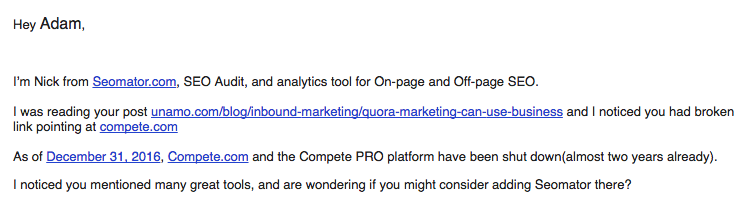
    A good outreach email will get straight to the point. Here’s an example:

    The email works well by:

    • Identifying the page with the broken link
    • Explicitly stating the anchor text of the broken link
    • Providing a new link to replace the old one
    • Giving an explanation of why the new link is a good solution

    It’s short, sweet, and to the point.

    Set up a nice template like this that you can paste the links and other relevant information into to save time and begin a campaign that reinforces the point two or three times if the emails aren’t responded to.

    Conclusion

    The process to claim broken backlinks can be difficult and time consuming, but building a database for it can be used for guest posting opportunities as well if they’re not interested in replacing the broken link with yours.

    In terms of value, reaching out and getting a few links a week that point to specific content can do wonders for driving it up the search engines.

    Good luck!

  • 13 Awesome Prototyping Tools for Designers

    13 Awesome Prototyping Tools for Designers

    My friend told me a joke once: “If I were to be a father, I’d want to see the prototype first.”

    I laughed at his remark and realized that this is true. Creating mockups is a crucial part of giving life to a new project, after all.

    Some of them prefer to go vanilla and create prototypes and mockups  by hand using good ol’ pen and paper.

    But one thing  UX designers or researchers have in common is that they always look out for new technologies.

    Sure, you can even use Microsoft PowerPoint for mockups. But why not use something that covers your needs and doesn’t make you feel like an undergraduate student?

    Here’s a coherent presentation of 13 prototyping tools which will help you design your project and test it. Read on and prototype away!

    1. Balsamiq

    Creating a list about prototyping tools without mentioning Balsamiq is like a sphere: pointless. It is one of the basics when it comes to creating your first wireframes and mockups.

    It is quick and easy, so if you want to jump right in and leave with a good locking prototype, then it’s a great choice. What captivates is its simplicity.

    There’s no need to think about which font to use, which color and whatnot because of the limited choices. You focus on the layout only and that’s it. Balsamiq is cheap, has good support is easy to pick up. If you don’t need interactions with your prototype, this is a perfect choice.

    balsamiq prototyping tools

    Here’s a sample mockup with a Google Translate infused Lorem Ipsum. The Skirt of Zen.

    2. Lucidchart

    The front page is deceitful, but it’s not only about diagrams, flowcharts and graphs. Lucidchart is for IT and Engineering, for Business clients and for Product Management and Design.

    The back-end functionalities such as server diagrams or UML are free, and the wireframing requires a subscription.

    Wireframing uses interactive drag and drop interface where you can use preset elements to create your frame.

    And of course you can share your project with others. Lucidchart is well priced and its versatility allows you to jump in for a quick project or sit and tweak at a little bit to later use it for your final product.

    lucidchart prototyping tools

    My own Wingdings inspired design, expected to hit shelves in: never. The tool offers good options, though.

    3. MarvelApp

    Marvel attracts you with its simple and clear design which allows you to get right to work. It also operates on web browsers, so it is accessible via many platforms (PC, mobile, etc.).

    Marvel syncs with Dropbox, and offers access to projects for full teams, like other tools. Marvel can export the prototype as an .apk for Android developers, so you can turn your prototypes into offline apps.

    To follow their words “napkins supported”, you can take a screenshot with your phone iPhone and turn it into a prototype with few clicks. It’s simple, clear, and most of all free, with some extensive plans available.

    MarvelApp prototyping tools

    A prototype of our old website. It’s gone.

    4. Moqups

    How can you not fall in love with a front page which already is an editor for wireframing? If you want to check out the features, just click on any element of the website for yourself live.

    Moqups is easy and fast, like Balsamiq. No visual clutter included if you want to focus on the frame alone. The fact that it’s in HTML5 make it  fast and seamless. The amount of members on projects is unlimited, so it’s perfect for larger and growing teams.

    Moqups prototyping tools

    Dear Moqups, I introduced some improvements. Feel free to hire me.

    5. MockFlow

    Don’t mock this one, as this is a fine tool for prototypes. It looks confusing, but once you get the hang of the interface and of the MockStore, you can use all the elements and templates available.

    Creating a non-cartoonish mockup is simple, looks good, and you have an online link to a HTML wireframe which you can share as you wish. MockFlow is constantly updated and receives new features and fixes all the time, so it is good to see it develop rapidly. It uses Flash, but that shouldn’t be much of a problem.

    mockflow prototyping tools

    I got excited at the sight of 2 notifications, but then I remembered it’s not 2010 any more.

    6. UXPin

    UXPin is a great tool with tons of options for wireframing. But what  caught my attention is the option of turning your sketch into a digital wireframe.

    I don’t mean taking a screenshot and then using it as a background image – UXPin sells notepads which contains UI elements that can be modified as you wish. After having done so, you upload the picture to UXPin and it changes into a digital version! It’s a bit pricey, but the idea of seeing your sketches come to life is quite alluring.

    UXPin doesn’t need that much recommendation – it’s a big player used by other big players such as Microsoft and Sony

    UXPin prototyping tools

    Because one date connected with one day of the week will be the harbinger of doom.

    7. Protoshare

    The strength of Protoshare lies in collaboration.

    Protoshare makes you feel like you are entering the professional world of creating professional wireframes, but it also offers you the option to discuss projects in real-time.

    Sharing is the proto principle, after all. The tool is clear and extensive – it may appear overwhelming at first, but the multitude of options available makes it a worthy contender.

    Protoshare prototyping tools

    See what I did here? Hint: It’s a completely normal picture.

    8. Proto.io

    Let’s follow the naming convention a little bit. When I first entered the proto.io site it charmed with the simplistic design of their page and tool. It’s clean and slick, and somehow familiar. Made me want to try it straight away without any further ado.

    It’s a valuable tool for prototyping for iOS, Android and Windows Phone, which you can later test on live devices. Give proto.io a go.

    Protoio prototyping tools

    I’ve been greeted with a similar message, and I don’t look good in pictures ever since. Figures.

    9. HotGloo

    It will stick to you. Even though it uses Flash, it is rather slick and clean, and like proto.io it also gave me that feel of familiarity – it means it follows already successful design principles.

    I was able to play around and get the hang of it fast, so that definitely is a plus. It is another viable option for creating your prototype, and it’s rather well priced. Most features offered by HotGloo are enough to get you going, so don’t hesitate.

    HotGloo prototyping tools

    A screenshot given us from HotGloo.

    10. iPhoneMockup

    I’ve stumbled upon this little thing completely by chance. It is the perfect tool for people who are suffering from a PTSD caused by transferring from paper to digital.

    You choose one of the styles, illustration or pencil. One has straight lines whereas the other is a drawing by a drunk chimpanzee. Then, you use few basic elements to create a simple iOS mockup.

    If you are in a situation that you need to create a mockup in 30 seconds or else the world will end, then this is perfect. Also, the “projects” are shareable, but you can’t control the changes once you made the link public – beware.

    iPhoneMockup prototyping tools

    I know, I know, this is a lot to digest, but breathe, slowly, don’t let the options overwhelm you…

    11. FluidUI

    Their name is not a coincidence.

    FluidUI design is fluid and the tool is simple to use, even though it might appear to be a bit clumsy once you perform too many actions.

    You can prepare some basic wireframes or go armed to teeth and use high fidelity components, which simulate the environments you are creating for.

    You can see the screen flows thanks to the Fluid Player, which will show you exactly how the prototype will behave on a real device. Features such as cloning screens or adding notes are also a plus.

    FluidUI prototyping tools

    I made a prototype of a convenient program for fixing all the IT problems of your relatives.

    12. Pidoco

    Remote usability tests!

    Yes, that’s what makes Pidoco stand out from other competitors. You can run tests of your prototypes by sending a link to users, and then you start gathering data. Otherwise, it is also a solid option for creating interactive prototypes and wireframes.

    Pidoco prototyping tools

    I decided to create something constructive here, but the result varies.

    13. Wirify

    This one came off as a surprise. Wirify offers you a script which turns any website into a wireframe. Cool when you find an inspiring website and you want to use it as a basis for your new project.

    This option is free, but the Pro version of the service allows you to export the wireframe into, for example, Balsamiq, for further edit. You won’t use it all the time, but it’s a neat service to remember about.

    Wirify prototyping tools

    Be inspired.

    This is where we close off the list. Of course, there are many other tools on the market, some maybe even better than anything listed here. But this list tried to be eclectic in its choices. So, after you check out and find out which tool suits you best, you can start prototyping away.

  • Franchise SEO: How to Apply Local SEO to Multiple Locations

    Franchise SEO: How to Apply Local SEO to Multiple Locations

    From creating different landing pages to finding niche, relevant keywords, a lot of franchisors (and their SEO vendors) are neck deep in their search for the Holy Grail of franchise SEO.

    And that’s only the beginning.

    As a franchisor, you’re aware by now of the many pitfalls of attempting to unify information without duplicating it. Especially when you have independent franchises in multiple locations.

    So, how do you find a franchise SEO strategy that works for you and your franchisees?

    And how do you avoid wading through all the guides on the Internet promoting blanket SEO franchise strategies?

    For starters, you can read this articles. It will layout severals ways for you to apply franchise SEO tactics companywide without upsetting the search engine gods.

    New to SEO? Learn more about Search Engine Optimization! Download this free Beginner’s Guide to SEO.

    2. Franchise SEO Tactics That Make Local Websites Not So Local

    When it comes to creating websites for franchises, there are two schools of thoughts.

    First, there are those who believe that all franchises should appear together on one site.

    For example:

    www.yourcompany.com

    www.yourcompany.com/locations

    www.yourcompany.com/locations/city
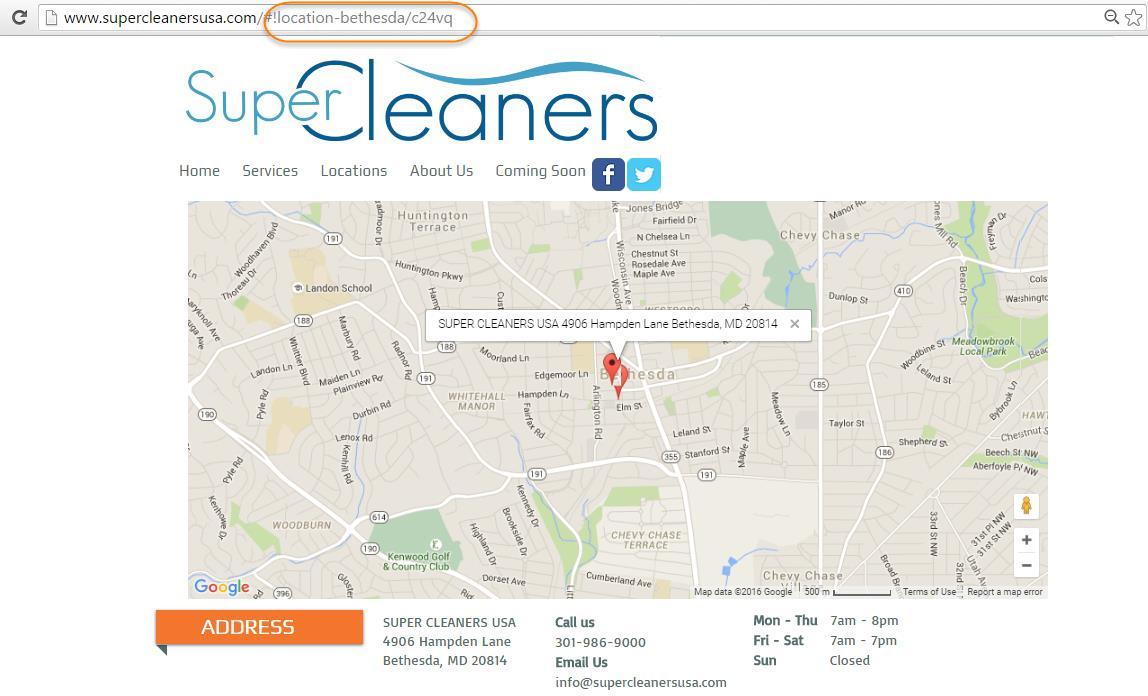
    local

    Method One provides your website with the most link juice.

    You can even use geolocation to guide your visitors to relevant locations. Don’t expect customers to do a manual search when your competitors allow them to find relevant franchises via automatic redirects.

    The second franchise SEO option is to create microsites for each franchise location.

    The downside?

    Creating microsites for each location can be a money pit.

    The upside?

    You get great results when applying franchise SEO tactics to individual websites. Plus, each franchise has an easier time doing PPC.

    Is there a cost-effective way to build multiple websites?

    Sure! Solutions like SpaceCraft and Spaces can help you create multiple websites to budget.

    Such solutions also help you create professional, on-brand websites for multiple locations. That way you can maintain brand identity across all franchise websites.

    I prefer Method Two because a single website can rank for a limited number of keywords. Plus, keywords and keyword strength can vary across regions and locations.

    Having multiple websites allows you to optimize pages for local keywords. In the end, you can customize what you rank for based on location.

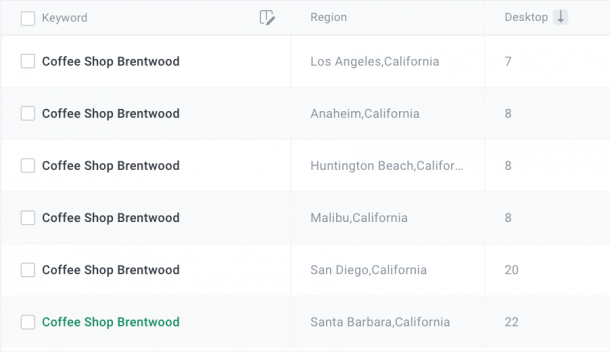
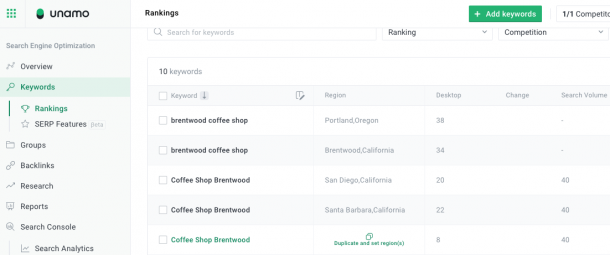
    Pro Tip: Want to see how keywords perform across regions? Some SEO tracking software allows you to duplicate keywords to see how they’re performing in multiple regions. Why is that cool? Because you can track one keyword in one place and get different local results.

    Here’s an example of how it works on Unamo SEO for franchise keywords:

    tracking keywords in multiple locations with unamo seo

    Want some more tips on cool local SEO tools that will help you up your SEO franchise game? Then check this out: 9 Free Local SEO Tools That Will Help You Dominate Your Niche

    Here’s How to Design Customized Local Landing Pages

    A lot of rules for landing pages don’t apply to franchise sites.

    See, here’s the thing. The rules for laying out landing pages are different for franchises. The biggest differences are in the design.

    The goal of a customized franchise landing page is to distinguish that location from all the others. So you want to be sure to:

    • Make your call to action (CTA) prominent and locally relevant.
    • Create unique content instead of duplicating content from other landing pages.
    • Keep your company name, address, and phone number (NAP) consistent with all other online listings for that branch.

    Also, your site needs to be mobile friendly as most searches are now conducted via mobile.

    To keep things simple, Tim Gilboy of FranchiseHelp recommends “using a bunch of awesome services that make it very easy for you to start creating your own landing pages from scratch.”

    He uses Unbounce to design and host landing pages for FranchiseHelp.

    Here’s an example of a landing page layout with a prominent CTA:

    landing-pages

    Image Source: Author’s own

    Pro Tip: If the visitor lands on your page through an affiliate referral or a paid ad, make sure both the message and location are consistent. You don’t want a referral to your New York branch to redirect to Chicago’s page. Also, set goals for conversions so you can understand why one franchise’s landing page outperforms another.

    If You Don’t Do Anything Else – Always Start With Listings

    Let’s say you’ve already got your websites up and running. What’s next?

    Listings – the number one franchise SEO magic trick.

    A long time ago, people who wanted to find information on local businesses looked for them in the yellow pages of the phone book.

    Now, businesses need to list themselves in multiple locations online. That means that you as a franchisor have to track your business across multiple physical and online locations.

    Yes, it’s a headache. But wait, there’s more!

    See, here’s the thing. If you’re allowing each franchisee to manage their local business listings, you’ll begin to discover minor differences in the way the company’s NAP info is written across listings. And Google doesn’t like that.

    So, you’ll want to start by regaining access to as many of these listings as you can. Bring listings made by independent franchisees or rogue webmasters back into the fold as much as possible.

    Reach out to franchisees to stress the importance of keeping NAP info uniform.

    Be sure to retain control over such listings in the future as you continue to sell franchises.

    The bottom line – good franchise SEO strategies start with making sure NAP information for all locations is uniform across all online listings.

    Once you have your ducks in a row, you’ll want to find all local directories. You can do so manually or by using a tool like Whitespark.

    Whitespark helps you find relevant, local directories where you can list multiple local franchises.

    Let’s say you have a franchise in Pennsylvania. Whitespark automatically places it in the Pennsylvania directory.

    whitespark

    source

    Taking Advantage of Google My Business Profiles and SERP Features

    One of the cheapest and easiest franchise SEO strategies is creating individual Google My Business profiles for all your franchise locations.

    What can Google My Business profiles do for you?

    First, claiming your profile allows you to show up in special Knowledge Panel SERP features. Think of them as prime Google real estate.

    When you have multiple brick and mortar locations as a franchisor, Google will also give your business access to the Local Pack SERP feature.

    Here’s how it looks:

    Knowledge panel and local pack serp features

    So, what does it look like when a big e-retailer tries to do the same? They aren’t fed into a Local Pack. Instead they will feed into other SERP features such as Twitter Packs or News Boxes.

    Here’s how it looks:

    knowledge panel serp feature

    You’ll want to be sure that each franchise location has a dedicated profile. You can optimize each profile by adding contact information for that branch, images of that location, and local business hours.

    The same rules apply for creating franchise-specific social media pages. You’ll want to be sure that each location has its own set of social media profiles, including Facebook, Twitter, Pinterest, and Instagram.

    Of course, your choice of social media platforms will differ depending on the nature of your business.

    Franchise SEO Strategies Benefit Most from Schema Markups

    What are schema markups?

    Schema markups are breadcrumbs of information about your company that you leave for Google. They are located right above your meta description on Google result pages.

    You can include such information as location, ratings, and price ranges for individual franchise locations. If you’ve decided to create individual websites for each franchise, you should consider providing customized schema markups for each site.

    The benefit? Customizing schema markups allows you to rank for local keywords. You may be XYZ Cleaners. But the Chicago branch will want to rank for Chicago. Adding Chicago to your schema markup makes that happen.

    That’s because you’re giving Google as much local information as possible.

    You may also want to to consider adding or marking your franchise location on Schema Place. The code you download allows search engines to find out more direct information about your franchise location.

    As a franchisor, it’s best to make sure that all branches receive this information along with uniform NAP information.

    Pro Tip: One way to make sure addresses are different is to add a branch code or store code. For example, (http://XYZcleaners.com/Chicago/store-locator/etc/detail/0153) the code “0153” is a branch or store code for a particular outlet in a city. You should also mark the Geo Coordinates of your franchise. You can mark maps in Schema Maps as well.

    Don’t Forget to Link Your Business to GPS Devices

    Whether it’s managing your listings on Google Maps, GPS devices, or navigation apps, it’s important to add all franchise locations as Points of Interest (POI) in databases.

    You can use a solution like Advice Local’s GPS mapping tool to supercharge your implementation of this franchise SEO tactic.

    gps

    source

    The solution ensures that all your businesses show up as POIs on primary devices including Garmin, TomTom, and Magellan. They also contact popular car manufacturers like Fiat, Toyota, and BMW so that your business shows up in built-in car navigation systems.

    Adding your franchise locations to GPS systems ensures that your customer can find your business on the go.

    Pro Tip: Do be sure to cross-check all listings after using such tools. Local businesses often gripe that customers find listing with the wrong franchise location.

    Conclusion

    There are a lot of franchisors out there who are not using franchise SEO tactics to their advantage.

    If you want to take your SEO franchise strategy to the next level across multiple locations, follow these tips:

    • Love your listings – run periodic audits to ensure NAP info is uniform across listings.
    • Strike a design balance between local landing pages and your corporate website.
    • Make sure that your franchise locations show up on maps and GPS devices.
    • Make unique landing pages for each location without duplicating content.
    • Enable geolocation to ensure your visitors are directed to their local franchise online.
    • Follow top SEO experts and SEO franchise strategies to stay on top of your game.
    • Use SEO for franchises and listing tools to supercharge your listings for more visibility.
    • Don’t underestimate the importance of your online reputation.
    • Use social media and reviews to piggyback to the top of the SERPs.
    • Test, test, and test some more without being afraid of trying new SEO franchise tactics.
  • Multiregional Tracking in Unamo SEO

    Multiregional Tracking in Unamo SEO

    With Multiregional Keyword Tracking you’ll be able to track keywords in multiple regions in your Unamo SEO campaign.

    multiregional keyword tracking in unamo seo

    Multiregional tracking only applies to Google; however, with a variety of local search engines in various countries, you can check the success of your keywords in one region against their success in another.

    By doing this, you’ll find potential locations where your business can improve locally as well as understand where your competitors have a strong SEO foothold.

    Whether you’re a small business servicing multiple locations in a region or a franchise wanting to monitor your SEO success all over the country, tracking keywords in multiple locations has never been easier.

    We currently support multiregional tracking for the following countries on Google:

    • USA (20,041 regions)
    • Germany (1148 regions)
    • Poland (621 regions)
    • Austria (10 regions)
    • Australia (17 regions)
    • Canada (917 regions)
    • United Kingdom (1103 regions)
    • The Netherlands (980 regions)
    • Brazil (Curitiba, Sao Paulo, Rio de Janeiro)
    • Mexico (Guadalajara, Mexico City, Monterrey)

    Overview Section

    You will also be able to view keyword rankings for each region in aggregate in your overview section. Simply select a specific region, all the regions, or multiple regions to view their average rankings.

    Duplicating Keywords to track in Multiple Regions

    To track your keywords in multiple regions from your keywords section, simply click duplicate and select the region(s) you would like rankings for.

    If you would like to collapse the Regions column, you can do so by clicking on the book icon and deselecting Regions.

    Hovering over the arrow next to the keyword will display the region it’s currently being tracked in.

    Adding Keywords Manually

    When adding keywords, you can now select the region(s) you want the keywords to be tracked in.

    Adding Regions to Your Groups and Keywords with a CSV

    To set regions in your CSV, please add your preferred Regions of your selected country search engine into Column C.

    They should be formatted as City, State/Province.

    Example: Los Angeles, California

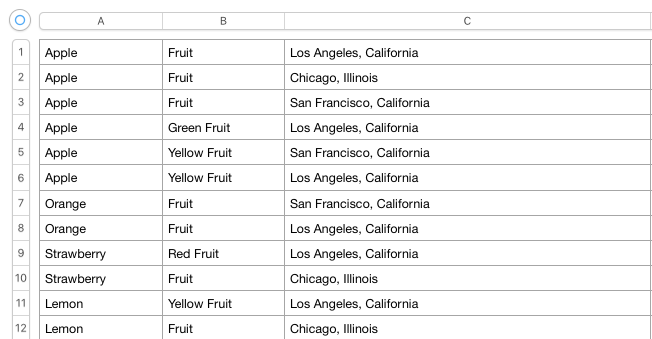
    You can add multiple Regions to your CSV with multiple Groups and Keywords as it appears below.

    For the keyword “Apple”, we have it appearing in 3 rows, and the Group “Fruit” appearing in 3 rows because we want to track this keyword in 3 different Regions (Los Angeles, San Francisco, and Chicago).

    Thus we duplicate the Keyword and Group 3 times, but with the different Regions in Column C.

    By doing this, our Keyword “Apple” will be tracked in 3 different Local search engines within the “Fruit” Group.

    Adding a Group multiple times will not duplicate the Group in your Campaign, it will simply ensure that your keyword is tracked in that group in the different Regions you have chosen.

    Adding Keywords With Just Regions

    If you would like to add Keywords without Groups and only Regions, you can simply add the keywords in Column A and the Regions in Column C.

    You will need to duplicate the keyword in multiple rows if you want to track the same keyword in different locations.

    CSV with regions list

    You need to prepare your Multiregional CSV with the exact naming supported by UNAMO. You can download this list straight from the app.

    1. Click  “ADD KEYWORDS” and open a dialogue
    2. Click the 💡 bulb icon and go to step 3/3 (Setting Regions)
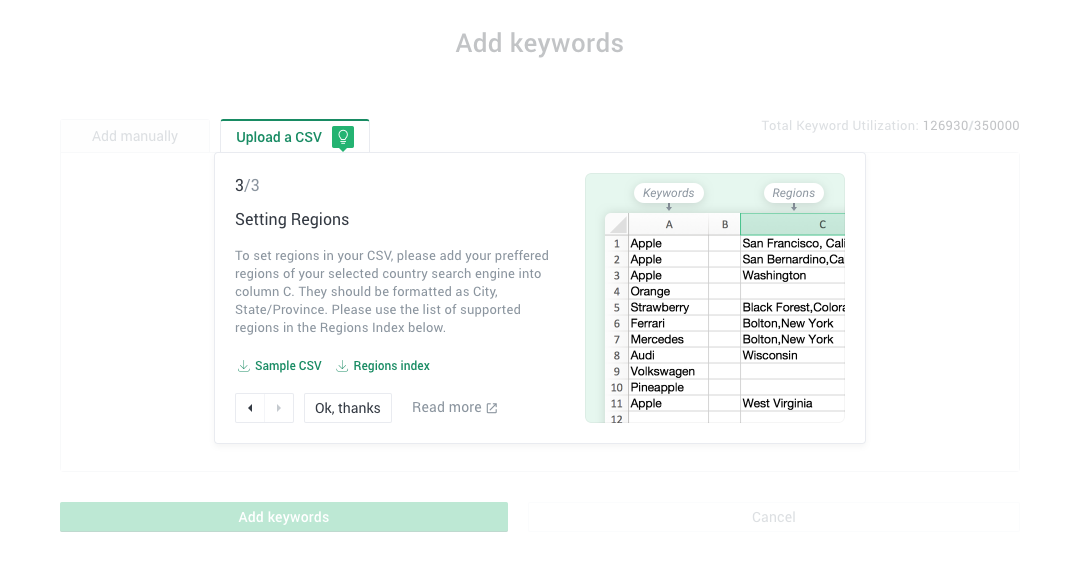
    3. Locate downloadable “regions index” on the bottom

    If you have any questions regarding tracking keywords in multiple regions, please reach out to support@unamo.com and we would be happy to help. 🙂