Online Services

Tag: WordPress Security

  • 22 Abandoned WordPress Plugins with Vulnerabilities

    As an interesting research project, Pan Vagenas, one of our researchers, took a closer look at abandoned plugins in the WordPress repository. His work was inspired by a recent post by Isabel Castillo where she lists the oldest abandoned plugins in the WordPress plugin repository.

    An abandoned plugin is one that has not been updated for several years. According to Isabel’s post there are several plugins that have a large install base that haven’t been updated for some time:

    “Exec-PHP plugin by Sören Weber has over 100,000 active installs despite that it has not been updated since June of 2009. Category Order by Wessley Roche has over 90,000 active installs even though it was last updated in May of 2008. Ultimate Google Analytics by Wilfred van der Deijl has over 80,000 installs even though it was last updated more than nine years ago.”

    We took a look at the plugin repository and discovered the following:

    • There are currently a total of 37,300 plugins available in theWordPress.org repository
    • 17,383 of those plugins have not been updated in the past 2 years.
    • 13,655 plugins have a compatibility tag of 3.x. WordPress 4.0 was released in September 2014.
    • 3,990 plugins have not been updated since 2010 which is over 7 years ago.
    • There are 29,892 additional WordPress plugins in the plugin source code repository that are not listed in WordPress.org in the plugin directory.

    Unmaintained Plugins with Vulnerabilities

    During our analysis, we found 18 abandoned plugins that are currently available for installation from the WordPress plugin repository that appear to have vulnerabilities that have not been fixed. In each case the plugin has not been updated for 2 years or more. Some of them have thousands of active installs.

    We also found 4 plugins (marked with asterisks in the table below) that have fixed a vulnerability, but their fix was released in such a way that existing users are not updated to the newest fixed version. In each case, the author committed a fix to trunk but did not increment the version number and tag it properly in the plugin repository, so their users remain vulnerable.

    The following table lists the plugins that we found, along with number of active installs and the details about each vulnerability. Several plugins are listed multiple times because they have had multiple vulnerabilities reported.

    Note that all vulnerabilities published here have been publicly known for 2 to 3 years. These are all old vulnerabilities which have been publicly disclosed and have not been fixed by the plugin author. Please see our suggestions after the table on what to do if you are the plugin author or if you are a plugin user.

    What to do if you use one of the plugins above

    If the plugin is not marked with an asterisk, we suggest you disable the plugin and remove it from your system. Then immediately contact the plugin author and ask for clarification on whether the plugin has a vulnerability or not. You can direct the author to this blog post which includes suggested actions for plugin authors below. You should start with the plugin support forum on wordpress.org for a particular plugin.

    If the plugin is marked with an asterisk, you can disable and remove the plugin. Then reinstall it and you should have a newer version. We have not audited individual plugins for security so we can not verify whether a vulnerability has been comprehensively fixed.

    What to do if you are the author of a plugin mentioned above

    If you are the author of one of these plugins and have not fixed one of the reported vulnerabilities, we recommend you do so immediately and release a fix to your customers. Then follow the steps in the bullet list below.

    If your plugin is marked with an asterisk, we suggest you read the section on the WordPress codex on updating your plugin. Create a new version for your plugin so that existing users will be updated to the fixed version, tag the release and follow the additional steps we suggest below.

    If you have fixed a vulnerability in your plugin and we included it above, then you did not mention it in your changelog and it has not been recorded on the wpvulndb website, the source of our data above.

    We suggest you take the following actions:

    • Update your changelog and mention that you fixed a vulnerability and what the vulnerability was that was fixed.
    • Contact the wpvulndb project and ask them to update their database to indicate that your plugin has been fixed. Right now their database shows no entry for a version that your vulnerability was fixed in.
    • You should also consider visiting the source of wpvulndb’s data which is often a security mailing list. On that list you’ll find the researcher who discovered your vulnerability. You should drop them a note letting them know the vulnerability has been fixed.

    Evaluating Plugins

    If you are a WordPress site owner, it is important that you evaluate each plugin carefully before you install it. Check how long it has been since the last update. If it has been more than 2 years, you should think twice before installing the plugin because it is no longer actively maintained. You may consider reaching out to the author or posting on the support forum to find out more information.

    The plugin repository is one of WordPress’s greatest assets because it provides a huge amount of code and a large number of applications that extend WordPress. It is also completely open and anyone can contribute. There is no formal source code auditing process or security analysis done on a plugin when it is submitted. There is also no ongoing auditing process for each subsequent release.

    A large number of plugin updates are submitted to the WordPress repository every day. For this reason it is important that you gain at least a basic understanding of who is behind a particular plugin before you install it. Here are a few steps you can take to evaluate whether you should use a plugin:

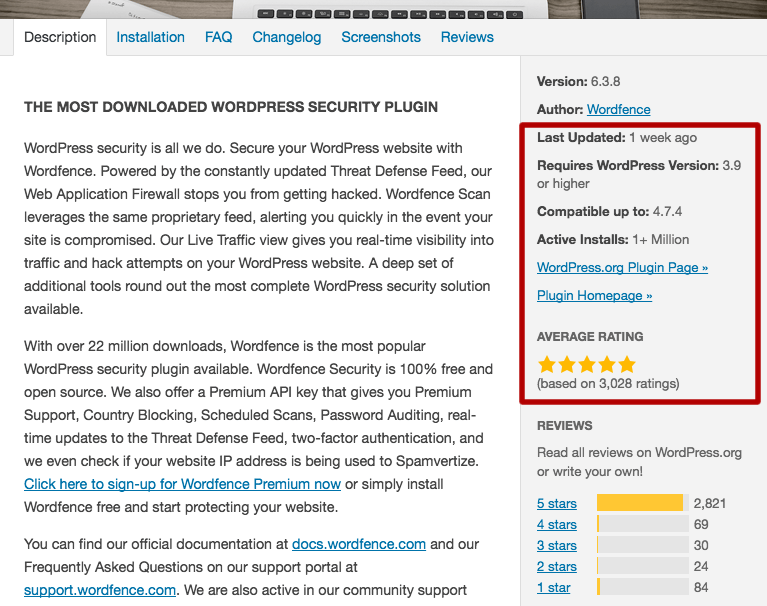
    • Check the average plugin rating.
    • Check when it was last updated.
    • Check that it is compatible with the current version of WordPress.
    • Check the number of active installs the plugin has. Some reliable and useful plugins have low install numbers but you should examine a plugin carefully if it has a low install base (below 1,000 active installs). It may not be maintained.

    You can find all this information when you add the plugin in WordPress. Simply click on the plugin title and you’ll find the following. We have highlighted the section you should pay attention to below:
    Conclusion

    Plugins can make adding functionality to your website incredibly easy and are a big part of why WordPress is such a popular platform. The plugin repository on WordPress.org is an incredible resource, but as we have shown above it contains both abandoned plugins and ones with known vulnerabilities. Every plugin you add to your site increases your security risk, and you should evaluate each one to make sure it is being properly maintained.

    As always we welcome your comments below. Special thanks to our security researcher Pan Vagenas who compiled the research we included in this post.

    The post 22 Abandoned WordPress Plugins with Vulnerabilities appeared first on Wordfence.
  • Fake WordPrssAPI Stealing Cookies and Hijacking Sessions

    Fake WordPrssAPI Stealing Cookies and Hijacking Sessions

    Fake WordPrssAPI Stealing Cookies and Hijacking Sessions

    Cookies are stored in the user’s browser to track behavior on a specific website. They also keep a user logged in during the active browsing session. Without cookies a user would need to log in, in order to authenticate every action they take. Essentially, cookies keep a user logged in until they either log out or the cookie expires.

    Cookie Stealing and Session Hijacking

    If an attacker is able to steal active cookies, the attacker can pretend to be that user and perform any actions the user has permissions to perform.

    Continue reading Fake WordPrssAPI Stealing Cookies and Hijacking Sessions at Sucuri Blog.

  • The April 2017 WordPress Attack Report

    Today we are releasing the WordPress Attack Report for April, 2017. You can also find these previous attack reports on our blog:

    This report contains the top 25 attacking IPs for the month of April and their details. It also includes charts of brute force attack activity and complex attack activity for the period. We also include the top themes and plugins that were attacked and which countries generated the most attacks for the period.

    The Top 25 Attacking IPs

    I’m including our standard explanation of how the table below works. If you are familiar with our attack reports, you can skip down to the table below which contains the April data and read my comments that follow the table.

    Brief introduction if you are new to viewing these reports

    In the table below we have listed the most active attack IPs for April 2017. Note that the ‘Attacks’ column is in millions and is the total of all attacks that originated from each IP. Further right in the table (you may have to scroll right) we break out the attacks into ‘brute force’ attacks and ‘complex’ attacks.

    Brute force attacks are login guessing attacks. What we refer to as ‘complex’ attacks are attacks that were blocked by a rule in the Wordfence firewall.

    We have also included the netblock owner, which is the organization, usually a company, that owns the block of IP addresses that the attack IP belongs to. You can Google the name of the owner for more information. A Google search for any of these IP addresses frequently shows reports of attacks.

    The hostname included is the PTR record (reverse DNS record) that the IP address owner created for their IP, so this is not reliable data but we include it for interest. For example, we have seen PTR records that claim the IP is a Tor exit node, but it is clearly not, based on traffic.

    We also include the country and city if available. To the far right of the report we show the date in April when we started logging attacks and the date attacks stopped.

    The Top Attacking IPs

    The total attacks from our top 25 attackers increased from 118 million in March to 137 million total attacks on WordPress sites from these IP addresses in April 2017.

    The distribution of brute force attacks compared to complex attacks among the top 25 attackers remained roughly the same. 32% of attacks on WordPress sites in April were complex attacks. 68% were brute force attacks. Brute force attacks remain by far the most popular attack method on WordPress sites.

    Turkey made up a total of 11 of our top 25 attacking IPs in April. There are a total of 5 separate ISPs in Turkey that contributed to the top 25 attacking IPs.

    Brute Force Attacks on WordPress in April 2017

    The chart below shows the brute force attack activity on WordPress sites that we monitor for the month of April.

    The average number of daily brute force attacks from March to April 2017 is amazingly consistent. We saw almost exactly 35 million average attacks per day for both months. There was a slight upward trend in volume during the month and about the same level of volatility. The peak in March was just over 45 million attacks in a single day and the lowest day was at the beginning of the month with 27 million brute force attacks in a single day.

    Complex Attacks on WordPress in April 2017

    The graph below shows complex attacks (attacks that try to exploit a vulnerability) for the month of April 2017.

    We saw an uptick in complex attack activity in April on WordPress sites that Wordfence protects. The daily average increased from 3.8 million attacks per day to 5.9 attacks per day.

    We also saw a significant upward swing in attacks towards the end of the month with the daily total complex attacks on WordPress sites approaching 10 million.

    Attacks on Themes in April 2017

    The table below shows the total number of attacks on WordPress themes. We identify each theme using it’s ‘slug’ which is the directory in which it is installed in WordPress.

    The most commonly attacked themes on WordPress for the month of April is surprisingly stable. Almost all themes in our top 25 were also in the list last month with a slight reshuffling.

    Attacks on Plugins in April 2017

    The table below shows the attacks we saw on plugins across the sites Wordfence protects. As with themes, we identify each plugin by its unique ‘slug’ which is the unique installation directory where the plugin is installed.

    The biggest gainer in our top 25 most attacked plugins is the “N-Media Post Front-end Form”. The plugin author fixed a file upload vulnerability about 7 months ago. The vulnerability was disclosed in August 2015, so was in the wild for a long time before it was fixed, which is probably why it became part of many attack toolkits even though it only has 60 active installs. It is important to note that the large majority of these attacks are attempting to exploit vulnerabilities that have already been fixed.

    Attacks by Country for April 2017

    The table below shows the top 25 countries that attacks originated from in the month of April on WordPress sites that we monitor.

    Our usual suspects are still at the top of the list of the top countries from where attacks on WordPress originate. The most remarkable thing about the list is that Algeria is still in the top 25. The home router botnet we wrote about in early April continued attacking WordPress sites throughout the month of April.

    We published a post 48 hours ago in which we explained that there was a dramatic drop in attacks on WordPress from hacked routers around the world. The drop occurred rapidly when you consider the scale of attacks. This includes attacks from Algeria and we expect that Algeria may drop out of the top 25 list completely in next months report if the home router botnet remains shut down.

    Conclusion

    That concludes our attack report for the month of April 2017. As always we will continue to monitor attack activity on WordPress sites in real-time. If you have any questions or comments about the report, as always I welcome your feedback in the comments and I’ll do my best to reply.

    Mark Maunder – Wordfence Founder/CEO.

    The post The April 2017 WordPress Attack Report appeared first on Wordfence.

  • Home Router Botnet Shut Down in Past 72 Hours. Who did it?

    On April 11th, 3 weeks ago, we published a story discussing routers at a specific set of ISPs that have been hacked. These routers have been used to launch attacks on WordPress websites. The ISPs with compromised routers included Telecom Algeria, BSNL in India, PLDT in the Philippines and many more large ISPs around the world.

    When we discovered this botnet over 3 weeks ago, we started monitoring attacks originating from those IPs. This allowed us to add the attacking IPs to the Wordfence Premium real-time blacklist to protect our customers.

    Yesterday morning we noticed that there was a rapid drop-off in attacks from the ISPs we identified 3 weeks ago, that had targeted WordPress websites.

    This is what the change in activity looked like from the top 50 ISPs from where these attacks were originating during a 72 hour period ending yesterday (Monday) evening. Click the chart for a larger version.


    The chart above shows attacks per hour by ISP. This is the most recent 72 hour period, ending yesterday evening at approximately 5pm Pacific time. Each line is an Internet Service Provider from which these attacks were originating.

    As you can see, starting at around midnight on Sunday night (April 30th) Pacific time, the number of attacks we are seeing from ISPs where we found vulnerable routers have dropped from peaks of 40,000 in some cases to peaks of just above 5,000 attacks per hour. In many cases the attacks drop to much lower levels and continue to decrease.

    Why did the attacks stop?

    The data indicates that this is a botnet that was acting in a coordinated fashion and attacking WordPress sites that we protect. In the past 72 hours, the attack frequency dropped simultaneously across hundreds of ISPs in many countries.

    One possibility is that the individual or group controlling the botnet stopped attacking WordPress and that resulted in a rapid decrease in attack volume over a 24 hour period.

    Another possibility is that the command and control servers of the botnet were taken offline by a coordinated effort involving security services in multiple countries.

    It is worth noting that earlier this month, INTERPOL worked with investigators in Indonesia, Malaysia, Myanmar, Philippines, Singapore, Thailand and Vietnam to identify almost 9,000 command and control servers and just under 270 hacked websites. They produced reports for authorities in each country which allowed local enforcement to take action against the compromised systems.

    This kind of coordinated action by INTERPOL is encouraging. It helps protect the global online community and creates a safer internet.

    This is great news!

    This reduction in attacks originating from hundreds of ISPs around the world is great news. Attacks on WordPress sites around the world have been reduced.

    The attacks originating from these ISPs were also resulting in their IP addresses being blacklisted by Wordfence and other services like SpamHaus. That resulted in the customers of those ISPs suffering because certain websites and services would block them. By reducing these attacks, this ensures those ISP customers have full internet access again.

    We will continue to monitor the situation

    It is unclear whether this reduction in attacks is a permanent change or just a temporary respite. We will continue to monitor the situation and if attacks increase again, the Wordfence algorithms will react very rapidly and will add offending IPs to the Wordfence Premium blacklist in a matter of minutes to protect our WordPress site owners.

    As new data emerges, we will publish it here. As always, I encourage you to share your thoughts in the comments below and I will be around to reply if needed. If you haven’t already, please consider joining our mailing list.

    The post Home Router Botnet Shut Down in Past 72 Hours. Who did it? appeared first on Wordfence.