 Yesterday at Wordfence we had an “all welcome” technology sharing meeting with the entire company – or at least everyone that was available at the time. The meeting became so popular with our team that we had to upgrade the license we use for our real-time collaboration service to accommodate everyone. It is the largest team meeting we have had to date.
The goal of the call was to have an informal chat about some of the external security and investigative tools that our team finds useful. The meeting included most of our security services team, senior dev staff, security analysts including all senior analysts, team members from customer service and even execs.
I think we all learned something new and Brad, one of our senior analysts, was kind enough to compile the list of tools we chatted about in a shared document.
I know that many security analysts, WordPress developers and readers who are interested in security visit this blog. So I thought I’d share the list of tools the Wordfence team came up with so that if you work in security or just want to increase your cyber security literacy, you can benefit from this list too.
I should emphasize that this is by no means an exhaustive list of security tools. This list merely includes a few of the more interesting cyber security tools that came up in a 40 minute conversation with our team yesterday. We also have a suite of internal tools that are not included. If you have a personal favorite, you are most welcome to share it in the comments.
Reading this list may be worrying or intimidating for readers who don’t work in the security industry. You should know that all tools on this list are free and publicly accessible. They are also well known within the professional security community and among malicious actors. This list of tools, software and utilities should empower anyone interested in protecting themselves and their online assets by making you aware of the capabilities that exist for analysts and malicious actors. By better understanding the tools that your adversary uses, you can better protect yourself.
Information gathering and analysis
Google dorks – Using advanced operators in the Google search engine to locate specific strings of text within search results.
Using Google for penetration or malicious activity may seem silly or obvious, but Google is incredibly powerful and very popular among analysts and malicious actors alike. “Google dorks”, or google-hacks as they’re also known, are a search query that attackers use on Google to identify targets. If you visit a site like exploit-db.com or any other database of exploits, you’ll find that many of them include Google dorks to help find targets to attack with the exploit.
Maltego – An interactive data mining tool that renders directed graphs for link analysis.
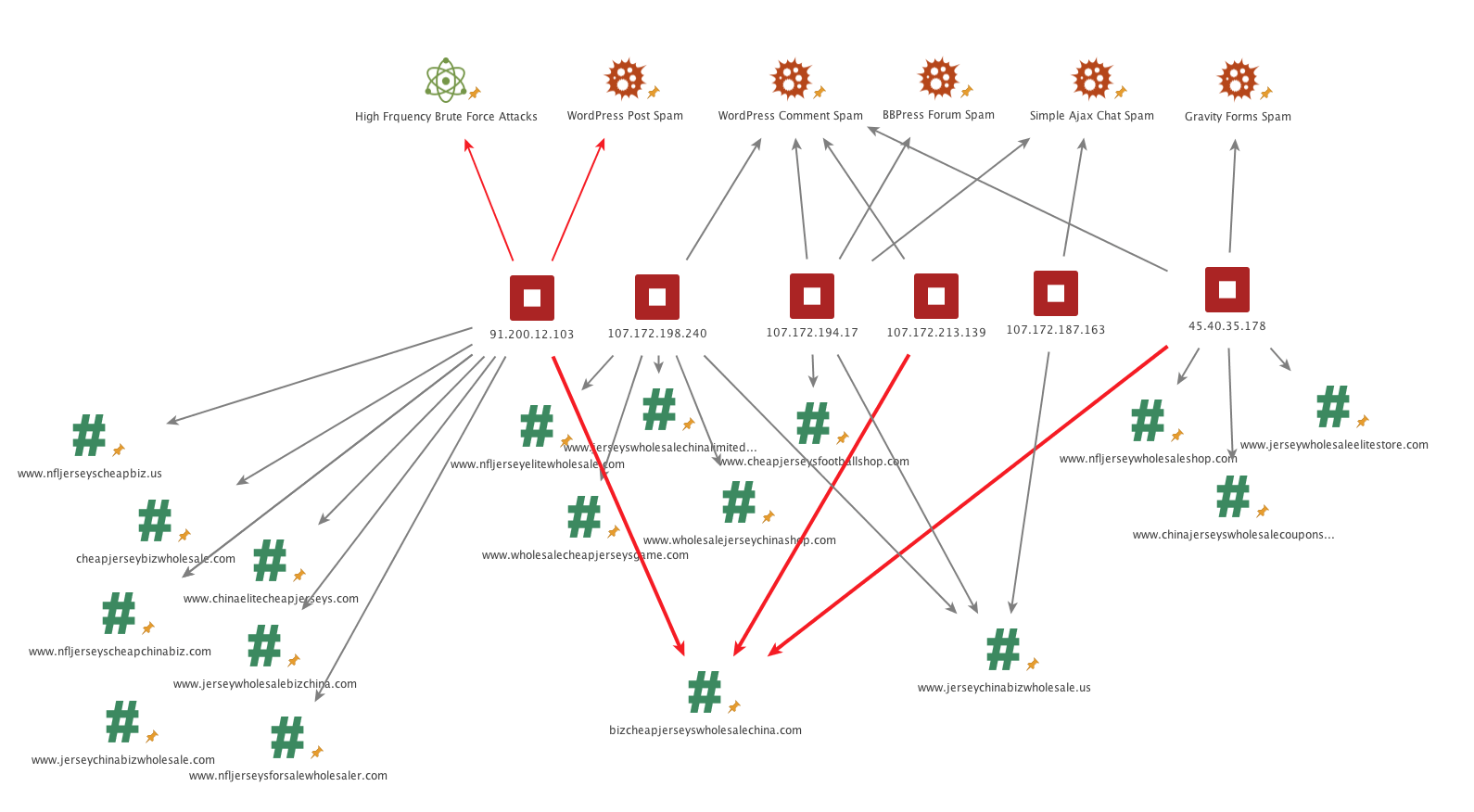
Maltego is one of our favorites. It is an investigator’s tool that lets you graphically organize your thoughts and your investigation by creating objects (people, places, devices, events) and link them. It also gives you the ability to run ‘transforms’ on objects. For example, you can run transforms on an IP address to list its malicious activity using external sources of threat intelligence. You can download a free version from Paterva which has some limitations.
You can see an example of the work we do with Maltego below.
FOCA – A tool used to find metadata and hidden information in the documents its scans.
When you create and publish MS Office, PDF, EPS and PS documents online, you may not realize how much information you are leaking to the general public. FOCA is a security analyst’s tool that can be used to extract ‘leaked’ data from documents that have been made public. Using FOCA, an analyst can find things like an organization’s network structure, IP addresses, internal server names, printers, shared folders, access control lists and more. You can watch this video filmed at DefCon 17 for a demo of how FOCA can be used by researchers or malicious actors to perform recon on a target organization or individual.
http://checkusernames.com/ – Check the use of a brand or username on 160 social networks.
If you simply want to find a unique username, checkusernames.com is a useful tool. If you are in the security field, it can be a powerful way to attribute an attack to a specific individual. Malware authors occasionally include usernames or ‘hacker names’ in their malware. Using this tool you can search 160 online services to see if they have used the same username somewhere else.
https://haveibeenpwned.com/ – Check if an account has been compromised in a data breach.
The term ‘pwned’ is slang for ‘owned’ which in the security industry means “to have your data or system compromised”. So ‘haveibeenpwned.com’ is slang for “Have I been owned dot com”. This is a well known and respected site run by Troy Hunt which finds and aggregates data from data breaches. You can use the service to find out if an account has been compromised by looking up your email or username.
https://www.beenverified.com/ – Search people & public records.
This is a general “people search” that is useful to find additional meta-data when researching a target during penetration testing or when researching an attacker.
Shodan – Search engine for Internet-connected devices.
This is a very popular service among security researchers. Shodan continually crawls and indexes devices on the internet. We recently used Shodan as part of our research into routers at several ISPs around the world that have been hacked and are now attacking WordPress. You can find a few example searches demonstrating Shodans use on their ‘explore’ page.
Censys – A search engine that allows computer scientists to ask questions about the devices and networks that compose the internet.
Censys is similar to Shodan in that it indexes devices and websites connected to the internet. The data is also searchable and differs from Shodan in some ways. Shodan is focused on ports and the services running on those ports. Censys is great at indexing web site SSL certificates among other things. Censys is maintained by a team of computer scientists at the University of Michigan and University of Illinois Urbana-Champaign.
Gephi – Visualization and exploration software for all kinds of graphs and networks.
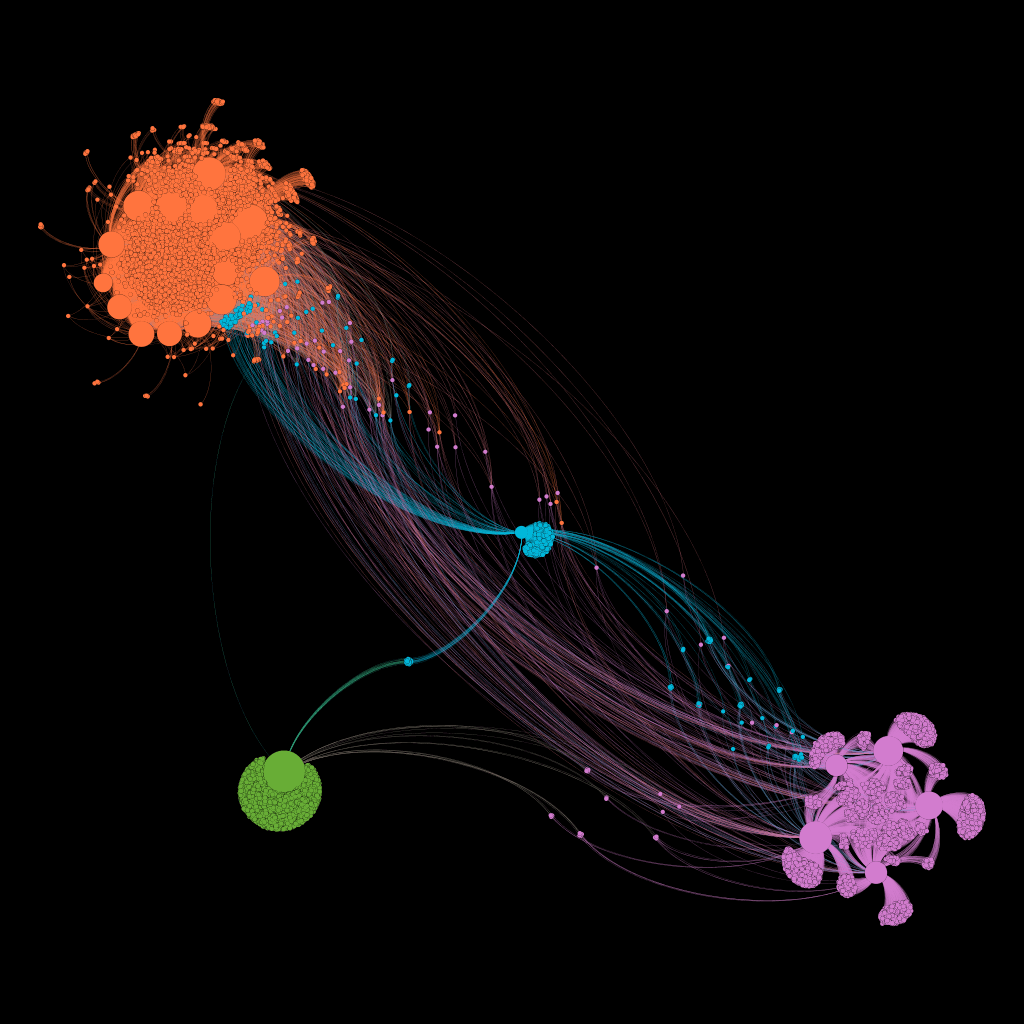
We mentioned Maltego earlier in this post. It uses a ‘graph’ structure which is a diagram of linked objects to represent relationships. Gephi is a tool to analyze graph data at massive scale. We used Gephi to generate the graphical representations of attack data that we published in our February Attack report, seen below.
Fierce – A DNS reconnaissance tool for finding target IPs associated with a domain.
Fierce is a tool used to find IP addresses that are potential attack targets associated with a specific domain. It is used by penetration testers when evaluating insecure points on a network.
BuiltWith – Find out what websites are built with.
BuiltWith has a search engine-like interface and lets you search for a specific site to find out what tools were used to build it. BuiltWith also aggregates that data so that you can find out what the most popular technologies are on the web or how a specific technology is trending relative to another.
Wappalyzer – A cross-platform utility that uncovers the technologies used on websites.
Wappalyzer is another tool that helps you discover what technologies a specific site is using. Like BuiltWith, they also aggregate data to help you determine how technologies are trending. This is their view of the popularity of blog technologies, with WordPress clearly the market leader.

Wappalyzer Chrome extension
Wappalyzer also has a browser extension for Chrome that lets you immediately see the technologies a specific site is using. There is also a Python driver available on github called python-Wappalyzer.
https://aw-snap.info/ – Tools for owners of hacked websites to help find malware and recover their site.
aw-snap.info includes a suite of tools that may be helpful for site owners who have decided to try to clean their own hacked site. It can help you fetch pages as Google, which sometimes reveals malware. It can also decode base64 obfuscated malware and help find obfuscation in your files that may hide malware.
http://themecheck.org/ – A quick service that lets you verify WordPress themes for security and code quality.
ThemeCheck may help you verify your theme integrity by uploading it. It can also help find malware embedded in themes.
theHarvester – Gather emails, subdomains, hosts, employee names, open ports and banners from different public sources like search engines, PGP key servers and SHODAN.
This is a tool that performs a variety of reconnaissance operations on an organization and may be useful in the early stages of a penetration test to determine an organization’s overall online footprint.
Cymon.io – Tracker of malware, phishing, botnets, spam, and more.
Cymon can help you research a potentially malicious IP or malware hash. Here’s an example of the results for one of our top IPs in the March Wordfence monthly attack report.
Mnemonic – A passive DNS database.
Mnemonic is a useful tool that can find which websites are hosted at a specific IP or which IPs host a website.
Vulnerability scanning and penetration testing
WPScan – A black box WordPress vulnerability scanner.
WPScan is a command line tool that is used to remotely scan WordPress sites for vulnerabilities.
Sqlmap – An open source penetration testing tool that automates the process of detecting and exploiting SQL injection flaws and taking over database servers.
SQLMap is widely used among penetration testers and is highly effective at finding and exploiting SQL injection vulnerabilities in target sites.
BeEF – A penetration testing tool that focuses on the web browser.
BeEF is a powerful tool that lets penetration testers exploit and control a web browser. Using BeEF you can set up a malicious website, exploit a visiting browser and gain access to the workstation running the browser. You can watch this 2014 KiwiCon video for a demo.
Firefox Hackbar – A simple security audit / penetration test tool.
Hackbar is a plugin for Firefox that may help application developers perform security audits on their own web applications. It includes a variety of tools to assist with this task.
Burp Suite – Software for web security testing.
Burp Suite is a very well known and powerful framework used to perform security audits and analysis on web applications. It includes a proxy that can intercept traffic and allow you to modify it on the fly. It includes a huge variety of exploit and penetration testing tools.
OpenVAS – An open source vulnerability scanner and manager.
You have probably heard of the vulnerability scanning tool Nessus. Back in 2005 Tenable Network Security changed the Nessus open source license to a closed source one. The developers forked the project at that time and created OpenVAS.
I’ve found that OpenVAS can be quite effective, but it is a bit more challenging to set up than Nessus. OpenVAS does have the advantage of being completely free and open source. The project is well known throughout the online security community.
Fiddler – A free web debugging proxy.
Fiddler is a proxy server that lets you intercept requests to a website, view them in different ways, modify the requests and can help debug websites and perform security audits.
Joomscan – Detect Joomla CMS vulnerabilities and analyze them.
Joomscan is the Joomla CMS’s equivalent of wpscan.
Kum0nga – A simple Joomla scan.
This is another joomla vulnerability scanner.
Arachni – A feature-full, modular, high-performance Ruby framework aimed towards helping penetration testers and administrators evaluate the security of modern web applications.
Arachni is a framework to perform detailed vulnerability scanning on web applications.
Forensics and log analysis
Lnav – An advanced log file viewer.
Lnav is short for log file navigator. It automatically detects your log file formats, provides syntax highlighting and a host of other features to view and analyze log files. It can be invaluable when analyzing a compromised website.
Mandiant Highlighter – A free log file analysis tool.
Mandiant (now owned by Fireeye) produced this useful product that can help analyze log files. It includes the ability to graphically view a histogram of log files and several other powerful log file analysis features.
Wp-file-analyser – Find modified, missing and extra files in a WordPress directory.
This utility can download the original versions of WordPress core and plugin files and can help you compare them against their originals. Wordfence already does this from within WordPress, but this provides a command line tool to perform a similar action.
Auditd – Access monitoring and accounting for Linux.
Access monitoring and logging/accounting is very helpful when monitoring a system to see if it is being attacked or performing an investigation after the attack. Auditd can help you improve logging and provide an audit trail on Linux.
Araxis Merge – Advanced 2 and 3-way file comparison (diff), merging and folder synchronization.
When responding to a hack, the ability to compare files to originals to determine what has changed is important. Araxis Merge is a powerful tool that can assist with this.
WinMerge – An Open Source differencing and merging tool for Windows.
Much like Araxis Merge, WinMerge can help you compare files to examine changes when responding to an incident.
DiffNow – Compare files online.
DiffNow is a web based file ‘diff’ tool that can also assist when comparing file differences during incident response.
Code and malware analysis
CyberChef – the Cyber Swiss Army Knife
CyberChef is a tool that is developed by GCHQ, the British intelligence agency. It can help de-obfuscate malware and other code.
UnPHP – A free service for analyzing obfuscated and malicious PHP code.
Obfuscating (hiding/garbling) PHP is a favorite tool of hackers, UnPHP can help analyze obfuscated code.
UnPacker – JavaScript unpacker.
Jsunpack – A generic JavaScript unpacker.
‘Packing’ javascript is a favorite technique of hackers who are dropping malicious javascript on websites. It makes their code more compact and harder to read. Jsunpack can help de-obfuscate JS code to make it more readable so that you can understand how it operates.
JSBeautifier – An online JavaScript beautifier.
Much like Jsunpack, JSBeautifier helps improve the readability of packed javascript code.
https://www.base64decode.org/ – Base64 Decode and Encode
Base64 encoding is a way to encode anything into an encoded string of (what appears to be) random characters. Anyone who is repairing hacked sites or responding to incidents uses base64 decoding several times a day to expose malicious code that has been base64 encoded. This tool can help decode base64 encoding.
https://www.urldecoder.org/ – URL Decode and Encode
URL encoding is also a popular way for hackers to hide their code, through encoding it using this form of encoding. urldecoder.org can help you decode malicious code that has been hidden using urlencoding.
http://lombokcyber.com/en/detools/decode-sourcecop – Decode SourceCop v3.x
This is a tool that decodes a specific type of PHP encoding that may prove useful during a hacked site investigation.
Other tools
regex101 – Develop and test regular expressions.
Regex, or regular expressions, are pattern matching routines to find complex patterns in files and code. We use regex extensively at Wordfence to help fix hacked sites and in our software and products.
regexpal – Another site to develop and test regular expressions.
Both regex101 and regexpal provide online development environments to help you create or analyze regular expressions.
HashKiller – Online hash cracking service. Useful to reverse engineer hashes into passwords.
In most systems, passwords are stored as hashes. Malware authors occasionally use hashing to store their own passwords. In our research we have needed to crack hashes that are used by malware authors in order to read their source code. HashKiller can help reverse a hash into a password if you need to crack a hash as part of your malware analysis.
Noscript – Noscript is a Firefox extension that allows Javascript, Java and Flash to only be executed by websites that you define and trust.
When visiting malicious websites, Noscript can help disable malicious code on that site. Note that you should always visit a malicious site that you are analyzing using a virtual machine that has no important data on it. If the VM gets infected, you can simply destroy it without worrying about important data being leaked. Using Noscript in your browser within your virtual environment can be useful when analyzing the function of a hacked site.
Other lists of tools
- Awesome Forensics – A curated list of awesome free (mostly open source) forensic analysis tools and resources.
- awesome-incident-response – A curated list of tools and resources for security incident response, aimed to help security analysts and DFIR teams.
- OSINT Framework – OSINT is short for ‘open source intelligence’. This site provides a graphical directory of OSINT resources.
Kali Linux
Kali Linux is a linux distribution that is the favorite of penetration testers and security analysts world-wide. It is a linux distribution that comes packed with security analysis tools. If you want to learn about cyber security, Kali should be one of your starting points. If you simply would like to know about some of the more important tools that Kali provides, you can use the list below.
Kali Linux Tools Listing – All the tools in Kali Linux, a Linux variant used by penetration testers and security analysts.
Conclusion
The tools on this page can help you respond to an incident, test the security of your own website and better understand how attackers think and what tools they have available to them. As always I welcome your feedback in the comments and you are most welcome to suggest your own favorite security or analysis tools.
The post 51 Tools for Security Analysts appeared first on Wordfence.

 Securing WordPress has become easy thanks to the amazing work the WordPress team continuously do to fix vulnerabilities and improve the security of the platform. With the addition of Wordfence, it is possible to run a secure WordPress site and sleep well at night knowing your investment is safe.